A new malware campaign observed in December 2025 is abusing interest in AI tools by distributing a malicious installer disguised as a legitimate ChatGPT desktop application. Victims believe they are installing a trusted open-source client but instead deploy a persistent backdoor that operates with SYSTEM-level privileges.
What makes this campaign particularly effective is its use of deception and stealth. The installer launches a fully functional ChatGPT interface in the user’s browser, reinforcing the illusion of legitimacy, while quietly establishing persistence and injecting malicious code into a trusted Windows process. This activity reflects a broader surge in AI-themed threats, with security researchers reporting a significant increase in malwaremasquerading as productivity and AI tools.
The malware is delivered as a Windows Installer package (MSI) named Setup.msi, commonly distributed through SEO poisoning and deceptive landing pages associated with “ClickFix” social engineering campaigns. These pages impersonate legitimate software sources and prompt users to download what appears to be a trusted ChatGPT desktop client.
To increase credibility, the installer mimics the directory structure and branding of a popular open-source ChatGPT project developed by “lencx,” exploiting user trust in well-known community tools. Once executed, the installer initiates malicious activity before any visible installation interface appears.
Execution
Flow
The malware employs a multi-stage execution process designed to prioritize persistence before the user interacts with the application.
1. Immediate Persistence (Pre-UI):
Before the installation user interface even loads, the installer spawns msiexec.exe to create a Scheduled Task.
Task Name: “GPTAI Update Scheduler”
Privilege Level: SYSTEM (/RU SYSTEM). This grants the malware full control over the OS, bypassing User Account Control (UAC).
Frequency: Hourly (/SC HOURLY).
Command: Uses rundll32.exe to proxy-execute the malicious payload:
“C:\Windows\System32\rundll32.exe” “C:\Program Files\GPTAI\gpt-ai.dll”,start
2. Decoy Launch:
Simultaneously, the installer drops and executes GPTAI.exe from C:\Program Files\GPTAI\. This legitimate Electron-based application uses msedgewebview2.exe to load the real chatgpt.com interface, ensuring the user perceives a successful installation.
3. Process Injection (The Backdoor):
The core payload, gpt-ai.dll, exports a function named start which performs the following injection routine every hour:
Target Identification: The DLL utilizes CreateToolhelp32Snapshot to iterate through running processes, specifically hunting for AggregatorHost.exe. This is a legitimate Windows background process used for telemetry, likely chosen for its stealth and constant presence.
Payload Decryption: The DLL allocates memory for the shellcode payload and decrypts it using a basic XOR operation.
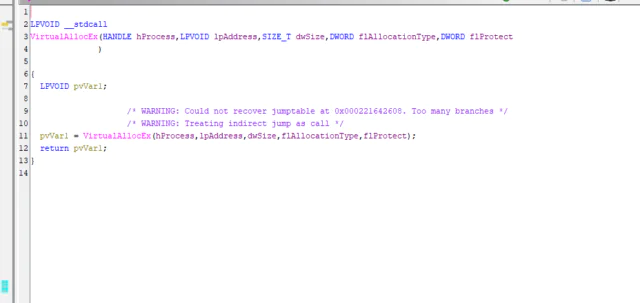
Injection: Using VirtualAllocEx and WriteProcessMemory, the decrypted shellcode is written into the memory space of AggregatorHost.exe.
Execution: Finally, CreateRemoteThread is called to execute the injected code, effectively hiding the malware within a trusted Microsoft binary.
Network
Behavior
C2 Communication: The injected code beacons to raw.githubusercontent.com (IP: 185.199.109.133) to fetch scripts or updates. Using GitHub allows the traffic to blend in with legitimate developer activity and bypass standard reputation-based blocking.
Traffic Blending: The malware also generates connection attempts to lencx.me (the legitimate project site), creating “noise” to mask the malicious GitHub connections.
MITRE ATT&CK
Mapping
ID
Technique
Observed Behavior
T1053.005
Scheduled Task
Task “GPTAI Update Scheduler” executes payload as SYSTEM hourly.
T1055.002
Portable Executable Injection
Injects decrypted shellcode into legitimate AggregatorHost.exe.
T1218.011
System Binary Proxy
Uses rundll32.exe to execute the malicious DLL export.
T1027
Obfuscated Files
Payload encrypted with XOR.
T1102.002
Web Service
Uses GitHub (raw.githubusercontent.com) for C2 communication.
Prevention
To reduce exposure to similar threats, organizations should:
Restrict software installation to trusted and verified sources
Educate users about fake AI tools and installer-based attacks
Monitor for scheduled tasks running with SYSTEM privileges from non-standard directories
Enforce application control policies to limit abuse of system binaries like rundll32.exe
Ensure endpoint protection solutions are configured to detect process injection and persistence mechanisms
Impacted
Technologies
Windows endpoints
MSI-based software installers
Scheduled Tasks
Trusted Windows processes (AggregatorHost.exe, rundll32.exe)
GitHub-hosted content used for command-and-control
Trends & Threat
Landscape
ClickFix Correlation: Security researchers have noted infrastructure overlaps between this campaign and “ClickFix” social engineering clusters. The ClickFix tactic, which uses fake error messages to trick users into running malicious scripts, saw a 517% surge in H1 2025.
Ransomware Nexus: Reports from Trellix (March 2025) indicate that the Black Basta ransomware group has previously utilized fake ChatGPT installers to gain initial access. While definitive attribution for this specific sample is pending, the TTPs align with initial access broker (IAB) activity often preceding ransomware deployment.
Why This Is
Important
System-Level Compromise: Unlike user-level malware, this campaign secures SYSTEM privileges immediately. This allows attackers to dump credentials (LSASS), disable security tools, or install bootkits without further escalation.
High Evasion: By injecting into AggregatorHost.exe, the malware “lives off the land,” making it difficult to detect via standard process monitoring. The use of a “working decoy” further reduces the likelihood of the user reporting the issue.
Supply Chain Trust Abuse: The campaign specifically targets users seeking productivity tools, exploiting the reputation of the open-source “lencx” project.
Managed Detection and Response (MDR): Our 24/7 SOC leverages Microsoft Defender XDR to detect and block the specific behavior of rundll32.exe targeting AggregatorHost.exe for injection.
Microsoft Sentinel Analytics: We deploy custom analytics rules to identify the creation of scheduled tasks running with /RU SYSTEM that execute binaries from non-standard locations like \GPTAI\.
Threat Hunting: Our analysts proactively search for network connections to raw content repositories (like GitHub) initiating from unexpected system processes, identifying C2 channels before data exfiltration occurs.
CYBERSECURITY READINESS
Strengthen Your Cyber Defences Today
As cyber threats grow more complex, proactive detection is no longer optional.
With Wizard Cyber’s Microsoft expertise, organizations can transform their security posture and gain real-time visibility across all endpoints.
Start your journey to smarter, faster cybersecurity today.
Ahmad specialises in cyber security innovation, security research, and emerging defensive technologies. He supports the development of new SOC capabilities and operational improvements across Wizard Cyber’s security services. He holds Microsoft SC-200, AZ-500, and SC-300 certifications
Certifications: SC-200, AZ-500, SC-300
Cyber Shield Intelligence (CSI) Team
Wizard Cyber’s first line of defense in proactive threat intelligence. CSI is dedicated to the identification, monitoring, and analysis of emerging cyber threats, including activity across the dark web, underground forums, and threat actor infrastructure. Leveraging advanced threat intelligence platforms, OSINT tools, and adversary tracking methodologies, the team provides actionable intelligence to anticipate attacks before they occur.
With expertise in threat actor profiling, TTP mapping (aligned with the MITRE ATT&CK framework), and IOC enrichment, CSI equips clients with the critical insights needed to fortify defenses, mitigate risk, and stay ahead of evolving threat landscapes.