Detecting Boot-Level Persistence In Windows: BCD Abuse And Startup Manipulation

Most security detections focus on what happens after the operating system is fully running. However, some of the most critical attacker actions happen before that point

In modern environments, analysts may encounter subtle signals such as unexpected boot configuration changes or the appearance of unfamiliar binaries within trusted system paths. These are often early indicators that an attacker is not just executing code, but attempting to influence how the system starts

This type of activity is significantly harder to detect and investigate because it operates below traditional visibility layers.

By manipulating Windows Boot Configuration Data (BCD) and abusing native utilities such as bcdedit.exe, attackers can alter startup behavior, disable recovery mechanisms, and prepare the system for persistence before most defenses are active

This blog explains how to identify these behaviors using Microsoft Defender XDR telemetry and Microsoft Sentinel analytics, focusing on detecting intent rather than relying on traditional indicators

When Attackers Touch the Boot Layer

Unified Extensible Firmware Interface (UEFI) and boot configuration tampering is attractive to attackers because it provides persistence that survives:

  • Operating system reinstallation
  • Disk re-imaging
  • Endpoint security resets
  • Many traditional remediation workflows

Instead of relying on files or services, attackers manipulate the startup logic of the machine itself


Common malicious behaviors include:

  • Modifying boot entries using bcdedit.exe
  • Disabling recovery or repair options
  • Forcing Safe Mode or alternate boot behavior
  • Redirecting boot flow to malicious components
  • Introducing unknown binaries into system directories


The most concerning indicator appears when bcdedit.exe is used with sensitive arguments such as:

  • delete
  • deletevalue
  • import
  • safeboot
  • network

These operations are rarely required in daily administration and are typically associated with recovery or controlled system maintenance

When they occur outside expected administrative change windows, especially from non-system accounts, they become highly suspicious

Additional concern arises when unknown executables such as wpbbin.exe are observed in System32, where legitimate binaries are expected by default trust assumptions

At that point, the behavior shifts from suspicious activity to possible boot-level manipulation or persistence staging
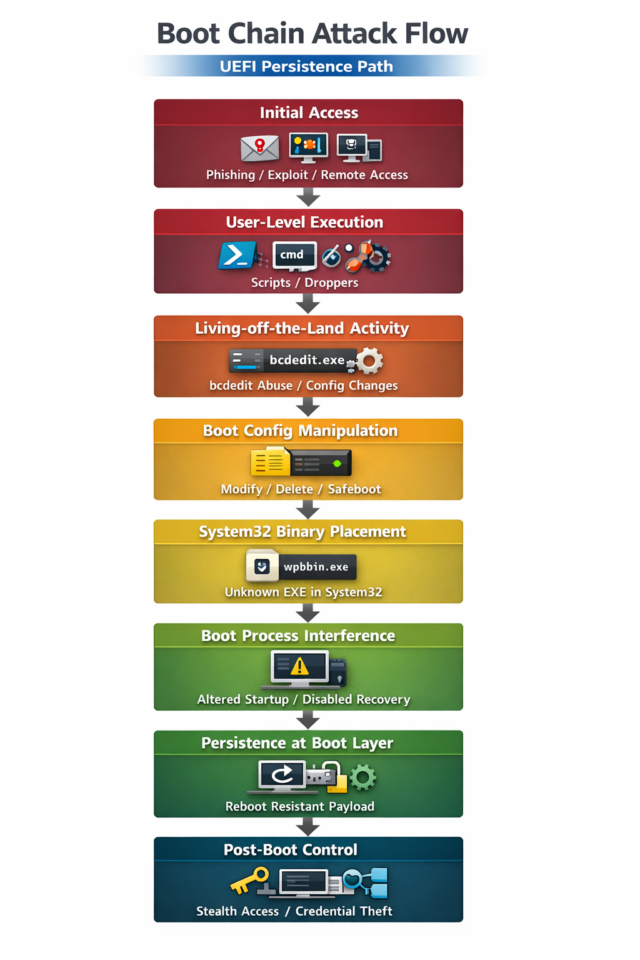
Boot Chain Attack Flow (UEFI Persistence Perspective)

Boot-level attacks typically follow a structured progression:

  1. Initial access is established
  2. The attacker executes commands to modify boot configuration
  3. Persistence mechanisms are introduced below the OS layer
  4. Startup behavior is altered to maintain control
  5. System integrity is weakened before full compromise occurs


The key point for detection is not the final stage

It is the moment the attacker begins modifying how the system starts

How to Read This Flow in Detection Context

This visualization is important because your detection logic sits at a very specific point in the chain:

Your detection triggers at:

  • Boot configuration manipulation stage
  • Early persistence staging stage
  • System-level binary anomaly stage

This means you are not detecting:

  • Finished malware execution
  • Fully established persistence

You are detecting:

  • The moment the attacker starts rewriting how the system boots

Why This Matters for SOC Visibility

Most security tools observe activity at these layers:

  • Process execution
  • File creation
  • Network connections

But this attack chain introduces a different control plane:

  • Boot configuration becomes the execution logic
  • System startup becomes the persistence mechanism
  • Legitimate tools become the attack interface

That is why signals like bcdedit.exe misuse combined with suspicious system binaries are high value:

They appear before the attacker fully owns the system at runtime.

Detection Strategy

This detection is built on behavioral analysis rather than static indicators.

It focuses on identifying:

  • Execution of wpbbin.exe inside C:\Windows\System32
  • Execution of bcdedit.exe with sensitive boot modification parameters
  • Non-standard account context execution (excluding system-level accounts)


Instead of asking whether a file is malicious, the detection asks:

What is this system trying to change about how it starts?


This is important because modern attackers frequently avoid dropping traditional malware and instead rely on legitimate tools performing malicious actions.

Reference KQL

union

(
DeviceProcessEvents
| where TimeGenerated > ago(1h)
| where FileName == “wpbbin.exe” and FolderPath =~ “C:\\Windows\\System32”
),

(
DeviceProcessEvents
| where TimeGenerated > ago(1h)
| where FileName =~ “bcdedit.exe”
| where ProcessCommandLine has_any (“delete”, “deletevalue”, “import”, “safeboot”, “network”)
)

| project TimeGenerated, DeviceName, AccountName, FileName, FolderPath, ProcessCommandLine, InitiatingProcessFileName, InitiatingProcessCommandLine

How to Interpret the Results

Each alert represents a potential interaction with the system boot configuration layer.

Key indicators include:

  • Unauthorized or unusual execution of bcdedit.exe
  • Modification of boot parameters related to recovery or startup behavior
  • Presence of unknown binaries inside trusted system directories
  • Execution initiated from non-system accounts
  • Behavioral patterns consistent with persistence or pre-boot manipulation

This activity is significant because it reflects control over system startup behavior, not just user-space execution.

In many investigations, this pattern has been associated with:

  • Early-stage ransomware preparation
  • Advanced persistent threat activity
  • System-level persistence mechanisms
  • Post-exploitation foothold establishment

MITRE ATT&CK Mapping

Tactic Technique ID Technique Description
Persistence T1542.003 Bootkit Attackers modify boot processes to maintain persistence below the OS
Defense Evasion T1070 Indicator Removal on Host Boot manipulation may disable recovery and hinder forensic visibility
Privilege Escalation T1068 Exploitation for Privilege Escalation Boot-level control enables elevated influence over system behavior
Impact T1490 Inhibit System Recovery Recovery mechanisms may be altered or disabled


Impacted Technologies

  • Windows endpoints
  • UEFI and Boot Configuration Data (BCD)
  • System directories (e.g., System32)
  • Microsoft Defender XDR
  • Microsoft Sentinel

Response and Remediation Guidance

When this detection triggers:

  1. Isolate the affected endpoint if malicious activity is confirmed
  2. Review all bcdedit.exe execution history and parameters
  3. Investigate the origin and legitimacy of unknown binaries in System32
  4. Analyze the full process execution chain
  5. Validate boot configuration changes against approved administrative actions
  6. Inspect the BCD store for unauthorized modifications
  7. Search across the environment for similar activity
  8. Review administrative access tied to system-level changes
  9. Remove or block unauthorized binaries
  10. Treat confirmed boot manipulation as a system-level compromise

Why This Detection Matters

Traditional security telemetry focuses on what happens inside the operating system.

This detection focuses on what happens before the operating system fully controls itself.

Most defensive tools are strong at detecting:

  • Malware execution
  • File-based persistence
  • Network-based indicators
  • Registry modifications

Modern attackers increasingly rely on:

  • Boot configuration manipulation
  • Trust abuse of native Windows tools
  • Persistence below the OS layer
  • Stealth modification of recovery mechanisms

This detection surfaces a rare but critical behavioral signal:

The system’s startup behavior is being altered in ways that are not aligned with legitimate administrative activity.

That makes it a high-confidence indicator of advanced compromise.

How Wizard Cyber Can Help

Wizard Cyber focuses on detection engineering that goes beyond signatures and known indicators.

We build analytics that identify:

  • Boot-level persistence techniques
  • Living-off-the-land abuse in Windows environments
  • Pre-ransomware system manipulation behavior
  • High-fidelity behavioral signals in Microsoft Sentinel
  • Advanced attacker tradecraft targeting system integrity

Our approach focuses on detecting intent, not just artifacts.

Because the most dangerous attacks are not the ones that install malware.

They are the ones that quietly change how the system begins.

CYBERSECURITY READINESS

Strengthen Your Cyber Defences Today

As cyber threats grow more complex, proactive detection is no longer optional.

With Wizard Cyber’s Microsoft expertise, organizations can transform their security posture and gain real-time visibility across all endpoints.

Start your journey to smarter, faster cybersecurity today.

EXPLORE MORE

Related Blogs & Insights

Discover blogs that deepen your knowledge and accelerate your security strategy.

ABOUT THE AUTHOR
Zaid Al-Rajabi
SOC Analyst Level 1

Zaid specialises in detection engineering, KQL development, analytics rule creation, and Microsoft Sentinel optimisation. He develops and refines detection content to improve visibility into modern cyber threats across enterprise environments. He holds Microsoft SC-200, AZ-500, and SC-300 certifications


Certifications: SC-200, AZ-500, SC-300

Detection Engineering Team

WIZARD CYBER
Headquarters
Providing enterprises with bespoke & powerful managed solutions to protect against all forms of cybercrime
OUR LOCATIONS
Where to find us?
world map
GET IN TOUCH
Latest Updates
Stay up to date with the latest news from Wizard Cyber and the cybersecurity industry
https://wizardcyber.com/wp-content/uploads/2026/04/ISO-QSL-Cert-ISO-27001-scaled.png
https://wizardcyber.com/wp-content/uploads/2026/04/ISO-QSL-Cert-ISO-9001-scaled.png
WIZARD CYBER
Headquarters
Providing enterprises with bespoke & powerful managed solutions to protect against all forms of cybercrime
OUR LOCATIONS
Where to find us?
world map
GET IN TOUCH
Latest Updates
Stay up to date with the latest news from Wizard Cyber and the cybersecurity industry

Copyright by Wizard Cyber. All rights reserved.

Copyright by Wizard Cyber. All rights reserved.

Contact Us
×
Contact Us
Need Cybersecurity Guidance? Get in touch with us!

Our experts are ready to help with your cybersecurity questions—book a conversation with us by clicking the button.

Book a Meeting
Funded Workshops
×
Funded Workshops
Explore Our Funded Microsoft Security Workshops

Click to learn more about each Microsoft-supported engagement

Book a Consultation