
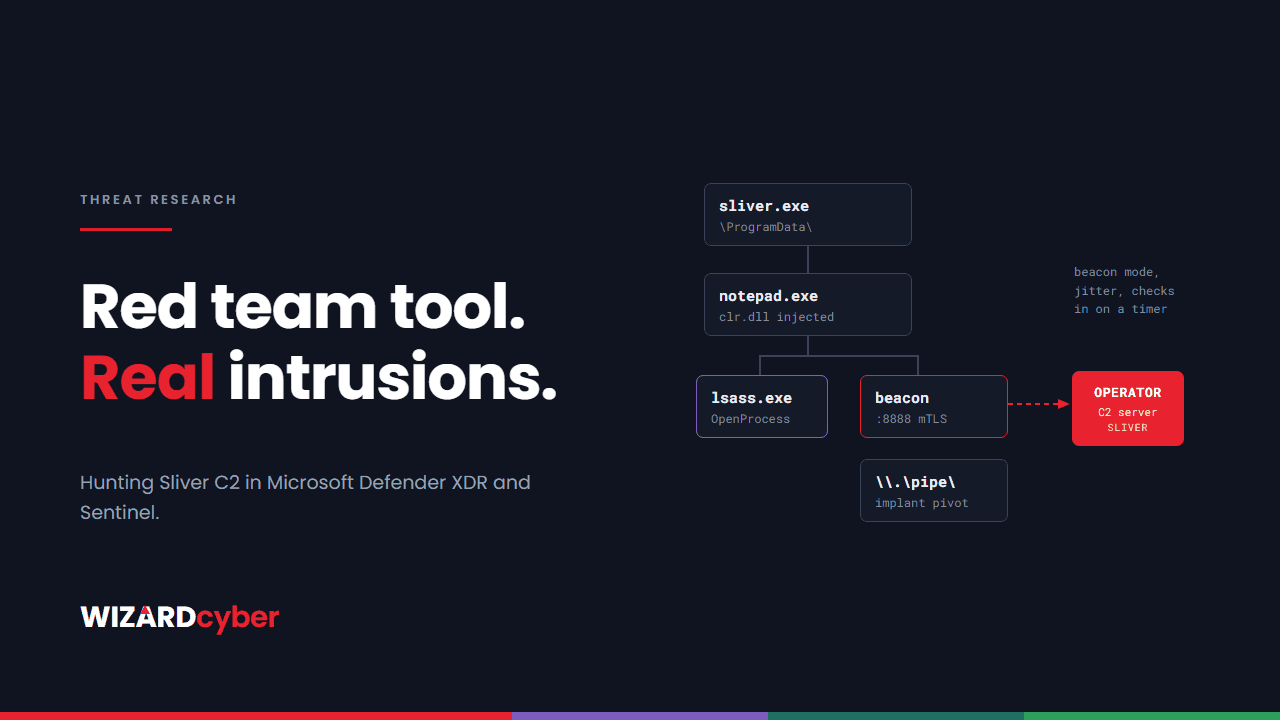
Sliver is an open-source command and control (C2) framework, written in Go and built for red teams. Because it is free, actively maintained and cross-platform, it has also become a common choice for real attackers who want an alternative to cracked copies of commercial tools. Microsoft and other vendors have reported it in use by ransomware affiliates and state-linked groups.
Sliver does very little that an attacker could not do with other frameworks, but the way it does things leaves a recognisable pattern. This post explains what a Sliver implant does on a Windows host and gives Defender XDR queries for each stage. The same queries run in Microsoft Sentinel when the Defender XDR connector is streaming advanced hunting tables.
How Sliver works
An operator runs the Sliver server, starts one or more listeners, and generates an implant for the target. Each implant is a compiled Go binary, so it is usually much larger than a typical piece of commodity malware and carries Go runtime artefacts. Implants can run in two modes:
- Session mode keeps a live, interactive connection open.
- Beacon mode checks in on a timer, with jitter, and collects queued tasks. This is quieter and is what most real intrusions use.
Implants can talk to the server over mutual TLS, HTTP or HTTPS, DNS, or WireGuard. Once running, the operator has the usual post-exploitation toolkit: running .NET assemblies in memory, injecting into other processes, dumping credentials, moving laterally through remote services, and pivoting through other implants over named pipes or TCP.
What it leaves behind
1. An unfamiliar binary in a writable folder
Implants are typically delivered by a loader or dropped directly, then run from a user-writable path such as AppData, Temp, ProgramData or Public. They are rarely signed and rarely carry meaningful version information.
2. Regular outbound connections
Beacon mode produces repeated connections to the same destination at roughly fixed intervals. Some operators leave listeners on default ports; mutual TLS listeners default to 8888. Others front the server with a redirector on 443, so the destination and the timing matter more than the port.
3. .NET running where it should not
Sliver's execute-assembly command runs a .NET tool in memory. By default it starts a sacrificial process, injects the .NET runtime into it, and runs the tool there. That leaves the CLR loaded into a process, such as notepad.exe or rundll32.exe, that never normally hosts .NET code.
4. Named pipes for pivoting
To reach hosts with no direct route out, operators chain implants together over SMB named pipes. A new pipe created by an unsigned process in a user-writable folder is worth a look.
5. Credential access and lateral movement
Sliver can dump process memory, including LSASS, and can move laterally by creating a remote service that runs an uploaded implant. Both show up in Defender telemetry if you look for them.
Hunting in Microsoft Defender XDR and Sentinel
These queries are starting points to tune for your estate. Software deployment tools, developer machines and some legitimate agents will produce noise, so expect to build exclusions. Treat a hit as a lead, then work it to a verdict.
One note on matching folder paths. These queries use contains rather than has or has_any. The has family matches whole terms, and a path fragment wrapped in backslashes does not tokenise the way you would expect, so a has_any on paths will quietly miss hits. contains is a plain substring match and is the right operator here.
1. Alerts that already name Sliver
Start with what Defender has already flagged. Check for related alerts that were closed as benign or never triaged.
AlertInfo
| where Timestamp > ago(90d)
| where Title has "Sliver"
| join kind=inner (AlertEvidence | where EntityType in ("File", "Process", "Machine")) on AlertId
| project Timestamp, Title, Severity, DeviceName, FileName, FolderPath, SHA256, ProcessCommandLine
2. The .NET runtime loaded into unusual processes
DeviceImageLoadEvents
| where Timestamp > ago(30d)
| where FileName in~ ("clr.dll", "mscoreei.dll")
| where InitiatingProcessFileName in~ ("notepad.exe", "rundll32.exe", "dllhost.exe", "werfault.exe",
                                       "svchost.exe", "msiexec.exe", "wuauclt.exe", "searchprotocolhost.exe")
| summarize Loads = count(), First = min(Timestamp), Last = max(Timestamp)
          by DeviceName, InitiatingProcessFileName, InitiatingProcessParentFileName,
             InitiatingProcessCommandLine
Pay most attention where the parent is an unsigned binary or a script host, and where the command line is just the bare executable name.
3. Unsigned binaries in writable folders making regular outbound connections
DeviceNetworkEvents
| where Timestamp > ago(7d)
| where ActionType == "ConnectionSuccess" and RemoteIPType == "Public"
| where InitiatingProcessFolderPath contains @"\AppData\"
     or InitiatingProcessFolderPath contains @"\Temp\"
     or InitiatingProcessFolderPath contains @"\ProgramData\"
     or InitiatingProcessFolderPath contains @"\Users\Public\"
| where isempty(InitiatingProcessVersionInfoCompanyName)
| summarize Connections = count(), Hours = dcount(bin(Timestamp, 1h)),
            Ports = make_set(RemotePort, 10)
          by DeviceName, InitiatingProcessFileName, InitiatingProcessFolderPath, RemoteIP
| where Hours >= 12
| order by Hours desc
A process that reaches the same address in most hours of the day, from a folder no installed software lives in, is behaving like a beacon. Raise the Hours threshold if the estate is noisy; a true beacon will usually sit well above it.
4. Named pipes from unsigned processes
DeviceEvents
| where Timestamp > ago(30d)
| where ActionType == "NamedPipeEvent"
| extend PipeName = tostring(parse_json(AdditionalFields).PipeName),
         Operation = tostring(parse_json(AdditionalFields).NamedPipeEnd)
| where InitiatingProcessFolderPath contains @"\AppData\"
     or InitiatingProcessFolderPath contains @"\Temp\"
     or InitiatingProcessFolderPath contains @"\ProgramData\"
     or InitiatingProcessFolderPath contains @"\Users\Public\"
| where isempty(InitiatingProcessVersionInfoCompanyName)
| project Timestamp, DeviceName, InitiatingProcessFileName, InitiatingProcessFolderPath, PipeName, Operation
5. Access to LSASS from an unexpected process
DeviceEvents
| where Timestamp > ago(30d)
| where ActionType == "OpenProcessApiCall" and FileName =~ "lsass.exe"
| where InitiatingProcessFolderPath contains @"\AppData\"
     or InitiatingProcessFolderPath contains @"\Temp\"
     or InitiatingProcessFolderPath contains @"\ProgramData\"
     or InitiatingProcessFolderPath contains @"\Users\Public\"
     or isempty(InitiatingProcessVersionInfoCompanyName)
| project Timestamp, DeviceName, InitiatingProcessFileName, InitiatingProcessFolderPath,
          InitiatingProcessCommandLine, AdditionalFields
This one is deliberately wide: it returns LSASS access from a writable folder or from anything without version information, because both are worth seeing. Expect volume on the first run. Backup agents, EDR components and some monitoring tools are the usual exclusions, and they should be excluded by signer and path rather than by file name.
6. Remote services that run a freshly copied binary
DeviceEvents
| where Timestamp > ago(30d)
| where ActionType == "ServiceInstalled"
| extend ServiceName = tostring(parse_json(AdditionalFields).ServiceName),
         ServicePath = tostring(parse_json(AdditionalFields).ServiceFileName)
| where ServicePath contains @"\Windows\Temp\"
     or ServicePath contains @"\ProgramData\"
     or ServicePath contains @"\Users\Public\"
     or ServicePath contains @"\AppData\"
| project Timestamp, DeviceName, ServiceName, ServicePath, InitiatingProcessFileName, InitiatingProcessAccountName
Correlate any hit with an inbound SMB file write to the same path from another host a few seconds earlier. That pairing is the lateral movement step.
7. DNS used as the channel
DeviceEvents
| where Timestamp > ago(7d)
| where ActionType == "DnsQueryResponse"
| extend Query = tostring(parse_json(AdditionalFields).DnsQueryString)
| where strlen(Query) > 60
| extend Labels = split(Query, ".")
| extend LabelCount = array_length(Labels)
| where LabelCount >= 2
| extend Parent = strcat(tostring(Labels[LabelCount - 2]), ".", tostring(Labels[LabelCount - 1]))
| summarize Queries = count(), Distinct = dcount(Query), Example = any(Query)
          by DeviceName, InitiatingProcessFileName, Parent
| where Distinct > 50
| order by Distinct desc
Long, high-variety subdomains under one parent domain, requested by something other than a browser or a known security agent, suggest data is being carried in DNS. Note that KQL has no negative array indexing, so the parent domain is built from the label count rather than from the end of the array.
If you find it
- Isolate the host in Defender and preserve a timeline before cleaning anything.
- Find the delivery route. Work back from the implant's first execution to the email, download, exploited service or remote session that put it there.
- Check for pivots. Look for named pipe and SMB activity from the host, and run the queries above across the estate rather than on one machine.
- Treat credentials on the host as exposed if there is any sign of LSASS access, and reset them in order of privilege.
- Block the infrastructure at the proxy and firewall, and add the implant hashes as indicators in Defender.
Hardening that makes Sliver harder to use
- Turn on Attack Surface Reduction rules, including the rules that block executables that do not meet prevalence, age or trusted-list criteria and that block credential stealing from LSASS.
- Use application control so unsigned binaries cannot run from user-writable folders.
- Restrict outbound traffic so workstations reach the internet only through the proxy, and block direct connections to bare IP addresses and uncommon ports.
- Enable LSA protection and Credential Guard where supported.
- Limit remote service creation and local administrator rights, so one implant cannot become many.
For how detection and response fit together across endpoint, identity and email, read our explainer on Microsoft XDR.
How a managed SOC helps
- Beacons are low and slow. They count on a quiet signal being ignored overnight. Our 24/7 SOC is staffed around the clock, and every alert is worked to a verdict, with senior analyst sign-off by default on the managed service.
- Hunting, not just alerting. Our Complete and Command packages include a threat hunting allocation, and the Intel Analyst Agent maintains a Threat Attack Profile for your estate.
- Compromise assessment. If you think an implant may already be running, our consultants can look across the estate for the traces described here.
If any of these hunts turns something up, or you want them run for you, talk to our team.