
Introduction
As we navigate the digital era, QR codes have seamlessly integrated into our daily routines, offering unmatched convenience in accessing information with a simple scan. This same convenience, however, has become a double-edged sword, as evidenced by the rise of QR code phishing—a rapidly growing email-based threat. Ingeniously camouflaged within emails, these malicious QR codes, when scanned, direct users to counterfeit websites masquerading as legitimate password reset screens or two-factor authentication requests. This deceptive practice not only highlights the evolving sophistication of cybercriminals but also underscores the urgent need for heightened vigilance and robust cybersecurity measures in our increasingly interconnected world.
Understanding QR Codes
A QR code, short for “Quick Response code,” is a two-dimensional barcode that stores information in a grid of tiny squares. Designed for quick scanning using a smartphone or camera-equipped device, QR codes are incredibly versatile. They commonly contain links to websites, contact details, product information, or even credentials for Wi-Fi networks. Originally developed for tracking parts in automotive manufacturing, QR codes have expanded into broader use, such as in marketing, ticketing, and payment systems, offering a seamless bridge between physical and digital interactions.
QR Code Phishing on the Rise
QR code phishing has seen a marked increase in recent years. This rise is attributed to the growing popularity of QR codes for legitimate purposes, particularly accelerated by the pandemic. Cybercriminals have exploited this trend, recognizing the potential of QR codes to bypass traditional security measures. These attacks are often harder to detect as they are embedded in emails as images, making them less likely to be caught by standard phishing filters. This rise in QR code phishing underscores a critical shift in cybercrime tactics, necessitating advanced countermeasures.
A few examples of
QR Codes are embedded as inline images within email body
In the example below, the QR code is embedded inline within the body of the email, which when scanned redirects the user to a phishing website attempting to gather their credentials.

QR Code within an image in the email body
In the example below, the QR code is placed inside an image embedded inline within the body of the email.
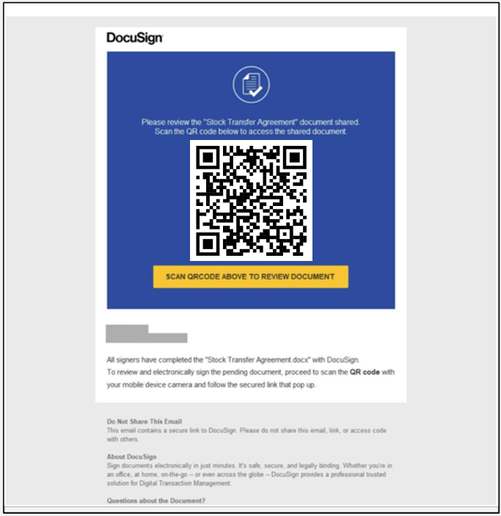
QR Code as an image in an attachment
In the example below, the QR code is embedded inside an attachment that is a PDF, which when scanned redirects the user to a phishing website attempting to gather their credentials.

How Defender for Office 365 detects QR Code phishing
Microsoft Defender for Office 365 combats QR code phishing by utilizing advanced image extraction technologies. During email processing, it identifies QR codes and extracts URL metadata, enabling a thorough analysis of the linked content. The system employs a combination of threat signals, URL analysis, and heuristic rules, integrating these inputs with machine learning algorithms for accurate threat detection. This multi-faceted approach allows Defender for Office 365 to proactively identify and block these sophisticated phishing attempts, safeguarding users’ inboxes from these emerging threats.
Conclusion
In conclusion, while QR codes offer unparalleled convenience and adaptability in our digital era, it’s crucial to balance this ease of use with caution. The rise of QR code phishing poses a significant threat, underscoring the need for vigilance. Microsoft Defender for Office 365 represents a leap in securing these codes, yet individual awareness remains key. As we embrace these technological advancements, let’s commit to staying informed and practicing responsible digital habits, ensuring that the benefits of QR codes are enjoyed safely and securely.


