

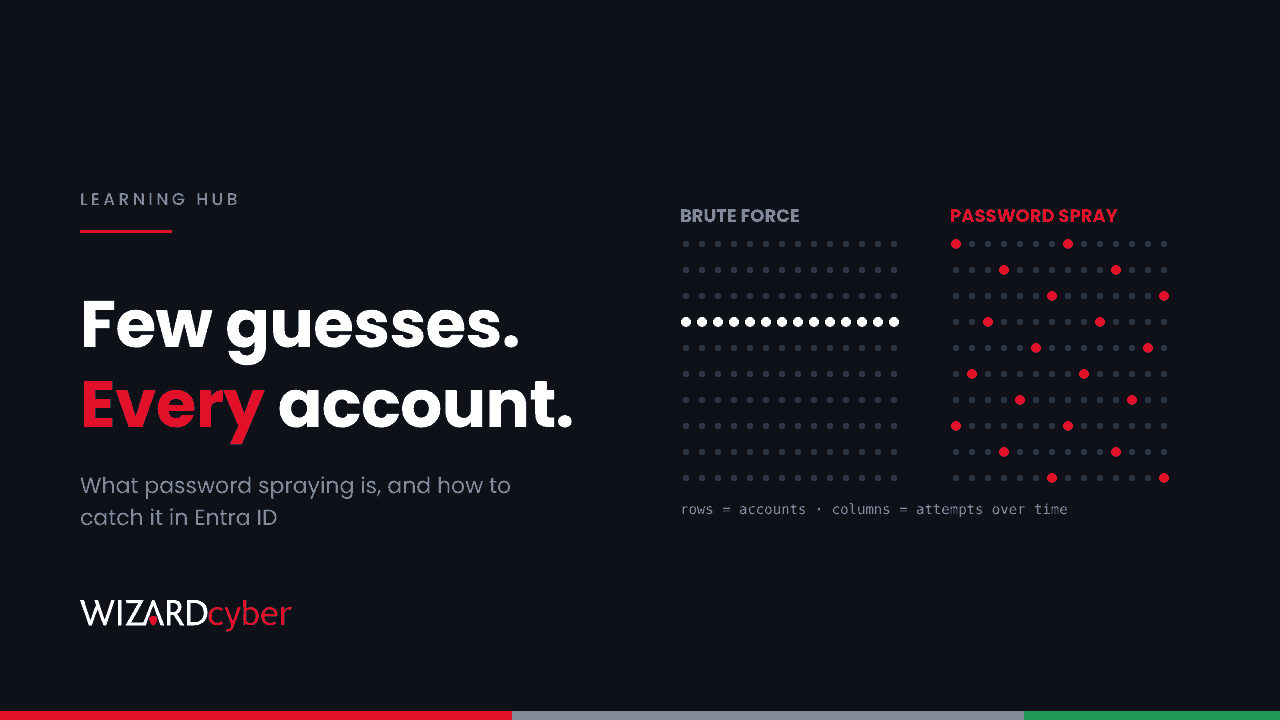
Password spraying is an attack where someone tries a small number of common passwords against a large number of accounts, instead of many passwords against one account. Each account sees only one or two failed sign-ins, which stays under lockout thresholds and looks like ordinary user error. Across hundreds or thousands of accounts, though, a password like Autumn2026! or Welcome1 only needs to work once.
MITRE ATT&CK tracks it as T1110.003, a sub-technique of brute force. In Microsoft environments it's one of the most common ways attackers get a first valid account. Most recently, it featured in joint advisory AA26-281A, which we cover in Hunting AA26-281A in Microsoft 365.
How a password spraying attack works
- Build a list of accounts. Attackers collect usernames from LinkedIn, email signatures, data breaches and the predictable format most organisations use (firstname.lastname@). Some tools check which accounts exist first by querying Microsoft services that respond differently to real and fake usernames.
- Pick a handful of passwords. Seasons plus the year, the company name plus a number, "Password1", and passwords from previous breaches that meet common complexity rules.
- Spray slowly. One password is tried against every account, then the attacker waits before trying the next. Requests are spread across many IP addresses, often rented cloud infrastructure, to get around IP-based blocking.
- Use whatever works. A single valid password is enough to read mail, search SharePoint, register an MFA method if none exists, or phish colleagues from a trusted mailbox.
Password spraying vs brute force vs credential stuffing
| Accounts targeted | Passwords per account | What it relies on | |
|---|---|---|---|
| Brute force | One or a few | Many | No lockout, or a weak password |
| Password spraying | Many | One to a few | Somebody using a common password |
| Credential stuffing | Many | One known pair each | Passwords reused from another breach |
Lockout policies were designed for brute force, and spraying is designed to sit underneath them. That's why it keeps working against organisations that consider their password policy strong.
Why it still works in Microsoft 365
MFA gaps, not MFA failures
Spraying rarely beats MFA. It finds the accounts and the protocols where MFA isn't enforced. The usual gaps are:
- Legacy authentication. Protocols such as IMAP, POP, SMTP AUTH, older ActiveSync clients and basic-auth EWS can't perform an MFA challenge. If Conditional Access doesn't block them, a correct password is all an attacker needs.
- Excluded accounts. Service, shared and "functional" accounts are often left out of MFA because something broke once. In a September 2026 campaign, Proofpoint reported 5,714 Microsoft 365 accounts sprayed across 28 tenants. The only seven compromised were unmanaged functional accounts with no MFA.
- On-premises Exchange. OWA may sit behind MFA while EWS, ActiveSync, Autodiscover and other endpoints on the same server still accept a plain username and password.
Lockout is a speed limit, not a block
Microsoft Entra Smart Lockout is on for every tenant. By default it locks an account for one minute after 10 failed attempts in Azure public cloud tenants, with longer lockouts after that. It keeps separate counters for familiar and unfamiliar locations, so a spray from abroad shouldn't lock out the real user at their desk. It also ignores repeats of the last three bad password hashes. All of that helps, but a sprayer making one attempt per account per hour never comes close to the threshold.
Signs of password spraying in Entra ID
The pattern is wide and shallow: many accounts, few failures each, usually from a small set of sources and often with the same user agent. Things to look for in sign-in logs:
- Error code 50126 (invalid username or password) for many different users from one IP address or network range.
- Bursts of 50053 (account locked by Smart Lockout) across several accounts at once.
- Failures against accounts that never sign in, such as former staff, room mailboxes and service accounts. Real users don't mistype passwords for accounts they don't use.
- A single unusual user agent across many accounts, including outdated Teams or Office client strings that no current device should send.
- Activity from cloud hosting or anonymising networks rather than your users' usual ISPs.
- Most importantly, a successful sign-in from an address that has been failing against other accounts.
If you hold Microsoft Entra ID P2, ID Protection includes a Password spray risk detection that compares patterns across all Entra tenants. It fires only when the attacker has got a password right, so treat it as a confirmed credential compromise, not a warning.
A starter KQL query for Microsoft Sentinel
This query finds the wide-and-shallow pattern and then checks whether any of those sources also signed in successfully. It's a starting point. Tune the thresholds to your tenant size, and list known sources such as your own proxies or VPN as exceptions.
let window = 7d;
let Failures = union SigninLogs, AADNonInteractiveUserSignInLogs
| where TimeGenerated > ago(window)
| where ResultType in ("50126", "50053")
| summarize FailedAccounts = dcount(UserPrincipalName), Failures = count()
          by IPAddress
| where FailedAccounts >= 15 and Failures <= FailedAccounts * 3;
union SigninLogs, AADNonInteractiveUserSignInLogs
| where TimeGenerated > ago(window) and ResultType == "0"
| join kind=inner Failures on IPAddress
| project TimeGenerated, UserPrincipalName, IPAddress, FailedAccounts,
          AppDisplayName, ClientAppUsed, UserAgent
Any row is worth an investigation. A row where ClientAppUsed shows a legacy protocol is worth one now.
How to prevent password spraying
- Block legacy authentication with Conditional Access for every user, and check the sign-in logs first so you know what will break.
- Require MFA for all accounts, and move privileged users to phishing-resistant methods such as passkeys or certificate-based authentication.
- Ban predictable passwords. Microsoft Entra Password Protection blocks common passwords and lets you add your own terms, such as your company name, products and city. In hybrid environments, extend it to on-premises Active Directory.
- Find and fix forgotten accounts. Every service, shared and functional account needs an owner and a reason to exist. Disable the rest.
- Tune Smart Lockout for hybrid. If you use pass-through authentication, Microsoft advises setting the Entra lockout threshold lower than the on-premises one and the lockout duration longer, so attackers are stopped in the cloud before they lock users out on-premises. Customising Smart Lockout requires Entra ID P1.
- Send the right logs to your SIEM. Without non-interactive sign-in logs, a large share of spraying against Exchange and API endpoints is invisible.
What to do if a spray succeeds
- Reset the password and revoke the account's sessions and refresh tokens.
- Check for MFA methods, inbox rules, mail forwarding or app consents added after the successful sign-in.
- Review mailbox, OneDrive and SharePoint access from the attacker's addresses.
- Look for other accounts that signed in from the same sources.
- Close the gap that let it work, whether that was legacy authentication, an MFA exclusion or a guessable password, or it will happen again.
Frequently asked questions
Is password spraying the same as a brute force attack?
It's a type of brute force, but the shape is reversed. Brute force tries many passwords against one account. Spraying tries one password against many accounts, which keeps it under lockout limits.
Does MFA stop password spraying?
MFA stops a sprayed password from being used, wherever MFA is actually enforced. Most successful sprays exploit accounts excluded from MFA or protocols that can't do MFA, which is why blocking legacy authentication matters as much as enabling MFA.
Will account lockout protect us?
Only partly. Lockout slows attackers down, but a patient spray stays under the threshold. Smart Lockout in Entra ID also tries to avoid locking out real users, so it isn't designed to stop a low-and-slow spray on its own.
How do I know if we've been sprayed?
Look for one source failing against many accounts in your Entra ID sign-in logs, then check whether that source ever succeeded. With Entra ID P2, review Password spray risk detections in ID Protection.
Which accounts are most at risk?
Accounts with no MFA and no owner: service accounts, shared mailboxes with sign-in enabled, test accounts and leavers' accounts that were never disabled. Nobody notices when these are used.
How Wizard Cyber helps
Spraying is noisy across a tenant but quiet in any single account, so it's easy to miss when nobody is correlating sign-ins around the clock. Our SOCs are manned 24/7, and CYBERSHIELD AI's Investigation Agent links the failed sign-ins, the one that succeeded and what happened next into a single verdict, typically in 3m 30s. On the managed service, a senior analyst signs off by default.
If you'd like to know whether your tenant would catch a spray today, book a demo or talk to our team.