
Introduction
Interlock ransomware has been active since September 2024, targeting Windows, Linux and ESXi environments with a hybrid RSA-AES cryptosystem. Unlike many modern ransomware operations, Interlock doesn’t run a ransomware-as-a-service affiliate model. It appears to be operated and shared within a smaller, closely held group. Combined with double extortion tactics — data theft before encryption — and anti-forensic capabilities like event log clearing and self-deletion, Interlock represents a serious threat to organisations in education, manufacturing, healthcare and aviation, with the heaviest concentration of victims in the United States alongside activity in Australia, Canada and the UK.
Technical Details
Threat overview
Interlock first emerged in 2024 and has continued to evolve, including a Java-based (JAR) variant targeting Windows environments. The group’s core objective is double extortion: exfiltrate sensitive data, encrypt systems, then threaten public leak of the stolen data if the ransom isn’t paid within a tight window.
Technical analysis
Interlock is a command-line-driven binary, which gives operators granular control over each encryption run:
| Argument | Function |
|---|---|
| -d <path> | Encrypt a specific directory |
| -f <filename> | Encrypt a specific file |
| -del | Self-delete after encryption |
| -e <dirs> | Exclude directories from encryption |
| -s | Reschedule itself as a scheduled task (TaskSystem) |
| -r | Terminate file owner processes (currently non-functional) |
| -u | Encrypt without appending the encrypted extension |
Notable behaviours
Persistence and evasion. Uses scheduled tasks and registry modifications to disable the firewall and tamper with certificates.

Command-line arguments used by Interlock ransomware for scheduling tasks and executing malware
Lateral spread via symlinks. Runs fsutil behavior set SymlinkEvaluation commands to enable symbolic link traversal, allowing encryption of files across mapped and linked devices.

Commands to enable symbolic link evaluation using fsutil behavior set
Anti-recovery. Deletes Volume Shadow Copies before encrypting to block easy restoration.
Encryption scheme. Generates a 48-byte key buffer per file — a 32-byte AES key plus a 12-byte IV — then encrypts that buffer with an embedded RSA public key. A standard hybrid cryptosystem approach that makes brute-force decryption infeasible without the attacker’s private key.
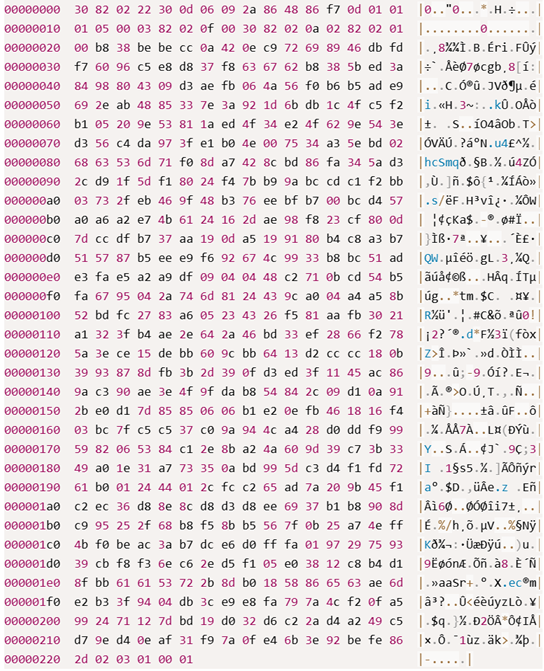
Hexadecimal representation of ransomware code showing encrypted data
File exclusions. Deliberately skips system-critical and already-encrypted files — .exe, .dll, .sys, .ps1, Thumbs.db, its own ransom note — to keep the machine bootable enough to display the ransom demand.
Ransom note. Dropped as IMPORTANT_BEFORE_START.txt in every scanned directory. Notable for leaning on regulatory and legal exposure — fines, breach disclosure obligations — rather than pure fear, with a 72-hour compliance window.
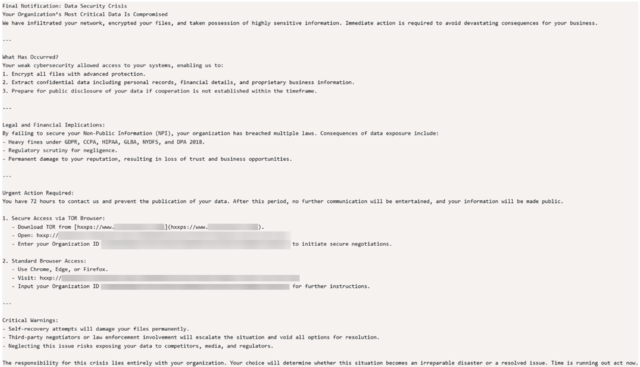
The Interlock ransom note
Anti-forensics. Clears Application, Security, Setup, System and Forwarded Events logs post-encryption. Self-deletion is achieved by dropping a DLL payload to %TMP%\tmp<random>.wasd and invoking it via rundll32.exe.

Command for self-deletion using rundll32.exe and a temporary DLL file
MITRE ATT&CK Mapping
| Tactic | Technique ID | Technique Name | Description |
|---|---|---|---|
| Privilege Escalation | T1611 | Escape to Host | Executes commands to enable symbolic link evaluation, facilitating access to host resources. |
| Defense Evasion | T1562.002 | Impair Defenses: Disable Windows Event Logging | Clears Windows Event Logs to remove evidence of malicious activity. |
| Defense Evasion | T1562.004 | Impair Defenses: Disable or Modify System Firewall | Disables the Windows Firewall to reduce detection and allow unrestricted network communication. |
| Defense Evasion | T1070.004 | Indicator Removal: File Deletion | Deletes its own executable using the -del command to remove forensic evidence. |
| Defense Evasion | T1027.013 | Obfuscated Files or Information: Encrypted/Encoded File | Encrypts or encodes its payload to evade security detection and analysis. |
| Discovery | T1083 | File and Directory Discovery | Enumerates files and directories on the compromised system. |
| Discovery | T1135 | Network Share Discovery | Discovers accessible network shares for potential lateral movement or data access. |
| Discovery | T1057 | Process Discovery | Enumerates running processes on the compromised device. |
| Lateral Movement | T1053 | Scheduled Task/Job | Creates or uses a scheduled task to rerun itself when the -s argument is provided, helping maintain execution. |
| Impact | T1486 | Data Encrypted for Impact | Uses a hybrid RSA-AES encryption scheme to encrypt files and render them inaccessible. |
| Impact | T1489 | Service Stop | Stops targeted services to facilitate encryption or disrupt normal system operations. |
Detection
The threat hunting team wrote a query to detect the behaviour of the attack, and leveraged an IOC query from the Microsoft Threat Analytics report. Both are listed below.
TTPs query
let InterlockScheduledTask = DeviceProcessEvents
| where Timestamp > ago(30d)
| where (FileName has_any ("schtasks.exe", "schtasks"))
| where ProcessCommandLine has "TaskSystem";

let InterlockSymlinkAbuse = DeviceProcessEvents
| where Timestamp > ago(30d)
| where FileName =~ "fsutil.exe"
| where ProcessCommandLine has "behavior" and ProcessCommandLine has "SymlinkEvaluation";

let InterlockRansomArtifacts = DeviceFileEvents
| where Timestamp > ago(30d)
| where (
    FolderPath has @"!_KEYS_FOR_DECRYPT_"
    or FileName =~ "IMPORTANT_BEFORE_START.txt"
    or FileName endswith ".INT3R1OCK"
);

let InterlockSelfDelete = DeviceProcessEvents
| where Timestamp > ago(30d)
| where FileName =~ "rundll32.exe"
| where ProcessCommandLine matches regex @"tmp[0-9]+\.wasd";

let InterlockEventLogClear = DeviceProcessEvents
| where Timestamp > ago(30d)
| where FileName has_any ("wevtutil.exe", "powershell.exe", "powershell_ise.exe", "cmd.exe")
| where ProcessCommandLine has_any ("wevtutil", "Clear-EventLog", "ClearEventLog")
| where ProcessCommandLine has_any ("Application", "Security", "Setup", "System", "ForwardedEvents")
| where ProcessCommandLine has " cl " or ProcessCommandLine has "Clear-EventLog";

let InterlockVSSDeletion = DeviceProcessEvents
| where Timestamp > ago(30d)
| where (
 (FileName =~ "vssadmin.exe" and ProcessCommandLine has "delete" and ProcessCommandLine has "shadows")
 or (FileName =~ "wmic.exe" and ProcessCommandLine has "shadowcopy" and ProcessCommandLine has "delete")
 or (FileName has_any ("powershell.exe", "powershell_ise.exe")
 and ProcessCommandLine has_any ("Get-WmiObject", "Get-CimInstance")
 and ProcessCommandLine has "shadowcopy"
 and ProcessCommandLine has "Remove")
 or (FileName =~ "diskshadow.exe")
)
| where not(ProcessCommandLine has "Commvault" or FolderPath has "Commvault");

union (InterlockScheduledTask | extend DetectionType = "TaskSystem scheduled task creation")
| union (InterlockSymlinkAbuse | extend DetectionType = "Symlink evaluation enabled via fsutil")
| union (InterlockSelfDelete | extend DetectionType = "Self-deletion via rundll32 + .wasd temp DLL")
| union (InterlockEventLogClear | extend DetectionType = "Event log clearing (wevtutil/PowerShell/cmd)")
| union (InterlockVSSDeletion | extend DetectionType = "Volume Shadow Copy deletion (recovery sabotage)")
| project Timestamp, DeviceName, DetectionType, FileName, FolderPath, ProcessCommandLine, AccountName, InitiatingProcessAccountName, InitiatingProcessCommandLine
| union (
    InterlockRansomArtifacts
    | extend DetectionType = "Interlock ransom artifact / note dropped"
    | project Timestamp, DeviceName, DetectionType, FileName, FolderPath, ProcessCommandLine = "", AccountName = InitiatingProcessAccountName, InitiatingProcessAccountName, InitiatingProcessCommandLine
)
| sort by Timestamp desc
IOCs query
let fileHashes = dynamic([
    "53efa51fccd9dc1af51945ae02fec47536ca22dd139f92f27840588285156118",
    "11a00160a82b94f20167938654789a2dc8784397eb9124cae8a0df6a90399120"
]);

union
(
    DeviceFileEvents
    | where Timestamp >= ago(30d)
    | where SHA256 in (fileHashes)
    | project Timestamp, FileHash = SHA256, SourceTable = "DeviceFileEvents"
),
(
    DeviceEvents
    | where Timestamp >= ago(30d)
    | where SHA256 in (fileHashes)
    | project Timestamp, FileHash = SHA256, SourceTable = "DeviceEvents"
),
(
    DeviceImageLoadEvents
    | where Timestamp >= ago(30d)
    | where SHA256 in (fileHashes)
    | project Timestamp, FileHash = SHA256, SourceTable = "DeviceImageLoadEvents"
),
(
    DeviceProcessEvents
    | where Timestamp >= ago(30d)
    | where SHA256 in (fileHashes)
    | project Timestamp, FileHash = SHA256, SourceTable = "DeviceProcessEvents"
)
| order by Timestamp desc
Prevention
Enable attack surface reduction rules, particularly:
- Block executable files unless they meet prevalence, age or trust criteria
- Block process creation from PsExec and WMI, if managed through Intune or MDM
- Advanced protection against ransomware
Alongside those:
- Turn on cloud-delivered protection and tamper protection in Defender Antivirus
- Configure Controlled Folder Access, especially on sensitive assets. Test in audit mode first
- Run EDR in block mode to catch threats even if a non-Microsoft AV misses them or Defender AV is passive
- Enable automated investigation and remediation and automatic attack disruption in Defender XDR to contain fast-moving encryption events
Remediation
- Isolate affected devices immediately on detection of encryption behaviour or ransom note drops
- Treat Volume Shadow Copy deletion events as a strong precursor signal and act before mass encryption begins
- Rotate credentials for any accounts observed in hands-on-keyboard activity
- Preserve forensic evidence before remediation, since Interlock actively clears event logs
Trends and impact
Interlock’s targeting so far skews toward critical-service sectors — healthcare, education, aviation, manufacturing — verticals where downtime has outsized real-world consequences, increasing pressure to pay.
The group’s non-affiliate model suggests a smaller operational footprint but potentially tighter operational security, which can make attribution and pattern-matching harder for defenders.
Why this is important
Interlock demonstrates how ransomware operators continue to blend technical sophistication — hybrid cryptosystems, symlink-based lateral encryption — with psychological and legal pressure tactics in ransom notes.
For organisations, the risk isn’t just encrypted files. It includes data exfiltration exposure, regulatory notification obligations, operational downtime in sectors where uptime is safety-critical, and reputational fallout from a double-extortion leak. The anti-forensic techniques also mean detection speed matters more than post-incident investigation: by the time the logs are gone, the visibility window has closed.
How Wizard Cyber can help
- 24/7 threat monitoring through Microsoft Sentinel, correlating signals across endpoints, identities and cloud workloads before ransomware reaches the encryption stage
- Managed detection and response on Defender XDR, catching precursor behaviours such as scheduled task creation, shadow copy deletion and log-clearing attempts ahead of mass encryption
- Continuous threat exposure management to identify and close the attack surface gaps groups like Interlock rely on for initial access and lateral movement
- Incident response and containment support to isolate affected systems fast and limit blast radius during an active event
- Proactive threat hunting to search historical telemetry for Interlock-associated TTPs, even where no alert has yet fired