

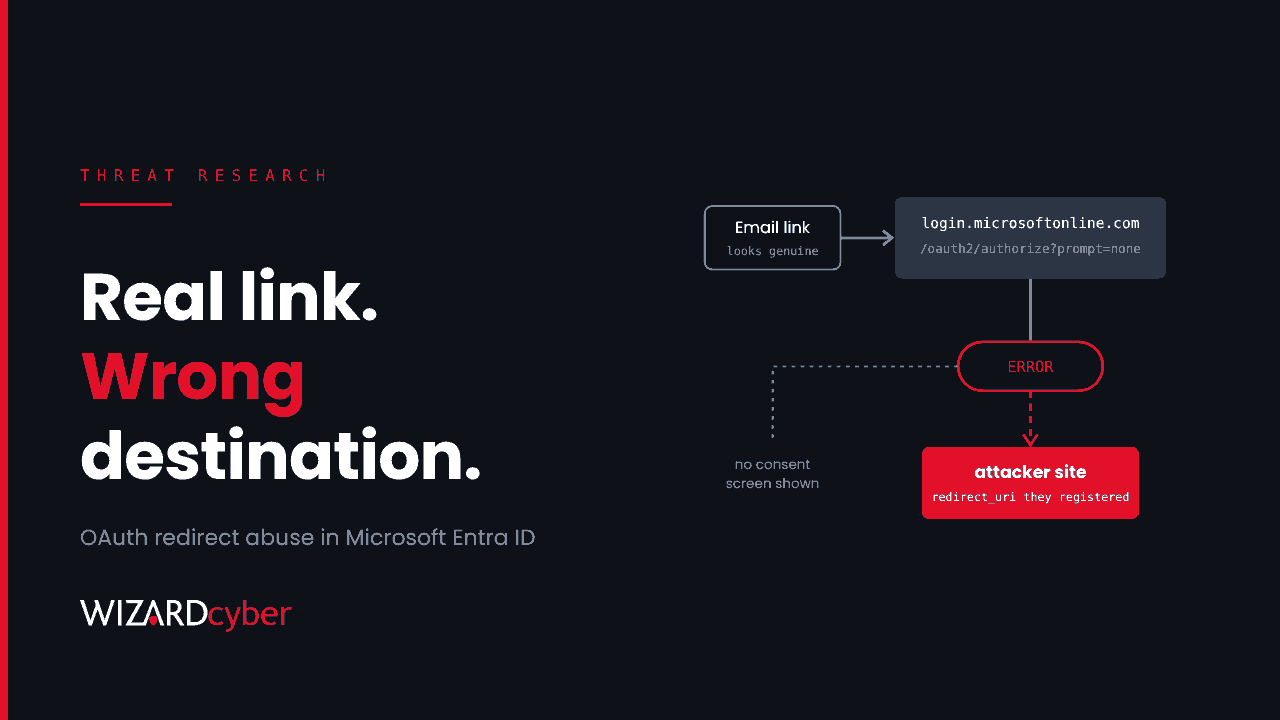
For years, the standard phishing advice was to hover over the link and check where it goes. That advice is failing. Between 1 August and 18 September, Kaspersky says it blocked more than 31,000 emails whose links pointed at genuine Microsoft sign-in addresses. The findings were published on 7 October and reported again this week. The link really does start at login.microsoftonline.com. It just doesn't end there.
None of this needs a vulnerability in your tenant. The attackers use their own Microsoft tenants and features that work as designed. That makes it hard to block outright, but it leaves traces in mail, click and endpoint telemetry that most Microsoft customers already collect.
What is happening
Technique 1: a redirect URI the attacker controls
Every app registered in Microsoft Entra ID has one or more redirect URIs. These are the addresses Entra sends the browser to once a sign-in request has been handled. The attackers create a tenant, register an app and set its redirect URI to a site they own. They then email links to the real Microsoft authorisation endpoint that carry their app's ID and redirect URI.
Microsoft's own researchers described the same pattern in March, in a campaign against government and public-sector organisations. The links add prompt=none, which asks Entra to complete the request silently, and a deliberately invalid scope. The request fails, and Entra redirects the browser, together with the error, to the registered redirect URI. The attacker never receives a token and doesn't need one. What they get is a trusted first hop that leads straight to a phishing kit or a download.
Tenable reported a closely related behaviour to Microsoft in March and published it in June as TRA-2026-51. Certain malformed requests, which return errors such as AADSTS700054 and AADSTS9002331, redirect a signed-in user to the attacker's domain before any consent screen appears. Microsoft rated it low severity, and Tenable listed it as unfixed at its last update. Treat this as a technique that will keep working, not one that a patch will close.
In the March campaign, the lures were e-signature requests, shared Teams meeting recordings, Microsoft 365 password resets and political themes. Some arrived as PDF attachments. The victim's email address was sometimes passed in the state parameter so the landing page could greet them by name. One chain delivered a ZIP archive holding a shortcut file, which ran PowerShell and side-loaded a DLL. Microsoft disabled the malicious apps it found, but said related activity was continuing.
Technique 2: genuine Microsoft emails carrying the attacker's words
Kaspersky also described a quieter trick. The attacker creates a tenant on a trial or low-cost licence and puts lure text where Microsoft's emails will repeat it, such as the organisation name. They then create a user, sign in to the My Account portal as that user, and enter the victim's real address as the backup email. The victim receives a genuine Microsoft verification email from a genuine Microsoft sender, with the attacker's text in the subject line and signature: a phone number to call, a "document" to sign, a service to "update".
Sender authentication passes, because Microsoft really did send the email. Only the content gives it away.
Who is affected
- Any Microsoft 365 organisation. Your tenant's settings don't decide whether you receive these emails, because the apps and accounts are in the attacker's tenant.
- Users with an active Microsoft session. A redirect that happens before a consent screen is most convincing to someone already signed in, which during the working day is almost everyone.
- Organisations that rely on URL reputation. Filtering that trusts Microsoft's domains will pass the first hop. Some attackers also host payloads at the redirect URI so they can swap domains as soon as one is blocked.
Detection and hunting
The queries below are starting points for Microsoft Defender XDR advanced hunting and Microsoft Sentinel. Run them over a few weeks first, expect legitimate single sign-on traffic in the results, and list known applications as exceptions before you turn anything into an alert.
1. Authorisation links in inbound mail
Legitimate business email rarely contains a raw link to the Entra authorisation endpoint, and almost never one that asks for prompt=none. Start by looking at which apps and redirect hosts appear.
EmailUrlInfo
| where Timestamp > ago(30d)
| where Url has "login.microsoftonline.com" and Url has "/oauth2/"
| extend ClientId = extract(@"client_id=([0-9a-fA-F-]{36})", 1, Url),
         RedirectUri = url_decode(extract(@"redirect_uri=([^&]+)", 1, Url)),
         Silent = Url has "prompt=none"
| extend RedirectHost = tostring(parse_url(RedirectUri).Host)
| join kind=inner (EmailEvents | where EmailDirection == "Inbound"
    | project NetworkMessageId, SenderFromAddress, RecipientEmailAddress, Subject)
  on NetworkMessageId
| summarize Messages = dcount(NetworkMessageId), Recipients = dcount(RecipientEmailAddress),
            Senders = make_set(SenderFromAddress, 5), Subjects = make_set(Subject, 5)
          by ClientId, RedirectHost, Silent
| order by Silent desc, Recipients desc
A redirect host that isn't yours or a supplier you recognise, combined with Silent == true, deserves a closer look.
2. Clicks on silent or invalid-scope authorisation links
Safe Links click data shows who opened one of these links and whether the click was allowed.
UrlClickEvents
| where Timestamp > ago(30d)
| where Url has "login.microsoftonline.com"
| where Url has "prompt=none" or Url has "scope=invalid"
| extend RedirectUri = url_decode(extract(@"redirect_uri=([^&]+)", 1, Url))
| project Timestamp, AccountUpn, ActionType, IsClickedThrough,
          RedirectHost = tostring(parse_url(RedirectUri).Host), Url, NetworkMessageId
3. Files that arrived by way of a Microsoft sign-in page
If a download's referrer is the Microsoft sign-in host, the browser was redirected from there to the download.
DeviceFileEvents
| where Timestamp > ago(30d)
| where ActionType == "FileCreated"
| where FileOriginReferrerUrl has "login.microsoftonline.com"
| where FileName endswith ".zip" or FileName endswith ".lnk" or FileName endswith ".iso"
    or FileName endswith ".js" or FileName endswith ".msi"
| project Timestamp, DeviceName, InitiatingProcessAccountUpn, FileName,
          FolderPath, FileOriginUrl, FileOriginReferrerUrl, SHA256
Follow any hit into DeviceProcessEvents on the same device, looking for a shortcut or archive that launches PowerShell in the minutes that follow.
4. Verification emails nobody asked for
For the backup-email trick, look for Microsoft account security emails reaching work mailboxes, especially with subjects that carry phone numbers, links or calls to action. Confirm the sender address against messages in your own tenant before you rely on it, and adjust the patterns to the lures you see.
EmailEvents
| where Timestamp > ago(30d)
| where EmailDirection == "Inbound"
| where SenderFromDomain endswith "accountprotection.microsoft.com"
| where Subject matches regex @"(\+?\d[\d\s\-]{8,}\d)|(https?://|www\.)"
    or Subject has_any ("invoice", "payment", "renew", "call", "sign", "document")
| project Timestamp, RecipientEmailAddress, SenderFromAddress, Subject, DeliveryAction
Mitigation
- Stop treating Microsoft URLs as automatically safe. Keep Safe Links time-of-click checks on, including for internal mail and for links inside PDFs and Office files. Make sure no allow-list entry exempts
login.microsoftonline.comfrom inspection. - Turn hunt 1 into a mail detection. Once you know which applications legitimately send authorisation links to your users, alert on authorisation URLs with
prompt=noneor unfamiliar redirect hosts arriving from outside. - Break the malware chain on the endpoint. Turn on network protection and the attack surface reduction rules that block obfuscated scripts and executable content launched from email and webmail. Block or warn on downloads of shortcut and script files from the internet.
- Change the advice you give users. "Check the link" isn't enough when the link is genuine. Tell them to report any sign-in link or verification email they didn't request, and never to call a number that appears in an automated email.
- Report malicious apps to Microsoft. Microsoft can disable the attacker's app registration, which kills every link that uses it.
- Keep your own consent settings tight anyway. These campaigns don't rely on consent, but the next one might. Restrict user consent to verified publishers and low-risk permissions, and use the admin consent workflow for everything else.
How a managed SOC helps
This technique sits in the gap between email security and identity monitoring. The link passes reputation checks, the sender may be Microsoft itself, and the harmful part happens one redirect later. Catching it means connecting a mail record, a click and an endpoint event that each look harmless on their own.
- 24/7 coverage. Our SOCs are manned around the clock, so a click at 22:00 on a Friday is investigated on Friday.
- Investigations that join mail, identity and endpoint. CYBERSHIELD AI's Investigation Agent works each incident through to a verdict, averaging 3m 30s, or 7m 50s where it needs Advanced Investigation. It traces the click back to the email and forward to whatever arrived on the device.
- People accountable for the outcome. On the managed service, senior analyst sign-off is the default. Whether to close or escalate is decided by policy and your own decision templates, not by the model.
- Microsoft-native detection engineering. We have run Microsoft Sentinel since 2019. Hunts like the ones above become tuned, maintained analytics for your tenant.
If you'd like to know whether your mail and endpoint telemetry would catch a redirect like this today, talk to our team.