

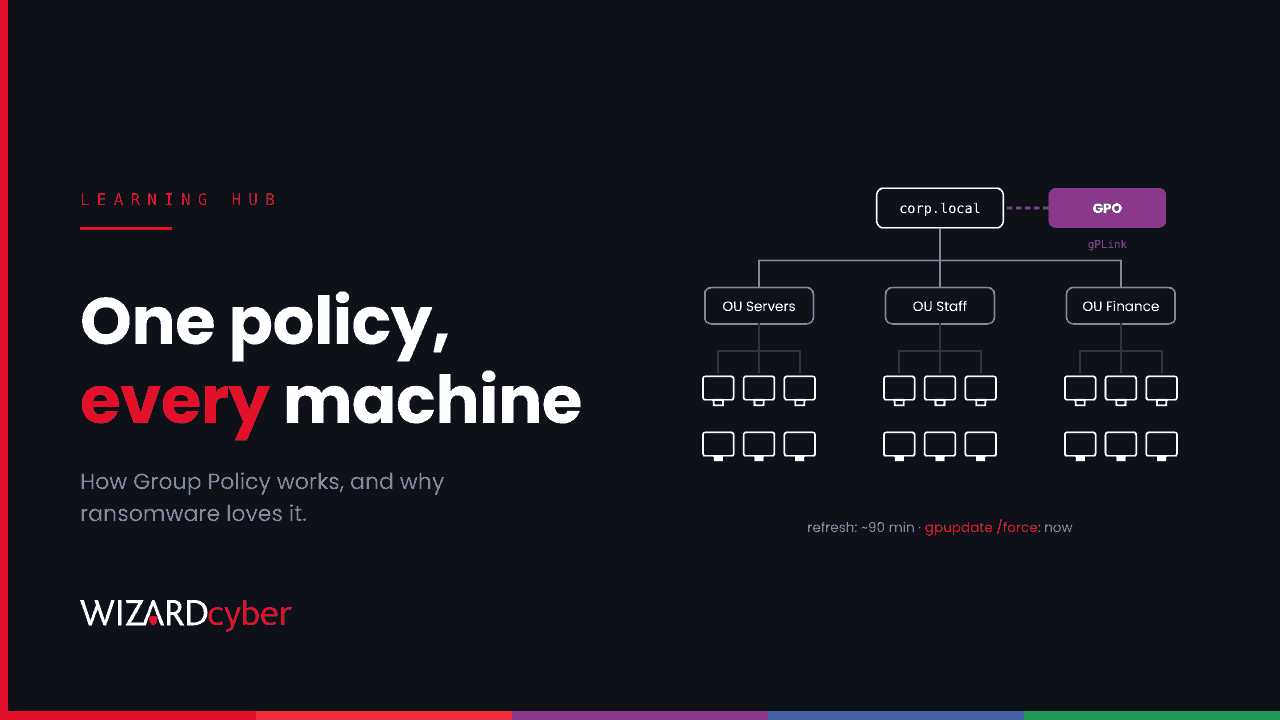
Group Policy is the Active Directory feature Windows administrators use to apply settings to many users and computers at once. A Group Policy Object (GPO) is a named bundle of settings, such as password rules, firewall configuration, mapped drives, software installs or scheduled tasks, that you link to a domain or an organisational unit. Every domain-joined machine in scope picks it up automatically. That reach is what makes Group Policy so useful to administrators, and why ransomware groups use it to hit every machine in a network at once.
How Group Policy works
A GPO has two halves:
- The Group Policy container lives in Active Directory. It holds the GPO's name, version and permissions, and is identified by a GUID.
- The Group Policy template lives in SYSVOL, a shared folder replicated to every domain controller, under
\\yourdomain\SYSVOL\yourdomain\Policies\{GUID}. It holds the actual settings, scripts and files.
A GPO does nothing until it's linked to a site, the domain or an organisational unit (OU). Computers and users in scope then apply it. You can narrow that further with security filtering (only these groups) and WMI filters (only machines that match a condition).
Order of processing
When several GPOs apply, Windows processes them in a fixed order, often remembered as LSDOU: Local policy, then Site, then Domain, then Organisational Unit, parent OU first. Later settings win when two conflict. Two options change that: Enforced stops a higher-level GPO being overridden, and Block inheritance on an OU stops higher-level GPOs applying unless they're enforced.
When policy is applied
Computer settings apply at start-up and user settings at sign-in. After that, domain members refresh Group Policy in the background roughly every 90 minutes, with a random offset of up to 30 minutes so domain controllers aren't flooded. Domain controllers themselves refresh every five minutes. An administrator can force a refresh with gpupdate /force, locally or remotely.
What GPOs are used for
- Security baselines: password and lockout policy, audit policy, user rights, firewall and Defender settings.
- Configuration: mapped drives, printers, desktop settings and browser policy.
- Software and scripts: start-up and logon scripts, software installation, and Group Policy Preferences items such as scheduled tasks, registry values and files.
Many organisations now manage some of this through Microsoft Intune instead, especially for laptops that rarely see the office network. For servers and on-premises machines, Group Policy is still the main tool.
How attackers use Group Policy
Anyone who can edit or link a GPO can make every machine in its scope run their code. That makes Group Policy one of the main goals of a ransomware intrusion, alongside domain admin itself.
Mass deployment of ransomware
The pattern is consistent across many groups. The attacker gains domain admin or GPO edit rights, copies the ransomware into SYSVOL or another share every machine can reach, creates a GPO with an immediate scheduled task that runs it, links the GPO at the domain root, and forces a refresh. Within an hour or two, every machine has run it. The same GPO often turns off Microsoft Defender, stops the Volume Shadow Copy service and sets a ransom wallpaper.
The Citrus ransomware group, reported by Kaspersky in November 2026, did exactly this. Their GPO was named after a well-known security product's agent so that it looked routine, and it skipped the domain controllers so Group Policy kept working while the rest of the estate was encrypted. We cover how to hunt for it in our Citrus guide.
Persistence and defence evasion
A quieter GPO can add an attacker's account to the local Administrators group on every machine, deploy a remote access tool, or switch off logging and security settings. Because Group Policy reapplies regularly, removing the change from one machine doesn't help: it comes back at the next refresh.
Credentials in SYSVOL
Old Group Policy Preferences files could store passwords encrypted with a key Microsoft published, and any domain user can read SYSVOL. Microsoft removed the ability to set new passwords this way in 2014, but old files can still be there. Scripts in SYSVOL sometimes contain passwords in plain text too.
Who can edit GPOs
Domain Admins and Enterprise Admins can edit any GPO. So can members of Group Policy Creator Owners for the GPOs they create, and anyone who has been delegated edit rights on a specific GPO or link rights on an OU. Those delegations accumulate over years and are rarely reviewed, which makes them a common route to escalation. We cover that in What Is Privilege Escalation?
How to monitor Group Policy changes
Turn on Audit Directory Service Changes on your domain controllers, and include SACLs on the Policies container, the domain root and your OUs. You'll then see:
- 5136: a directory object was modified (a GPO's version changes, or
gPLinkchanges when a GPO is linked). - 5137: a directory object was created (a new GPO).
- 5141: a directory object was deleted.
A starting query in Microsoft Sentinel:
SecurityEvent
| where TimeGenerated > ago(7d)
| where EventID in (5136, 5137, 5141)
| where ObjectClass == "groupPolicyContainer" or AttributeLDAPDisplayName == "gPLink"
| project TimeGenerated, DC = Computer, EventID, ChangedBy = SubjectUserName, ObjectDN, AttributeLDAPDisplayName, AttributeValue
| order by TimeGenerated desc
Each result should match a change request. Pay most attention to new links at the domain root, changes made outside working hours, and changes by accounts that don't normally manage Group Policy. On endpoints, Defender for Endpoint can show new scheduled tasks and executables written to SYSVOL, which is where most malicious GPOs leave their files.
How to secure Group Policy
- Treat GPO editing as Tier 0. Anyone who can edit a GPO linked to domain controllers or the domain root can take over the domain. Limit those rights to a small group of admin accounts used from dedicated admin workstations.
- Review delegation. List who can edit each GPO and link to each OU, and remove anything nobody can explain. Check the membership of Group Policy Creator Owners.
- Clean SYSVOL. Search it for old Preferences files with
cpasswordvalues and scripts containing passwords, then remove them and change the passwords. - Back up your GPOs. Regular backups let you see what changed and restore a known-good state quickly.
- Turn on Defender tamper protection, so a malicious GPO can't simply switch it off.
- Alert on change. GPOs change rarely. That makes every change worth a look.
Frequently asked questions
What's the difference between a GPO and Group Policy?
Group Policy is the feature. A GPO is one object within it: a named set of settings you link to part of your directory.
How often does Group Policy refresh?
Every 90 minutes or so on member computers, with a random offset of up to 30 minutes, and every five minutes on domain controllers. Settings also apply at start-up and sign-in.
Does Intune replace Group Policy?
For cloud-managed devices, often yes. Many organisations run both: Intune for laptops and Group Policy for servers and on-premises machines. Both need the same care about who can change them.
Can a normal user read Group Policy?
Yes. Any authenticated domain user can read SYSVOL and most GPO settings, which is why passwords should never be stored there.
Why do ransomware groups skip domain controllers?
Group Policy and authentication depend on them. Leaving them running keeps the deployment working until every other machine is encrypted.
How Wizard Cyber helps
Wizard Cyber's SOCs are staffed 24/7 and treat a new GPO link or an unexpected SYSVOL change as the high-priority signal it is. Our identity threat detection and response service covers Active Directory as well as Entra ID, and our Microsoft security consultancy team can review your GPO delegation and auditing. Talk to our team.