

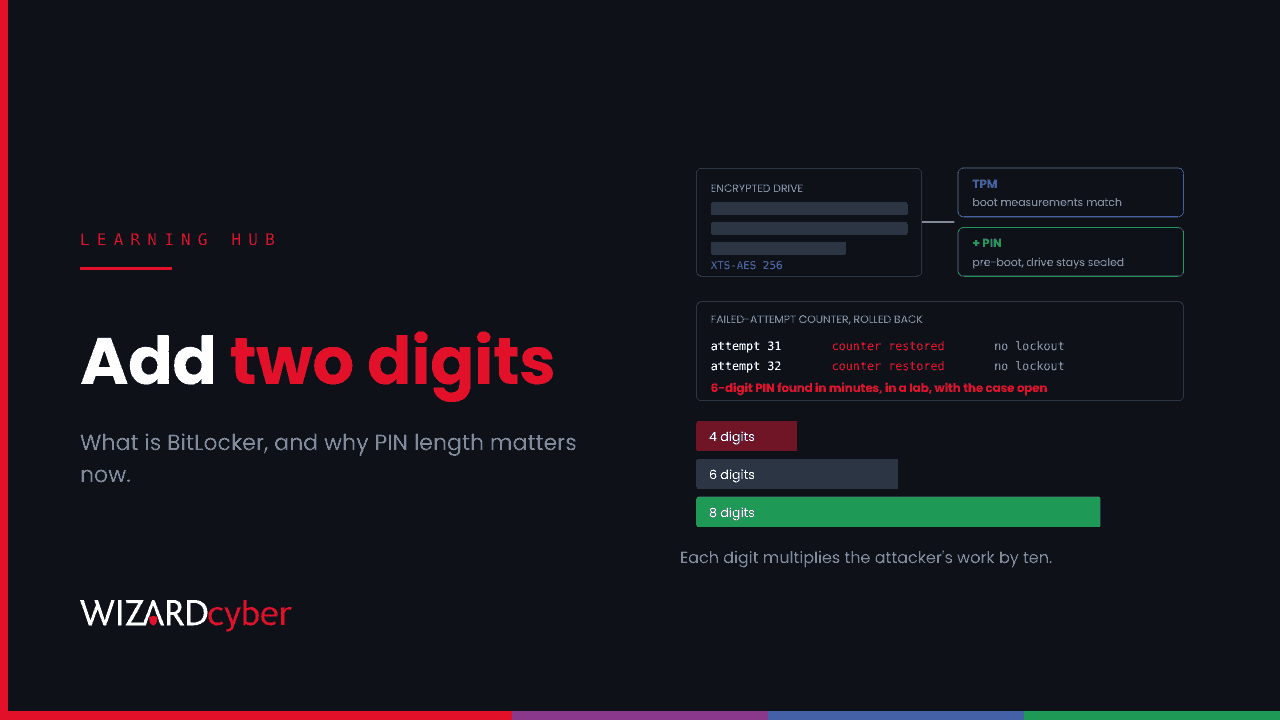
BitLocker is the full-disk encryption built into Windows. It encrypts everything on the drive so that the data cannot be read by taking the disk out and plugging it into another machine, and it releases the decryption key at boot only if the machine is in the state it expects. For most organisations it is the control that turns a lost laptop from a reportable data breach into a lost piece of hardware.
This guide explains how BitLocker protects a drive, the difference between TPM-only and TPM plus PIN, where recovery keys live, how to manage it with Microsoft Intune, and why recent research into the TPM's lockout counter has made PIN length a decision worth revisiting.
How BitLocker works
The drive's contents are encrypted with a key that never leaves the machine. That key is itself protected by one or more key protectors, and the protector you choose is the whole security story.
On a typical business laptop the protector is the TPM — the Trusted Platform Module, a chip (or a function inside the processor) that stores keys and can measure the boot process. During startup, the firmware and boot components are measured into the TPM. If those measurements match what the TPM recorded when BitLocker was enabled, the TPM releases the key and Windows boots straight to the sign-in screen. If something has changed — different firmware settings, a modified boot loader, the disk moved to another machine — the measurements do not match, the TPM withholds the key, and Windows asks for the recovery key instead.
That is why BitLocker on a modern laptop appears to do nothing: when everything is as expected, it is invisible.
What it protects against, and what it does not
- It does protect data at rest on a powered-off machine: a stolen laptop, a disk pulled from a decommissioned device, a drive sent for repair.
- It does not protect a running machine. Once Windows has booted and a user has signed in, the drive is decrypted for anything with access. Malware on a running laptop is unaffected by disk encryption.
- It does not protect files once they leave the disk — copied to a share, emailed, or synced to cloud storage.
This is the distinction people most often get wrong when assessing a lost device. "It was encrypted" answers a question about the disk, not about the session.
TPM-only vs TPM plus PIN
This is the main configuration decision, and it is a trade between convenience and the state of the machine when it is lost.
- TPM-only. No prompt before Windows starts. The user powers on and reaches the sign-in screen. The key is released on the basis of the boot measurements alone — possession of the machine in its unmodified state is enough to boot it. Protection then rests on Windows sign-in.
- TPM plus PIN (pre-boot authentication). The user enters a PIN before Windows loads. The TPM will not release the key without it, so the drive stays sealed until someone who knows the PIN is present. This is what defeats attacks that rely on booting the machine, or on waking a sleeping one, as we discussed when writing about a locked screen not being a control.
There is also TPM plus startup key (a USB device) and combinations of all three. In practice most estates run TPM-only for general users and consider TPM plus PIN for laptops carrying sensitive data or for travelling staff. The objection to pre-boot authentication is always the same — a second thing to type, and it complicates remote patching and reboots — and it is a fair objection worth weighing rather than dismissing.
Device state matters as much as the protector. A machine that is fully powered off or hibernated has no keys in memory. A sleeping machine does. That difference is why "it was locked" and "it was off" are very different statements about a stolen laptop.
Recovery keys
Every BitLocker-protected drive has a 48-digit recovery key, and sooner or later someone will need it — after a firmware update changes the measurements, or a hardware repair, or a forgotten PIN.
Where it is stored is a security decision. For Entra-joined devices, keys are escrowed to the device object in Microsoft Entra ID and can be retrieved by the user or by an administrator with the right role. For hybrid or domain-joined devices, keys can be stored in Active Directory. Either way, two things are worth checking:
- Escrow actually happened. An encrypted drive whose recovery key was never escrowed is a device you will eventually have to rebuild. Report on it.
- Who can read the keys. Anyone who can retrieve recovery keys at scale can decrypt any of those drives they can get hold of. Treat that permission as privileged, require phishing-resistant MFA for the roles that hold it, and alert on bulk retrieval. The same argument applies here as to any account that can read secrets in bulk.
Why PIN length now matters
A short PIN is normally fine, because the TPM throttles guessing. Enter the wrong PIN too many times and the TPM enters a lockout, with the delay growing as attempts fail. That is what makes a six-digit PIN defensible when a six-digit password would not be.
Research from Technische Universität Berlin, reported in November 2026, attacks that assumption. Where the TPM is a firmware TPM inside the processor, it has no secure storage of its own, so its saved state — including the failed-attempt counter — sits encrypted on the mainboard's flash chip. The researchers showed that on the systems they tested, that state could be copied and written back, resetting the counter, and that the hardware counters meant to prevent this could be bypassed or their signing key extracted by glitching. In their lab, a four-digit Windows Hello PIN fell in 57 minutes and a six-digit BitLocker PIN in roughly seven, where documented lockout should have meant 69 days and 19 years respectively.
The important caveats:
- It needs physical access, the case opened, and the flash chip interposed or removed — plus a custom board and scripting. This is a stolen-device attack, not a remote one.
- Findings differ by platform. AMD issued CVE-2026-43613 (CVSS 5.1) with firmware fixes planned, and says physical attacks fall outside its threat model. Intel said the research did not demonstrate a vulnerability in an Intel component. The flash chip vendor involved has committed to no fix.
- Microsoft rated the Windows Hello report moderate severity, issued no immediate fix, and committed to raising the recommended minimum Hello PIN to six digits.
The practical response is cheap: add digits. Every extra digit multiplies the work by ten, and the attack's cost scales linearly with the number of guesses. Going from six to eight digits on a BitLocker PIN moves the researchers' worst case from days to years. Nobody needs to redesign anything.
Managing BitLocker with Intune
In Microsoft Intune, BitLocker is configured through endpoint security disk encryption policy (or a configuration profile). The settings that matter most:
- Require encryption on the operating system drive, and decide your position on fixed and removable drives.
- Encryption method — XTS-AES 256 for operating system and fixed drives is the usual choice.
- Startup authentication. Whether a TPM is required, and whether a startup PIN is required, allowed or blocked. This is the TPM-only versus TPM plus PIN decision.
- Minimum PIN length for startup. Configurable from 4 to 20 digits, with a default of 6. Given the research above, 8 is a reasonable new floor for devices where pre-boot authentication is used.
- Allow enhanced PINs for startup, which permits letters and symbols as well as digits — a bigger increase in difficulty than extra digits, at some cost in usability and keyboard-layout surprises at pre-boot.
- Recovery key escrow, and whether to block the user from enabling encryption until the key has been stored successfully.
- Silent enablement, which turns encryption on without user interaction where the hardware allows.
For Windows Hello for Business, minimum PIN length is set separately, under PIN complexity in the Hello policy. The settings and their names change over time, so check Microsoft's current documentation before writing your standard. And whatever the policy says, report on the outcome — encryption state and escrow state per device — because the gap between policy and reality is where lost-laptop incidents come from.
Frequently asked questions
Is BitLocker good enough on its own?
For data at rest on a powered-off device, yes, when it is configured and escrowed properly. It does nothing for a running machine, a signed-in session, or files that have left the disk.
Do I need a TPM?
Not strictly — BitLocker can run with a startup key on a USB device — but without a TPM you lose boot integrity measurement and gain a USB stick that must not be lost with the laptop. Every machine shipping today has one.
Should we require a PIN?
It is the right answer for devices carrying sensitive data, for travelling staff, and anywhere theft while asleep is a realistic scenario. For a large fleet of desk-bound machines the operational cost may outweigh the benefit. Decide per device group, not per organisation.
What happens if a user forgets the PIN?
They use the recovery key, then set a new PIN. This is the main support cost of pre-boot authentication, and it is why escrow has to be reliable before you enable it.
Does the TPM research mean BitLocker is broken?
No. It means the lockout protection on a PIN is weaker than documented on some hardware, so a short PIN is worth less than it appears. The response is longer PINs, firmware updates where the vendor provides them, and treating physical control of devices as a real control.
Is BitLocker enough to satisfy a regulator after a lost laptop?
We are not lawyers, and the assessment is specific to the circumstances. Encryption is generally the control that matters most in that conversation, but what you will be asked for is evidence — that the device was encrypted, in what state it was lost, and that you can show it from your own records rather than assuming.
Where we can help
Designing the encryption standard, the Intune policies and the recovery process is work our Microsoft security consultancy does. Keeping firmware current across a mixed fleet — which is how the hardware fixes above actually reach devices — sits with our vulnerability and patch management service. And watching what happens on the devices themselves, which encryption cannot do, is the job of our managed SOC.
To talk it through, get in touch or book a demo.