

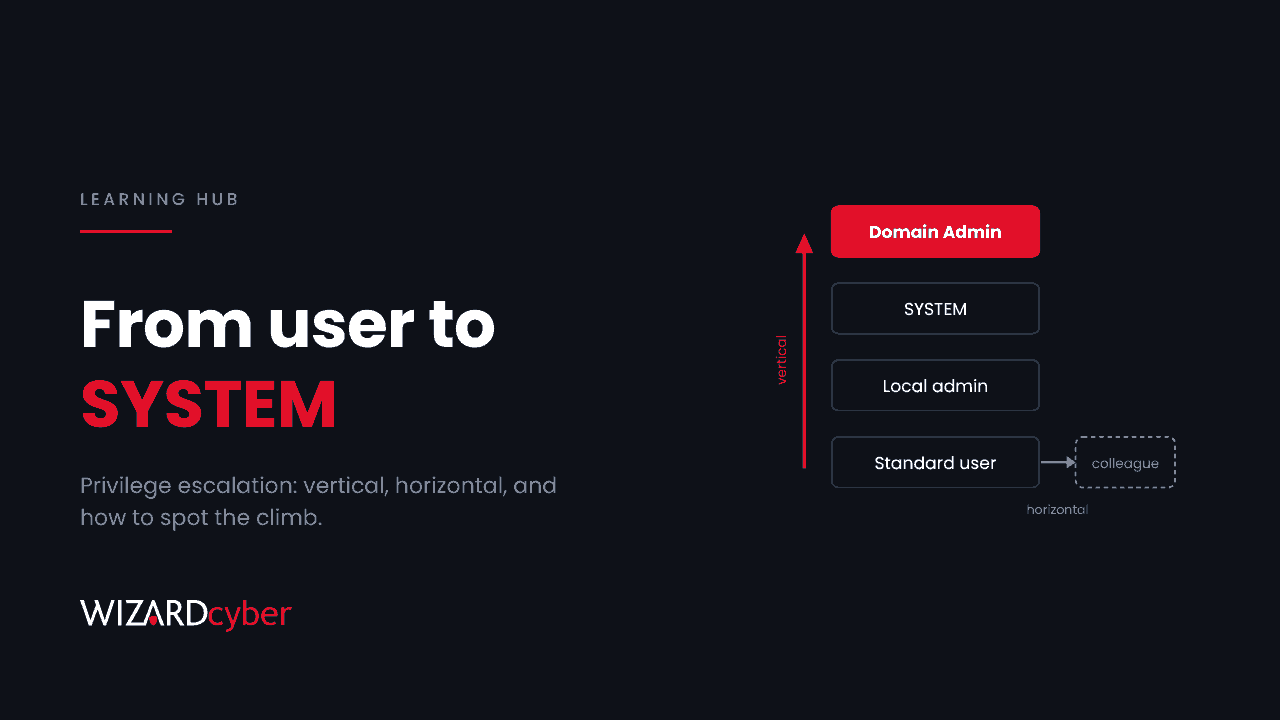
Privilege escalation is when an attacker who already has some access to a system gains more access than they were given: a standard user becomes an administrator, an administrator becomes SYSTEM, or an ordinary account becomes a domain admin. It's rarely how an attack starts, but it's in the middle of almost every serious one, because the first account an attacker gets is usually too weak to do real damage.
Privilege escalation explained
Every account and process has a set of permissions. A user can read their own files, an administrator can install software, a service running as SYSTEM can do almost anything on that machine, and a domain admin can do almost anything in Active Directory. Attackers usually get in at the bottom of that ladder, through a phished user, a stolen password or a vulnerable web app running with limited rights. Privilege escalation is how they climb.
It happens in two ways:
- Exploiting a flaw. A bug in the operating system, a driver or a privileged service lets a low-privilege user run code with higher privileges.
- Abusing a misconfiguration. Nothing is broken; the system is simply set up in a way that lets one account become another. Weak service permissions, passwords in scripts, over-permissive certificate templates and accounts with more rights than they need all fall into this group. In real intrusions, misconfigurations are used more often than exploits.
Vertical vs horizontal privilege escalation
Vertical privilege escalation means moving up: from a standard user to local admin, or from a server admin to domain admin. This is what most people mean by the term.
Horizontal privilege escalation means moving sideways into another account at the same level, usually to reach different data or systems. Logging in as a colleague using a stolen session cookie is horizontal. So is a web app flaw that lets one customer read another customer's records. Horizontal moves often set up vertical ones, because the next account along may be the one with admin rights.
Two more terms come up in incident reports. Local privilege escalation happens on one machine. Domain privilege escalation happens in the directory, giving the attacker control over many machines at once.
Real Windows and Active Directory examples
Local: from user to SYSTEM
- Kernel and driver flaws. The Common Log File System driver has been a repeated target. In November 2026 a researcher published code called SignDrop that claims to reach SYSTEM by abusing a CLFS hardening feature, with no patch yet. We cover what to do about it in Public Exploit, No CVE, No Patch.
- Bring your own vulnerable driver. An attacker with admin rights loads a signed but vulnerable driver to reach the kernel and switch off security tools.
- Weak service configurations. A service that runs as SYSTEM but whose executable or folder ordinary users can write to. Replace the file and the next restart runs the attacker's code. Unquoted service paths are a variant of the same mistake.
- Stored credentials. Admin passwords in scripts, scheduled tasks, old Group Policy Preferences files or a browser's password store.
Domain: from user to domain admin
- Kerberoasting. Any domain user can request service tickets for accounts with service principal names and crack weak passwords offline.
- AD CS abuse. Misconfigured certificate templates let a user request a certificate for someone else, including a domain admin or a domain controller. The Citrus ransomware group used a certificate flaw to authenticate as a domain controller, which we cover in our Citrus hunting guide. Our AD CS explainer covers ESC1 and ESC8.
- Credential theft. Once an attacker is local admin on a machine where a privileged user has logged on, tools like Mimikatz can take that user's hash or tickets. See What Is Pass-The-Hash?
- Delegated rights nobody remembers. Helpdesk groups that can reset admin passwords, service accounts that can edit Group Policy, or appliance accounts that can read LAPS passwords.
Cloud: from user to Global Administrator
In Microsoft Entra ID, escalation usually goes through applications and roles: a user who owns an app with high Graph permissions, a service principal that can assign itself roles, or a consent grant that gives an attacker's app access. Our privileged access management guide covers the controls.
How to detect privilege escalation
The method changes; the outcome doesn't. Most detections look for the moment of change rather than the bug.
- Unexpected SYSTEM processes. A shell or script interpreter running as SYSTEM whose parent leads back to an ordinary user's session.
- Group membership changes. Additions to Domain Admins, Enterprise Admins, Administrators or other privileged groups (Windows events 4728, 4732 and 4756).
- New services and drivers. Service installation (7045) and driver loads, especially of known vulnerable drivers.
- Kerberos and certificate anomalies. Bursts of service ticket requests with weak encryption, and certificate requests where the requester and the subject don't match.
- Role assignments in Entra ID. New directory role assignments and new app role grants, particularly by applications.
A simple starting point in Microsoft Sentinel is to alert on any change to privileged groups:
SecurityEvent
| where TimeGenerated > ago(7d)
| where EventID in (4728, 4732, 4756)
| where TargetUserName in~ ("Domain Admins", "Enterprise Admins", "Administrators", "Schema Admins", "Account Operators", "Backup Operators")
| project TimeGenerated, Computer, EventID, Group = TargetUserName, MemberAdded = MemberName, ChangedBy = SubjectUserName
Microsoft Defender for Endpoint and Defender for Identity also raise alerts for many common techniques. Make sure they're switched on, and that someone reviews them at 3am as well as 3pm.
How to prevent privilege escalation
- Patch privilege escalation flaws quickly, even though they're "only local". They are the second step in most attacks.
- Remove local admin rights from everyday users, and use Windows LAPS so every machine has a different local admin password.
- Apply least privilege to service accounts and apps. Give them the rights they need, review them, and remove the rest.
- Tier your admin accounts. Domain admins should only log on to domain controllers and dedicated admin workstations, so their credentials never sit on ordinary machines.
- Use just-in-time access for privileged roles in Entra ID and Active Directory where you can.
- Harden AD CS and audit delegated rights regularly. Misconfigurations don't show up in a patch report.
Frequently asked questions
Is privilege escalation a vulnerability or an attack?
It's a stage of an attack. It can use a vulnerability, but it often uses a misconfiguration or stolen credentials instead.
What's the difference between privilege escalation and lateral movement?
Privilege escalation gains more rights. Lateral movement moves to other machines or accounts. Attackers alternate between them: escalate on one machine, steal credentials, move to the next, escalate again.
Why are local privilege escalation bugs rated lower than remote ones?
Because an attacker needs a foothold first, so the CVSS score is usually lower. In practice, that foothold is easy to get through phishing, so local flaws are often exploited soon after details are public. Our CVSS explainer covers why the score isn't the whole story.
Can MFA stop privilege escalation?
Not on its own. MFA protects sign-ins; most privilege escalation happens after the attacker is already signed in or running code. It does make the first foothold harder to get.
How Wizard Cyber helps
Wizard Cyber's SOCs are staffed 24/7 and watch for the moment an account or process gains rights it shouldn't have, across endpoints, Active Directory and Entra ID. Our purple team exercises test whether those detections fire against real escalation techniques, and our vulnerability and patch management service makes sure the escalation flaws get patched first. Talk to our team.