
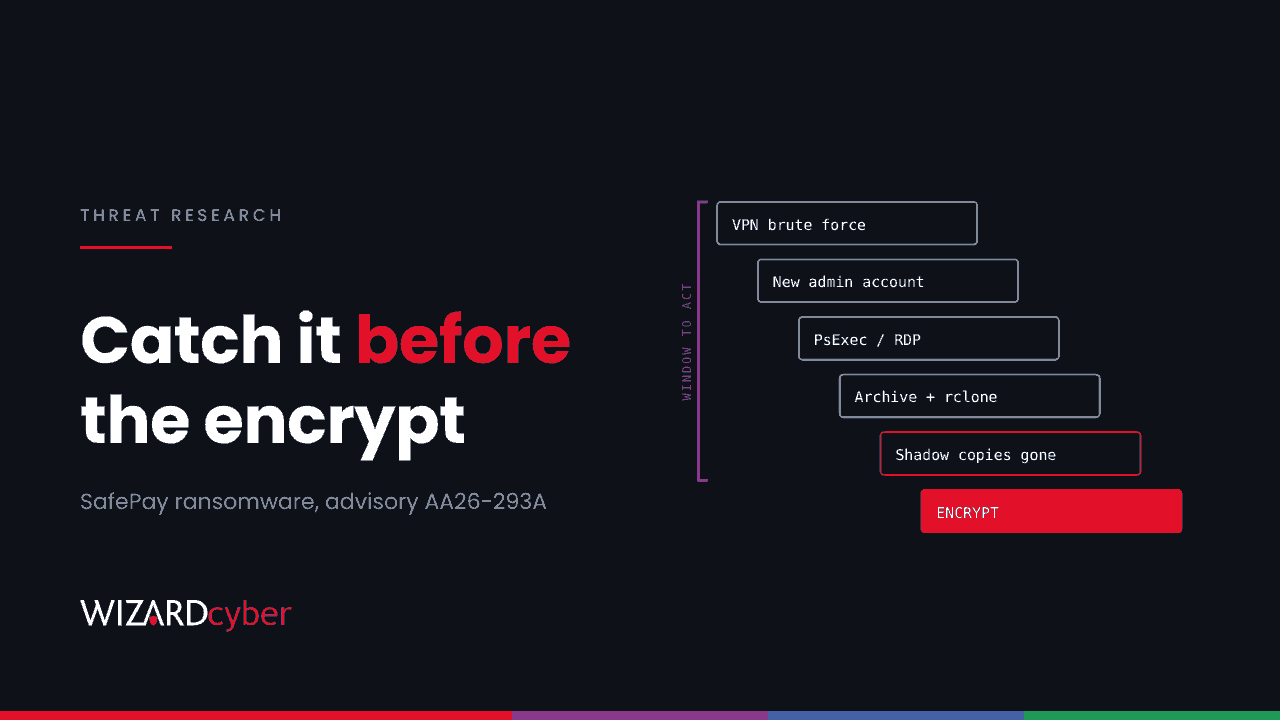
On 20 October 2026, CISA, the FBI and the US Secret Service published #StopRansomware advisory AA26-293A on SafePay, with partners in Germany and the UK. The UK's National Crime Agency and North West Regional Organised Crime Unit are among the co-authors. The advisory says SafePay has hit at least 600 organisations across multiple critical infrastructure sectors since August 2024, in North America, South America, Europe and Australia, and calls it one of the most active ransomware groups of 2026.
SafePay is unusual in one respect: it works as a closed group rather than renting its ransomware to affiliates. That makes its playbook unusually consistent, which is good news for defenders. This post turns the advisory's reported behaviour into hunts for Microsoft Defender XDR and Sentinel.
How SafePay gets in
According to the advisory and reporting from The Record and Infosecurity Magazine, initial access comes from four routes:
- Exposed credentials and brute-force password attacks, often against remote access.
- VPN access, with the advisory highlighting connections from IP addresses associated with a commercial consumer VPN provider.
- Phished accounts.
- Automated exploitation of edge devices and internet-facing systems. CVEs named in reporting include CVE-2020-3259 and CVE-2023-20269 (VPN appliance flaws, the second enabling brute force), CVE-2023-27532 and CVE-2024-40711 (backup server flaws) and CVE-2024-40766 (a firewall access-control flaw).
The backup server CVEs matter. A group that plans to delete your recovery options likes to own the backup server first.
What happens next
- Account control. "Once inside the network, SafePay actors establish control by creating new accounts or taking over existing ones," the agencies said. In some cases they change users' passwords to lock them out.
- Lateral movement using PsExec, WinRM, RDP and remote management tools, including AnyDesk and TeamViewer, which are also used to deliver the ransomware.
- Defence evasion by disabling security software, plus packing and virtual-machine-based protection of the payload.
- Exfiltration with legitimate tools: 7-Zip and WinRAR to compress, then RClone, FileZilla or OneDrive to move data out.
- Recovery sabotage. Shadow copies are deleted and network-attached storage holding backups is reset.
- Encryption with a hybrid ChaCha20 and RSA scheme, followed by a ransom note pointing to a Tor chat portal. A representative may phone the victim to add pressure, and data is published if the victim refuses to pay.
Every step before encryption is a chance to stop it. Most of those steps use tools that already exist in Windows estates, so detection depends on context rather than signatures.
Hunting in Microsoft Defender XDR and Sentinel
These queries are starting points to tune, not finished detections. Expect your own IT team's use of PsExec, remote support tools and backup scripts to show up, and baseline them before alerting.
1. Password guessing that succeeded against remote access
// Many failures followed by a success from the same source, on remote or network logons
DeviceLogonEvents
| where Timestamp > ago(14d)
| where LogonType in ("RemoteInteractive", "Network")
| summarize Failures = countif(ActionType == "LogonFailed"),
            Successes = countif(ActionType == "LogonSuccess"),
            Accounts = make_set(AccountName, 20)
    by RemoteIP, DeviceName
| where Failures > 50 and Successes > 0
| order by Failures desc
2. New local or domain accounts, and admin group changes
IdentityDirectoryEvents
| where Timestamp > ago(14d)
| where ActionType in ("Account created", "Group Membership changed")
| extend Group = tostring(AdditionalFields.["TO.GROUP"])
| where ActionType == "Account created"
    or Group has_any ("Domain Admins", "Enterprise Admins", "Administrators")
| project Timestamp, ActionType, AccountName, TargetAccountUpn, Group, DeviceName
3. Remote execution and remote access tools appearing
DeviceProcessEvents
| where Timestamp > ago(14d)
| where FileName in~ ("psexec.exe", "psexec64.exe", "PSEXESVC.exe", "AnyDesk.exe", "TeamViewer.exe")
    or (FileName =~ "wsmprovhost.exe")
| summarize FirstSeen = min(Timestamp), Devices = dcount(DeviceName), Examples = make_set(DeviceName, 10)
    by FileName, InitiatingProcessAccountName
| order by FirstSeen desc
A remote support tool that appears on a server for the first time, under an account that has never used it, is worth a question before anything else.
4. Staging and exfiltration
DeviceProcessEvents
| where Timestamp > ago(14d)
| where FileName in~ ("rclone.exe", "filezilla.exe", "fzsftp.exe", "7z.exe", "7za.exe", "rar.exe", "winrar.exe")
    or ProcessCommandLine has_any ("rclone copy", "rclone sync", " --config ")
| project Timestamp, DeviceName, AccountName, FileName, ProcessCommandLine, InitiatingProcessFileName
| order by Timestamp desc
RClone is often renamed. Pair the query above with network telemetry: large outbound transfers from a server that normally sends little.
DeviceNetworkEvents
| where Timestamp > ago(7d)
| where RemoteIPType == "Public"
| summarize Connections = count(), RemoteIPs = dcount(RemoteIP) by DeviceName, InitiatingProcessFileName,
    InitiatingProcessSHA256
| where Connections > 500
| order by Connections desc
5. Security tools being switched off
DeviceEvents
| where Timestamp > ago(14d)
| where ActionType == "TamperingAttempt"
    or (ActionType == "RegistryValueSet" and RegistryKey has @"Windows Defender" and RegistryValueName has "Disable")
| project Timestamp, DeviceName, ActionType, InitiatingProcessFileName, InitiatingProcessCommandLine
6. Shadow copy deletion, the last warning
DeviceProcessEvents
| where Timestamp > ago(14d)
| where (FileName =~ "vssadmin.exe" and ProcessCommandLine has_all ("delete", "shadows"))
    or (FileName =~ "wmic.exe" and ProcessCommandLine has_all ("shadowcopy", "delete"))
    or (FileName in~ ("powershell.exe", "pwsh.exe") and ProcessCommandLine has "Win32_ShadowCopy")
    or (FileName =~ "wbadmin.exe" and ProcessCommandLine has "delete")
| project Timestamp, DeviceName, AccountName, ProcessCommandLine, InitiatingProcessFileName
If this query fires, encryption is minutes away, not days. It should page someone, not wait in a queue.
Mitigation priorities
The advisory's three headline actions, with the Microsoft-estate detail added:
- Patch edge and backup infrastructure first. Work through the CVEs above and anything else on the KEV catalogue that touches VPNs, firewalls and backup servers. Take backup consoles off the internet entirely.
- Put MFA on every remote access path, including the VPN, and enforce account lockout or smart lockout so brute force runs out of road.
- Restrict administrative tools and privileges. Block PsExec and unapproved remote access tools with application control, limit WinRM and RDP to jump hosts, and use tiered admin accounts.
Then protect recovery: keep at least one backup copy immutable or offline, protected by separate credentials that do not live in Active Directory. Test that you can restore from it.
How a managed SOC helps
SafePay's playbook leaves a trail: failed logons that end in a success, a new admin account, a remote tool on a server, a compressed archive and a large upload. Each one alone is easy to dismiss. Together, and in order, they describe an attack in progress, and spotting the early steps is what leaves time to act before encryption.
Our SOC is staffed 24/7 with senior analysts, incident responders and L3 analysts on every shift. CYBERSHIELD AI investigates each incident as it arrives, with an average time to verdict of 3 minutes 30 seconds, so the chain is pieced together while there is still time to act. If the worst has already happened, our incident response team can help you scope and recover.
To see how that works on your estate, talk to us or book a demo.