

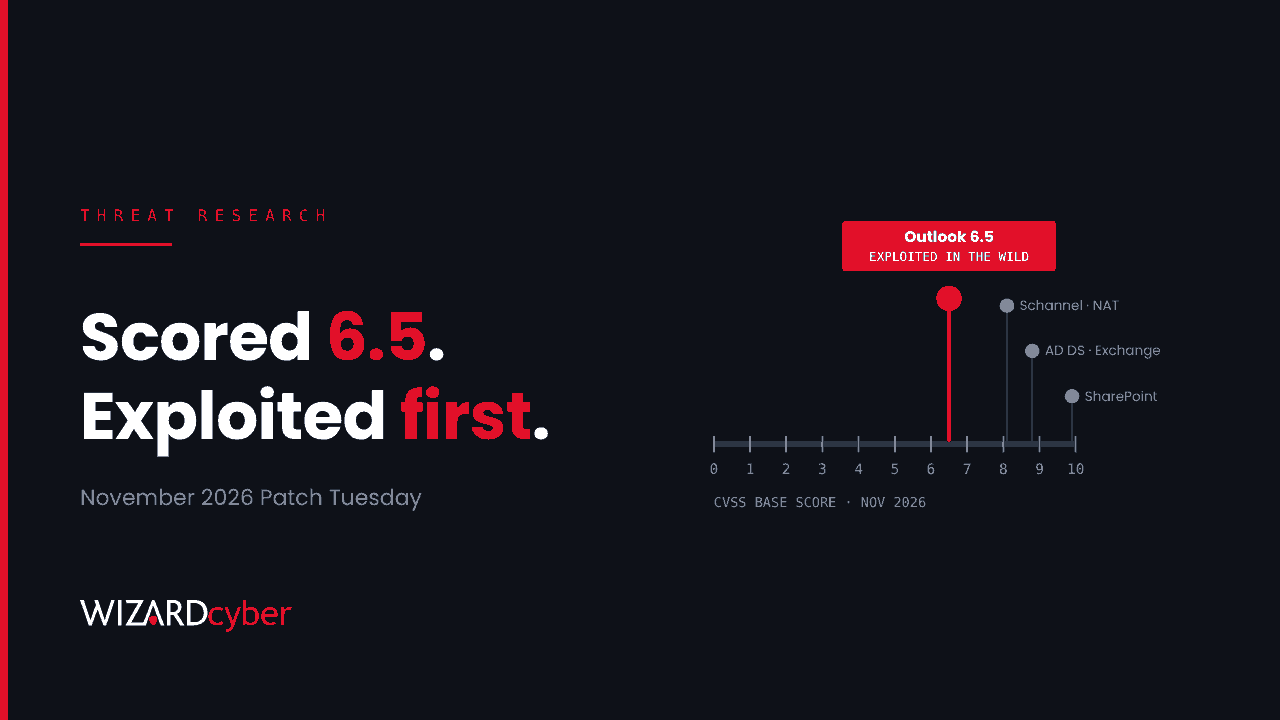
Microsoft's November 2026 security release fixes more than a thousand vulnerabilities, and only one of them is known to be under attack. It isn't one of the 63 rated Critical. It is CVE-2026-124194, an Outlook flaw with a CVSS score of 6.5 that Microsoft rates Moderate. Open the wrong message file and Outlook hands the user's NTLMv2 authentication hash to a server the attacker controls, without showing the usual warning. This post explains the flaw, ranks the rest of the release by what is likely to be exploited rather than by score, and gives starting-point hunts for Microsoft Defender and Sentinel.
What happened
Patch Tuesday landed on 10 November. Tenable counts 1,093 CVEs: 63 Critical, 1,029 Important and one Moderate. Qualys gives 1,235 because it includes 142 fixes for the Chromium-based Edge browser. Either way, it is one of the largest releases Microsoft has shipped, and elevation of privilege and remote code execution make up most of it.
The one Moderate bug is the one that matters this week. Microsoft says CVE-2026-124194 has been exploited in the wild as a zero-day, and CISA added it to the Known Exploited Vulnerabilities catalogue the same day, with a 24 November deadline for US federal agencies. Microsoft hasn't named the attackers, the targets or the scale.
How the Outlook flaw works
Microsoft classes CVE-2026-124194 as a spoofing vulnerability (CWE-356, a missing warning before an unsafe action). Based on public reporting of the advisory:
- The attacker sends or plants a specially crafted message file, and the user has to open it.
- Opening it makes Outlook connect to an attacker-controlled network location without the external-content warning users would normally see.
- That connection leaks the user's NTLMv2 hash, which the attacker can try to crack offline or relay to another service to act as the user.
- Microsoft says the Preview Pane is not an attack vector. Someone has to open the file.
- Affected products are Microsoft 365 Apps for Enterprise and Office LTSC 2021 and 2024, in both 32-bit and 64-bit builds.
The CVSS score is low because nothing runs on the victim's machine and the user has to act. That says little about the risk. A leaked NTLMv2 hash for a user with a weak password can be cracked within hours. Relayed to a service that still accepts NTLM without signing or channel binding, it may not need cracking at all. If you remember CVE-2023-23397, this is the same kind of problem, although that one needed no click.
What to patch first
Rank the release by evidence of exploitation and by where a bug sits, not by score alone.
- Office and Outlook (CVE-2026-124194). The only exploited bug. Click-to-Run installs update themselves, but check that they have: devices that are offline, paused or on a slow update channel lag behind. For LTSC volume-licensed builds, reporting lists fixed builds 16.0.14334.21048 (LTSC 2021) and 16.0.17932.21140 (LTSC 2024). Confirm against Microsoft's release notes for your channel.
- Domain controllers. CVE-2026-118146 is a Critical remote code execution flaw in Active Directory Domain Services (CVSS 8.8) that an authenticated attacker can reach over the network, and Microsoft marks it "Exploitation More Likely". CVE-2026-118148, an AD DS elevation of privilege, is in the same release. Any domain user is "authenticated", so treat these as the next priority after Outlook.
- Exchange Server. CVE-2026-118207 is an authenticated remote code execution flaw (CVSS 8.8, "Exploitation More Likely"). On-premises Exchange has a long record of fast exploitation once patches are reverse engineered.
- Unauthenticated network flaws. Windows Schannel (CVE-2026-119952) and Windows NAT (CVE-2026-113862) are both Critical, need no credentials and are marked "Exploitation More Likely". Qualys also lists Critical fixes in CredSSP (CVE-2026-119962), LDAP (CVE-2026-119958) and the SMB server (CVE-2026-113825). Prioritise internet-facing servers.
- Local privilege escalation. A dozen Important elevation-of-privilege bugs in Windows Installer, the kernel, Print Spooler, WMI and others are marked "Exploitation More Likely". These are what ransomware operators use after initial access, so don't leave them to the next cycle.
The highest CVSS score in the release goes to a SharePoint Server elevation of privilege, CVE-2026-120002, at 9.9. Microsoft rates it Important and "Exploitation Less Likely". Patch it on schedule, but it is a good example of why a score on its own is a poor queue. Our post on prioritising by exploitability covers the approach in more depth.
Hunting for CVE-2026-124194
Public reporting doesn't say whether the leak travels over SMB or WebDAV, so the queries below look for both. They are starting points to tune for your estate, not finished detections. Look back to at least mid-October, since Microsoft hasn't said when exploitation began.
1. Outlook reaching the internet over SMB (Defender for Endpoint)
DeviceNetworkEvents
| where Timestamp > ago(30d)
| where InitiatingProcessFileName =~ "outlook.exe"
| where RemotePort in (445, 139)
| where RemoteIPType == "Public"
| summarize Attempts = count(), Users = make_set(InitiatingProcessAccountName, 10),
            FirstSeen = min(Timestamp), LastSeen = max(Timestamp)
    by DeviceName, RemoteIP, RemotePort, ActionType
| order by LastSeen desc
Outlook has no normal reason to open SMB connections to a public address. Any result is worth a look, even if your firewall blocked it (ConnectionFailed still tells you someone tried).
2. WebDAV connections after Outlook activity
// The WebClient service makes WebDAV requests on Outlook's behalf
DeviceNetworkEvents
| where Timestamp > ago(30d)
| where RemoteIPType == "Public"
| where (InitiatingProcessFileName =~ "svchost.exe" and InitiatingProcessCommandLine has "WebClient")
     or (InitiatingProcessFileName =~ "rundll32.exe" and InitiatingProcessCommandLine has "davclnt")
| project Timestamp, DeviceName, RemoteIP, RemotePort, RemoteUrl, InitiatingProcessCommandLine
| join kind=inner (
    DeviceProcessEvents
    | where Timestamp > ago(30d)
    | where FileName =~ "outlook.exe" or InitiatingProcessFileName =~ "outlook.exe"
    | project OutlookTime = Timestamp, DeviceName
  ) on DeviceName
| where Timestamp between (OutlookTime .. (OutlookTime + 10m))
| summarize Hits = count(), Urls = make_set(RemoteUrl, 10) by DeviceName, RemoteIP
| order by Hits desc
This is noisier: legitimate WebDAV to SharePoint or other cloud storage will appear. Exclude known Microsoft and partner ranges, and look for single, short-lived destinations.
3. Message files opened from email
DeviceFileEvents
| where Timestamp > ago(30d)
| where FileName endswith ".msg" or FileName endswith ".eml"
| where FolderPath has_any (@"\Content.Outlook\", @"\INetCache\", @"\Downloads\")
| project Timestamp, DeviceName, InitiatingProcessAccountName, FileName, FolderPath, SHA256
| order by Timestamp desc
Join the devices and times from this query against queries 1 and 2. A message file saved or opened from a mail attachment, followed within minutes by an outbound authentication attempt to a public address, is the pattern to escalate.
4. What happened to the hash afterwards
The attacker's next step is to use the credential. For each user found above, look at sign-ins in the following days.
let Suspects = dynamic(["user1@contoso.com", "user2@contoso.com"]);  // from queries 1-3
SigninLogs
| where TimeGenerated > ago(30d)
| where UserPrincipalName in~ (Suspects)
| summarize Signins = count(), Results = make_set(ResultType, 10), Apps = make_set(AppDisplayName, 10)
    by UserPrincipalName, IPAddress, tostring(LocationDetails.countryOrRegion)
| order by Signins desc
Look for a new IP or country, and especially for failures with error 50074 or 53003 after a correct password. Those mean the password was right and something else stopped the attacker. On-premises, run the same accounts through IdentityLogonEvents and look for NTLM logons from hosts the user never uses, which is what a relayed authentication looks like.
Mitigation
- Update Office and confirm the build on every device, including laptops that rarely connect to the network.
- Block outbound SMB. TCP 445 and 139 to the internet should be blocked at your perimeter and on the endpoint firewall for laptops that leave the office. This stops the most common route for this class of leak.
- Put privileged users in the Protected Users group. Microsoft recommended this for earlier Outlook NTLM leaks: members can't authenticate with NTLM, so there is no hash to leak.
- Restrict outgoing NTLM. The policy "Network security: Restrict NTLM: Outgoing NTLM traffic to remote servers" can be set to audit first, then to deny with an allow-list. Our post on NTLM debt explains how to find what still depends on it.
- Make relay harder. Require SMB signing and Extended Protection for Authentication on services that still accept NTLM, including AD CS web enrolment and Exchange.
- Raise the cost of cracking. Long passphrases make an offline crack of an NTLMv2 response impractical. Short, guessable passwords don't.
If NTLM itself is unfamiliar, our NTLM explainer and guide to pass-the-hash cover how stolen hashes are used.
How a managed SOC helps
Patching closes the hole. It doesn't tell you whether anyone used it in the weeks before. That needs endpoint network telemetry, mail activity and sign-in logs in one place, and someone looking at them every day. Wizard Cyber has run Microsoft Sentinel since 2019. Our SOCs are staffed 24/7, senior analyst sign-off is the default on the managed service, and every investigation produces a full report. Our vulnerability and patch management service can help you keep a release this size in order.
Want help working out what to patch first, or checking whether anyone got there before you did? Talk to our team.