
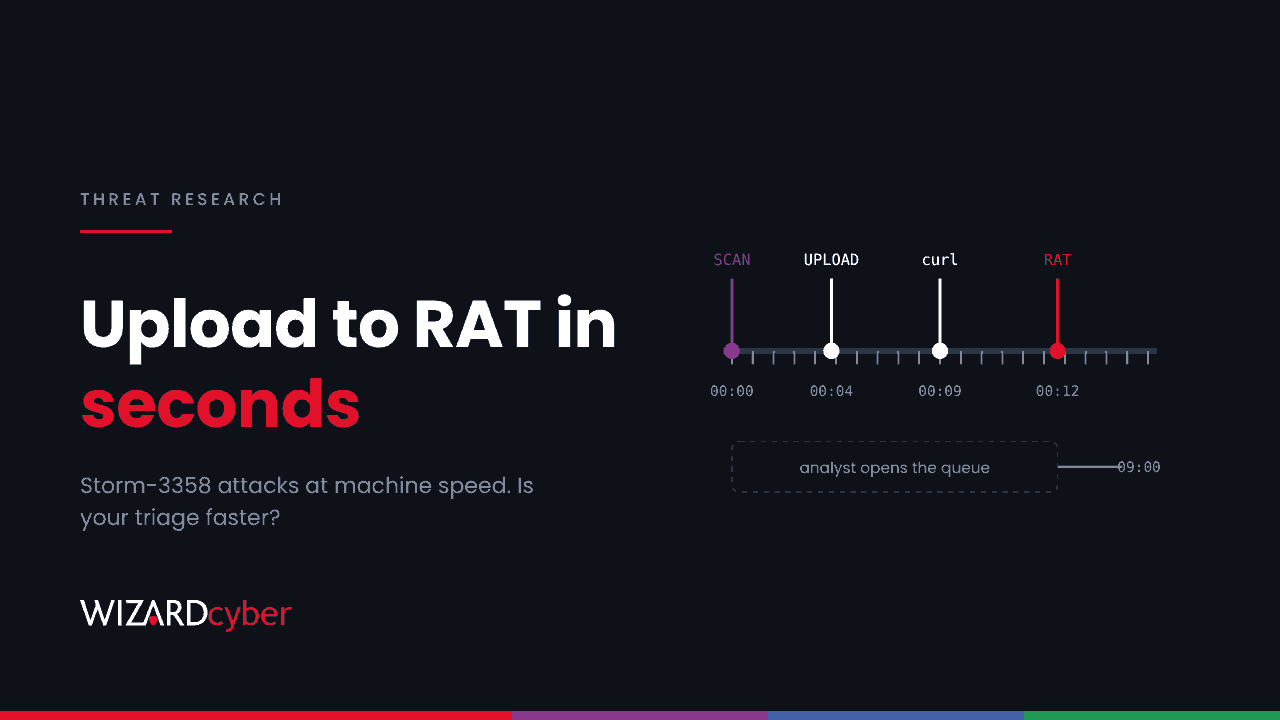
Microsoft has described a financially motivated group, Storm-3358, that uses an agentic offensive framework to scan internet-facing systems, exploit weak upload handlers and SSRF bugs, and then pull open-source remote access tools onto the compromised server with curl or netcat. None of the techniques is new. What has changed is how fast it happens: requests and retries arrive at machine speed, so the gap between "scanned" and "remote shell" can be shorter than an analyst takes to triage a WAF alert. This post explains what Microsoft found and turns it into hunts for Sentinel and Defender.
What happened
On 6 November Microsoft Threat Intelligence reported that Storm-3358, a Cambodia-based intrusion cluster, began using an AI-driven attack framework in October 2026. The group mainly targets financial organisations in Southeast Asia, along with "a smaller number of large financial organizations globally". Microsoft gave no victim count.
The chain Microsoft describes:
- Discovery: agents combined with conventional scanners sweep internet-facing systems. By default the framework uses Nmap, curl, wget, Python HTTP clients and headless Chromium driven by Playwright.
- Initial access: exploitation of anonymous file upload and server-side request forgery (SSRF) flaws in web applications.
- Tooling: netcat and curl download remote access tools onto the host.
- Persistence and lateral movement: the open-source RATs WISP, vshell and AdaptixC2.
Microsoft's wider description of the framework adds web shells on web servers, credentials collected from public sources, compromised cloud identities, brute force, password spraying, API enumeration and database dumping. It doesn't say which of these Storm-3358 used, so treat them as the likely next steps rather than confirmed ones.
This is the third Microsoft report on the same tooling in three weeks, after the supply-chain intrusion of 21 October and the secret-harvesting campaign we covered on 6 November. Several crews now have the same capability.
Who is affected
Financial services organisations are the stated target. The method fits anyone with an internet-facing web application that takes uploads or fetches URLs on the user's behalf. That covers document portals, onboarding and KYC forms, image processing, webhooks and PDF generators. A mid-market firm with one forgotten file-upload form on a Windows IIS or Linux PHP server is exactly the kind of system an agent finds and tests in minutes.
Indicators
Microsoft published eight IP addresses, all active as of 6 November:
- 199.19.95[.]66, 199.19.95[.]67, 199.19.95[.]68 (WISP C2 nodes, first seen 2 November)
- 91.92.240[.]238 and 85.11.168[.]45 (framework servers, first seen 4 November)
- 85.11.167[.]52 (C2 server, first seen 4 November)
- 178.16.54[.]129 (framework server, first seen 19 October)
- 31.77.229[.]35 (framework server, first seen 28 October)
Microsoft's indicator table and its Sentinel query disagree on one address. The table has 178.16.54.129, the query has 178.15.54.129. We include both in query 1 until Microsoft corrects one. IP indicators for infrastructure like this go stale quickly, so treat a miss as "not seen here", not "clean".
Hunting in Sentinel and Defender
Microsoft's post includes two hunting queries: new files downloaded with curl, and an ASIM IP sweep. The queries below build on the same ideas and add the web-server angle. They are starting points to tune.
1. Any traffic to the published infrastructure
let IOC = dynamic(["199.19.95.66","199.19.95.67","199.19.95.68","91.92.240.238",
                   "85.11.168.45","85.11.167.52","178.16.54.129","178.15.54.129","31.77.229.35"]);
union isfuzzy=true
  (DeviceNetworkEvents | where TimeGenerated > ago(30d) | where RemoteIP in (IOC)
     | project TimeGenerated, Source="MDE", DeviceName, RemoteIP, InitiatingProcessFileName, InitiatingProcessCommandLine),
  (CommonSecurityLog | where TimeGenerated > ago(30d) | where SourceIP in (IOC) or DestinationIP in (IOC)
     | project TimeGenerated, Source=DeviceVendor, DeviceName, RemoteIP=iff(SourceIP in (IOC), SourceIP, DestinationIP), Activity),
  (W3CIISLog | where TimeGenerated > ago(30d) | where cIP in (IOC)
     | project TimeGenerated, Source="IIS", DeviceName=Computer, RemoteIP=cIP, csUriStem, scStatus)
| order by TimeGenerated asc
Inbound hits from the framework servers show you were scanned. Outbound connections to the C2 addresses from a server should be treated as an incident.
2. Web server processes launching download tools or shells
This is the step that matters. An IIS worker, PHP or a Java application server should almost never start curl, netcat or a shell that then reaches the internet.
DeviceProcessEvents
| where Timestamp > ago(30d)
| where InitiatingProcessFileName in~ ("w3wp.exe","php-cgi.exe","php.exe","httpd","nginx","php-fpm","java","java.exe","node","node.exe","tomcat9.exe")
| where FileName in~ ("curl","curl.exe","wget","nc","ncat","nc.exe","bash","sh","cmd.exe","powershell.exe","python","python3")
| project Timestamp, DeviceName, InitiatingProcessFileName, FileName, ProcessCommandLine, AccountName
| order by Timestamp desc
Defender has built-in alerts for this pattern, including "Suspicious shell execution from PHP application", "Possible Web Server compromise activity" and "Possible reverse shell". If those fired and were closed as benign in October or November, reopen them.
3. New files fetched by curl on servers
let Baseline = DeviceProcessEvents
  | where Timestamp between (ago(14d) .. ago(1d))
  | where FileName in~ ("curl","curl.exe","wget")
  | extend Url = extract(@"(https?://[^\s'""]+)", 1, ProcessCommandLine)
  | summarize by Url;
DeviceProcessEvents
| where Timestamp > ago(1d)
| where FileName in~ ("curl","curl.exe","wget")
| extend Url = extract(@"(https?://[^\s'""]+)", 1, ProcessCommandLine)
| where isnotempty(Url) and Url !in (Baseline)
| where ProcessCommandLine has_any (" -o ", " -O ", "--output", "| sh", "| bash", "chmod")
| project Timestamp, DeviceName, AccountName, InitiatingProcessFileName, ProcessCommandLine
Run it daily as a scheduled rule. Downloads into world-writable paths (/tmp, /dev/shm, C:\Users\Public, C:\ProgramData) followed by chmod +x or immediate execution deserve the closest look.
4. Machine-speed request bursts against your web apps
Microsoft's main behavioural signal is volume and variety: many different requests in a short time, with variations retried faster than a person could manage. If your IIS logs are in Sentinel:
W3CIISLog
| where TimeGenerated > ago(7d)
| summarize Requests = count(), Paths = dcount(csUriStem), Errors = countif(scStatus >= 400),
            Uploads = countif(csMethod == "POST" and csUriStem has_any ("upload","import","file","attach")),
            Agents = make_set(csUserAgent, 5)
    by cIP, Computer, bin(TimeGenerated, 1m)
| where Requests > 120 and Paths > 40
| order by Requests desc
Tune the thresholds to your own traffic. Look for user agents from command-line tools, Python HTTP libraries or headless browsers, and for upload or URL-fetch endpoints in the burst. Microsoft is clear that blocking these user agents won't stop an agent, which can change them. Use them to alert, not as a control.
5. Cloud identity follow-on
Entra ID Protection raises a high-risk Verified threat actor IP detection for this infrastructure. Check for it:
AADUserRiskEvents
| where TimeGenerated > ago(30d)
| where RiskEventType has "threatActorIP" or RiskEventType has "verifiedThreatActor"
| project TimeGenerated, UserPrincipalName, RiskEventType, RiskLevel, IpAddress, Location
Risk event type names differ between tenants and over time, so if this returns nothing, list the distinct RiskEventType values in your tenant before you conclude it's clean.
Mitigation
- Inventory upload and URL-fetch features on everything internet-facing. Require authentication where you can, check file types on the server side, store uploads outside the web root, and never execute them.
- Block SSRF at the network layer. Web servers shouldn't be able to reach cloud metadata endpoints or internal admin interfaces, and should only make outbound connections to destinations you have approved. Restricting egress also stops the RAT download in the chain above.
- Turn on Conditional Access for sign-in risk and user risk, so a verified threat-actor IP gets a block or a strong challenge rather than a session.
- Put decoys in the path. Microsoft reports that honeypots, tarpits and "fake wins" cut the attack traffic that reached real assets in its testing. Automated attackers follow the first promising lead, so a decoy wastes their time and alerts you.
- Shorten your response time. If the attack runs at machine speed, triage that waits for a human to open a queue in the morning is too slow.
How a managed SOC helps
The last point is the one most organisations struggle with. Wizard Cyber runs a multi-stage investigation pipeline. The average time to verdict is 3 minutes 30 seconds, or 7 minutes 50 seconds where an incident needs advanced investigation, and our SOCs are staffed 24/7 behind it. The decision to close or escalate follows policy and your own decision templates, not the model. Senior analyst sign-off is the default on the managed service, so a web shell alert at 03:00 gets a human decision, not a ticket for the morning. Our guide to AI threat detection covers where automation helps and where it doesn't.
Want to see how quickly your web estate would be triaged? Book a demo.