
Introduction
A sophisticated and increasingly prevalent attack chain has been observed where threat actors abuse Microsoft Teams’ external collaboration capabilities to impersonate IT or helpdesk personnel, social-engineer users into granting remote desktop access, and then systematically pivot across the enterprise toward domain controllers, sensitive data stores and cloud infrastructure. Unlike traditional email phishing, this campaign exploits a collaboration workflow that users instinctively trust: an inbound “support call” from what appears to be an internal IT team.
Once the user grants remote access via Quick Assist or similar tools, attackers move fast. Reconnaissance takes under two minutes, payload staging follows immediately, and lateral movement toward domain controllers can occur within the same session. The campaign concludes with Rclone-based exfiltration of business-relevant documents to attacker-controlled cloud storage.
Any organisation using Microsoft Teams with external collaboration enabled is a potential target. The attack requires no vulnerability, no malware delivered via email, and no exploit — only a user who trusts an unsolicited support interaction.
Technical Details
Threat overview
The intrusion chain begins with a cross-tenant Microsoft Teams message where the attacker impersonates helpdesk personnel using lures such as “Microsoft Security Update”, “Spam Filter Update” or “Account Verification”. Voice phishing is often layered on top to increase urgency and compliance. In some cases this initial contact is preceded by a mailbombing event, followed by a “helpdesk assistance” message designed to overwhelm the user and increase the likelihood that they accept external support.
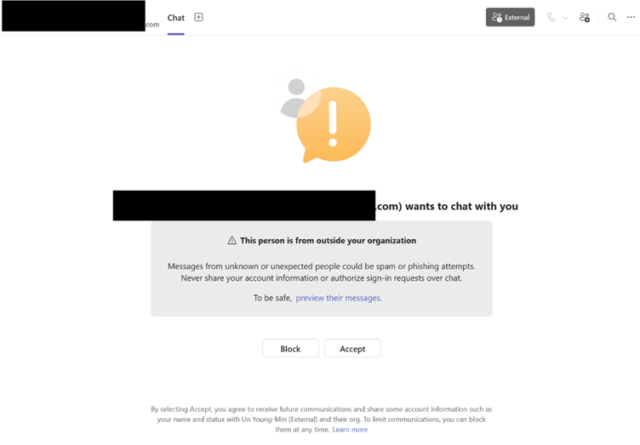
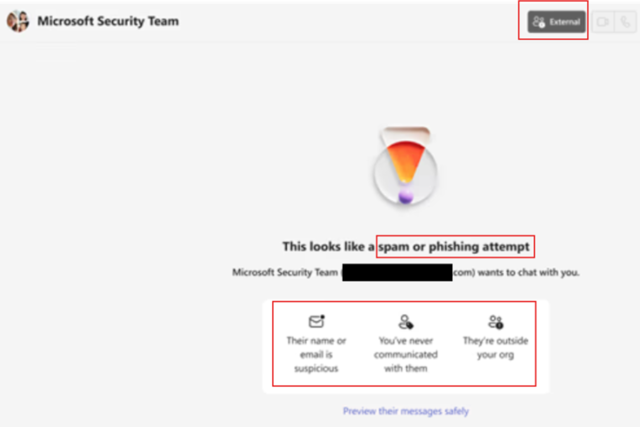
Critically, Teams presents multiple security warnings at first contact — external sender labels, Accept/Block prompts, spam and phishing indicators, and Safe Links checks. This attack succeeds only when users actively bypass those controls.
After consent is obtained, attackers establish interactive control via Quick Assist, perform rapid reconnaissance, stage DLL sideloading payloads, establish command and control infrastructure, move laterally via WinRM, deploy persistent RMM tooling, and exfiltrate data using Rclone — all within a single intrusion session.
Technical analysis
This intrusion chain begins with cross-tenant social engineering in Microsoft Teams, where external actors impersonate internal IT or helpdesk personnel to establish trust and prompt users into initiating remote support sessions. Once the user accepts the interaction and launches a tool such as Quick Assist, the attacker gains interactive control of the endpoint under the guise of legitimate support activity.
After initial access, the attacker performs rapid system reconnaissance to validate privileges, domain context and network reachability using native Windows utilities and lightweight command execution. This phase is typically short-lived and designed to quickly determine whether the host provides a viable pivot point.
The attack then transitions into execution and staging, where trusted, signed binaries are abused for DLL side-loading to execute attacker-controlled payloads under legitimate process contexts. Payloads are often placed in writable directories such as ProgramData and executed through renamed or abused vendor applications to blend into normal software behaviour.
To maintain persistence and operational flexibility, attackers may store encrypted configuration data within registry keys and decrypt it at runtime, reducing reliance on disk-based artefacts. Command and control is established over HTTPS, often using infrastructure that mimics legitimate software update traffic.
For lateral movement, adversaries leverage credential-backed remote administration protocols such as WinRM to pivot across domain-joined systems, with a focus on identity infrastructure and high-value assets. In parallel, additional remote management tools may be deployed to maintain redundant access paths.
In the final stage, targeted data exfiltration is performed using synchronisation utilities such as Rclone, with filters applied to selectively extract business-relevant data while minimising detection footprint. Throughout, the heavy reliance on legitimate tools and native protocols enables adversaries to blend into normal administrative and IT support activity.
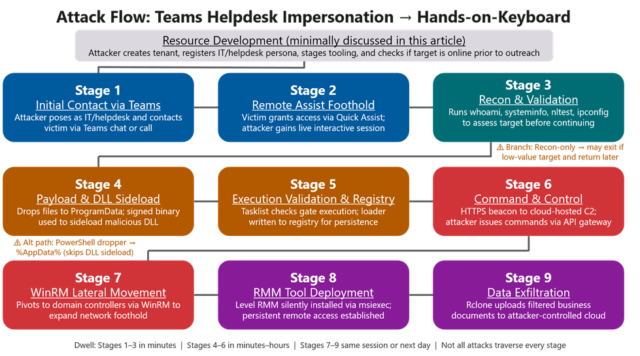
Attack chain
| # | Stage |
|---|---|
| 1 | Initial contact via Teams |
| 2 | Remote access foothold |
| 3 | Reconnaissance |
| 4 | Payload staging and DLL sideloading |
| 5 | Loader state via registry |
| 6 | Command and control |
| 7 | Lateral movement via WinRM |
| 8 | Persistent RMM deployment |
| 9 | Data exfiltration via Rclone |
The stages in detail
1. Initial access via Teams social engineering. An external tenant impersonates IT or helpdesk in Microsoft Teams. The user receives a chat or call request appearing legitimate. The attacker may reinforce trust via voice phishing, and the user is convinced to launch Quick Assist or a similar remote support tool.
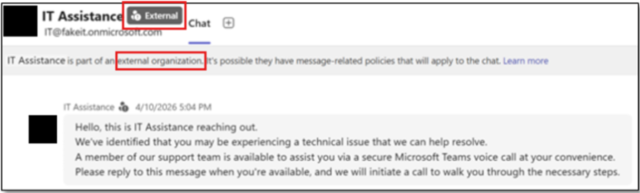

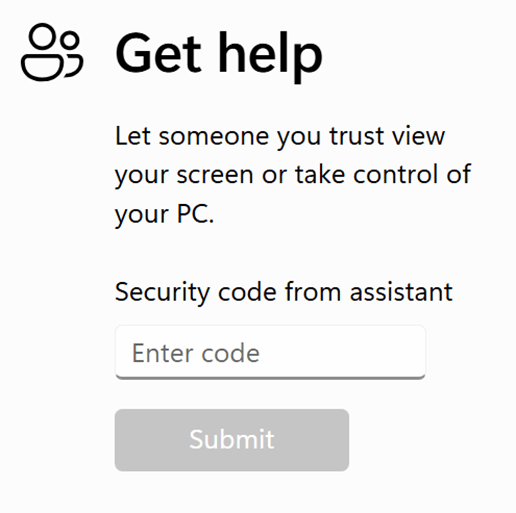
2. Remote access establishment. Execution of QuickAssist.exe, consent prompts handled via consent.exe, attacker gains interactive desktop control. A rapid transition from chat to system-level execution.
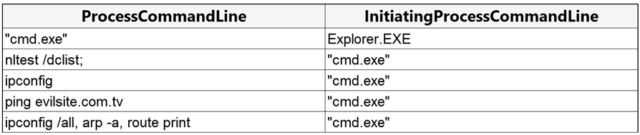
3. Reconnaissance and validation. Execution of whoami, ipconfig, nltest, route print; registry queries for OS and domain context; network reachability checks for lateral movement planning.
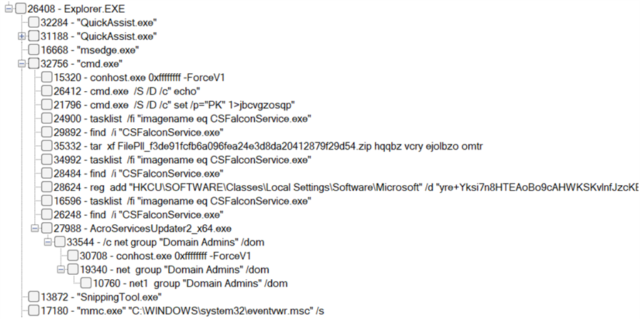
4. Payload staging and execution. Dropped payloads in writable paths such as ProgramData, with DLL side-loading via signed binaries: AcroServicesUpdater2_x64.exe → msi.dll, ADNotificationManager.exe → vcruntime140_1.dll, DlpUserAgent.exe → mpclient.dll, werfault.exe → Faultrep.dll. Execution occurs under trusted application contexts.
5. Persistence and loader behaviour. Registry-based encrypted payload storage in HKCU, in-memory decryption of configuration data, and fileless execution patterns aligned with loader frameworks.

6. Command and control. Outbound HTTPS traffic over port 443, cloud-hosted and dynamically rotating infrastructure, beaconing disguised as legitimate update traffic.
7. Lateral movement. WinRM-based execution over TCP 5985, credential-backed movement across domain-joined systems, targeting identity infrastructure such as domain controllers.
8. Data exfiltration. Use of Rclone for selective synchronisation, file-type exclusions to reduce detection footprint, and upload to external cloud storage platforms.

MITRE ATT&CK Mapping
| Tactic | Technique | Observed behaviour |
|---|---|---|
| Initial Access | T1566.002 | Phishing via spearphishing link: Teams message delivers social engineering lure |
| Execution | T1204.004 | Malicious copy and paste: user pastes clipboard content into Quick Assist or browser |
| Command & Control | T1219 | Remote access software: Quick Assist, AnyDesk, TeamViewer used for initial foothold |
| Defense Evasion | T1574.001 | DLL sideloading: malicious DLLs loaded by signed legitimate executables |
| Defense Evasion | T1112 | Modify registry: encrypted C2 config stored in HKCU registry keys |
| Persistence | T1053.005 | Scheduled task: used for payload persistence alongside RMM deployment |
| Lateral Movement | T1021.006 | Remote services, WinRM: credential-backed pivot to domain controllers |
| Lateral Movement | T1072 | Software deployment tools: RMM deployed via msiexec across hosts |
| Execution | T1059.001 | PowerShell: used for download and staging activity |
| Discovery | T1082 | System information discovery: whoami, systeminfo, hostname, nltest |
| Discovery | T1016 | System network config discovery: ipconfig, arp, route print |
| Credential Access | T1552.001 | Credentials in files: harvested to enable WinRM lateral movement |
| Exfiltration | T1567 | Exfiltration to cloud storage: Rclone transfers to external cloud destination |
| Defense Evasion | T1027 | Obfuscated files: encoded registry payloads; polyglot and encoded execution chains |
Prevention and recommendations
- Restrict external Microsoft Teams communication to trusted domains only
- Enforce clear external tenant and sender labelling in Teams
- Limit unsolicited cross-tenant contact and unknown helpdesk interactions
- Apply device- and identity-based controls before allowing remote support sessions
- Enable Safe Links for Microsoft Teams with time-of-click protection
- Ensure Zero-hour Auto Purge is enabled for malicious message removal
- Block or restrict remote support tools such as Quick Assist and similar RMM tools
- Enable Attack Surface Reduction rules in block mode
- Use Windows Defender Application Control to prevent DLL sideloading from ProgramData and AppData
- Monitor for suspicious execution of signed or trusted binaries
- Enforce MFA for all privileged actions
- Require compliant and managed devices through Conditional Access policies
- Restrict WinRM usage to authorised and hardened administrative workstations
- Detect and monitor usage of data exfiltration tools such as Rclone
- Enable Network Protection to block malicious or newly registered domains
- Monitor registry modifications to persistence locations by non-installation processes
- Detect abnormal outbound HTTPS beaconing patterns
- Train users to identify helpdesk impersonation attempts in collaboration tools
- Establish verbal authentication codes for IT helpdesk verification
- Define and communicate official IT support channels and identifiers
- Educate users on distinguishing external from internal Teams identities
- Require reporting of unexpected helpdesk messages or security-related URLs
- Treat all unsolicited external IT support contact as inherently suspicious
Detection
Teams to RMM correlation
let _timeFrame = 30m;
// Teams message signal
let _teams =
    MessageEvents
    | where Timestamp > ago(30d)
    | extend Recipient = parse_json(RecipientDetails)
    | mv-expand Recipient
    | extend
        VictimAccountObjectId = tostring(Recipient.RecipientObjectId),
        VictimRecipientDisplayName = tostring(Recipient.RecipientUserDisplayName)
    | project
        TTime = Timestamp,
        SenderEmailAddress,
        SenderDisplayName,
        VictimRecipientDisplayName,
        VictimAccountObjectId;

// RMM launches on endpoint side
let _rmm =
    DeviceProcessEvents
    | where Timestamp > ago(30d)
    | where FileName in~ ("QuickAssist.exe", "AnyDesk.exe", "TeamViewer.exe")
    | extend VictimAccountObjectId = tostring(InitiatingProcessAccountObjectId)
    | project
        DeviceName,
        QTime = Timestamp,
        RmmTool = FileName,
        VictimAccountObjectId;

_teams
| where isnotempty(VictimAccountObjectId)
| join kind=inner _rmm on VictimAccountObjectId
| where isnotempty(DeviceName)
| where QTime between ((TTime) .. (TTime + (_timeFrame)))
| project
    DeviceName,
    SenderEmailAddress,
    SenderDisplayName,
    VictimRecipientDisplayName,
    VictimAccountObjectId,
    TTime,
    QTime,
    RmmTool
| order by QTime desc
Execution
DeviceProcessEvents
| where Timestamp > ago(30d)
| where InitiatingProcessFileName =~ "cmd.exe"
| where FileName =~ "cmd.exe"
| where ProcessCommandLine has_all (
"/S /D /c",
"\" set /p=\"PK\"",
"1>"
)
ZIP to ProgramData service path to signed host sideload
let _timeFrame = 10m;
let _armOrDevice =
    DeviceFileEvents
    | where Timestamp > ago(30d)
    | where FolderPath startswith "C:\\ProgramData\\"
        or FolderPath startswith "D:\\ProgramData\\"
    | where ActionType in ("FileCreated", "FileRenamed")
    | where FileName endswith ".dll"
        or FileName endswith ".exe"
        or FileName endswith ".zip"
    | where FolderPath !has "\\Microsoft\\Windows Defender\\"
        and FolderPath !has "\\Microsoft\\Windows\\WER\\"
        and FolderPath !has "\\Package Cache\\"
        and FolderPath !has "\\Microsoft\\ClickToRun\\"
        and FolderPath !has "\\Dell\\"
        and FolderPath !has "\\Lenovo\\"
        and FolderPath !has "\\ASUS\\"
        and FolderPath !has "\\Adobe\\ARM\\"
    | project DeviceName, First=Timestamp, FileName, FolderPath;

let _hostRun =
    DeviceProcessEvents
    | where Timestamp > ago(30d)
    | where FileName in~ (
        "AcroServicesUpdater2_x64.exe",
        "DlpUserAgent.exe",
        "ADNotificationManager.exe",
        "werfault.exe"
    )
    | where FolderPath startswith "C:\\ProgramData\\"
        or FolderPath startswith "D:\\ProgramData\\"
    | where FolderPath !has "\\Microsoft\\Windows Defender\\"
        and FolderPath !has "\\Adobe\\ARM\\"
    | project
        DeviceName,
        Run=Timestamp,
        Host=FileName,
        ProcessCommandLine,
        ProcessFolderPath=FolderPath;

_armOrDevice
| join kind=inner _hostRun on DeviceName
| where Run between (First .. (First + (_timeFrame)))
| summarize
    First=min(First),
    Run=min(Run),
    Files=make_set(FileName, 10),
    Paths=make_set(FolderPath, 10)
    by DeviceName, Host, ProcessCommandLine, ProcessFolderPath
| order by Run desc
PowerShell to high-risk TLD, writing an EXE to AppData\Roaming
let _timeFrame = 5m;
let _psNet = DeviceNetworkEvents
| where Timestamp > ago(30d)
| where InitiatingProcessFileName in~ ("powershell.exe", "pwsh.exe")
| where RemoteUrl matches regex @"(?i)\.(top|xyz|zip|click)$"
| project DeviceName, NetTime=Timestamp, RemoteUrl, RemoteIP;

let _exeWrite = DeviceFileEvents
| where Timestamp > ago(30d)
| where FolderPath has @"\AppData\Roaming\" and FileName endswith ".exe"
| project DeviceName, WTime=Timestamp, FileName, FolderPath, SHA256;

_psNet
| join kind=inner _exeWrite on DeviceName
| where WTime between (NetTime .. (NetTime + (_timeFrame)))
| project
DeviceName,
NetTime,
RemoteUrl,
RemoteIP,
WTime,
FileName,
FolderPath,
SHA256
| order by WTime desc
Registry breadcrumbs and ASEP anomalies
DeviceRegistryEvents
| where Timestamp > ago(30d)
| where RegistryKey has @"\SOFTWARE\Classes\Local Settings\Software\Microsoft"
| where RegistryValueName in~ (
    "UCID",
    "UFID",
    "XJ01",
    "XJ02",
    "UXMP"
)
| where ActionType in (
    "RegistryValueSet",
    "RegistryValueDeleted"
)
| where InitiatingProcessFileName in~ (
    "AcroServicesUpdater2_x64.exe",
    "DlpUserAgent.exe",
    "ADNotificationManager.exe",
    "werfault.exe"
)
| project
    Timestamp,
    DeviceName,
    ActionType,
    RegistryKey,
    RegistryValueName,
    RegistryValueData,
    PreviousRegistryValueData,
    InitiatingProcessFileName
| order by Timestamp desc
Non-browser process to API Gateway, then internal AD and WinRM protocols
let _timeFrame = 10m;
let _net1 =
    DeviceNetworkEvents
    | where Timestamp > ago(30d)
    | where RemoteUrl has ".execute-api."
    | where isnotempty(InitiatingProcessFileName)
    | where InitiatingProcessFileName !in~ (
        "chrome.exe",
        "msedge.exe",
        "firefox.exe",
        "opera.exe",
        "brave.exe",
        "iexplore.exe"
    )
    | where InitiatingProcessFolderPath !startswith "C:\\Program Files"
        and InitiatingProcessFolderPath !startswith "C:\\Program Files (x86)"
    | project
        DeviceName,
        Proc=InitiatingProcessFileName,
        ProcPath=InitiatingProcessFolderPath,
        AccountName=InitiatingProcessAccountName,
        OutTime=Timestamp,
        RemoteUrl,
        C2IP=RemoteIP;

let _net2 =
    DeviceNetworkEvents
    | where Timestamp > ago(30d)
    | where RemotePort in (135, 389, 445, 636, 5985, 5986)
    | where isnotempty(InitiatingProcessFileName)
    | where InitiatingProcessFileName !in~ (
        "chrome.exe",
        "msedge.exe",
        "firefox.exe",
        "svchost.exe",
        "lsass.exe",
        "System"
    )
    | project
        DeviceName,
        Proc=InitiatingProcessFileName,
        InTime=Timestamp,
        InternalIP=RemoteIP,
        RemotePort;

_net1
| join kind=inner _net2 on DeviceName, Proc
| where InTime between (OutTime .. (OutTime + (_timeFrame)))
| project
    DeviceName,
    Proc,
    ProcPath,
    AccountName,
    OutTime,
    RemoteUrl,
    C2IP,
    InTime,
    InternalIP,
    RemotePort
| order by InTime desc
DLL side-loading through trusted signed applications, with HTTPS and WinRM outbound
let _timeFrame = 10m;
let _c2 =
    DeviceNetworkEvents
    | where Timestamp > ago(30d)
    | where InitiatingProcessFileName in~ (
        "AcroServicesUpdater2_x64.exe",
        "DlpUserAgent.exe",
        "ADNotificationManager.exe",
        "werfault.exe"
    )
    | where RemotePort == 443
    | project
        DeviceName,
        C2Time=Timestamp,
        InitiatingProcessFileName,
        C2IP=RemoteIP,
        C2Url=RemoteUrl;

let _winrm =
    DeviceNetworkEvents
    | where Timestamp > ago(30d)
    | where InitiatingProcessFileName in~ (
        "AcroServicesUpdater2_x64.exe",
        "DlpUserAgent.exe",
        "ADNotificationManager.exe",
        "werfault.exe"
    )
    | where RemotePort in (5985, 5986)
    | project
        DeviceName,
        WinRMTime=Timestamp,
        InitiatingProcessFileName,
        WinRMTarget=RemoteIP,
        WinRMPort=RemotePort;

_c2
| join kind=inner _winrm on DeviceName, InitiatingProcessFileName
| where WinRMTime between (C2Time .. (C2Time + (_timeFrame)))
| project
    DeviceName,
    InitiatingProcessFileName,
    C2Time,
    C2IP,
    C2Url,
    WinRMTime,
    WinRMTarget,
    WinRMPort
| order by C2Time desc
PowerShell history deletion
DeviceFileEvents
| where Timestamp > ago(30d)
| where FileName =~ "ConsoleHost_history.txt"
| where ActionType == "FileDeleted"
| where InitiatingProcessFileName in~ (
    "AcroServicesUpdater2_x64.exe",
    "DlpUserAgent.exe",
    "ADNotificationManager.exe",
    "werfault.exe",
    "cmd.exe",
    "powershell.exe",
    "pwsh.exe"
)
| project
    Timestamp,
    DeviceName,
    InitiatingProcessFileName,
    InitiatingProcessCommandLine,
    FolderPath
| order by Timestamp desc
Reconnaissance burst via cmd or PowerShell
let _reconWindow = 10m;
let _rmm =
    DeviceProcessEvents
    | where Timestamp > ago(30d)
    | where FileName in~ ("QuickAssist.exe", "AnyDesk.exe", "TeamViewer.exe")
    | project DeviceName, RMMTime=Timestamp;

let _recon =
    DeviceProcessEvents
    | where Timestamp > ago(30d)
    | where FileName in~ ("cmd.exe", "powershell.exe", "pwsh.exe")
    | where ProcessCommandLine has_any (
        "whoami",
        "nltest",
        "net user",
        "ipconfig /all",
        "arp -a",
        "route print",
        "query user",
        "whoami /all",
        "whoami /groups",
        "whoami /priv"
    )
    | where InitiatingProcessFileName !in~ (
        "m_agent_service.exe",
        "updater.exe",
        "msiexec.exe",
        "asussplendid.exe",
        "icloudhome.exe",
        "dropbox.exe",
        "code.exe",
        "TiWorker.exe",
        "MsMpEng.exe",
        "ccmexec.exe",
        "cscript.exe",
        "wscript.exe"
    )
    | where InitiatingProcessFileName !has "agent"
        and InitiatingProcessFileName !has "update"
        and InitiatingProcessFileName !has "install"
    | project
        Timestamp,
        DeviceName,
        FileName,
        InitiatingProcessFileName,
        ProcessCommandLine;

_rmm
| join kind=inner _recon on DeviceName
| where Timestamp between (RMMTime .. (RMMTime + (_reconWindow)))
| summarize
    RMMTime=min(RMMTime),
    eventCount=count(),
    FileNames=make_set(FileName),
    InitiatingProcessFileNames=make_set(InitiatingProcessFileName),
    ProcessCommandLines=make_set(ProcessCommandLine, 5)
    by DeviceName
| where eventCount > 2
| project
    DeviceName,
    RMMTime,
    eventCount,
    FileNames,
    InitiatingProcessFileNames,
    ProcessCommandLines
| order by eventCount desc
Data exfiltration
DeviceProcessEvents
| where Timestamp > ago(30d)
| where FileName =~ "rclone.exe" or ProcessVersionInfoOriginalFileName =~ "rclone.exe"
| where ProcessCommandLine has_all (
    "copy ",
    "--config rclone_uploader.conf",
    "--transfers 16",
    "--checkers 16",
    "--buffer-size 64M",
    "--max-age=3y",
    "--exclude *.mdf"
)
Quick Assist-anchored recon with no staging writes within ten minutes
let _reconWindow = 10m;
let _stageWindow = 15m;
let _rmm =
    DeviceProcessEvents
    | where Timestamp > ago(30d)
    | where FileName in~ ("QuickAssist.exe", "AnyDesk.exe", "TeamViewer.exe")
    | project DeviceName, RMMTime=Timestamp;

let _recon =
    DeviceProcessEvents
    | where Timestamp > ago(30d)
    | where FileName in~ ("cmd.exe", "powershell.exe", "pwsh.exe")
    | where ProcessCommandLine has_any (
        "whoami",
        "whoami /all",
        "whoami /groups",
        "whoami /priv",
        "nltest",
        "net user",
        "net localgroup",
        "query user",
        "ipconfig /all",
        "arp -a",
        "route print"
    )
    | where InitiatingProcessFileName !in~ (
        "m_agent_service.exe",
        "updater.exe",
        "msiexec.exe",
        "asussplendid.exe",
        "icloudhome.exe",
        "dropbox.exe",
        "code.exe",
        "explorer.exe",
        "TiWorker.exe",
        "MsMpEng.exe",
        "ccmexec.exe",
        "GoogleUpdate.exe",
        "setup.exe"
    )
    | where InitiatingProcessFileName !has "agent"
        and InitiatingProcessFileName !has "update"
        and InitiatingProcessFileName !has "install"
        and InitiatingProcessFileName !has "deploy"
    | where ProcessCommandLine !has "Program Files"
        and ProcessCommandLine !has "uninstall"
        and ProcessCommandLine !has "InventoryInstall"
        and ProcessCommandLine !has "spool\\drivers"
        and ProcessCommandLine !has "AppData\\Roaming\\Apple"
        and ProcessCommandLine !has "AppData\\Local\\Apple"
    | project
        DeviceName,
        ReconTime=Timestamp,
        ReconCmd=ProcessCommandLine,
        ReconProc=FileName,
        InitiatingProc=InitiatingProcessFileName;

let _staging =
    DeviceFileEvents
    | where Timestamp > ago(30d)
    | where ActionType in ("FileCreated", "FileRenamed")
    | where FileName endswith ".zip"
        or FileName endswith ".exe"
        or FileName endswith ".dll"
    | where FolderPath !has "\\Program Files"
        and FolderPath !has "\\Windows\\Temp"
        and FolderPath !has "\\Google\\"
        and FolderPath !has "\\Apple\\"
    | project
        DeviceName,
        STime=Timestamp,
        StageFile=FileName,
        StagePath=FolderPath;

let _rmmRecon =
    _rmm
    | join kind=inner _recon on DeviceName
    | where ReconTime between (RMMTime .. (RMMTime + (_reconWindow)))
    | project DeviceName, RMMTime, ReconTime, ReconProc, ReconCmd, InitiatingProc;

_rmmRecon
| join kind=leftouter _staging on DeviceName
| extend HasStagingInWindow = iff(
    STime between (RMMTime .. (RMMTime + (_stageWindow))), 1, 0)
| summarize HasStagingInWindow=max(HasStagingInWindow)
    by DeviceName, RMMTime, ReconTime, ReconProc, ReconCmd, InitiatingProc
| where HasStagingInWindow == 0
| project
    DeviceName,
    RMMTime,
    ReconTime,
    ReconProc,
    ReconCmd,
    InitiatingProc
| order by ReconTime desc
Trends and impact
This technique reflects a broader shift from traditional phishing to interactive social engineering attacks inside collaboration platforms. Rather than delivering payloads directly, attackers rely on users to initiate compromise themselves through trusted workflows.
Key trends include:
- Increased abuse of Microsoft Teams external collaboration
- Heavy reliance on legitimate remote support tools
- Growth in helpdesk impersonation as a primary intrusion vector
- Blending of human manipulation with legitimate administrative tooling
Impacted technologies
- Microsoft Teams external collaboration features
- Quick Assist and other remote support tools
- Windows WinRM and native admin protocols
- Microsoft Entra ID authentication workflows
- Microsoft Defender for Endpoint telemetry
- Cloud storage services used for exfiltration via Rclone
Why this is important
This campaign represents a meaningful evolution in enterprise social engineering: it requires no vulnerability, no malicious email attachment and no exploit kit. The attacker’s primary weapon is the enterprise’s own collaboration infrastructure, and the mechanism of delivery is a user who believes they are receiving legitimate IT support.
The business and operational risks are severe and compounding:
- Domain controller compromise. WinRM-based lateral movement targeting identity infrastructure can result in full Active Directory takeover, enabling attackers to create persistent admin accounts, modify GPOs and establish long-term footholds that survive endpoint remediation.
- Credential exfiltration at scale. Harvested credentials from a single endpoint can provide access to dozens of downstream systems, VPNs, cloud workloads and SaaS platforms.
- Business data exfiltration. Rclone’s targeted file-type filtering indicates deliberate selection of commercially sensitive documents, contracts, financial data and strategic plans, creating regulatory breach notification risk under GDPR and sector-specific frameworks.
- Stealth and dwell time. The use of signed legitimate executables, encrypted C2 configuration and commercial RMM platforms means this campaign consistently evades signature-based and network-level detection. Dwell time before detection significantly amplifies impact.
- Compounding threat actor handoffs. In some campaigns, initial access brokers hand off to different threat actors mid-intrusion, meaning later stages can differ materially in objective and tooling.
This profile underscores how attackers increasingly weaponise the trust users place in enterprise collaboration platforms, and why identity-aware, behaviour-based detection across Teams, endpoint and network telemetry is now a fundamental requirement rather than an enhancement.
How Wizard Cyber can help
- 24/7 monitoring through Microsoft Sentinel for cross-tenant impersonation patterns
- Managed detection and response using Microsoft Defender for Endpoint
- Threat hunting across identity and collaboration telemetry for early-stage social engineering indicators
- Incident response support for containment of remote access abuse and lateral movement
- Continuous exposure assessment aligned with Microsoft security best practices
- Detection engineering for Teams-based impersonation and WinRM lateral movement patterns