

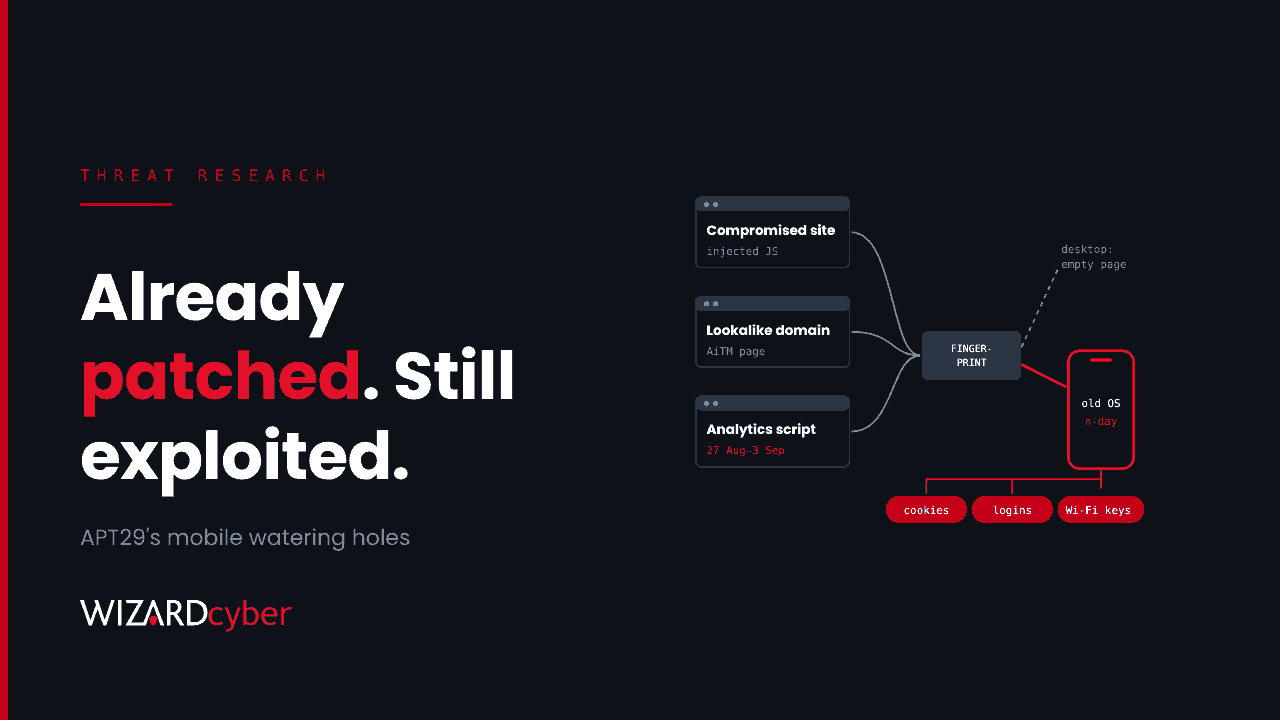
Someone on your staff opens a news site on their phone. The page looks normal. In the background, a script checks what kind of device they're using and, if the phone is running an older iOS or Android build, quietly steals its browser cookies, saved Wi-Fi passwords or more. Nothing is installed and nothing survives a reboot. The cookies are what the attacker came for, and some of them may belong to your Microsoft 365 tenant.
Sekoia published the campaign on 4 November and attributes it, with moderate to high confidence, to APT29, the Russian intelligence group Microsoft tracks as Midnight Blizzard. The detail that matters most for defenders is in Sekoia's own words: "All three exploit chains rely entirely on known, already-patched vulnerabilities." This post covers what happened, how to hunt for it from Microsoft Defender and your network logs, and what to change in Intune.
What happened
Sekoia describes a watering-hole campaign active in mid-October 2026 with three ways of reaching visitors:
- Compromised legitimate websites with injected JavaScript.
- Lookalike domains built to resemble real US and UK sites.
- A compromised third-party analytics script, a tracker used by many websites, which served the malicious code between 27 August and 3 September 2026. Every site that loaded the tracker in that window passed it on to its visitors.
Visitors were fingerprinted first. Desktops and implausible screen sizes received an empty response, so a security team browsing the site from a laptop would see nothing unusual. Phones that matched received an exploit chain built for their platform:
- An iOS chain that steals browser cookies.
- A second iOS chain that takes broader device data, including messages and saved Wi-Fi passwords.
- An Android chain for vulnerable Chrome versions (139 to 145, except 143) that reads Chrome's cookies, saved logins and history, plus the device's Wi-Fi configuration.
None of the chains installs persistent malware. They take what they want and leave.
On 4 November, CISA added one of the iOS flaws, CVE-2024-27834, to its Known Exploited Vulnerabilities catalog, with a federal patch deadline of 18 November. Apple fixed it in May 2024.
Why a phone exploit is a Microsoft 365 problem
Most of your users read work email and Teams on their phones, often in a browser as well as in the apps. A stolen session cookie for Outlook on the web or SharePoint can let an attacker continue that session without a password or an MFA prompt, until the session expires or is revoked. Saved logins give them passwords to try elsewhere. Wi-Fi passwords matter if the phone has been on your office network.
Three things make this hard to see:
- Phones are rarely in the same telemetry as laptops. Many organisations have Intune on phones but no endpoint detection on them, and little network visibility once the phone leaves the office.
- No persistence means no artefact to find later. A scan next week will show a clean phone.
- The fingerprinting hides the page from analysts. Visiting the compromised site from a desktop proves nothing.
So the evidence you are most likely to find is network contact with the delivery infrastructure, and Microsoft 365 activity that doesn't fit the user afterwards.
Hunting
The queries below are starting points to tune for your estate. Table availability depends on what you collect: Defender for Endpoint covers managed laptops, and phones are usually only visible through your DNS, proxy or firewall logs while they're on your network or VPN. The indicators are from Sekoia's report, so check them against the original before you block anything.
1. DNS and proxy contact with the delivery and exfiltration infrastructure
let Apt29Domains = dynamic(["flux-telemetry.com", "clouds-stacks.com", "ads-it-assets.com",
  "adv-static.com", "wpvortex-mod.com", "assets-int.com", "starx-net.com",
  "america250.holiday", "theowo.club"]);
let Apt29IPs = dynamic(["109.104.106.107", "195.58.140.105", "192.121.46.25", "188.190.17.232"]);
union isfuzzy=true
  (DnsEvents | where TimeGenerated > ago(60d)
     | where Name has_any (Apt29Domains)
     | project TimeGenerated, Source = "DNS", Client = ClientIP, Indicator = Name),
  (CommonSecurityLog | where TimeGenerated > ago(60d)
     | where RequestURL has_any (Apt29Domains) or DestinationIP in (Apt29IPs)
     | project TimeGenerated, Source = DeviceProduct, Client = SourceIP,
               Indicator = coalesce(RequestURL, DestinationIP))
| summarize Hits = count(), First = min(TimeGenerated), Last = max(TimeGenerated)
          by Client, Indicator, Source
If you use the ASIM parsers, swap in _Im_Dns and _Im_WebSession. Map any client IP back to a device through DHCP or your Wi-Fi controller, then to a user.
2. The same infrastructure from managed laptops
DeviceNetworkEvents
| where Timestamp > ago(60d)
| where RemoteUrl has_any ("flux-telemetry.com", "clouds-stacks.com", "starx-net.com",
                           "america250.holiday", "theowo.club")
    or RemoteIP in ("109.104.106.107", "195.58.140.105", "192.121.46.25", "188.190.17.232")
| project Timestamp, DeviceName, InitiatingProcessAccountName,
          InitiatingProcessFileName, RemoteUrl, RemoteIP
Desktops were screened out of the exploit stage, so a hit here is most likely a fingerprinting request rather than a compromise. It still tells you which users visit the poisoned sites, and they probably do so on their phones too.
3. Sites that loaded the compromised tracker
union isfuzzy=true
  (DeviceNetworkEvents | where Timestamp between (datetime(2026-08-27) .. datetime(2026-09-04))
     | where RemoteUrl has "plerdy.com"
     | project Timestamp, Who = DeviceName, Url = RemoteUrl),
  (CommonSecurityLog | where TimeGenerated between (datetime(2026-08-27) .. datetime(2026-09-04))
     | where RequestURL has "plerdy.com"
     | project Timestamp = TimeGenerated, Who = SourceIP, Url = RequestURL)
| summarize Requests = count() by Who, bin(Timestamp, 1d)
The tracker is a legitimate product, so don't block it on the strength of this campaign. Use the result to scope who may have been exposed during the window Sekoia gives. If your own websites used it, check them too.
4. Session activity that doesn't fit the user
let Window = 30d;
SigninLogs
| where TimeGenerated > ago(Window)
| where ResultType == 0
| extend Os = tostring(DeviceDetail.operatingSystem), Browser = tostring(DeviceDetail.browser)
| summarize Countries = make_set(Location, 10), IPs = dcount(IPAddress),
            Oses = make_set(Os, 5), Browsers = make_set(Browser, 5)
          by UserPrincipalName, AppDisplayName
| where array_length(Countries) > 1 and IPs > 5
A replayed cookie often shows up as a session used from a new country or hosting provider, with the original device details. Run this first for the users found in queries 1 to 3, then look in OfficeActivity or CloudAppEvents for mailbox rules, file downloads and sharing changes around the same time.
5. Phones below your minimum OS version
IntuneDevices
| where TimeGenerated > ago(1d)
| summarize arg_max(TimeGenerated, *) by DeviceId
| where OS in ("iOS", "iPadOS", "Android")
| project DeviceName, UserEmail, OS, OSVersion, CompliantState, LastContact
| order by OS asc, OSVersion asc
This needs Intune diagnostic settings sending device data to your workspace. Without it, export the same list from the Intune admin centre. Either way, it is the list of phones these chains could have worked on.
If you find a hit
- Treat the user's sessions as stolen. Revoke their sign-in sessions and refresh tokens in Entra ID and require them to sign in again.
- Reset passwords that were saved in the phone's browser, starting with anything that isn't behind phishing-resistant MFA.
- Update the phone to the current OS and browser before it reconnects to corporate resources.
- Review mailbox and file activity for the period between the visit and the session revocation.
- Rotate Wi-Fi credentials if the phone joined a network that uses a shared password.
Prevention
- Set and enforce a minimum OS version in Intune compliance policies for iOS and Android, with a short grace period, and make Conditional Access require a compliant device for Microsoft 365. Every exploit in this campaign fails on a current build.
- Use app protection policies with minimum OS and app version conditions for personal devices you don't enrol.
- Prefer the Outlook and Teams apps over mobile browsers for work, so corporate sessions aren't sitting in the browser cookie store the exploits read.
- Shorten sign-in frequency for browser sessions on unmanaged devices, so a stolen cookie is useful for hours rather than weeks.
- Extend endpoint protection to phones where you can, so web threats and outdated OS builds raise alerts like they would on a laptop.
- Inventory the third-party scripts on your own websites. A compromised analytics tag made dozens of innocent sites into delivery points. Ask whether yours could be one.
We cover the leadership side of this in Every Exploit In The Chain Was Already Patched, and the attack type in our guide to watering hole attacks.
How a managed SOC helps
- Network and identity in one view. We correlate DNS and proxy hits with Entra sign-ins in Microsoft Sentinel, so an exposure on a phone is followed through to the Microsoft 365 sessions it might have produced.
- Every alert gets a verdict. Our SOCs are staffed 24/7, every investigation produces a full report, and senior analyst sign-off is the default on the managed service.
- Hunting when a report like this lands. Complete and Command include a threat hunting allocation for sweeps like the ones above.
- Compromise assessment. If you think users were exposed, our consultants can scope what was taken and where it was used.
If you'd like these hunts run across your estate, talk to our team.