

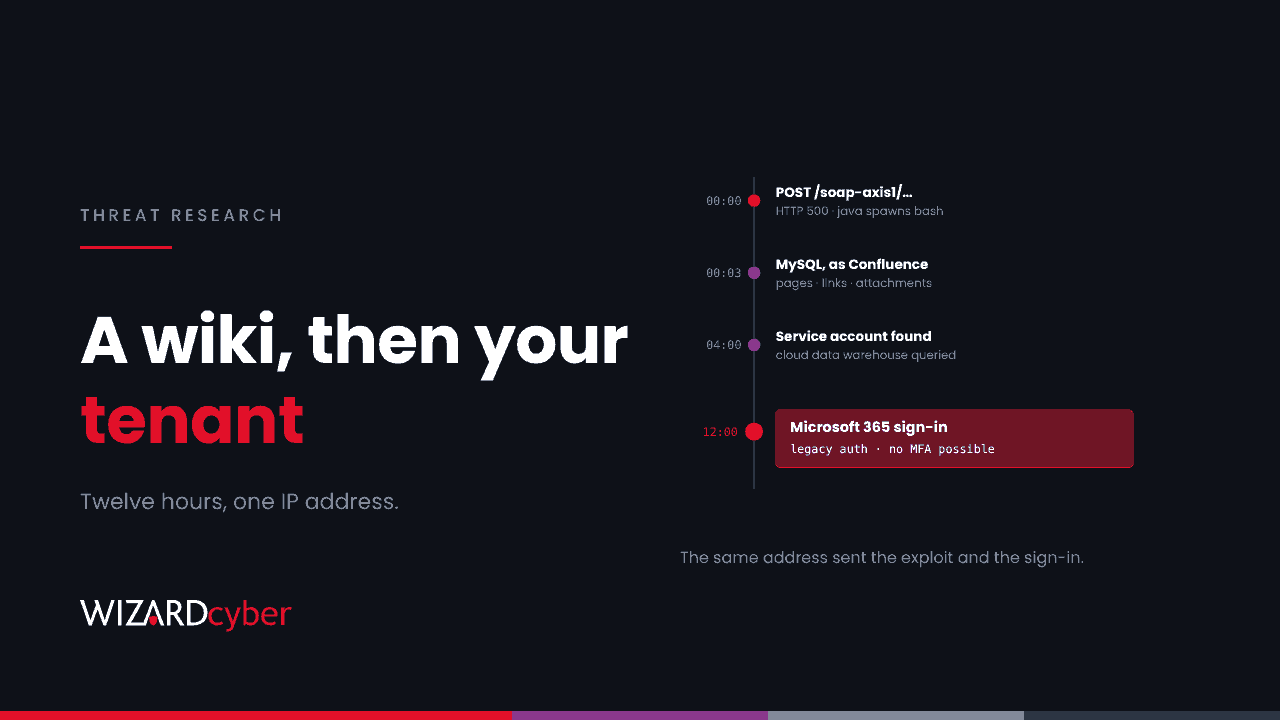
The vulnerability is in a SOAP library almost nobody thinks about, inside a wiki that sits outside most people's idea of the security estate. The end of the intrusion is a Microsoft 365 sign-in. Twelve hours after an unauthenticated request hit a Confluence server, the same operator signed in to Microsoft 365 as an integration service account, over legacy authentication, from the same IP address that had sent the exploit. If you only watch the wiki, you miss the second half. If you only watch Entra ID, you see the sign-in and have no idea why.
What happened
CVE-2026-90436 is an unsafe reflection flaw in Apache Axis 1.x, scored 9.8, allowing unauthenticated remote code execution. Apache disclosed it on 6 November. Axis 1 is end of life: there is no fixed 1.x release and there will not be one. It is reachable because other products embed it — Atlassian Confluence Data Center uses it for the XML-RPC and SOAP remote API, and N-able N-central was also exploited through it.
A proof of concept targeting N-central appeared on 12 November. Rapid7 detected exploitation against a customer's Confluence Data Center the next day and published the detail, updating it on 19 November when CISA added the CVE to its Known Exploited Vulnerabilities catalog.
The chain, timed from the first exploit request:
- Seconds. Unauthenticated POST requests to
/plugins/servlet/soap-axis1/confluenceservice-v2, each returning HTTP 500. The Confluence Java process then spawned Bash and curl as theconfluenceservice account. - Minutes. Hundreds of hex-encoded commands, fetched from temporary Pinggy and Cloudflare Tunnel domains. Rapid7 notes the scripting looked AI-assisted. About three minutes in, the operator authenticated to MySQL using Confluence's own database credentials and began querying page content, application links and attachments.
- Then. Scripts searched attachment storage for credentials, tokens, VPN configuration and private keys, and for payment card numbers using Luhn checks. The operator queried the Atlassian Crowd API with a Confluence application credential and attempted AS-REP roasting against a domain controller with Impacket. Those Kerberos attempts failed.
- About four hours. A service account credential was obtained and used to query a production cloud data warehouse.
- About twelve hours. A sign-in to Microsoft 365 as an integration service account, using legacy authentication, from
192.238.253[.]176— the same address that appears in the Pinggy tunnel hostname and in the earlier exploit requests.
Rapid7 does not say exactly how the operator went from a stored credential to that sign-in, and describes the destination as Microsoft 365 rather than naming a specific service. We are not going to fill that gap in for them. What the published detail does establish is that credentials harvested out of a wiki were used against a cloud tenant within a working day.
Why the wiki is a credential store
Nobody designs a wiki to be a secrets vault. It becomes one anyway. Runbooks with service account passwords in them, onboarding pages with an API key "temporarily" pasted in, a network diagram with a VPN config attached, a spreadsheet of integration credentials from a migration three years ago. The content is searchable, which is the point of a wiki, and it is searchable by whoever gets the database credentials too.
That is what makes this chain efficient. The operator did not need to escalate privilege on the Confluence host, and their Kerberos attempts against Active Directory failed. They did not need either. The wiki's own database gave them enough to sign in elsewhere as something trusted.
The last link, legacy authentication, is the part that is entirely within your control. Legacy authentication means the older protocols that pre-date modern authentication: they submit a username and password in a single step, and they cannot present an MFA prompt or evaluate a device. A password is sufficient. Integration and service accounts are the accounts most likely to still be using them, because they are the accounts nobody wants to break.
Step 1: are you exposed?
- Confluence Data Center 1.x through 9.x is affected when Remote API (XML-RPC & SOAP) is enabled. It has been off by default since version 3.0 and was removed entirely in 10.x, but long-lived instances carry it forward. Check General Configuration → Further Configuration. Clearing it needs no restart, though it may break integrations that still use the old API.
- Fix: upgrade to 9.2.28 or a current 10.x release. Atlassian Cloud is not affected.
- N-able N-central: confirm Legacy API is disabled. 2026.4 HF3 (2026.4.1.39), released 16 November, disables it. We covered the earlier N-central problems in this post.
- Anything else embedding Axis 1.x. This is the harder question, and it is the same one we raised in Patched The Server, Not The App: your patch report tracks products, not the libraries inside them. Search your Java application estate for
axis.jarand for SOAP endpoints you did not know were published.
Step 2: hunt it from the Entra side
If you had an exposed instance, do not stop at the host. Hunt the sign-ins. These Microsoft Sentinel queries are starting points to tune.
1. The published indicators, across sign-ins and network logs
let ioc = dynamic(["192.238.253.176","5.133.47.243","163.182.68.109","104.13.106.166",
                   "157.20.241.16","139.99.69.109","79.76.51.56"]);
union isfuzzy=true
  (SigninLogs | where IPAddress in (ioc) | project TimeGenerated, Source="SigninLogs",
     Identity=UserPrincipalName, IPAddress, AppDisplayName, ResultType),
  (AADNonInteractiveUserSignInLogs | where IPAddress in (ioc) | project TimeGenerated,
     Source="NonInteractive", Identity=UserPrincipalName, IPAddress, AppDisplayName, ResultType),
  (AADServicePrincipalSignInLogs | where IPAddress in (ioc) | project TimeGenerated,
     Source="ServicePrincipal", Identity=ServicePrincipalName, IPAddress, AppDisplayName="", ResultType)
| order by TimeGenerated asc
Rapid7's own caveat applies: the absence of these addresses does not mean you are unaffected. Tunnel infrastructure is disposable.
2. Every legacy authentication sign-in, successful or not
SigninLogs
| where TimeGenerated > ago(30d)
| where ClientAppUsed !in ("Browser", "Mobile Apps and Desktop clients")
| summarize SignIns=count(), Apps=make_set(ClientAppUsed), IPs=dcount(IPAddress),
    Countries=make_set(tostring(LocationDetails.countryOrRegion), 10),
    Success=countif(ResultType == "0")
    by UserPrincipalName
| order by SignIns desc
Run this before you need it. The output is your list of accounts for which a password alone is enough, and in most tenants it is shorter than people expect and consists almost entirely of integration accounts.
3. A legacy sign-in from a new country for an account that normally has one
let legacy = SigninLogs
  | where TimeGenerated > ago(60d)
  | where ClientAppUsed !in ("Browser", "Mobile Apps and Desktop clients")
  | where ResultType == "0"
  | summarize Countries=make_set(tostring(LocationDetails.countryOrRegion)) by UserPrincipalName
  | where array_length(Countries) == 1
  | project UserPrincipalName, HomeCountry=tostring(Countries[0]);
SigninLogs
| where TimeGenerated > ago(14d)
| where ClientAppUsed !in ("Browser", "Mobile Apps and Desktop clients")
| extend Country = tostring(LocationDetails.countryOrRegion)
| join kind=inner legacy on UserPrincipalName
| where Country != HomeCountry
| project TimeGenerated, UserPrincipalName, Country, HomeCountry, IPAddress, ClientAppUsed, ResultType
| order by TimeGenerated asc
4. What the account did after signing in
OfficeActivity
| where TimeGenerated > ago(30d)
| where UserId has "<integration account UPN>"
| summarize Ops=count(), Operations=make_set(Operation, 50) by ClientIP, bin(TimeGenerated, 1h)
| order by TimeGenerated asc
Compare against the account's normal pattern. An integration account usually does one narrow thing, from one place, forever. Breadth is the signal.
5. The Confluence host side, if you forward its logs
// Web/proxy logs: the exploit path, typically answering 500
CommonSecurityLog
| where TimeGenerated > ago(30d)
| where RequestURL has "soap-axis1"
| summarize Requests=count(), Paths=make_set(RequestURL, 10) by SourceIP, DeviceAction
| order by Requests desc
// Endpoint side: the Java process spawning a shell or curl
DeviceProcessEvents
| where TimeGenerated > ago(30d)
| where InitiatingProcessFileName in~ ("java", "java.exe")
| where FileName in~ ("bash", "sh", "curl", "wget", "python3", "cmd.exe", "powershell.exe")
| project TimeGenerated, DeviceName, InitiatingProcessAccountName, FileName, ProcessCommandLine
| order by TimeGenerated descAlso look for outbound connections to *.trycloudflare[.]com, Pinggy hostnames and webhook[.]site. Tunnelling services are legitimate and widely used, so treat a hit as a lead rather than a verdict — but a Confluence server reaching one is unusual.
Step 3: what to change
- Assume the wiki's secrets are gone. If you had an exposed instance during the exploitation window, the credentials in its pages, attachments and database are the incident. Enumerate and rotate them. Searching your own wiki for
password,api key,client secretand.ovpnis a sobering hour, and worth it even if you were not exposed. - Block legacy authentication. Conditional Access can block it outright. Use query 2 to find what breaks first, move those integrations to modern authentication — or better, to a managed identity or workload identity federation, which removes the stored password altogether — then block the rest.
- Constrain the accounts you cannot change yet. If an integration account must keep a password, restrict where it can sign in from by named location, scope its permissions to what it actually uses, and alert on every sign-in outside the expected pattern. Our post on the appliance account that could read every LAPS password makes the same argument for on-premises service accounts.
- Remove persistence before rotating. As we wrote in Rotation Isn't Recovery, check for credentials the attacker added — a second app secret, a new federated credential — because rotating the one you know about leaves theirs working.
- Put the wiki in scope. If an internet-facing application holds credentials to your estate, it is part of your estate, whatever the asset register says.
How a managed SOC helps
This intrusion is only legible end to end. On its own, a 500 response to an odd SOAP path looks like a scanner. On its own, a service account signing in over legacy authentication looks like it always has. Together, in order, from one address, it is an active intrusion with twelve hours on the clock.
Our SOC runs Microsoft Sentinel as the core of the managed service, and the connectors, parsers, analytical rules and playbooks for the rest of the estate — the proxy in front of the wiki, the endpoint telemetry on the host, the tenant sign-in logs — are built at onboarding and included. Average time to verdict is 3m 30s, or 7m 50s where an incident needs advanced investigation, and analysts are on shift 24/7 with senior analyst sign-off as the default.
If you had an exposed instance and want to know whether anything followed, a compromise assessment is the right scope. To find the Axis libraries and forgotten SOAP endpoints across the estate first, our vulnerability and patch management service can help build that register. Or talk to our team.