
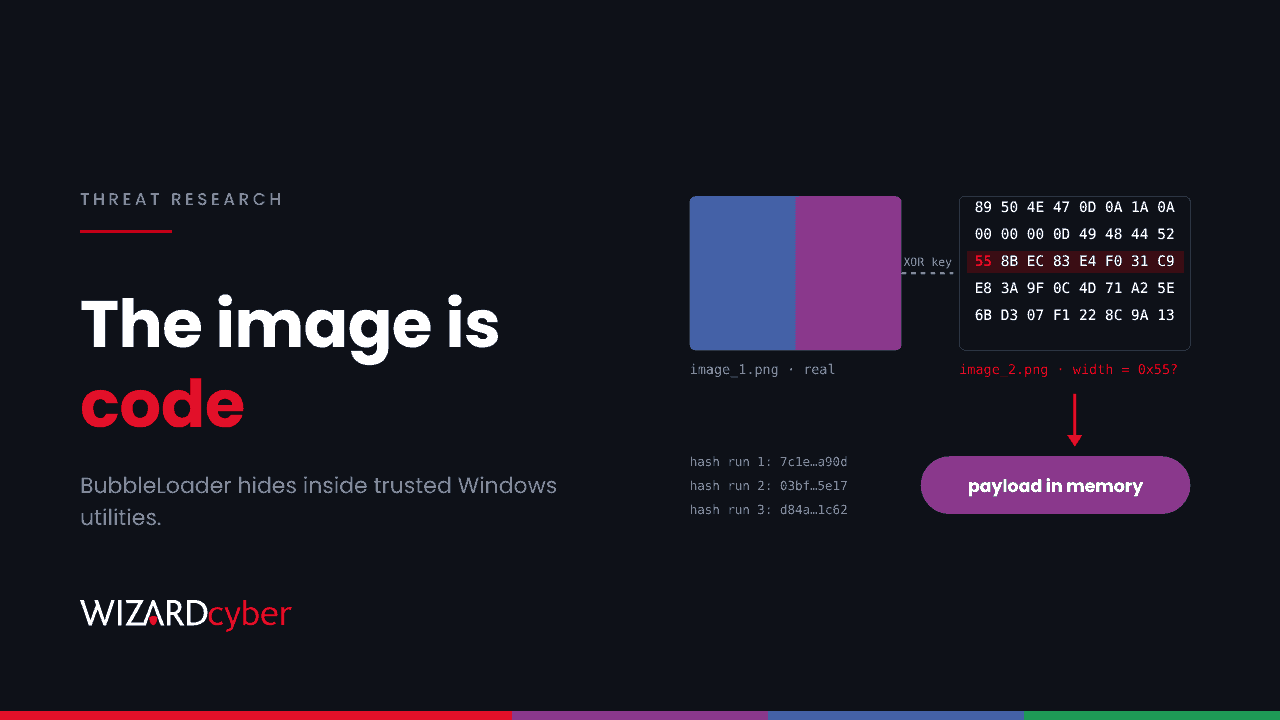
Most loaders bring their own executable. BubbleLoader takes yours instead. It patches the entry point of a familiar Windows utility, the kind of archive tool, debugger or media player people download without thinking, and turns it into a carrier. The malicious code sits inside something that looks like a PNG image, and the payload's in-memory hash changes every time it runs. A hash blocklist won't catch this. You need to check the software inventory itself, and watch how processes behave.
What was found
ReversingLabs describes BubbleLoader as "a loader/packer designed to hijack benign software". Help Net Security reported the research on 18 November. Here are the key points:
- Tampered copies of five legitimate programs have been found: an archive manager, an open-source debugger, a media player, a browser launcher and a virtualisation file-sharing driver tool.
- The earliest samples date from February 2026. Activity clustered in mid-September and early October.
- ReversingLabs lists 24 SHA-256 hashes, which identify the patched programs on disk.
- The final payload varies by sample, and ReversingLabs doesn't publish a single malware family.
- Help Net Security says the research doesn't explain how the tampered programs reach victims.
That last point matters. Without a known delivery channel there's no single email pattern or domain to block. The common factor is a familiar tool, obtained from somewhere other than its publisher.
How it works
Stage 1: a patched entry point
The attacker overwrites the instructions at the host program's entry point. When the program starts, the patch reserves a block of memory, copies two embedded images into it and jumps into the second one. Everything else in the binary is the genuine program.
Stage 2: a PNG that isn't one
The first image is a real PNG, a simple gradient. The second starts with a valid PNG signature but stops being an image where the width field should be, and from there on it's encrypted code. ReversingLabs' sample shows the giveaway: the first byte of a PNG width field should be 0x00, and in the sample it's 0x55. The shellcode decrypts the next stage with a rolling XOR, using the bytes of the first, genuine image as the key.
Stage 3: a reflective loader
The third stage decrypts the final payload and loads it directly into memory without writing it to disk. According to Help Net Security's summary, it overwrites the 0xCC filler bytes in the payload with values from the processor's timestamp counter, so the payload's in-memory hash is different on every run. It also hooks RtlPcToFileHeader in ntdll and registers the payload's exception table, so exceptions inside the injected code are handled cleanly instead of crashing the host.
Every BubbleLoader sample is a familiar program with a few changed bytes at its entry point. Hash blocklists miss that, and so do people.
Why a SOC should care
Tools like these are common on IT and developer workstations, which are often the best-connected machines on the network. Changing a binary's entry point invalidates its Authenticode signature, so a tampered copy should show up as unsigned or as failing signature checks. That only helps if somebody is checking. Many estates let users run whatever is in their Downloads folder, provided it has a familiar name and icon.
Hunting in Microsoft Defender
The queries below are starting points for Microsoft Defender XDR advanced hunting and Sentinel. Adjust the program list to the utilities used in your estate, and tune before relying on the results.
1. Familiar utilities that aren't properly signed
let Hosts = dynamic(["winrar.exe","rar.exe","x64dbg.exe","x32dbg.exe","wmplayer.exe",
                     "firefox.exe","virtiofs.exe"]);   // the tools named in the research
DeviceProcessEvents
| where Timestamp > ago(30d)
| where FileName in~ (Hosts)
| summarize Devices = dcount(DeviceId), FirstSeen = min(Timestamp), Paths = make_set(FolderPath, 10)
          by FileName, SHA1
| join kind=leftouter (
    DeviceFileCertificateInfo
    | summarize arg_max(Timestamp, IsSigned, IsTrusted, Signer) by SHA1) on SHA1
| where isempty(IsSigned) or IsSigned == false or IsTrusted == false
| project FileName, SHA1, Devices, FirstSeen, Signer, IsSigned, IsTrusted, Paths
| order by Devices asc
A copy that's rare, unsigned and running from a user's profile deserves a closer look. Most of these tools have publisher-signed builds, so an unsigned copy is worth questioning even when it turns out to be harmless.
2. The same file name, more than one hash
One version of a tool should have one hash across the estate. A hash seen on only one or two devices, next to a widely deployed version, is a classic sign of a tampered copy.
let Seen = DeviceProcessEvents
| where Timestamp > ago(30d)
| where FileName in~ ("winrar.exe","x64dbg.exe","wmplayer.exe","firefox.exe")
| summarize Devices = dcount(DeviceId) by FileName, SHA256, ProcessVersionInfoProductVersion;
Seen
| join kind=inner (Seen | summarize Variants = count() by FileName, ProcessVersionInfoProductVersion)
    on FileName, ProcessVersionInfoProductVersion
| where Variants > 1
| project FileName, ProcessVersionInfoProductVersion, SHA256, Devices, Variants
| order by FileName asc, Devices asc
3. Utilities making network connections they shouldn't
An archive manager or a media player opening outbound connections to unfamiliar hosts is unusual. A browser is excluded here because it connects everywhere.
DeviceNetworkEvents
| where Timestamp > ago(30d)
| where InitiatingProcessFileName in~ ("winrar.exe","x64dbg.exe","wmplayer.exe","virtiofs.exe")
| where RemoteIPType == "Public"
| summarize Connections = count(), Remote = make_set(RemoteUrl, 20)
          by DeviceName, InitiatingProcessFileName, InitiatingProcessSHA1, InitiatingProcessFolderPath
| order by Connections desc
4. Child processes from tools that rarely spawn any
DeviceProcessEvents
| where Timestamp > ago(30d)
| where InitiatingProcessFileName in~ ("winrar.exe","wmplayer.exe","virtiofs.exe")
| where FileName in~ ("powershell.exe","pwsh.exe","cmd.exe","rundll32.exe","regsvr32.exe",
                      "mshta.exe","wscript.exe","cscript.exe")
| project Timestamp, DeviceName, InitiatingProcessFileName, InitiatingProcessSHA1,
          FileName, ProcessCommandLine
On the memory side, ReversingLabs and Help Net Security point to two behaviours to alert on. The first is memory allocated as readable, writable and executable at once. The second is changes in memory protection aimed at ntdll's exception-handling routines. Defender's built-in memory protections and alerts cover some of this. If you run Sysmon or another EDR alongside Defender, these are good candidates for custom rules. For files at rest, a static rule that flags a PNG with a valid signature but a malformed header block is cheap to run on mail gateways and file shares.
Mitigation
- Allow only signed, known software. ReversingLabs recommends strict allowlisting and code-signing verification. Windows App Control for Business, or AppLocker with publisher rules, can block an unsigned copy of a tool that normally carries a signature.
- Give tools one approved source. Publish common utilities through Intune or your software portal so nobody has to search the web for them.
- Look at your developer and IT machines. They are the most likely to have debuggers and archive tools from mixed sources. See our earlier post on why developer workstations belong in Tier 0.
- Check hashes against the publisher. Where you can't enforce allowlisting yet, compare deployed hashes with the vendor's published builds.
How a managed SOC helps
- Behaviour over signatures. When the hash changes every run, detection depends on behaviour, process lineage and inventory. Our SOCs hunt for all three, 24/7.
- Every alert investigated. CYBERSHIELD AI's Investigation Agent works each alert through to a verdict, averaging 3m 30s, or 7m 50s where Advanced Investigation is needed. Senior analysts sign off on the managed service.
- Coverage built for your estate. Detection rules for your own tools and baselines are built at onboarding and included in the managed service.
If you'd like help finding unapproved software in your estate, talk to our team.