

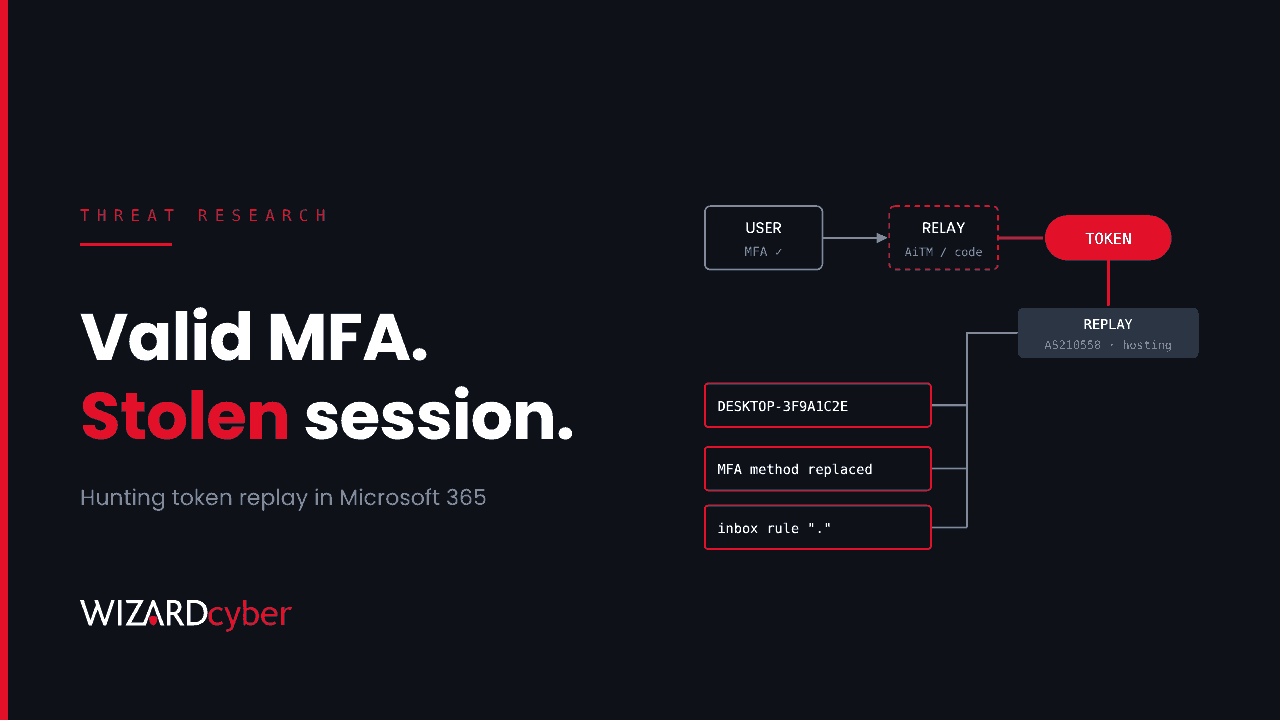
Most Microsoft 365 account takeovers still start with a password, but the one Huntress described on 22 October did not stop there. Between 14 July and 22 September 2026, an attacker captured sessions after users had completed MFA, then replayed those tokens from rented hosting. Huntress responded at 79 organisations, counting at least 497 successful sign-ins among more than 200,000 failed attempts. Once in, the attacker registered rogue devices, swapped out MFA methods and hid inbox rules. In one case a payroll email was redirected to an outside accountant.
This post covers how the campaign worked, what it leaves behind in Entra ID and Exchange Online, and how to hunt for it in Microsoft Sentinel and Defender XDR.
What happened
The campaign had two halves: capturing a token, then replaying it.
Capture
Huntress saw three capture routes:
- Adversary-in-the-middle (AiTM) relays. These proxy the real Microsoft sign-in page, so the user completes a genuine MFA prompt and the relay keeps the session that comes back.
- Device code phishing. The victim is persuaded to type a code into Microsoft's real device login page, which authorises the attacker's session. (Our device code phishing explainer covers this flow in detail.)
- Social engineering to get users through either flow.
Replay
Stolen tokens were replayed from a single hosting provider's range, 193.26.115.0/24 (AS210558, 1337 Services GmbH, Hamburg), plus a handful of other addresses in the same network. Huntress identified two tooling builds:
- Build A (scripted): a
nodeuser agent, or a bareMozilla/5.0, using the Microsoft Office and Microsoft Authentication Broker client IDs to make token requests. - Build B (browser replay): a current Chrome or Edge on Windows user agent, using the OfficeHome client.
The activity came in four phases. The busiest was a burst on 11 September: 303 successful sign-ins across 29 organisations over four days.
What the attacker left behind
Containment fails here when only the password is reset. Huntress saw three kinds of persistence that outlive a reset:
- Rogue Entra devices. At least 48 devices named
DESKTOP-followed by eight hex characters, registered from hosting IPs. A registered device can mint fresh tokens that look far more legitimate than a replayed session. - Replaced MFA methods. In 19 organisations the attacker deleted the user's authenticator methods and registered their own, often within minutes.
- Hidden inbox rules. Rules with very short or punctuation-only names that moved mail to RSS Feeds, RSS Subscriptions or Conversation History, or that keyed on payroll and banking terms.
Huntress makes one more point that changes triage. Sign-ins blocked by Conditional Access with error AADSTS53003 mean the credential was valid. The policy stopped that attempt; it did not stop the attack. We look at what that means for SOC triage in A Blocked Sign-In Is Still A Breached Password.
Who is affected
Any Microsoft 365 tenant where users can complete MFA through a phishable method (push, SMS, TOTP), where device code flow is not restricted, or where Conditional Access does not cover every app and client type. Finance, payroll and executive mailboxes are the obvious prizes, but the replay tooling sprayed widely.
Hunting in Microsoft Sentinel and Defender XDR
The queries below are starting points. Tune the time windows, add your own trusted egress ranges and expect some noise from legitimate cloud-hosted tools.
1. Sign-ins from the replay infrastructure
// Successful or CA-blocked sign-ins from the reported hosting network
let replayRanges = dynamic(["193.26.115.0/24"]);
let replayIPs = dynamic(["124.198.132.33","45.83.31.44","192.159.99.172"]);
union SigninLogs, AADNonInteractiveUserSignInLogs
| where TimeGenerated > ago(120d)
| where ipv4_is_in_any_range(IPAddress, replayRanges) or IPAddress in (replayIPs)
    or AutonomousSystemNumber == 210558
| project TimeGenerated, UserPrincipalName, IPAddress, AutonomousSystemNumber,
          AppDisplayName, ResourceDisplayName, UserAgent, ResultType, ResultDescription
| order by TimeGenerated asc
2. Scripted token use with the Build A fingerprint
// Office or Authentication Broker clients with a node or bare Mozilla user agent
AADNonInteractiveUserSignInLogs
| where TimeGenerated > ago(30d)
| where ResultType == "0"
| where AppDisplayName in ("Microsoft Office", "Microsoft Authentication Broker")
| where UserAgent == "node" or UserAgent == "Mozilla/5.0"
| summarize SignIns = count(), IPs = make_set(IPAddress, 20), ASNs = make_set(AutonomousSystemNumber, 10)
    by UserPrincipalName, AppDisplayName, UserAgent
| order by SignIns desc
3. Device code sign-ins from anywhere unexpected
SigninLogs
| where TimeGenerated > ago(30d)
| where AuthenticationProtocol == "deviceCode"
| summarize Count = count(), IPs = make_set(IPAddress, 20), Apps = make_set(AppDisplayName, 10)
    by UserPrincipalName
| order by Count desc
Most users never use device code flow. Anyone appearing here who is not on a conference-room device or a known CLI workflow deserves a look.
4. Rogue device registrations
AuditLogs
| where TimeGenerated > ago(120d)
| where OperationName in ("Add device", "Register device")
| extend DeviceName = tostring(TargetResources[0].displayName),
         Actor = tostring(InitiatedBy.user.userPrincipalName),
         ActorIP = tostring(InitiatedBy.user.ipAddress)
| where DeviceName matches regex @"^DESKTOP-[0-9A-Fa-f]{8}$"
| project TimeGenerated, Actor, ActorIP, DeviceName, OperationName
Windows uses DESKTOP- plus random characters as its default hostname, so this will match real laptops too. The signal is the combination: hex-only suffix, registered from a hosting IP, by a user who already has a managed device.
5. MFA wipe-and-replace
AuditLogs
| where TimeGenerated > ago(120d)
| where OperationName in ("User deleted security info", "User registered security info",
                          "Admin deleted security info")
| extend Target = tostring(TargetResources[0].userPrincipalName)
| summarize Ops = make_list(OperationName), First = min(TimeGenerated), Last = max(TimeGenerated)
    by Target, bin(TimeGenerated, 1h)
| where Ops has "deleted" and Ops has "registered"
| where Last - First < 30m
6. Hidden inbox rules
CloudAppEvents
| where TimeGenerated > ago(120d)
| where ActionType in ("New-InboxRule", "Set-InboxRule", "UpdateInboxRules")
| extend Params = tostring(RawEventData.Parameters)
| extend RuleName = extract(@'"Name","Value":"([^"]*)"', 1, Params)
| where strlen(RuleName) <= 3
    or Params has_any ("RSS Feeds", "RSS Subscriptions", "Conversation History")
    or Params has_any ("payroll", "salary", "bank", "invoice", "remittance")
| project TimeGenerated, AccountDisplayName, IPAddress, RuleName, Params
Containing it properly
If any of these hunts returns a hit, treat the account as compromised and work through all of the following, not just the first item:
- Reset the password and revoke sessions. A reset alone does not invalidate tokens already issued.
- Review and remove registered devices the user does not recognise, especially any registered from hosting IPs. Confirm with the user before deleting.
- Review authentication methods. Remove anything the user did not register, then have them re-register with a phishing-resistant method where possible.
- Remove malicious inbox rules and check forwarding settings and mailbox delegates.
- Look outward. Check sent items for fraud attempts on suppliers, payroll or customers, and warn anyone who may have received one.
Hardening against the next one
- Cover everything with Conditional Access. Huntress's first recommendation is to require MFA, or block, for all users, all cloud apps and all client app types, with no gaps for legacy clients.
- Block device code flow with the Conditional Access authentication flows condition, and allow it only for the specific accounts and devices that need it.
- Move privileged and finance users to phishing-resistant MFA (passkeys, Windows Hello for Business or FIDO2 keys), which AiTM relays cannot pass through.
- Disable user consent for new applications and route requests through admin approval.
- Treat valid-credential blocks as incidents rather than wins.
How a managed SOC helps
Token replay is quiet. There is no malware and no failed MFA prompt, just a successful sign-in from an address that should not be there, followed by small changes to devices, methods and mailbox rules. Catching it means correlating identity, audit and mailbox telemetry and having someone look at the result at 3am.
Our 24/7 SOC has run Microsoft Sentinel since 2019. CYBERSHIELD AI investigates every incident and reaches a verdict in an average of 3 minutes 30 seconds, and senior analysts sign off by default on the managed service. Identity alerts like these are worked end to end, from first sign-in to the last inbox rule, rather than closed on the first data point.
If you want to know whether this campaign touched your tenant, talk to us or book a demo to see how the SOC handles identity incidents.