
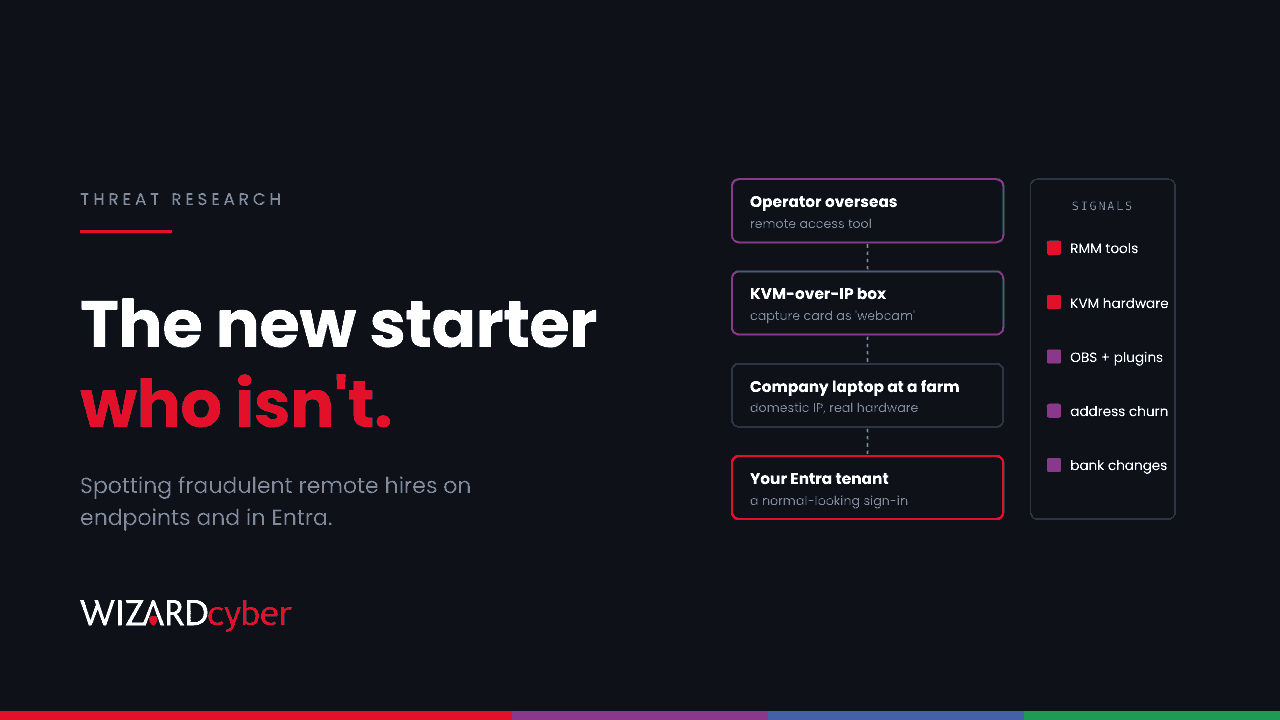
Most intrusions start with someone breaking in. This one starts with a job offer. On 13 October, the FBI published a new public service announcement warning that North Korean IT workers are expanding their use of facilitators and broadening their recruitment. On the same day, the US Department of Justice charged 14 people in a scheme that affected more than 70 US companies. More than 40 laptop farms in Texas were dismantled in September.
The worker passes interviews, signs a contract and gets a company laptop and an Entra ID account. From that point on, every sign-in is legitimate. That's what makes this hard: there's no exploit to detect. But the way these workers operate the laptop leaves signals on the endpoint and in identity logs, and those are worth hunting for.
What is happening
How the scheme works
According to the DoJ and the FBI, overseas IT workers use stolen or borrowed identities to get remote jobs, sometimes through staffing firms. Facilitators in the employer's country receive the company laptop at their home and keep it online, so the worker appears to connect from a domestic address. The worker then controls it remotely. Pay is moved abroad through accounts the facilitators open. The DoJ says the revenue funds the North Korean government and its weapons programmes.
What has changed
The FBI's latest alert describes several shifts:
- More, smaller laptop farms, so that losing one location doesn't take down the whole operation.
- A wider facilitator network. People are recruited to host devices, take interviews on the worker's behalf or lend their identity, and some work is subcontracted to freelancers in South Asia and West Africa.
- Better evasion. Since at least May 2026, the group has reportedly spoofed device identifiers, for example making a video capture card appear to be a webcam.
- Intimidation. Workers have demanded payment, threatened to leak data, and in some cases made threats against former managers after being dismissed.
Who is affected
The current charges concern US companies, but this isn't a US-only problem. The UK's Office of Financial Sanctions Implementation warned UK businesses in 2024 that North Korean IT workers are seeking jobs with UK firms, mostly presenting as non-North Korean remote freelancers, and that paying them can breach sanctions. Organisations most exposed are those that:
- hire remote developers, IT support or contractors, especially through third-party staffing firms;
- ship laptops to home addresses without checking them against verified identity;
- allow remote access tools on corporate devices or don't inventory them;
- have no joined-up process between HR, IT and security for new starters.
Detection and hunting
The FBI is clear that no single indicator is reliable, and that controls should be tuned to avoid harming legitimate employees and applicants. Treat the queries below as starting points for Microsoft Defender XDR advanced hunting and Microsoft Sentinel. They're meant to produce leads for an analyst to review, not alerts that lead straight to action against a person. Look for combinations of signals on the same device or account.
1. Remote access tools on corporate devices
The FBI names AnyDesk, TeamViewer and RustDesk as examples. Start by finding which devices run any remote access tool your organisation hasn't approved.
let RemoteTools = dynamic(["anydesk.exe", "teamviewer.exe", "teamviewer_service.exe",
    "rustdesk.exe", "screenconnect.windowsclient.exe", "remotepc.exe", "splashtop.exe"]);
DeviceProcessEvents
| where Timestamp > ago(30d)
| where FileName in~ (RemoteTools)
| summarize FirstSeen = min(Timestamp), LastSeen = max(Timestamp), Runs = count()
          by DeviceName, AccountName, FileName
| order by FirstSeen desc
Remove the tools your IT team uses, then pay most attention to devices issued in the last few months.
2. Hardware that suggests remote control
KVM-over-IP devices such as TinyPilot, PiKVM and GL.iNet units let someone control a laptop through its keyboard, mouse and display ports. Defender for Endpoint records plug-and-play connections, and the device description sometimes gives the hardware away. Expect to tune the keywords to what you see.
DeviceEvents
| where Timestamp > ago(30d)
| where ActionType == "PnpDeviceConnected"
| extend P = parse_json(AdditionalFields)
| extend Description = tostring(P.DeviceDescription), Class = tostring(P.ClassName),
         VendorIds = tostring(P.VendorIds)
| where Description has_any ("KVM", "PiKVM", "TinyPilot", "GL.iNet", "capture", "HDMI")
    or (Class in ("Camera", "Image") and Description has_any ("capture", "HDMI", "USB Video"))
| summarize FirstSeen = min(Timestamp), Devices = make_set(Description, 10) by DeviceName
3. Streaming and screen-relay software
The FBI lists OBS Studio with the VDO.Ninja plugin as unusual software to look for on work devices.
union
(DeviceProcessEvents
 | where Timestamp > ago(30d)
 | where FileName in~ ("obs64.exe", "obs32.exe")
 | project Timestamp, DeviceName, AccountName, Signal = "OBS Studio"),
(DeviceNetworkEvents
 | where Timestamp > ago(30d)
 | where RemoteUrl has "vdo.ninja"
 | project Timestamp, DeviceName, AccountName = InitiatingProcessAccountName, Signal = "VDO.Ninja")
| summarize FirstSeen = min(Timestamp), Signals = make_set(Signal) by DeviceName, AccountName
4. New starters whose sign-ins don't fit
Laptop farms give a domestic IP address for the device, but the account may still sign in from elsewhere, from a phone, a browser on another machine, or a VPN. This query finds accounts created in the last 90 days and summarises where they sign in from.
let NewUsers = AuditLogs
| where TimeGenerated > ago(90d) and OperationName == "Add user"
| extend UPN = tostring(TargetResources[0].userPrincipalName)
| project UPN, Created = TimeGenerated;
SigninLogs
| where TimeGenerated > ago(90d) and ResultType == "0"
| join kind=inner NewUsers on $left.UserPrincipalName == $right.UPN
| summarize Countries = make_set(tostring(LocationDetails.countryOrRegion), 10),
            ASNs = dcount(AutonomousSystemNumber), IPs = dcount(IPAddress),
            Apps = make_set(AppDisplayName, 10)
          by UserPrincipalName, Created
| where array_length(Countries) > 1 or ASNs > 5
An account that signs in from two countries in its first month isn't proof of anything. An account with remote access tools on its laptop, KVM hardware and sign-ins from a second country is worth a conversation with HR.
5. Changes outside the SOC's view
Some of the FBI's indicators sit with HR and finance, not security: frequent changes to bank details or home address, requests to ship replacement laptops to a new address, and verification documents that don't match. Agree with those teams how they'll tell security when they see them.
Mitigation
- Verify identity during hiring and again at onboarding. The FBI suggests live verification and checking more than one form of ID. Make sure the person on the video call is the person who collects the laptop.
- Ship hardware only to verified addresses. Treat a last-minute change of delivery address, or a request for a replacement after a reported theft, as a reason to check, not a routine ticket.
- Control remote access tools. Allow only the tools your IT team uses, block the rest with application control, and alert when one appears.
- Ask staffing firms the hard questions. Find out how they verify identity and where they send end-client devices. The DoJ case includes workers placed through staffing firms that didn't know.
- Connect HR, IT and security. The FBI recommends cross-functional working because the signals are spread across all three.
- Be careful and fair. Don't filter applicants by name or nationality. The FBI warns this is unreliable and harms legitimate candidates, including victims of identity theft. Use evidence about behaviour, and if you suspect a worker, take legal advice before you act and report it to the authorities.
For a broader explanation of the different kinds of insider risk, see our guide What Is an Insider Threat?
How a managed SOC helps
None of these signals is conclusive on its own, and most of them would be ignored if they arrived as separate alerts on separate days. Finding a fraudulent hire means correlating endpoint, identity and network activity for the same person over weeks, and then handing it to people who can judge it carefully.
- 24/7 coverage. Our SOCs are manned around the clock, so activity in an overseas working day is seen when it happens.
- Investigations that join the signals. CYBERSHIELD AI's Investigation Agent brings related incidents together into a case and works each one to a verdict, averaging 3m 30s, or 7m 50s where it needs Advanced Investigation.
- People make the call. On the managed service, senior analyst sign-off is the default, and close or escalate decisions follow policy and your own decision templates. That matters when the subject is a member of staff.
- Microsoft-native hunting. We have run Microsoft Sentinel since 2019, and hunts like these can be tuned to your estate and run on a schedule.
If you'd like to know what your endpoint and identity telemetry would show about a fraudulent hire, book a demo or talk to our team.