
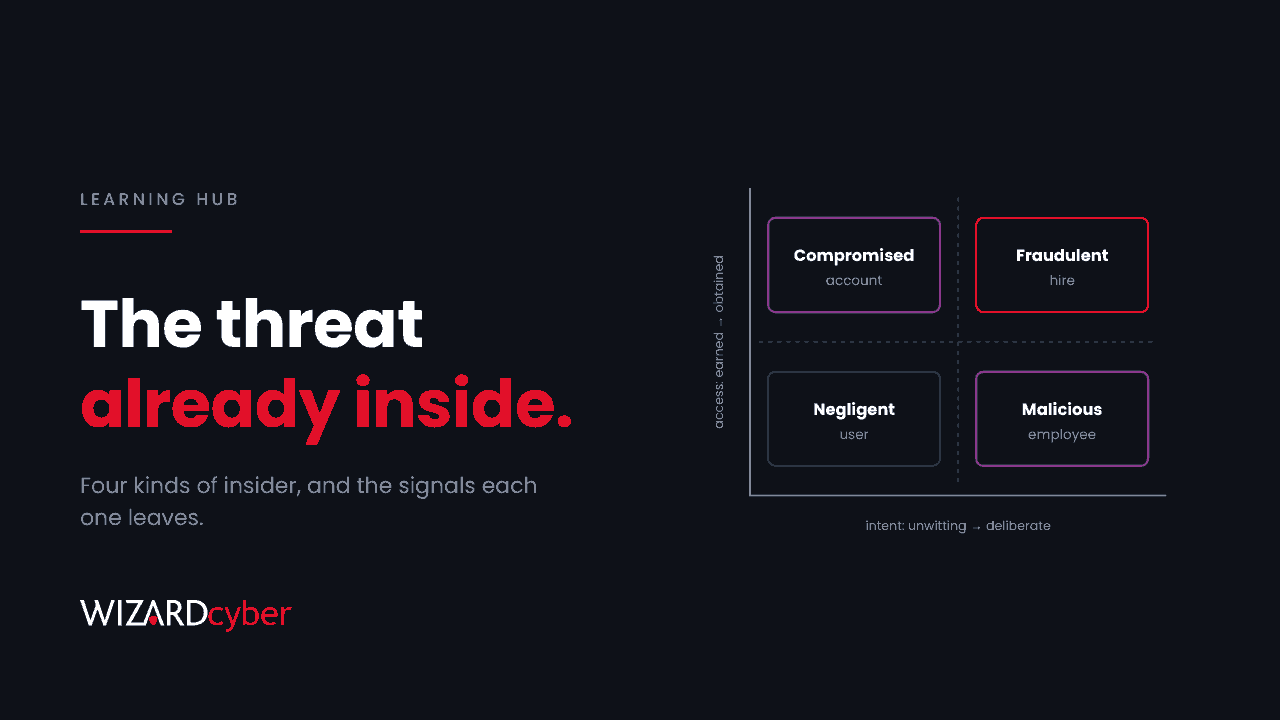
An insider threat is the risk that someone with legitimate access to your organisation's systems, data or premises uses that access to cause harm, whether they mean to or not. CISA defines it as the potential for an insider to use their authorised access or understanding of an organisation to harm it. The insider might be an employee, a contractor, a supplier or a former member of staff whose access was never removed.
What makes insider threats hard is that the access is real. There's no exploit and no malware to block at the door. The person signs in with valid credentials and uses tools they're allowed to use. Detecting insider activity means spotting when normal access is being used in an abnormal way.
The four types of insider threat
It helps to separate insiders by two questions: did they intend harm, and did they come by their access honestly?
1. Negligent insiders
Most insider incidents involve no malice. Someone emails a spreadsheet to the wrong person, shares a folder with "Anyone with the link", uploads company data to a personal cloud account or an AI tool, or ignores a policy because it slows them down. Their intent is innocent, and the damage can be just as real.
2. Malicious insiders
These are people who deliberately misuse their access. Common motives include money, a grievance against the employer, or taking customer lists and intellectual property to a competitor or a new job. Malicious insiders often act around a change in their circumstances, such as a resignation, a missed promotion or a disciplinary process.
3. Compromised insiders
Here the insider is unaware. An attacker has stolen their password or session, through phishing, password spraying or malware, and is acting as them. From the logs it looks like the employee is doing it. Strictly this is an external attack, but it is detected the same way, by spotting behaviour that doesn't fit the person.
4. Fraudulent hires
Some insiders were never who they said they were. The clearest current example is North Korean IT workers, who use stolen identities to get remote jobs and then use the access they're given. The FBI warned again in October 2026 that these schemes are expanding. We cover the detection side in The New Starter Who Isn't.
Warning signs of an insider threat
No single signal proves anything. Look for combinations, and for changes from that person's normal pattern.
Technical signs
- Unusual volume. Downloading, syncing, printing or emailing far more files than usual, especially from SharePoint sites they rarely visit.
- Data leaving by new routes. Forwarding work email to personal addresses, uploading to personal cloud storage, copying to USB drives or pasting into unapproved AI tools.
- Access beyond the role. Searching or opening data that has nothing to do with their job, or requesting access they don't need.
- Odd timing or location. Activity at unusual hours or from unexpected places, which can also point to a compromised account.
- Covering tracks. Deleting large numbers of files or emails, clearing browser history, or trying to turn off security tools.
- Unapproved tools. Remote access software, personal VPNs or hardware the organisation didn't issue.
Behavioural and HR signs
- A resignation or notice period, particularly to join a competitor.
- Open disputes, disciplinary action or expressed resentment towards the organisation.
- Reluctance to take leave or let anyone else cover their work.
- For new remote hires: identity documents that don't match, changes of address for hardware delivery, or reluctance to appear on camera.
Behavioural signs are sensitive. They should be handled with HR and legal input, consistently and fairly, and never used to profile people by background or protected characteristics.
How to detect insider threats in Microsoft 365
Most organisations running Microsoft 365 already collect the logs needed to see insider activity. The challenge is turning them into signals someone reviews.
Microsoft Purview Insider Risk Management
Insider Risk Management in Microsoft Purview correlates activity such as downloads, sharing, printing and exfiltration with triggers like a resignation date from your HR system. It uses pseudonymised user names by default, which helps keep investigations fair. It needs the right licensing and careful policy design, but it's built specifically for this problem.
Data loss prevention and sensitivity labels
Purview DLP and sensitivity labels let you see and control where sensitive data goes: blocking or warning on external sharing, uploads to personal cloud storage, or copying to USB.
Defender, Entra and Sentinel
Microsoft Defender for Endpoint shows processes, USB activity and remote access tools on devices. Entra ID sign-in logs show where and how accounts sign in. Microsoft Sentinel can bring these together with HR and audit data to find patterns across all of them.
A starter query: unusual download volumes
This Microsoft Sentinel query compares each user's SharePoint and OneDrive downloads over the last day with their own 30-day average. It's a starting point. Tune the threshold, and exclude service accounts and sync clients that download legitimately at volume.
let Baseline = OfficeActivity
| where TimeGenerated between (ago(31d) .. ago(1d))
| where Operation in ("FileDownloaded", "FileSyncDownloadedFull")
| summarize DailyAvg = count() / 30.0 by UserId;
OfficeActivity
| where TimeGenerated > ago(1d)
| where Operation in ("FileDownloaded", "FileSyncDownloadedFull")
| summarize Today = count(), Sites = dcount(Site_Url) by UserId
| join kind=leftouter Baseline on UserId
| extend Ratio = Today / max_of(DailyAvg, 1.0)
| where Today > 200 and Ratio > 10
| order by Ratio desc
How to reduce insider risk
- Apply least privilege. People should have access to what their job needs, and no more. Review access regularly, especially after role changes.
- Remove access promptly when people leave. Disable accounts, revoke sessions and app access, and collect devices on the last day, or before it for high-risk departures.
- Classify sensitive data. You can't protect what you haven't identified. Labels make DLP and monitoring far more accurate.
- Verify identity at hiring. Particularly for remote roles and contractors, confirm that the person you hired is the person doing the work.
- Connect HR, IT and security. Agree how HR events such as resignations and disciplinary cases are shared with security, with appropriate privacy safeguards.
- Train people, without blame. Most incidents are mistakes. Make it easy for staff to report errors, so they're fixed early instead of hidden.
- Monitor, and know who will respond. Detection only helps if someone reviews the alerts and has a process for handling cases involving staff.
Frequently asked questions
What is the most common type of insider threat?
Negligent insiders, people who cause harm by mistake or by cutting corners, are generally the most common. Malicious insiders are rarer but can do more targeted damage.
Is a compromised account an insider threat?
It's an external attacker using an insider's identity, so many frameworks classify it separately. In practice, it's detected the same way, by spotting behaviour that doesn't fit the account's normal pattern.
Can contractors and suppliers be insider threats?
Yes. Anyone with legitimate access counts, including contractors, suppliers with remote access and former staff whose accounts are still active.
How do you monitor for insider threats without invading privacy?
Focus on activity involving company data and systems, be transparent with staff about what is monitored, pseudonymise users during early triage where your tools allow, and involve HR and legal before acting on any individual case.
What should we do if we suspect an insider?
Preserve the evidence, limit further access if the risk is immediate, and involve HR and legal before you approach the person. If you suspect fraud or sanctions breaches, such as a fraudulent hire, take legal advice and report it to the authorities.
How Wizard Cyber helps
Insider activity rarely triggers a single obvious alert. It appears as small changes across identity, endpoint and data activity, often over days or weeks. Our SOCs are manned 24/7, and CYBERSHIELD AI's Investigation Agent groups related incidents into a case and works each one to a verdict, typically in 3m 30s. On the managed service, a senior analyst signs off by default, which matters when the subject of an investigation is a colleague.
If you'd like to understand what your Microsoft 365 telemetry would show about insider risk, book a demo or talk to our team.