
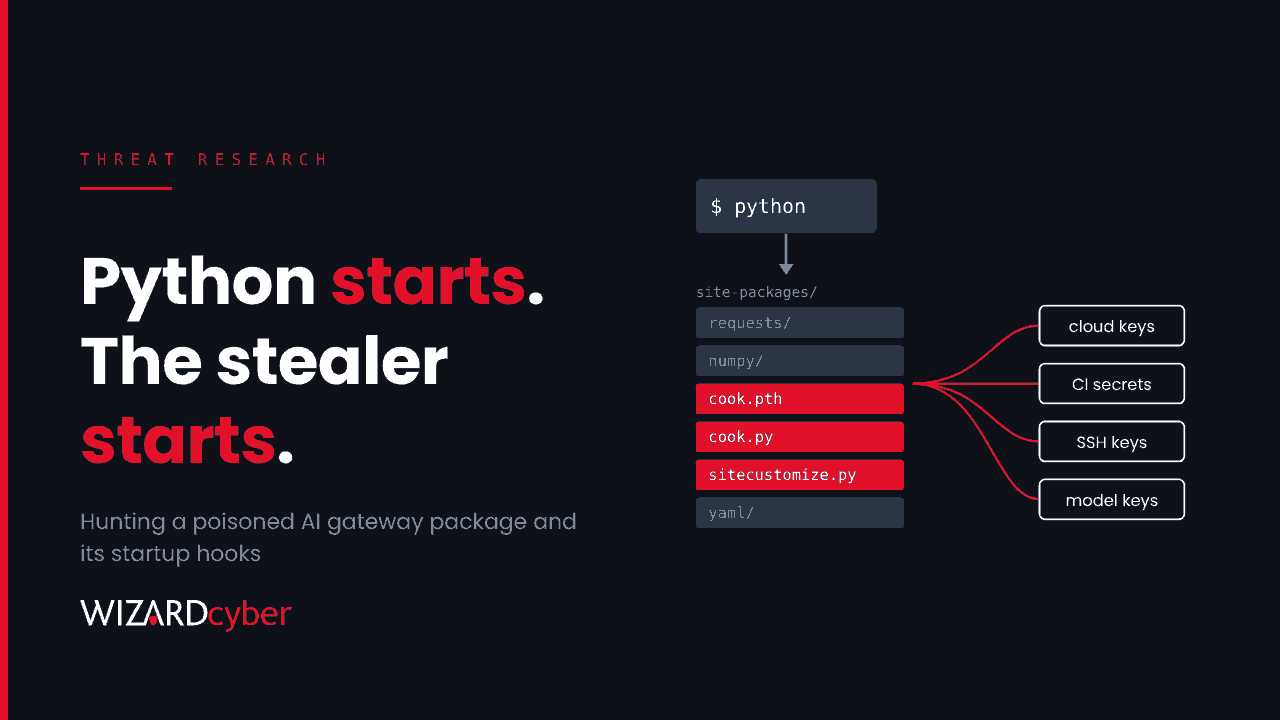
Most supply chain compromises need the victim to run the poisoned code. This one only needed Python to start. A hijacked release of a widely used open-source AI gateway library, version 1.107.0, was published on 21 October 2026. It installed three extra files that Python loads at startup, before any application code runs. Any process that started Python in an affected environment ran a credential collector, whether or not it imported the library.
This post covers what the release did, why removing the package does not remove the threat, and how to hunt for it and contain it with Microsoft Defender and Sentinel.
What happened
On 23 October, Microsoft Threat Intelligence published a full analysis of the compromised release. According to the project's maintainers, as cited by Microsoft, stolen developer GitHub credentials were used to point the release workflow at a lookalike repository, and a second developer's credential was used to pass a production approval step. The malicious version was published to PyPI and shipped in the project's official container images.
The window was short. The project's own statement, as summarised by Cyware, puts the PyPI package online from 11:39 to 13:23 UTC on 21 October, with the container images available on Docker Hub until 14:20 UTC. That is long enough. Automated builds, dependency updates and container pulls that ran in those hours took the bad version, and caches, internal mirrors and built images keep it long after the public copy has gone.
Only version 1.107.0 is affected, across the macOS, Linux and Windows wheels and the images built from it. The project's enterprise edition was reported as not affected.
How the startup hook works
When Python starts, its site module reads every .pth file in the library directory. These files normally just add paths. But any line in a .pth file that begins with import is executed. Python also runs a file called sitecustomize.py automatically if it finds one. Both mechanisms are documented, legitimate features, and both run before your own code.
The malicious release placed three files in the library directory, outside the package's own folder:
cook.pthimportscook.pyevery time Python starts.cook.pydecodes an embedded collector and runs it in a background thread, so the host process carries on normally.sitecustomize.pyis a loader aimed at Unix systems. It reads a pointer file hosted on GitHub, fetches code from the address it finds there and runs it without any signature check. Microsoft found the pointer empty during its analysis, so no second stage was confirmed. The loader stays armed until it's removed.
Microsoft's guidance is specific about one point: deleting the package's folder can leave all three files behind. A machine where someone ran a quick clean-up may still run the collector every time Python starts.
What it steals
The collector went after nearly everything a developer workstation, build agent or AI gateway server holds:
- The gateway's own database, including its credential and model configuration tables, up to 500 rows per query.
- Cloud and workload identities: Azure CLI, AWS and Google Cloud credentials, Kubernetes service account tokens, Docker configuration, mounted secrets and cloud metadata service requests.
- Source control and package manager credentials,
.envfiles and private keys. - Configuration and tokens for AI assistants, IDEs and their extensions.
- SSH, GPG and TLS keys, CI/CD and infrastructure tool configuration.
- Browser credential data, shell history and process environment variables. On Linux, it also read other processes' environments.
Each run encrypted the haul with a fresh AES-256 key, wrapped that key with an embedded RSA public key, and posted the archive to litellm[.]dev/healthcheck. Staging happened in temporary folders named .pc_e_*, using OpenSSL.
An AI gateway exists to hold everyone's model keys in one place. That is exactly why it was worth compromising.
Hunting in Defender and Sentinel
Microsoft has published Defender detections, a Defender Vulnerability Management exposure item (TVM-2026-0003) and six advanced hunting queries. Use those first. The queries below follow the same evidence and are starting points to tune for your estate. Remember that build agents, containers and Linux servers only appear here if Defender for Endpoint or Defender for Cloud covers them.
1. Who might have it
DeviceTvmSoftwareVulnerabilities
| where CveId == "TVM-2026-0003"
| project DeviceName, OSPlatform, SoftwareName, SoftwareVersion
A result means exposure, not compromise. It gives you the list of machines to examine first.
2. Connections to the collection endpoint
DeviceNetworkEvents
| where TimeGenerated > ago(14d)
| where RemoteUrl has "litellm.dev"
| project TimeGenerated, DeviceName, InitiatingProcessFileName,
          InitiatingProcessCommandLine, InitiatingProcessAccountName,
          RemoteUrl, RemoteIP
Check that matches are the lookalike collection domain and not a similarly named legitimate site. If you send DNS or proxy logs to Sentinel, search those too, because they cover machines without an agent.
3. The startup files on disk
DeviceFileEvents
| where TimeGenerated > ago(14d)
| where ActionType in ("FileCreated", "FileModified")
| where FileName in~ ("cook.pth", "cook.py")
    or (FileName =~ "sitecustomize.py" and FolderPath has "site-packages")
| project TimeGenerated, DeviceName, FolderPath, FileName, SHA256,
          InitiatingProcessFileName, InitiatingProcessCommandLine
Some environments use a legitimate sitecustomize.py, so review those results rather than alerting on them. To match exact files, add the six startup-file SHA-256 values from Microsoft's post.
4. The encryption staging step
DeviceProcessEvents
| where TimeGenerated > ago(14d)
| where FileName in~ ("openssl", "openssl.exe")
| where ProcessCommandLine has ".pc_e_"
| project TimeGenerated, DeviceName, ProcessCommandLine,
          InitiatingProcessFileName, InitiatingProcessCommandLine
For cloud workloads, Microsoft's equivalent query runs against CloudProcessEvents and looks for openssl pkeyutl -encrypt -pubin with /tmp/.pc_ paths.
5. Direct reads of the gateway's credential tables
DeviceProcessEvents
| where TimeGenerated > ago(14d)
| where FileName startswith "python"
| where ProcessCommandLine has_any ("LiteLLM_CredentialsTable", "LiteLLM_ProxyModelTable")
| project TimeGenerated, DeviceName, AccountName, ProcessCommandLine,
          InitiatingProcessFileName
6. Stolen credentials being used
Finding the collector tells you what left. It doesn't tell you what was used. Look for the identities that lived on affected machines signing in from somewhere new:
let Window = datetime(2026-10-21);
AADServicePrincipalSignInLogs
| where TimeGenerated > Window
| where ResultType == "0"
| summarize FirstSeen = min(TimeGenerated), IPs = make_set(IPAddress, 20)
          by ServicePrincipalName, AppId
| join kind=leftanti (
    AADServicePrincipalSignInLogs
    | where TimeGenerated between (Window - 30d .. Window)
    | distinct AppId
  ) on AppId
That finds workload identities that were quiet before 21 October and active since. Run the same idea over your source control, model provider and cloud provider audit logs. If those aren't in Sentinel yet, an incident like this is a strong reason to bring them in.
If you find it
- Don't investigate with the suspect interpreter. Running Python or pip on an affected machine runs the collector again. Inspect it from a clean system.
- Find every copy. Check installed environments, pip and uv caches, internal package mirrors, lock files, build outputs and container images. Use image digests, not tags.
- Rebuild, don't clean. Rebuild from verified artifacts and confirm all three startup files are gone from the library path.
- Rotate from a clean machine. Model provider keys, gateway virtual keys, cloud credentials, service principal secrets, CI/CD secrets, source control tokens, SSH and GPG keys, and AI tool tokens. Revoke sessions as well as resetting passwords and keys.
- Correlate before declaring. Combine file, process, network and identity evidence. The exposure list says where to look, not what happened.
Reducing the next one
- Pin by hash. Hash-pinned lock files would have refused a new artifact, even under a trusted version number.
- Delay new releases. A short quarantine before a new upstream version reaches your internal mirror would have outlasted this whole window.
- Restrict egress from build agents, developer machines and AI gateway servers to the destinations they actually need.
- Replace stored keys with identities. Managed identities and workload identity federation leave nothing on disk to collect. Our explainer on secrets management covers the options.
For the wider pattern, see our guide to supply chain attacks and our view on why AI gateways belong in Tier 0.
How a managed SOC helps
- Endpoint, cloud and identity in one investigation. A collector on a build agent and a service principal signing in from a new network two days later are one incident. CYBERSHIELD AI's Investigation Agent works each alert to a verdict, averaging 3m 30s, and our analysts take it from there.
- 24/7 cover. Stolen keys get used quickly. Our SOCs are staffed around the clock, with senior analyst sign-off by default on the managed service.
- The rest of the estate. Microsoft Sentinel is the only hard requirement. Connectors and rules for source control, cloud and other log sources are built at onboarding and included in the managed service.
If you run AI gateways or Python build pipelines and want a second pair of eyes on your exposure, talk to our team.