

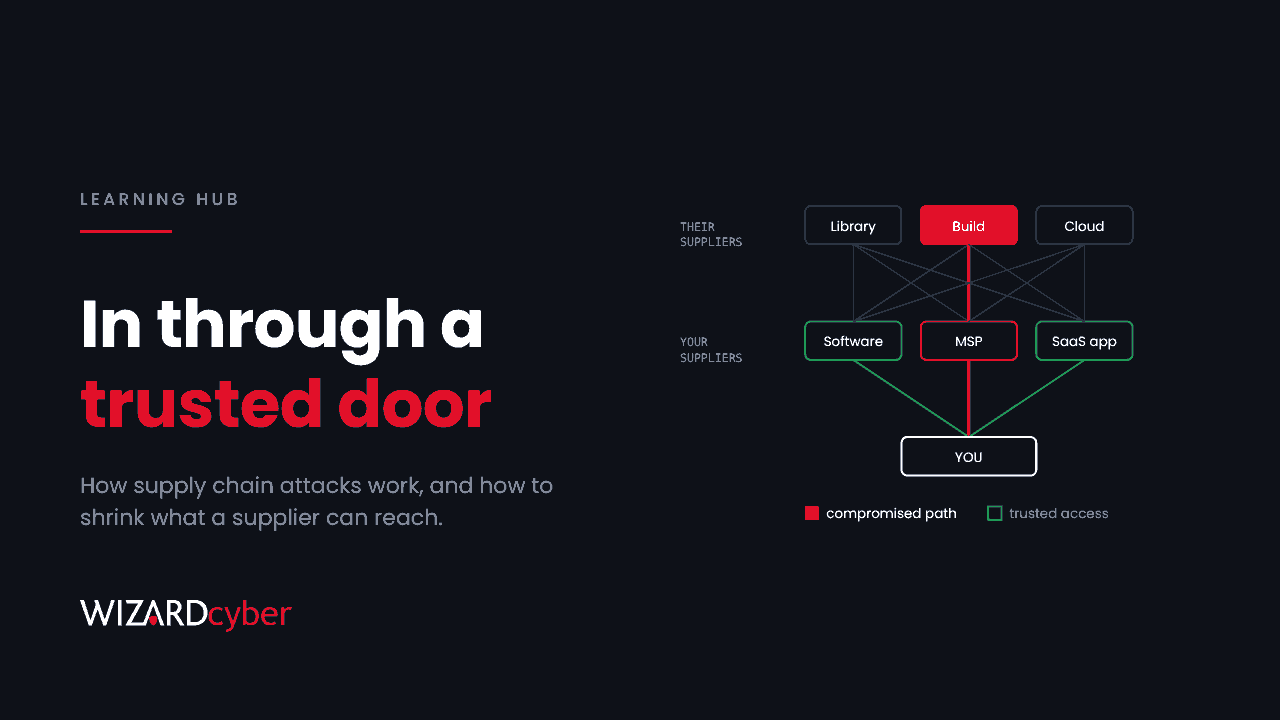
A supply chain attack is when an attacker compromises your organisation by first compromising someone you trust: a software vendor, a managed service provider, a cloud app or a contractor. Instead of breaking through your defences, they arrive through a channel you've already approved, such as a software update, a remote management tool, or an app with permission to read your mail. To your systems it looks like normal business.
That's why supply chain attacks do so much damage. One compromised supplier can reach thousands of customers at once, and each of those customers sees activity from a trusted source. This guide covers the main types, real examples, why they're hard to detect, and the steps that reduce your exposure.
How a supply chain attack works
Most supply chain attacks follow the same pattern:
- Pick a supplier with wide reach. The best targets have many customers and privileged access to them: software that runs with administrator rights, tools that manage other networks, or cloud apps with tenant-wide permissions.
- Compromise the supplier. Through stolen credentials, an unpatched system, a malicious insider or a poisoned dependency in their own code.
- Use the trusted channel. Push a tampered update, use the supplier's remote access, or sign in with the supplier's credentials.
- Choose which customers matter. Many attackers reach thousands of organisations but only act on a handful. The rest get reconnaissance, or nothing at all.
The main types of supply chain attack
Software build and update compromise
The attacker gets into a vendor's build system and adds malicious code to a legitimate, signed product. Customers install it through their normal update process. The best-known example is SolarWinds Orion in 2020, where a backdoored update reached around 18,000 customers. A smaller number of government and technology organisations were then targeted for espionage.
Open-source and dependency attacks
Modern software pulls in hundreds of open-source packages. Attackers publish look-alike packages, take over abandoned ones or compromise a maintainer's account, so their code ends up inside other people's applications. Build pipelines are a target too. Stolen CI/CD secrets let an attacker publish packages or reach cloud environments directly.
Managed service provider (MSP) attacks
MSPs hold administrative access to many customers at once, often through remote monitoring and management tools. Compromise the MSP or its tooling and you can reach every customer behind it. In July 2021, ransomware was pushed through Kaseya VSA to managed service providers and on to an estimated 800 to 1,500 downstream businesses.
SaaS and OAuth app compromise
This is the newest pattern and, in Microsoft 365 estates, one of the most important. When you approve a third-party app in Microsoft Entra ID, it gets a standing identity in your tenant with whatever permissions you granted. If the vendor's credential for that app is stolen, the attacker can sign in as the app in every tenant that approved it. No user is phished and no MFA prompt appears. In October 2026, a backup app's credential was used to sign in to 173 Microsoft 365 tenants this way. We cover the detail in One Trusted App, 173 Tenants.
Third-party software vulnerabilities
Not every supply chain incident involves a compromised supplier. Sometimes a widely used product has a flaw that attackers exploit across many customers at once. In 2023 the Cl0p group exploited a zero-day in the MOVEit Transfer file-sharing product to steal data from thousands of organisations. Many victims had never heard of MOVEit, because it was run by their payroll provider or pension administrator.
Hardware and physical supply chain
Tampered devices, implants and counterfeit components are rarer, but they exist. They mostly matter to organisations with state-level adversaries or critical infrastructure.
Why supply chain attacks are hard to detect
- The activity is trusted. Signed updates, known remote access tools and approved apps are exactly what your controls are set up to allow.
- You don't hold the keys. You can't rotate a vendor's signing key or an app's credential. Often you can only disable it.
- Logs are thin. App-only access in Microsoft 365 records Microsoft's infrastructure addresses, not the caller's. Some directory reads aren't audited at all unless you've switched on Microsoft Graph activity logs.
- Nobody owns the relationship. The app was approved for a trial years ago. The supplier's contract sits with procurement. Security finds out when the vendor's advisory lands.
- The window is long. In many supply chain cases the attacker was inside the supplier for weeks or months before anyone noticed.
How to reduce your exposure
You can't prevent a supplier being compromised. You can limit what they can reach, notice when their access is misused, and respond quickly when they tell you something has gone wrong.
1. Know who has access
Build an inventory of every supplier with access to your systems or data. Include software with administrator rights, MSPs and contractors with remote access, and every third-party app approved in Entra ID. For each one, record an internal owner and a reason it exists. If nobody can explain an app, remove it.
2. Grant the least access that works
Review what each supplier can do, not just whether they can get in. Does the backup app need write access to every mailbox? Does the contractor's account need Domain Admin? Restrict user consent to third-party apps in Entra ID, and send requests through the admin consent workflow so someone reviews the permissions before approving them.
3. Make supplier access visible
Collect the logs that show supplier activity and send them to your SIEM. That means Entra service principal sign-ins and audit logs, Microsoft Graph activity logs, remote access tool session logs, and the logs from any appliance a supplier manages. Alert on supplier identities doing things they don't normally do, such as signing in from a new network, adding credentials or taking new roles.
4. Assess suppliers before and during the contract
Ask how suppliers protect the credentials and tools they use to access you, how quickly they'll tell you about an incident, and what logs they can give you. The UK NCSC's supply chain security guidance is a good framework. Revisit the answers on a schedule, not just at onboarding.
5. Have a playbook for "our supplier was breached"
When a supplier advisory lands, you want to know within the hour whether you use them, what they can reach, and how to cut off their access without breaking the business. Write that down in advance. Disable before you delete, preserve logs before they age out, and hunt back to the start of the supplier's exposure window, not just to the date of the announcement.
Supply chain risk and regulation
Regulators increasingly expect organisations to manage risk from their suppliers. In the EU, NIS2 and DORA both place explicit duties on supply chain security. In the UK, the Cyber Security and Resilience Bill, introduced to Parliament in November 2025, proposes bringing managed service providers into scope of the NIS regulations. Even where no regulation applies, customers and insurers are asking the same questions in due diligence.
Frequently asked questions
What is the difference between a supply chain attack and third-party risk?
Third-party risk is the broad exposure you take on through any supplier, including outages, financial failure and data handling. A supply chain attack is one specific way that risk is realised, where an attacker uses a supplier deliberately to reach you.
Is a supply chain attack the same as a software supply chain attack?
No. A software supply chain attack is one type, involving tampered code, builds or dependencies. Supply chain attacks also include compromised MSPs, SaaS apps, contractors and hardware.
Can MFA stop a supply chain attack?
Usually not on its own. Updates, app-only access and supplier service accounts typically don't involve an interactive user sign-in, so there's no MFA prompt to stop. Least privilege, monitoring and a fast way to cut off access matter more.
How do I check which third-party apps have access to my Microsoft 365 tenant?
In the Microsoft Entra admin centre, go to Enterprise applications and set the filter to show all applications. Each app's Permissions page shows what it's been granted. Our guide to service principals in Entra ID explains what you're looking at.
Who is most at risk?
Any organisation that relies on outside software or services, which is nearly all of them. Organisations that are themselves suppliers, such as MSPs, SaaS providers, law firms and outsourcers, are attractive targets because they lead to many others.
How Wizard Cyber helps
Our third-party risk management service helps you find out which suppliers can reach your systems and data, and how well they protect that access. When a supplier is compromised, our SOCs are manned 24/7 and can hunt across your Microsoft estate the same day. CYBERSHIELD AI's Investigation Agent works each alert through to a verdict, typically in 3m 30s, and on the managed service a senior analyst signs off by default. If you need certainty after a supplier incident, a compromise assessment tells you whether their access was used against you.
If you'd like to know which suppliers hold standing access to your organisation today, book a demo or talk to our team.