

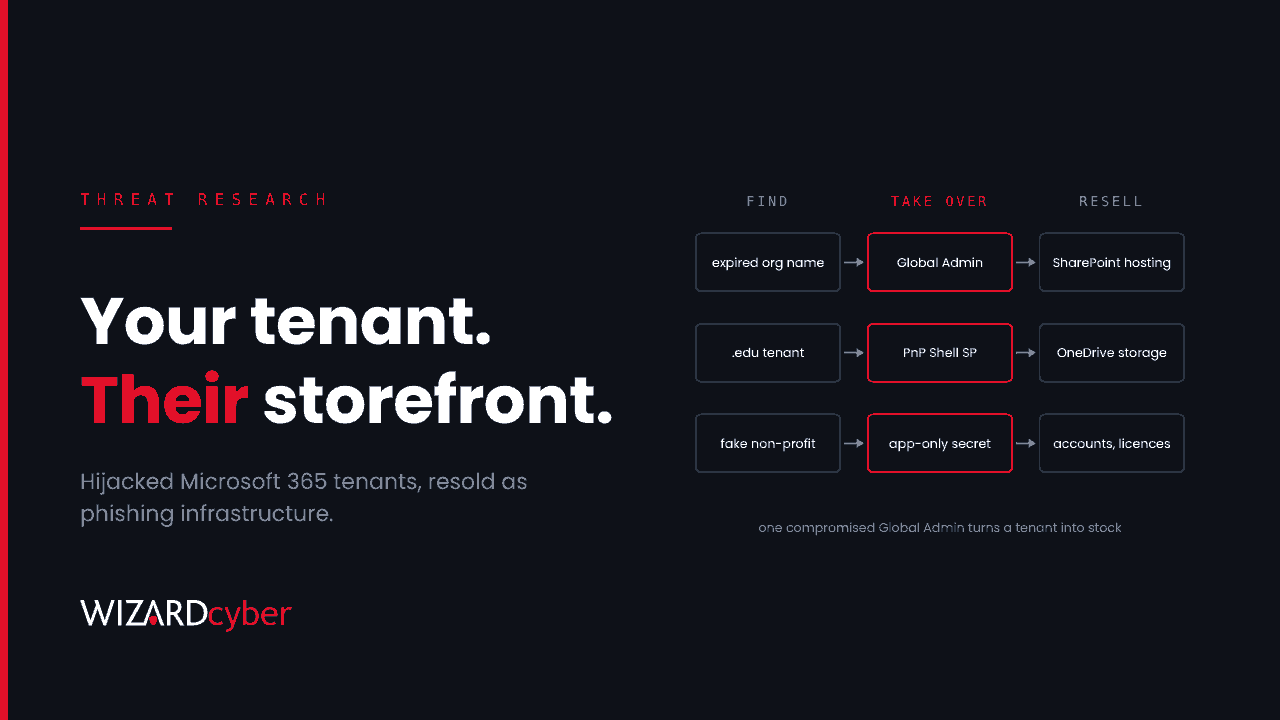
Most phishing write-ups are about the victim who clicks. This one is about the organisation whose tenant hosted the page. On 14 October, Microsoft's Digital Crimes Unit and partners disrupted a phishing-as-a-service operation responsible for more than one billion phishing emails and text messages since January, sent to more than 75,000 organisations. Part of what it sold was other people's Microsoft 365 tenants.
Microsoft Threat Intelligence tracks the marketplace as Storm-3119 and the developers of its three phishing kits (CoGUI, Haozi and Iron Man System) as Storm-2990. The kits get the headlines. For defenders, the more useful part of Microsoft's report is how Storm-3119 took over tenants, because every step of it leaves a record in Entra ID audit logs.
What happened
Finding tenants nobody is watching
According to Microsoft, Storm-3119 used automation to find expired environment and organisation names, then reused legitimate customer information tied to them to avoid detection. It focused on Microsoft 365 and Azure for Education tenants and sold listings sorted by age, subscription type and domain type, such as .edu or .org. Separately, it set up fraudulent organisations with supporting websites, probably using AI-generated content and forged documents, to get new tenants approved.
Taking over with a Global Administrator
Once it had a Global Administrator account, the operator self-provisioned the PnP Management Shell service principal and granted it broad Microsoft Graph permissions. These included read and write access to directory data, AppCatalog.ReadWrite.All and full control of the SharePoint API. Microsoft says the actor's admin panels then reset passwords silently, without forcing a change at next sign-in, assigned education licences and granted privileged attributes it could sell later.
Staying in through the application, not the user
For persistence, the operator used the compromised environment's client secret in an application-only authentication flow. Microsoft describes this as more durable, more scalable and harder to detect than holding a user session. Resetting the Global Administrator's password does nothing to an app secret.
Selling the storage
The tenant's SharePoint and OneDrive became bulk hosting for phishing pages, and the hijacked accounts, licences and storage were resold through an automated storefront. Lures sent from or linked to a genuine tenant's SharePoint inherit that tenant's reputation, which is the point.
Who is affected
- Organisations with tenants they've stopped watching. Trial tenants, project tenants, tenants left over from an acquisition, and tenants for subsidiaries or charities that nobody in security monitors. We cover this in more depth in Abandoned Tenants Are The New Expired Domains.
- Education and non-profit tenants. Microsoft says these were specifically targeted and listed for sale.
- Any tenant with a weakly protected Global Administrator. The takeover depends on getting one, so that's where prevention starts.
- Everyone receiving the lures. Phishing hosted on legitimate SharePoint is harder to block on reputation alone.
Detection and hunting
The queries below are starting points for Microsoft Sentinel, using Entra ID audit and sign-in logs. Run them across at least 30 days, expect some legitimate administration in the results, and add known tools and administrators as exceptions before turning any of them into an alert.
1. PnP Management Shell appearing in your tenant
Many tenants have never used PnP Management Shell. If it appears, check who added it and why. The ID below is the multi-tenant app's well-known application ID. Check it against your own records.
AuditLogs
| where TimeGenerated > ago(90d)
| where OperationName in ("Add service principal", "Consent to application")
| where tostring(TargetResources) has_any ("PnP Management Shell", "31359c7f-bd7e-475c-86db-fdb8c937548e")
| extend Actor = coalesce(tostring(InitiatedBy.user.userPrincipalName), tostring(InitiatedBy.app.displayName))
| project TimeGenerated, OperationName, Actor, Result, TargetResources
2. High-impact Graph and SharePoint permissions granted
Look for grants of the permissions Microsoft named, and others with similar reach, to any application.
let HighRisk = dynamic(["AppCatalog.ReadWrite.All", "Sites.FullControl.All",
    "Directory.ReadWrite.All", "RoleManagement.ReadWrite.Directory",
    "Application.ReadWrite.All", "User.ReadWrite.All"]);
AuditLogs
| where TimeGenerated > ago(90d)
| where OperationName in ("Add app role assignment to service principal",
    "Add delegated permission grant", "Consent to application")
| where tostring(TargetResources) has_any (HighRisk)
| extend Actor = coalesce(tostring(InitiatedBy.user.userPrincipalName), tostring(InitiatedBy.app.displayName))
| project TimeGenerated, OperationName, Actor, TargetResources
3. New secrets and certificates on applications
App-only persistence starts with a credential added to an app registration or service principal. Every one of these should match a change you know about.
AuditLogs
| where TimeGenerated > ago(30d)
| where OperationName has_any ("Certificates and secrets management", "Add service principal credentials")
| extend Actor = coalesce(tostring(InitiatedBy.user.userPrincipalName), tostring(InitiatedBy.app.displayName)),
         App = tostring(TargetResources[0].displayName)
| summarize Changes = count(), First = min(TimeGenerated), Last = max(TimeGenerated) by App, Actor
4. Service principals signing in from somewhere new
Application-only sign-ins appear in AADServicePrincipalSignInLogs, not in the user sign-in logs. This compares the last day with a 30-day baseline for each service principal.
let Baseline = AADServicePrincipalSignInLogs
| where TimeGenerated between (ago(30d) .. ago(1d))
| summarize by ServicePrincipalId, IPAddress;
AADServicePrincipalSignInLogs
| where TimeGenerated > ago(1d) and ResultType == "0"
| join kind=leftanti Baseline on ServicePrincipalId, IPAddress
| summarize SignIns = count(), IPs = make_set(IPAddress, 10), Resources = make_set(ResourceDisplayName, 5)
          by ServicePrincipalName, ServicePrincipalId
5. Bulk password resets and licence changes
The panels Microsoft describes reset passwords and assign licences at scale. A burst of either, especially initiated by an application, is unusual in most tenants.
AuditLogs
| where TimeGenerated > ago(30d)
| where OperationName in ("Reset user password", "Change user license", "Add member to role")
| extend Actor = coalesce(tostring(InitiatedBy.user.userPrincipalName), tostring(InitiatedBy.app.displayName)),
         ActorType = iff(isnotempty(tostring(InitiatedBy.app.displayName)), "App", "User")
| summarize Events = count(), Targets = dcount(tostring(TargetResources[0].userPrincipalName))
          by bin(TimeGenerated, 1h), OperationName, Actor, ActorType
| where Targets >= 10 or ActorType == "App"
6. SharePoint and OneDrive being used as hosting
In Microsoft 365 audit data, look for large numbers of files uploaded and shared anonymously from a small number of accounts, particularly HTML and script files, which ordinary business users rarely share.
OfficeActivity
| where TimeGenerated > ago(14d)
| where OfficeWorkload in ("SharePoint", "OneDrive")
| where Operation in ("AnonymousLinkCreated", "FileUploaded")
| where SourceFileExtension in~ ("html", "htm", "js", "svg", "shtml")
| summarize Files = dcount(SourceFileName), Links = countif(Operation == "AnonymousLinkCreated")
          by UserId, Site_Url
| where Files > 20 or Links > 20
Mitigation
- Protect every Global Administrator properly. Use phishing-resistant MFA (passkeys or certificate-based authentication), keep the number of Global Administrators to a handful, and make the role eligible through Privileged Identity Management, not permanently assigned. Microsoft makes the same point: Storm-3119's whole model depended on getting Global Administrator access.
- Restrict who can register and consent to apps. Turn off user app registration, limit user consent to verified publishers and low-risk permissions, and route everything else through the admin consent workflow.
- Review service principal credentials. List every app with a secret or certificate, its owner and its expiry. Remove the ones nobody can explain, and prefer certificates or managed identities to client secrets where you can.
- Find your forgotten tenants. Check your Microsoft account and partner relationships for every tenant your organisation owns, including trials and acquisitions. Secure them, monitor them or close them properly.
- Limit anonymous sharing. Restrict "Anyone" links in SharePoint and OneDrive, or set them to expire, especially for tenants that have no business reason to share anonymously.
- If you find signs of takeover, remove the app access as well as the user's. Delete unexpected service principals and credentials, revoke the grants, and reset the affected administrator accounts. Then check what was hosted in SharePoint and OneDrive in the meantime.
How a managed SOC helps
Tenant takeover like this happens in the identity control plane: role changes, consent grants, new credentials and app sign-ins. None of it touches an endpoint, and much of it looks like routine administration unless someone is reading it in context.
- 24/7 coverage. Our SOCs are manned around the clock, so a new service principal with directory write access at 03:00 is looked at when it happens.
- Investigations that follow the identity trail. CYBERSHIELD AI's Investigation Agent links the administrator sign-in, the consent grant, the new secret and the app's own sign-ins into one incident and works it to a verdict, averaging 3m 30s, or 7m 50s where it needs Advanced Investigation.
- Analysts accountable for the decision. On the managed service, senior analyst sign-off is the default. Whether to close or escalate is decided by policy and your own decision templates, not by the model.
- Detection engineering for Microsoft. We have run Microsoft Sentinel since 2019. Hunts like the ones above become tuned, maintained analytics for your tenant.
If you'd like to know whether your audit logs would show a takeover like this, book a demo or talk to our team.