
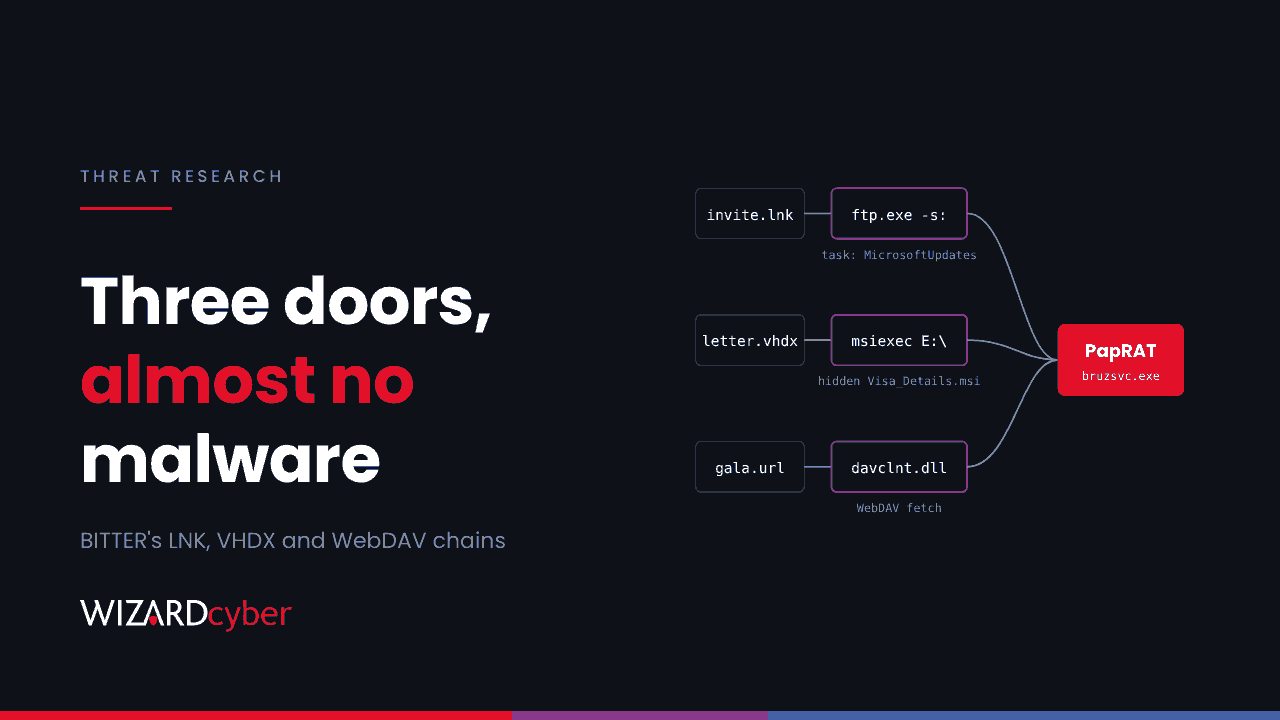
An espionage group has found three ways onto Windows machines that drop little or no malware at first. A shortcut that hands the job to Windows' own FTP client. A disk image whose shortcut quietly runs a hidden installer. A link that pulls its payload over WebDAV. FortiGuard Labs attributes all three to BITTER, a long-running South Asia-based group, and each one leaves telemetry Microsoft Defender for Endpoint can see.
What happened
Researchers at Fortinet's FortiGuard Labs tracked the campaign for several months and linked it to BITTER with high confidence, based on lure names, command-and-control patterns and malware analysis. Their findings were reported on 3 November. The lures are invitations and letters aimed at organisations in South Asia. BITTER has historically targeted government, energy and engineering.
All three chains end with PapRAT, a remote access tool written in both C++ and Rust, and one of them also loads WmRAT, a tool BITTER has used before.
Most of our readers are not in the group's target set. The techniques are still worth hunting for, because every step uses something built into Windows, and the same tricks turn up in criminal campaigns.
The three infection chains
1. A shortcut that runs ftp.exe
A Windows shortcut (LNK) starts ftp.exe, the command-line FTP client that still ships with Windows, to run a hidden script. The usual way to do this is ftp.exe -s:<file>, which reads commands from a file, with ! passing a command to the shell. The published research does not give the exact command line. The script creates scheduled tasks, including one named MicrosoftUpdates, and uses curl to contact the attacker's server. The user sees a fake message saying Explorer could not open the file. No executable is dropped at this stage.
2. A VHDX disk image with a hidden installer
The lure is a virtual hard disk named "Letter from the Ambassador – 11th Belt and Road Summit". When the user opens it, Windows mounts it as a new drive. The user sees a single shortcut. Two files are hidden: a decoy spreadsheet, Attachment-2.xls, and an installer, Visa_Details.msi. Clicking the shortcut opens the spreadsheet and runs the installer in the background.
Disk images are useful to attackers because files inside them may not carry the Mark of the Web, which can mean fewer SmartScreen and Office warnings.
3. A WebDAV link
A RAR archive named "Official Invitation Majilis 2026 Gala Dinner.rar" contains an internet shortcut. Opening it connects over WebDAV to a remote server and pulls down another shortcut and a script. The script creates a scheduled task, contacts the attacker's server and installs Imp_Details.msi. In this chain PapRAT then downloads vnces.exe, which is WmRAT.
The payload: PapRAT
- The C++ version installs as
bruzsvc.exe, with the product name "Microsoft redistributables". It beacons over plain HTTP every 10 seconds and identifies victims asusername_computername. - The Rust version has the product name "papsolutions" and the PDB name
requpap.pdb. It waits 42 seconds before starting, then checks in over HTTPS every 5 seconds. - Both can run commands, list and delete files, take screenshots, and upload and download files. The Rust version adds PowerShell execution.
Hunting in Microsoft Defender
These advanced hunting queries are starting points. Tune them to your estate before turning any into a detection rule.
ftp.exe running scripts or starting other programs
Few people run ftp.exe interactively any more, so any use is worth a look. Use from a shortcut or with a script argument is rarer still.
DeviceProcessEvents
| where Timestamp > ago(30d)
| where (FileName =~ "ftp.exe" and ProcessCommandLine matches regex @"(?i)[-/]s:")
     or InitiatingProcessFileName =~ "ftp.exe"
| project Timestamp, DeviceName, AccountName, FileName, ProcessCommandLine,
          InitiatingProcessFileName, InitiatingProcessCommandLine, InitiatingProcessParentFileName
| order by Timestamp desc
Scheduled tasks named to look like Windows updates
union
 (DeviceEvents
  | where Timestamp > ago(30d) and ActionType == "ScheduledTaskCreated"
  | extend TaskName = tostring(parse_json(AdditionalFields).TaskName)
  | where TaskName has "MicrosoftUpdates"),
 (DeviceProcessEvents
  | where Timestamp > ago(30d) and FileName =~ "schtasks.exe"
  | where ProcessCommandLine has "/create" and ProcessCommandLine has_any ("MicrosoftUpdates","curl"))
| project Timestamp, DeviceName, ActionType, AdditionalFields, ProcessCommandLine, InitiatingProcessCommandLine
Genuine Microsoft tasks live under \Microsoft\Windows\ and are created by installers, not by cmd.exe, scripts or a user's shell. A root-level task called "MicrosoftUpdates" is a red flag.
An installer launched from a mounted disk image
DeviceProcessEvents
| where Timestamp > ago(30d)
| where FileName =~ "msiexec.exe"
| where ProcessCommandLine matches regex @"(?i)\b[D-Z]:\\[^""]*\.msi"
| where InitiatingProcessFileName in~ ("cmd.exe","explorer.exe","powershell.exe","wscript.exe")
| project Timestamp, DeviceName, AccountName, ProcessCommandLine, InitiatingProcessCommandLine
Combine this with DeviceFileEvents for .vhdx, .vhd and .iso files arriving from a browser or Outlook in the hour before.
WebDAV fetches started by a shortcut
When Windows opens a WebDAV path it starts rundll32.exe with davclnt.dll,DavSetCookie. Legitimate SharePoint and OneDrive use can do this too, so exclude your own tenants and file servers.
DeviceProcessEvents
| where Timestamp > ago(30d)
| where FileName =~ "rundll32.exe" and ProcessCommandLine has "davclnt.dll" and ProcessCommandLine has "DavSetCookie"
| where ProcessCommandLine !has "sharepoint.com"       // add your own internal hosts
| project Timestamp, DeviceName, AccountName, ProcessCommandLine, InitiatingProcessFileName
PapRAT on disk and on the wire
let Hashes = dynamic([
 "a3081df333ca7f18bd90d10a45125ab5011dcf9d2806feae2935f09cab07da4c",
 "e3992f8c945b0761242377cba32d91b0a390c7cecd79478439843d93e6d2b76b",
 "ccefbdec2718d864d9d33c743aabfcef88a8d7904d1c598bfcf15cf5f3591c88",
 "569a21b519aaac8c92f653d708ab6ef34e3f38ea967f47e041d1e2425f6a4b33",
 "411c0b9a2f98b927d806a685faf0c1ab1005647b4816157008892347fb88546b"]);
let Domains = dynamic(["netmansrvdns.com","rappellingaart.com","techtalkhelp.com",
 "rivingtonclarks.com","goodnfortunes.com","felixfuturenext.com","gomescareerplans.com"]);
union
 (DeviceFileEvents | where Timestamp > ago(60d) | where SHA256 in (Hashes) or FileName in~ ("bruzsvc.exe","vnces.exe")),
 (DeviceProcessEvents | where Timestamp > ago(60d)
  | where SHA256 in (Hashes) or ProcessVersionInfoProductName in~ ("Microsoft redistributables","papsolutions")),
 (DeviceNetworkEvents | where Timestamp > ago(60d) | where RemoteUrl has_any (Domains))
| project Timestamp, DeviceName, ActionType, FileName, FolderPath, SHA256, RemoteUrl, InitiatingProcessFileName
A genuine Microsoft redistributable is signed by Microsoft and does not install itself as a standalone executable that beacons every few seconds. Check the signer on anything with that product name.
How to reduce the risk
- Block disk images and shortcuts at the mail gateway. Add
.vhd,.vhdx,.iso,.img,.lnkand.urlto the common attachments filter in Defender for Office 365, and scan inside archives. - Disable the WebClient service on endpoints that don't need WebDAV. It also blocks a family of NTLM relay tricks.
- Block outbound FTP at the firewall for ordinary workstations, and consider blocking
ftp.exewith App Control for Business. - Turn on attack surface reduction rules in block mode, starting with the rules for executable content from email and webmail and for obfuscated scripts, after an audit period.
- Train staff on unexpected invitations that arrive as archives or disk images. A real invitation rarely needs to be mounted.
Our explainers on advanced persistent threats and DLL sideloading cover other ways groups like this hide inside trusted Windows components.
How a managed SOC helps
None of these steps looks dramatic on its own: one ftp.exe run, one scheduled task, one installer. The pattern only shows up when someone links them across a device timeline. Our SOCs are staffed 24/7 and investigate Defender alerts with that context, and every investigation produces a full report, with senior analyst sign-off by default on the managed service.
Want to know whether these techniques would be caught in your estate? Talk to our team.