

NTLM (NT LAN Manager) is Microsoft's older family of authentication protocols for Windows. It proves who a user or computer is through a challenge and response, without sending the password across the network. Kerberos replaced it as the default for Active Directory domains in Windows 2000, but NTLM is still used whenever Kerberos can't be, and that happens more often than most organisations realise.
Microsoft is now retiring it. NTLMv1 single sign-on has been blocked by default since the October 2026 Windows update, and Microsoft has said NTLM will be disabled by default in the next major release of Windows Server and the matching client. Attackers like NTLM because its hashes can be relayed, cracked or reused. This guide explains how it works, why it's a risk, and how to find and reduce it in your own environment.
How NTLM authentication works
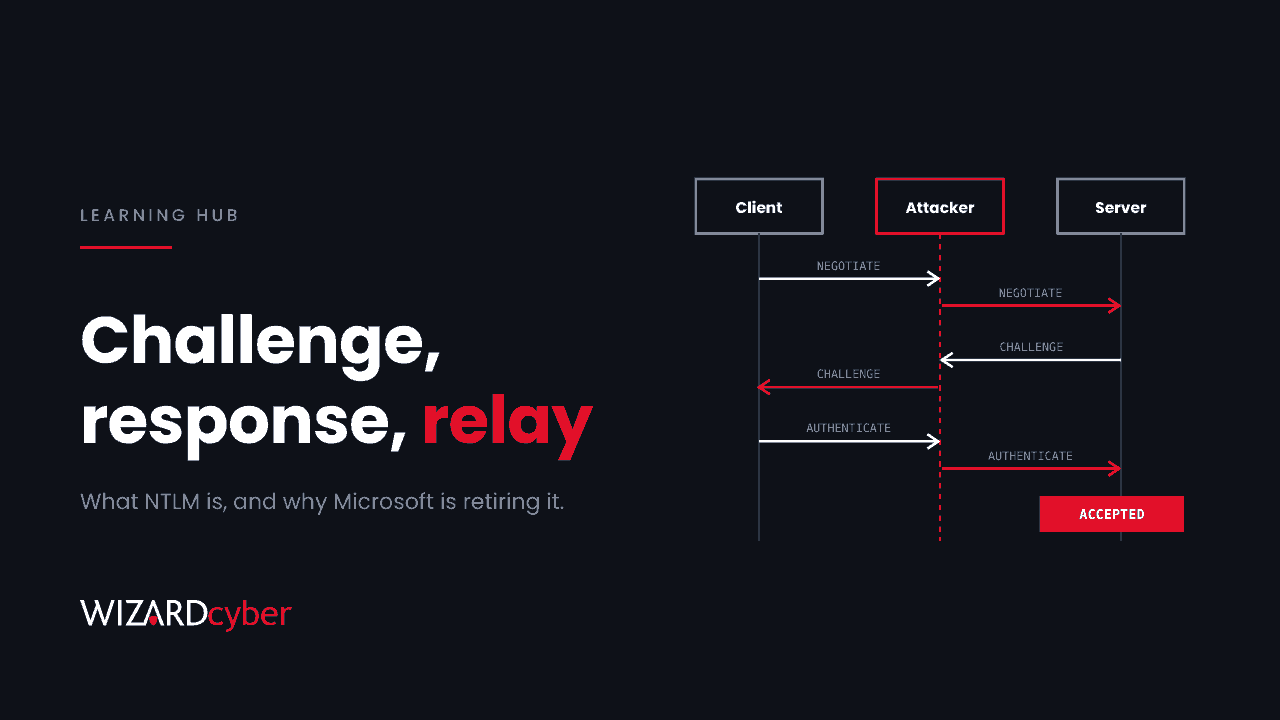
NTLM uses three messages between the client and the server it wants to reach:
- NEGOTIATE: the client says it wants to authenticate and which options it supports.
- CHALLENGE: the server replies with a random value, the challenge.
- AUTHENTICATE: the client combines the challenge with a hash of the user's password and sends back the result, the response.
For a domain account, the server can't check the response by itself. It passes it to a domain controller, which holds the user's password hash, works out what the response should be and says yes or no.
The hash at the centre of this is the NT hash, an unsalted MD4 hash of the user's password. Anyone who has that hash can produce valid responses without ever knowing the password. That single fact explains most of NTLM's security problems.
NTLMv1 and NTLMv2
- NTLMv1 builds its response with DES, which is weak enough that captured responses can be turned back into the NT hash quickly. Microsoft removed NTLMv1 from Windows 11 24H2 and Windows Server 2025, and the October 2026 update blocks single sign-on with NTLMv1-derived credentials by default.
- NTLMv2 uses HMAC-MD5 and adds more data from the client, so it's much stronger. It still has the structural weaknesses described below.
NTLM vs Kerberos
| NTLM | Kerberos | |
|---|---|---|
| How it proves identity | Challenge and response from the password hash | Tickets issued by a Key Distribution Center on the domain controller |
| Does the server prove itself? | No. The client can't tell it's talking to the real server | Yes, mutual authentication |
| Domain controller involvement | On every authentication | When a ticket is issued, then the ticket is reused |
| Delegation | Not supported | Supported, with controls |
| Main attacks | Relay, pass-the-hash, offline cracking | Kerberoasting, ticket theft and forging |
Kerberos isn't attack-free, but its design is far stronger. Windows tries Kerberos first and falls back to NTLM when Kerberos fails.
Why NTLM is still used
Windows falls back to NTLM in situations like these:
- A server is reached by IP address rather than by name, so Kerberos can't find a service principal name (SPN) for it.
- A service account has no SPN, or a duplicate one.
- The client can't reach a domain controller, for example over some VPNs or from outside the network.
- Local accounts and workgroup machines, which have no Kerberos at all.
- Older applications, appliances, printers and scanners that only support NTLM, or applications that hard-code it.
- Wi-Fi and VPN authentication using MS-CHAPv2, which caused the network problems after the October 2026 update.
How attackers abuse NTLM
Pass-the-hash
Because the NT hash is enough to authenticate, an attacker who steals it from memory or a credential store can sign in as that user anywhere NTLM is accepted, without cracking the password. It's one of the most common lateral movement techniques in Windows networks.
NTLM relay
NTLM doesn't bind the authentication to the server it was meant for. An attacker in the middle can take a user's or computer's authentication and pass it on to a different server, which accepts it as genuine. Relaying a domain controller's or server's authentication to services such as LDAP or Active Directory Certificate Services web enrolment has led to full domain compromise in many real incidents.
Forced authentication
Attackers don't have to wait for someone to connect. They can trick a machine into authenticating to them, through a link to a file share, a shortcut file, a document that loads a remote image, or by calling Windows services that connect out on request. In October 2026, Google's threat intelligence team described an attacker who hijacked a software updater and made it display a hidden one-pixel window loading content from an external WebDAV server, sending users' NetNTLMv2 hashes to the attacker. We covered it in our hunting guide.
Offline cracking
Captured NetNTLMv2 responses can be cracked offline. Weak passwords fall quickly. NTLMv1 responses can be converted to the NT hash itself.
How to find where NTLM is used
Start by measuring before you block anything. Most organisations find more NTLM than they expected.
- Turn on NTLM auditing. The Group Policy settings under Network security: Restrict NTLM include audit options. On domain controllers, auditing NTLM authentication in the domain writes Event ID 8004 to the Microsoft-Windows-NTLM/Operational log, naming the user, the client and the server.
- Use logon events. Event ID 4624 records the authentication package for each logon. "NTLM" in that field, with "NTLM V1" or "NTLM V2" in the package name, shows exactly which version was used.
- Watch NTLMv1 single sign-on. On Windows 11 and Server 2025, Event IDs 4024 (allowed, audit mode) and 4025 (blocked, enforce mode) in the same NTLM log show NTLMv1-derived credentials.
- Use Microsoft Defender for Identity if you have it. It records NTLM authentications seen on domain controllers and alerts on relay and pass-the-hash patterns.
Starting-point queries for Microsoft Sentinel and Defender
Tune these to your environment. The first needs Windows Security Events collected from servers and domain controllers.
// Which accounts and machines still use NTLM, and which version
SecurityEvent
| where TimeGenerated > ago(7d)
| where EventID == 4624 and AuthenticationPackageName == "NTLM"
| summarize Logons = count(), Targets = dcount(Computer)
          by TargetUserName, WorkstationName, IpAddress, LmPackageName
| order by Logons desc
// NTLM authentications seen by Defender for Identity
IdentityLogonEvents
| where Timestamp > ago(7d)
| where Protocol == "Ntlm"
| summarize Logons = count(), Sources = dcount(DeviceName)
by AccountName, DestinationDeviceName, LogonType
| order by Logons descPay particular attention to privileged accounts using NTLM, and to any NTLMv1 at all.
How to reduce the risk
- Fix the causes of fallback. Register missing SPNs, replace IP-address paths with names, and update or replace applications that only do NTLM.
- Get rid of NTLMv1 completely. Set the LAN Manager authentication level to send NTLMv2 only and refuse LM and NTLM.
- Move network access to certificates. Replace MS-CHAPv2 for Wi-Fi and VPN with EAP-TLS or PEAP-TLS.
- Make relay harder. Require SMB signing, require LDAP signing and channel binding, and turn on Extended Protection for Authentication on certificate enrolment web services.
- Protect your most important accounts. Members of the Protected Users group can't use NTLM. Add administrators once you've confirmed nothing they use needs it.
- Turn on Credential Guard where devices support it, to protect NTLM hashes in memory.
- Block outbound SMB and WebDAV to the internet, so forced authentication can't send hashes outside your network.
- Restrict NTLM step by step. Once auditing shows what's left, use the Restrict NTLM policies to block it, starting with servers that don't need it and adding exceptions only where you must.
Microsoft's retirement plan
In February 2026 Microsoft set out three phases: better auditing now; new features, IAKerb and a local Key Distribution Center, so Kerberos works in situations that used to force NTLM; and then NTLM disabled by default in the next major release of Windows Server and the associated Windows client. Disabled by default isn't the same as removed. It can be re-enabled through policy, but every dependency you haven't fixed will need an exception. Microsoft's Retiring NTLM FAQ has the latest detail.
Frequently asked questions
Is NTLM still used in Windows?
Yes. Kerberos is the default in Active Directory, but Windows falls back to NTLM whenever Kerberos can't be used. Most domains still have plenty of NTLM traffic.
Is NTLMv2 secure?
It's much stronger than NTLMv1, but it can still be relayed, its responses can be cracked offline, and the hash behind it can be used for pass-the-hash. Treat it as something to reduce rather than something safe.
What is the difference between NTLM and Kerberos?
NTLM proves identity through a challenge and response checked by a domain controller each time, and the server never proves its own identity. Kerberos uses tickets from a Key Distribution Center, supports mutual authentication and is much harder to relay.
Will disabling NTLM break things?
It can, which is why auditing comes first. Common breakages are file shares reached by IP address, older applications and devices, and Wi-Fi or VPN using MS-CHAPv2. Find them in audit mode and fix them before you block.
How do I check if NTLMv1 is being used?
Look for Event ID 4624 logons where the package name is "NTLM V1", and for Event IDs 4024 and 4025 in the NTLM operational log on Windows 11 and Server 2025.
How Wizard Cyber helps
Our Microsoft security consultancy helps organisations audit NTLM, fix the dependencies and move to Kerberos and certificate-based network access without disrupting users. Our SOCs are manned 24/7 and watch identity activity for relay and pass-the-hash behaviour, with senior analyst sign-off by default on the managed service. Our purple team work tests whether those attacks would actually be caught in your environment.
If you'd like to know how much NTLM is still running in your domain, book a demo or talk to our team.