

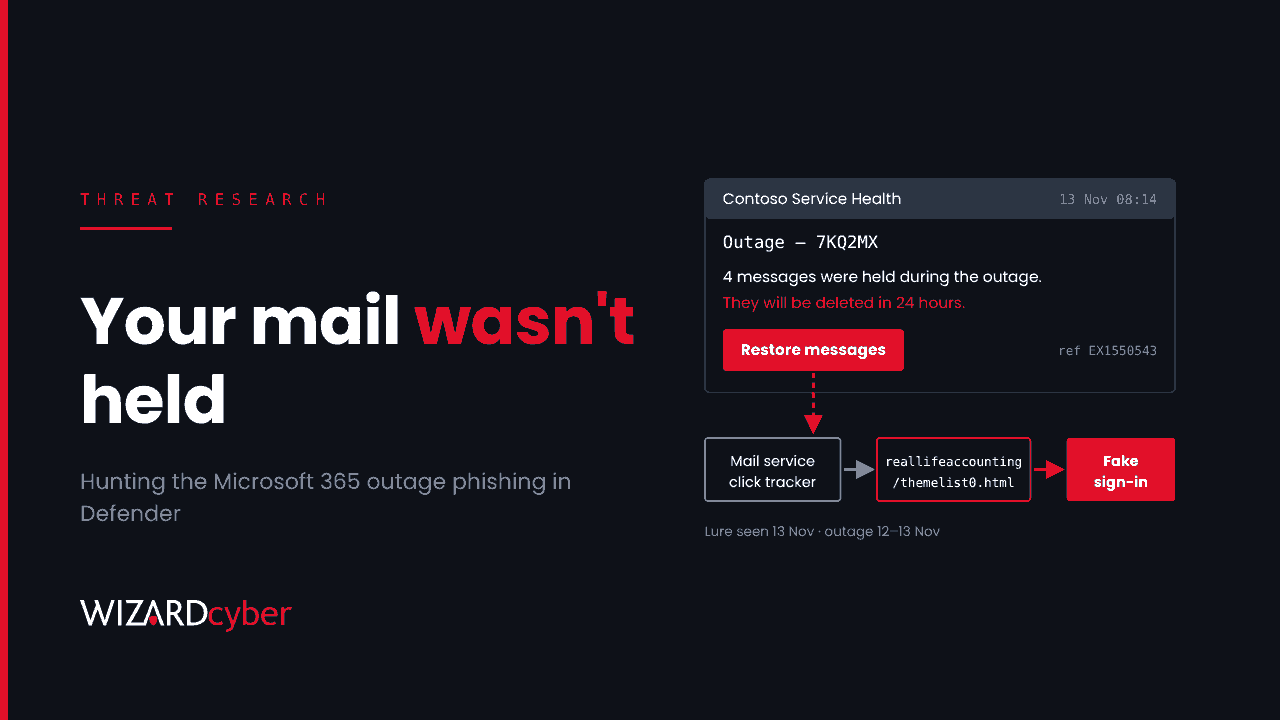
On Thursday 12 November a fault in Microsoft's networking gateway left most Exchange Online users unable to reach their mailboxes for almost a day. By the following morning, phishing emails were already arriving that used the outage as their story: your messages were held while the service was down, and they will be deleted in 24 hours unless you click to restore them. Microsoft Threat Intelligence warned about the campaign on 14 November. If your users were waiting for mail that week, some of them will have found this lure believable. Here's what to hunt for in Defender for Office 365 and Microsoft Sentinel, and what to do about anyone who clicked.
What happened
According to Microsoft's preliminary post-incident report for EX1550543 / MO1550821, impact ran from 16:20 UTC on 12 November to 16:10 UTC on 13 November. Microsoft put it down to a latent software defect that left Windows servers in its networking gateway overwhelmed, made worse by capacity already out of service and by extra traffic after a Teams failover. Exchange Online took the main hit, and Teams, SharePoint, OneDrive, Copilot, Intune, Purview and the Defender portals were listed among affected services. Microsoft said there was no sign of malicious activity behind the outage itself (see BleepingComputer's summary of the report).
The phishing started while recovery was still under way. Microsoft Threat Intelligence posted on 14 November that it had seen an active campaign that impersonated Microsoft 365 service health notifications and referenced the real Exchange Online incident, EX1550543. Reporting by Cyber Security News and GBHackers says the emails were first seen on 13 November and targeted organisations across several US sectors. Nothing limits a lure like this to the US, and UK tenants were hit by the same outage.
What the emails look like
The details below come from Microsoft's post as reported in that coverage. Microsoft has not published hashes or IP addresses.
- Story: messages were held during the outage and will be deleted within 24 hours unless the recipient clicks to restore them.
- Subject:
Outage –followed by a six-character code. - Display name: an organisation-specific prefix followed by Outage Notification or Service Health.
- Reference: the genuine incident number EX1550543, which is what makes the email look official.
- Sending domains:
moments-notice[.]com,planetmaison[.]com,newbooker[.]com. - Links: recipient-specific SendGrid click-tracking URLs that redirect to
reallifeaccounting[.]com, with the path/themelist0.htmlobserved.
Microsoft assessed the activity as consistent with credential phishing. It has not said whether credentials were collected or whether the pages use adversary-in-the-middle techniques, so treat any click as a possible credential exposure and check for session theft as well.
Why this one works
The lure doesn't need a clever pretext, because the real event supplied one. Users had spent a day without email, many were told by colleagues that Microsoft was down, and the incident number was real. The redirect through a well-known email delivery service also means the first hop in the link looks legitimate to anyone who hovers over it. It's the same pattern as tax-season or delivery lures, compressed into a few days.
Hunting in Defender for Office 365 and Sentinel
Microsoft recommends Threat Explorer and Defender XDR advanced hunting, using the EmailEvents, EmailUrlInfo and UrlClickEvents tables. The queries below are starting points to tune for your tenant. They run in Defender advanced hunting, or in Sentinel if you stream these tables there. Start the window on 12 November.
1. Delivered messages matching the campaign
let start = datetime(2026-11-12);
let badSenders = dynamic(["moments-notice.com", "planetmaison.com", "newbooker.com"]);
EmailEvents
| where Timestamp >= start
| where SenderFromDomain in~ (badSenders)
    or SenderMailFromDomain in~ (badSenders)
    or Subject matches regex @"^Outage\s*[–-]\s*[A-Za-z0-9]{6}$"
    or (SenderDisplayName has_any ("Outage Notification", "Service Health")
        and Subject has "Outage")
| project Timestamp, NetworkMessageId, RecipientEmailAddress, SenderFromAddress,
          SenderDisplayName, Subject, DeliveryAction, DeliveryLocation, ThreatTypes
| order by Timestamp desc
Pay most attention to rows where DeliveryAction is Delivered and the location is the inbox. Those are the users who could have clicked.
2. Messages carrying the redirect domain
EmailUrlInfo
| where Timestamp >= datetime(2026-11-12)
| where UrlDomain has "reallifeaccounting.com"
    or Url has "themelist0.html"
    or (UrlDomain has "sendgrid.net")
| join kind=inner (EmailEvents
    | where Timestamp >= datetime(2026-11-12)
    | where Subject has "Outage" or SenderDisplayName has_any ("Outage Notification", "Service Health"))
    on NetworkMessageId
| project Timestamp, RecipientEmailAddress, SenderFromAddress, Subject, Url, DeliveryAction
SendGrid is widely used for legitimate mail, so the join to outage-themed subjects keeps this query focused.
3. Who clicked
UrlClickEvents
| where Timestamp >= datetime(2026-11-12)
| where Url has "reallifeaccounting.com" or Url has "themelist0.html"
    or NetworkMessageId in ((EmailEvents
        | where Timestamp >= datetime(2026-11-12)
        | where Subject matches regex @"^Outage\s*[–-]\s*[A-Za-z0-9]{6}$"
        | project NetworkMessageId))
| project Timestamp, AccountUpn, Url, ActionType, IsClickedThrough, IPAddress, Workload
UrlClickEvents records clicks on links that Safe Links rewrote. IsClickedThrough shows whether the user went past a Safe Links warning. If Safe Links isn't on for every user, this table won't show every click, and you'll need proxy or endpoint browsing data for the rest.
4. Sign-ins after the click
let clickers = UrlClickEvents
| where Timestamp >= datetime(2026-11-12)
| where Url has "reallifeaccounting.com" or Url has "themelist0.html"
| summarize FirstClick = min(Timestamp) by AccountUpn;
SigninLogs
| where TimeGenerated >= datetime(2026-11-12)
| join kind=inner clickers on $left.UserPrincipalName == $right.AccountUpn
| where TimeGenerated between (FirstClick .. FirstClick + 3d)
| project TimeGenerated, UserPrincipalName, IPAddress, Location, AppDisplayName,
          ResultType, AuthenticationRequirement, RiskLevelDuringSignIn,
          DeviceDetail, UserAgent
| order by UserPrincipalName asc, TimeGenerated asc
Look for sign-ins from new countries or hosting providers, new user agents, and successful sign-ins that satisfied MFA from a device the user has never used. Then check for new inbox rules, new MFA methods and mailbox access from unfamiliar IPs for the same users.
What to do now
- Purge what's left. Use Threat Explorer to find and soft-delete remaining copies, and add the three sending domains and the redirect domain to the Tenant Allow/Block List.
- Treat clickers as possibly compromised. Reset their passwords, revoke their sessions and refresh tokens, review their MFA methods, and look for inbox rules and OAuth consents created since the click. Our explainer on session hijacking covers why a password reset alone isn't enough.
- Check Safe Links coverage. Microsoft specifically advises confirming that Safe Links policies apply to everyone and that time-of-click protection is on. Gaps here are also gaps in your click data.
- Tell staff where outage news comes from. Service health is in the Microsoft 365 admin centre, and your IT team will tell users through a channel they already know. Mail is never "restored" by clicking a link in an email.
- Expect a repeat. The next big outage will bring the same lure with a different incident number. Write the hunt down now so it's ready to run.
How a managed SOC helps
Campaigns that follow a real event move fast: the lure lands while users are distracted and support teams are busy with the outage itself. Wizard Cyber's SOCs are staffed 24/7 and have been running Microsoft Sentinel since 2019, so we can turn a vendor warning into a hunt across email, clicks and sign-ins the same day, and have a senior analyst confirm which users need containment. Our MXDR for Microsoft service brings Defender for Office 365 and Entra ID signals into one investigation. For background, read our guides to phishing-as-a-service and business email compromise.
Want to know whether this lure reached your users? Talk to our team.