
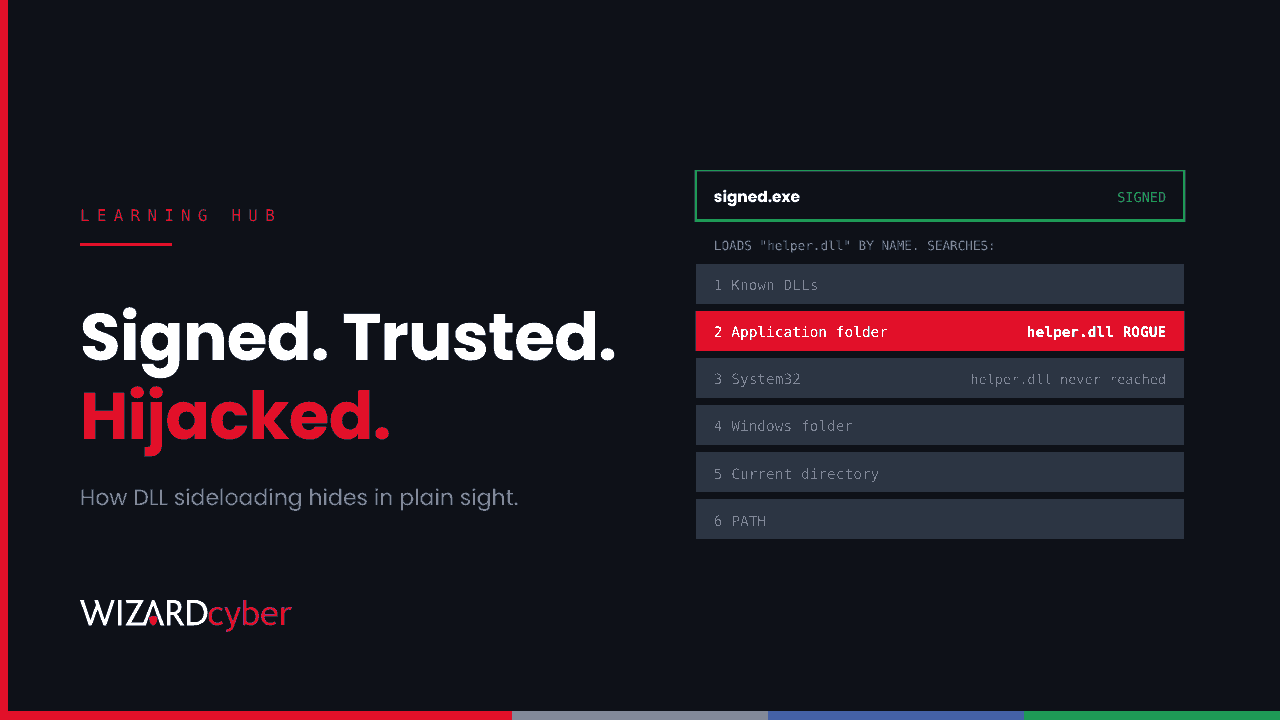
DLL sideloading is a technique where an attacker places a malicious DLL next to a legitimate program, so that when the program starts, Windows loads the attacker's code instead of the library the program expected. The program is genuine and often digitally signed, so security tools and people looking at the process list see a trusted name. The malicious code runs inside it.
It's one of the most common ways attackers hide malware on Windows, used by everyone from commodity loaders to state-backed espionage groups. This guide explains how it works, how it differs from related techniques, and how to detect and prevent it with Microsoft tools.
Why it works: the DLL search order
Most Windows programs depend on dynamic-link libraries (DLLs), shared code files they load when they run. Programs often ask for a DLL by name only, without a full path. Windows then searches a set of locations in order. With the default safe search mode on, that order for a desktop application is roughly:
- DLLs already loaded, and the system's list of Known DLLs
- The folder the program was started from
- The system folder (
C:\Windows\System32) - The 16-bit system folder and the Windows folder
- The current working directory
- The folders listed in the
PATHenvironment variable
The program's own folder comes before System32. So if an attacker can put a file with the right name in that folder, Windows loads it first. To avoid crashing the program and drawing attention, the malicious DLL often passes calls through to the real library, a trick called proxying, while running its own code in the background.
Sideloading vs DLL hijacking
The terms overlap and are often used interchangeably. MITRE ATT&CK groups them under Hijack Execution Flow. The useful distinctions are:
- DLL sideloading: the attacker brings their own copy of a legitimate, usually signed, program and drops it into a folder they control, such as AppData or Temp, together with the malicious DLL. They then run it.
- DLL search-order hijacking: the attacker plants a DLL somewhere a program already installed on the machine will find it before the real one.
- Phantom DLL loading: the attacker supplies a DLL that a program tries to load but which doesn't exist on the system, so nothing legitimate is displaced.
- DLL replacement: the attacker overwrites a real DLL, which usually needs more permissions and is noisier.
For defenders, the result is the same: trusted executable, untrusted code.
Why attackers like it
- It borrows trust. Allow-listing by publisher, and analysts glancing at a process tree, see a signed binary from a known vendor.
- It needs no special permissions. A user-writable folder is enough, so it works straight after a phishing click.
- It gives persistence. A scheduled task or Run key that starts a signed binary looks harmless in any persistence review.
- It keeps the payload off disk in readable form. The sideloaded DLL often just decrypts the real payload and runs it in memory.
Real examples
In October 2026, Google's threat intelligence team described an actor it tracks as UNC7017, which hijacked a backup tool's update servers for a few minutes at a time. The malicious update created a scheduled task that started a legitimate, signed remote-administration program from the user's AppData folder. That program loaded a malicious DLL from its own folder, which decrypted and ran a backdoor. We covered how to hunt for it in Ten Minutes On The Update Server.
Sideloading is also a standard step in loader chains delivered through ClickFix lures, which we covered in ClickFix and HijackLoader, and it has been a signature of long-running espionage malware families such as PlugX for more than a decade.
How to detect DLL sideloading
Because the executable is legitimate, detection focuses on where things run from and what they load.
- Signed programs running from unusual places. A Microsoft or other vendor binary normally lives in System32 or Program Files. The same file running from AppData, ProgramData, Temp or a user's Downloads folder is suspicious.
- Unsigned or rare DLLs loaded by signed programs, especially from user-writable folders.
- An executable and a DLL written to the same new folder at the same time, then the executable run or registered as a scheduled task.
- Signed programs making unexpected network connections, particularly to addresses nobody else in the organisation contacts.
Starting-point queries for Microsoft Defender and Sentinel
These use Defender XDR advanced hunting tables. They'll produce noise from legitimate software that installs into user profiles, so build an exclusion list from your own environment before alerting on them.
// Unsigned or unknown DLLs loaded from user-writable folders
let UserPaths = dynamic([@"\AppData\", @"\ProgramData\", @"\Temp\", @"\Users\Public\", @"\Downloads\"]);
DeviceImageLoadEvents
| where Timestamp > ago(7d)
| where FolderPath has_any (UserPaths)
| join kind=leftouter (
    DeviceFileCertificateInfo
    | summarize arg_max(Timestamp, IsSigned, Signer) by SHA1
  ) on SHA1
| where isempty(IsSigned) or IsSigned == false
| summarize Devices = dcount(DeviceName), FirstSeen = min(Timestamp)
          by InitiatingProcessFileName, InitiatingProcessFolderPath, FileName, FolderPath
| where Devices < 5
| order by FirstSeen desc
// Vendor-signed programs running from user-writable folders
DeviceProcessEvents
| where Timestamp > ago(7d)
| where FolderPath has_any (@"\AppData\", @"\ProgramData\", @"\Temp\", @"\Users\Public\")
| where ProcessVersionInfoCompanyName has "Microsoft"
or FileName in~ ("rundll32.exe", "dllhost.exe", "consent.exe", "werfault.exe")
| summarize Count = count(), Devices = dcount(DeviceName)
by FileName, FolderPath, ProcessVersionInfoCompanyName
| order by Devices asc// An executable and a DLL dropped into the same new folder within a minute
DeviceFileEvents
| where Timestamp > ago(7d)
| where ActionType == "FileCreated"
| where FolderPath has_any (@"\AppData\", @"\ProgramData\", @"\Temp\")
| extend Dir = tostring(parse_path(FolderPath).DirectoryPath),
Ext = tostring(parse_path(FolderPath).Extension)
| where Ext in~ ("exe", "dll")
| summarize Exts = make_set(Ext), Files = make_set(FileName, 10),
Start = min(Timestamp), End = max(Timestamp) by DeviceName, Dir
| where Exts has "exe" and Exts has "dll" and End - Start < 1mHow to prevent it
- Control what can run from user-writable folders. App Control for Business (formerly WDAC) can enforce rules on DLLs as well as executables. Policies that only allow code from Program Files and System32, plus specific signed exceptions, remove most of the space attackers use.
- Use attack surface reduction rules. In Microsoft Defender for Endpoint, the rule that blocks executable files unless they meet a prevalence, age or trusted list criterion makes rare, newly dropped files much harder to use. Test it in audit mode first.
- Install software in protected folders. Programs installed per-user in AppData can be tampered with by anything running as that user. Prefer machine-wide installs in Program Files, where standard users can't write.
- Keep software updated and inventoried. Older versions of some signed programs are known to load DLLs unsafely. Knowing what's installed tells you what could be abused.
- For developers: load DLLs by full path, and use the Windows APIs that restrict the search to System32 or the application's own protected folder.
Frequently asked questions
Is DLL sideloading the same as DLL injection?
No. DLL injection forces a DLL into a process that's already running, usually through Windows APIs that are closely watched by security tools. Sideloading gets a program to load the DLL itself, as part of its normal start-up, which is quieter.
Does the malicious DLL need to be signed?
Usually not. Windows doesn't require DLLs to be signed unless a policy such as App Control for Business enforces it. That's why the signed parent program matters to attackers and why unsigned DLLs loaded by signed programs are worth hunting for.
Can antivirus stop DLL sideloading?
It can catch known malicious DLLs. New or encrypted payloads often get past signature-based checks, so behaviour-based detection of where programs run and what they load is more reliable.
What MITRE ATT&CK technique covers DLL sideloading?
It sits under Hijack Execution Flow (T1574), alongside DLL search-order hijacking.
How Wizard Cyber helps
Sideloading is designed to look normal, so catching it depends on watching behaviour on every endpoint around the clock. Our SOCs are manned 24/7, and CYBERSHIELD AI's Investigation Agent works each alert to a verdict in an average of 3m 30s, or 7m 50s where Advanced Investigation is needed, with senior analyst sign-off by default on the managed service. If you think something may already be hiding inside a trusted program, a compromise assessment will tell you, and our breach and attack simulation service tests how your controls respond to attacker techniques.
If you'd like to know whether signed programs in your estate are loading code they shouldn't, book a demo or talk to our team.