

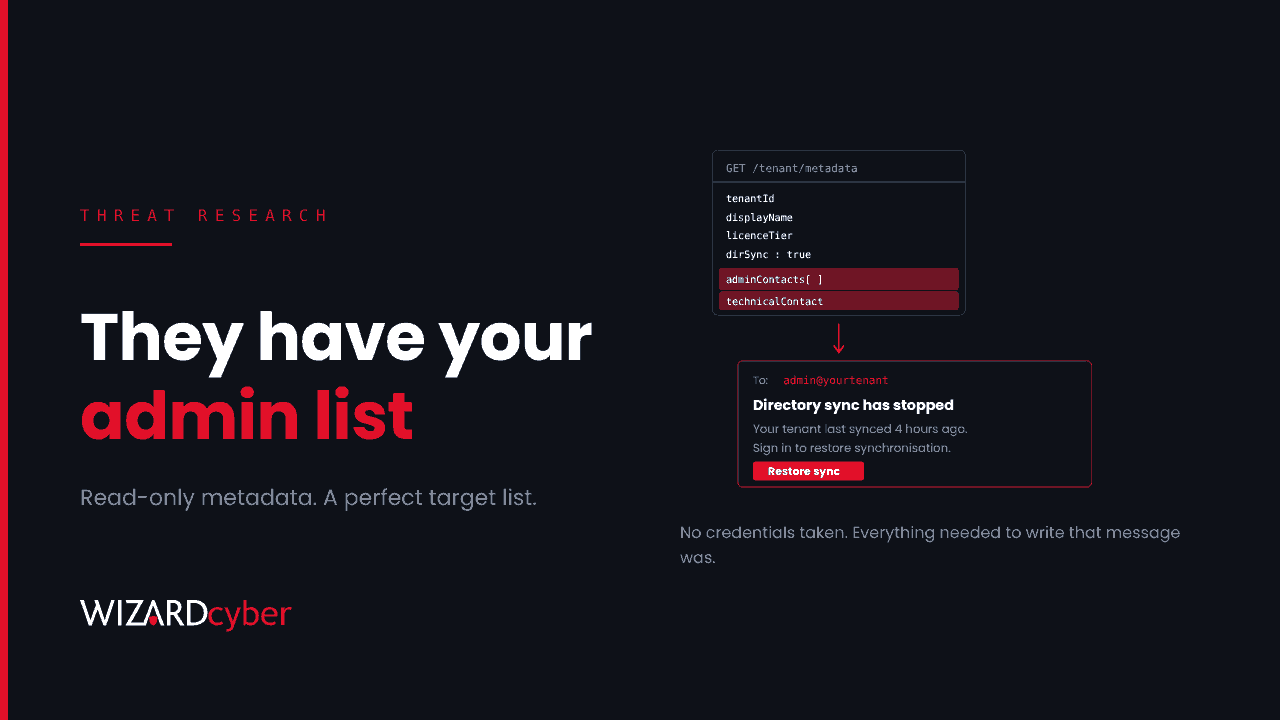
On 20 November, Microsoft began telling customers that someone had read tenant-level metadata about their organisation through a flaw in the Entra Connect Health API. No passwords, no hashes, no tokens, no usable keys. What did leave, according to the notification, is the list of email addresses for each tenant's administrators and technical contacts, alongside the tenant's name, ID, domain, licence tier and sync status. There is nothing to patch. There is still something to do, because that combination is exactly the raw material a targeted phishing campaign needs.
What happened
Microsoft Entra Connect Health is the monitoring side of directory synchronisation: agents on your on-premises servers report the health of Entra Connect, AD FS and domain controllers up to a cloud service. The flaw was in that cloud service's API.
From the notifications and public reporting, the timeline is:
- 23 July 2026 — the flaw is introduced into the API.
- 9 November 2026 — Microsoft discovers it.
- 19 November 2026 — a server-side fix is deployed. No customer action, no update to install.
- 20 November 2026 — Microsoft concludes that unauthorised parties had read tenant data before the fix, and begins notifying affected customers through Azure Service Health.
The notification wording is that "unauthorized read-only access to tenant-level metadata associated with your organization had occurred". Microsoft has not said when the access began, how many tenants were reached, or who was behind it. At the time of writing we have not found an MSRC advisory or a CVE for it, and the technical mechanism has not been described beyond "a vulnerability in the API".
What was exposed
- Email addresses of tenant administrators and technical contacts.
- Tenant ID, display name, initial
onmicrosoft.comdomain, country code and regional scope. - Entra licence tier.
- Whether directory sync is enabled, when it last ran, and whether Connect Health is onboarded.
- An expired certificate that had been used to register Connect Health agents with an internal Microsoft service decommissioned in late 2024. Microsoft says it was no longer in use.
What Microsoft says was not exposed
Passwords and password hashes, authentication tokens, valid cryptographic keys, on-premises server and Active Directory topology, and Azure subscription details. Microsoft also says it found no unauthorised changes to monitoring configuration.
Why a metadata leak still matters
Treat this as a reconnaissance event, not an intrusion. Nobody has your credentials as a result of it. What someone may have is a short, accurate, pre-qualified list that answers the questions an attacker normally has to guess at:
- Who to target. Not a scraped list of staff from a professional network, but the addresses your tenant itself nominates as administrative and technical contacts. That skews heavily towards accounts with privilege.
- What to say. Your tenant display name, your initial domain and your licence tier let a lure name your organisation and your estate correctly. Knowing whether directory sync is on, and when it last ran, supports a very plausible story about a sync failure or a hybrid identity problem.
- Which story will land. A tenant whose Connect Health onboarding status is set is a tenant that runs hybrid identity. "Your Entra Connect agent stopped reporting" is a believable message to send a named technical contact at that organisation, and it is the sort of message that gets clicked quickly because it looks operational rather than financial.
We have seen how effective a credible operational pretext is. The Microsoft 365 outage lures we wrote about on 16 November worked because they arrived in the middle of a real outage. A sync-failure lure to the right person, naming the right tenant, is the same trick with better targeting.
So the realistic follow-on is targeted phishing, vishing and help desk impersonation aimed at named administrators. If you want the mechanics of that, our explainer on spear phishing covers how these campaigns are built, and the vishing guide covers the phone-call version.
Step 1: find out whether you are in scope
- Sign in to the Azure portal directly — by typing the address, not by following a link in an email about this incident — and check the security advisory in Azure Service Health. Microsoft notified affected customers there, so that is the authoritative answer for your tenant.
- If you are a provider or you manage several tenants, check each one. Reporting indicates some providers received notifications covering multiple customer tenants.
- Microsoft has published a read-only PowerShell script (
aka.ms/ConnectHealth/scripts) that shows the types of tenant metadata which could have been exposed. Note the limit: it reports your current values. It cannot reconstruct what was actually read, or when. - Confirm who your administrative and technical contacts currently are, and whether any of those addresses are shared mailboxes or belong to people who have left. Those are the addresses you now need to watch.
Step 2: hunt for the follow-on, not the breach
There are no published indicators for the exposure itself — no IPs, no hashes, nothing to match on. The useful hunting is for what a holder of that list would do next, in the weeks after 20 November. The Microsoft Sentinel queries below are starting points to tune to your tenant.
1. Mail to your named contacts that mentions sync, Connect Health or the tenant by name
let contacts = dynamic(["admin@contoso.com","ithelp@contoso.com"]); // your notified contacts
EmailEvents
| where TimeGenerated > datetime(2026-11-19)
| where RecipientEmailAddress in~ (contacts)
| where Subject has_any ("Entra Connect", "Connect Health", "directory sync", "sync failed",
    "tenant", "service health", "agent offline")
| where SenderFromDomain !in~ ("microsoft.com", "azure.com", "contoso.com") // your own domains
| project TimeGenerated, SenderFromAddress, SenderFromDomain, RecipientEmailAddress, Subject,
    DeliveryAction, ThreatTypes, AuthenticationDetails
| order by TimeGenerated desc
Pay attention to anything that was delivered rather than blocked, and to senders on domains registered recently or close in spelling to yours. Our typosquatting explainer covers that pattern.
2. Clicks by those accounts
let contacts = dynamic(["admin@contoso.com","ithelp@contoso.com"]);
UrlClickEvents
| where TimeGenerated > datetime(2026-11-19)
| where AccountUpn in~ (contacts)
| project TimeGenerated, AccountUpn, Url, ActionType, IsClickedThrough, ThreatTypes
| order by TimeGenerated desc
IsClickedThrough being true means a warning page was overridden. For an administrator, that is worth a conversation the same day.
3. Sign-ins for those accounts from somewhere new
let contacts = dynamic(["admin@contoso.com","ithelp@contoso.com"]);
let baseline = SigninLogs
  | where TimeGenerated between (datetime(2026-09-01) .. datetime(2026-11-19))
  | where UserPrincipalName in~ (contacts) and ResultType == "0"
  | distinct UserPrincipalName, tostring(LocationDetails.countryOrRegion), AppDisplayName;
SigninLogs
| where TimeGenerated > datetime(2026-11-19)
| where UserPrincipalName in~ (contacts)
| extend Country = tostring(LocationDetails.countryOrRegion)
| join kind=leftanti baseline on UserPrincipalName, Country, AppDisplayName
| project TimeGenerated, UserPrincipalName, Country, IPAddress, AppDisplayName,
    AuthenticationRequirement, ResultType, ResultDescription
| order by TimeGenerated asc
Include failures. A run of 50126 or 50053 against precisely the accounts on that list is a password spray with a target list, and a failure still tells you the attempt happened.
4. New authentication methods or consent on those accounts
let contacts = dynamic(["admin@contoso.com","ithelp@contoso.com"]);
AuditLogs
| where TimeGenerated > datetime(2026-11-19)
| where OperationName has_any ("User registered security info", "Admin registered security info",
    "Add member to role", "Consent to application", "Add app role assignment grant to user")
| extend Target = tostring(TargetResources[0].userPrincipalName)
| where Target in~ (contacts) or isempty(Target)
| project TimeGenerated, OperationName, Target,
    Actor = coalesce(tostring(InitiatedBy.user.userPrincipalName), tostring(InitiatedBy.app.displayName)),
    Result
| order by TimeGenerated desc
A new MFA method registered on an administrator account that also appears in query 3 is the sequence to escalate on.
Step 3: the handful of changes worth making anyway
- Phishing-resistant MFA for privileged accounts. This is Microsoft's own advice in the notification, and it is the control that makes a stolen password useless. Conditional Access can require the phishing-resistant authentication strength for administrative roles. See our passkey guide for what that means in practice.
- Review who your contacts are. Technical contact addresses are often set once and forgotten. Point them at monitored mailboxes, not individuals who may have moved on.
- Tell those people what happened. The most valuable thing you can do this week is make sure the named administrators know their addresses are in someone's hands, and that an urgent, convincing message about directory sync is a plausible thing to expect. An administrator expecting a lure behaves very differently from one who is not.
- Agree an out-of-band channel. If a message claims your tenant has a problem, the answer is to check Service Health in the portal directly. Decide now how your team verifies this kind of claim, as we argued after the November outage.
- Keep privilege time-bound. Privileged Identity Management means that even a successful lure lands on an account that is not holding its role at that moment.
How a managed SOC helps
The difficulty with a leak like this is that the event you need to detect has not happened yet, and when it does it will look like ordinary mail to an ordinary mailbox. It is caught by correlation: a message to a named contact, a click, then a sign-in from an address that account has never used.
Our SOC runs Microsoft Sentinel as the core of the managed service, with the connectors, parsers and analytical rules for the rest of the estate built at onboarding, so Defender for Office 365 mail events sit next to Entra sign-ins and audit events. Analysts are on shift 24/7 and a senior analyst signs off before anything is closed, which matters when the signal is a single click by one administrator. Every investigation produces a full report, so you have a record of what was checked for the people who will ask.
If you have had a notification and want an independent check on whether anything followed it, a compromise assessment will answer that. Or talk to our team.