
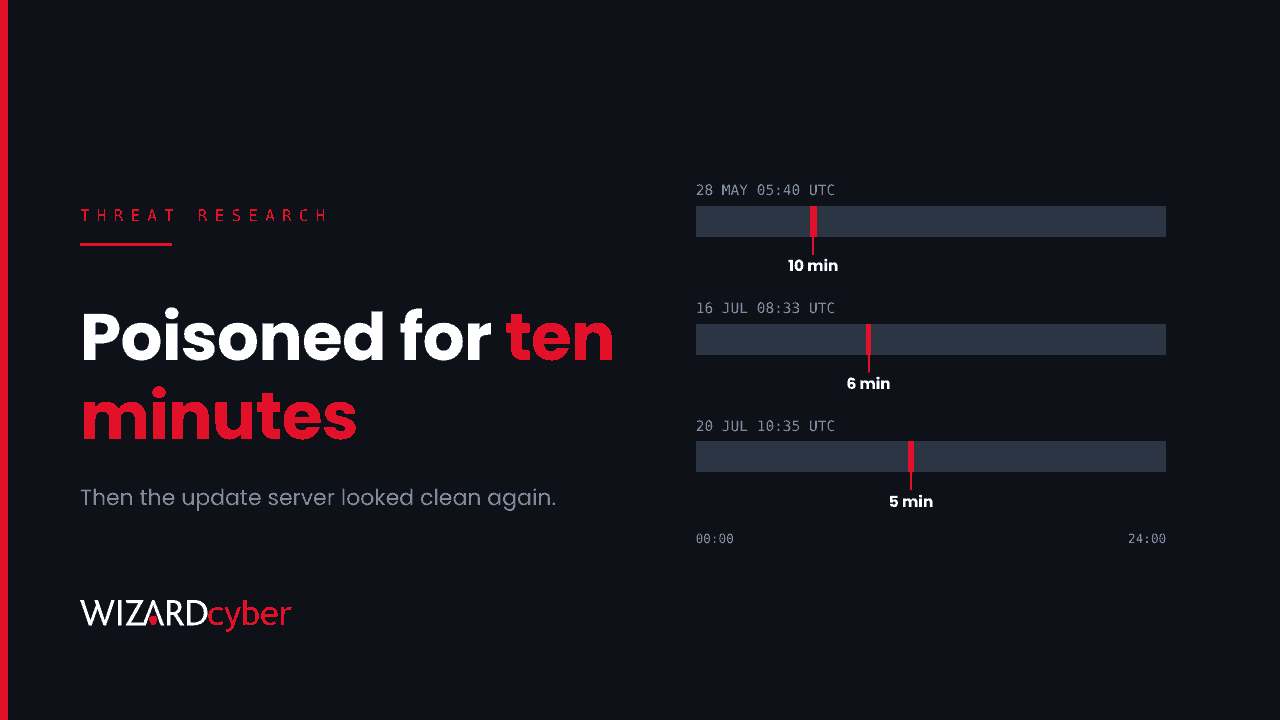
For about ten minutes on 28 May, six minutes on 16 July and five minutes on 20 July, the update servers of a widely used Windows backup and remote-access tool gave out instructions that weren't the vendor's. Any client that checked for updates during one of those windows was sent a trojanised "upgrade" and ran it. When each window ended, the attacker put the original files back.
Google Threat Intelligence Group (GTIG) and Mandiant published the analysis on 15 October and track the actor as UNC7017. The activity ran from April to July 2026. The vendor says it fixed its distribution servers at the end of July. That doesn't clean the endpoints that took the bad update. So the work now is a retrospective hunt on your own machines, and this piece explains how to do it with Microsoft Defender and Sentinel.
What happened
The tool's updater fetches two configuration files from the vendor's servers. One says where the newest build lives, which version it is and what its MD5 checksum should be. The other controls notifications and pop-ups. Neither file was signed or authenticated, so the client trusted whatever it was given. UNC7017 didn't need an exploit or a CVE. It only needed write access to those two files for a few minutes at a time.
- Download redirected. The download URL was pointed at an attacker-controlled host, the minor version number went up by one and the checksum was changed to match the malicious ZIP. The second file was padded with tens of thousands of dummy sections to force the update straight away.
- Stage 2 (CROSSROAD). The "upgrade" checked it was running from the tool's folder and which country it was in, pulled the next stage into
%LOCALAPPDATA%\Radmin\, created a scheduled task calledRadminComponentRuntimeto run every three hours, then deleted itself. - Stage 3 (SHINYROAD). The scheduled task launches a legitimate, signed remote-administration binary. That binary loads a malicious DLL from its own folder through DLL search-order hijacking. The DLL decrypts a Python-based backdoor and runs it in memory.
- Follow-on tooling. In July the actor also deployed an open-source C2 framework disguised as PDF software, persisted through a scheduled task called
NitroRuntime. - Credential theft without malware. On 20 July the pop-up file was changed to show a one-pixel window whose content was loaded from a WebDAV path on an attacker IP address. Opening it made Windows try to authenticate to that server, sending the user's NetNTLMv2 hash. No click was needed.
Victims GTIG observed were in IT services, telecoms and higher education across eleven countries, including the United States, Spain, Switzerland and Portugal. GTIG describes the targeting as opportunistic, so impact is likely wider than the cases it saw.
Why this one is hard to spot
Three things make this campaign awkward for defenders:
- The vendor's files look clean now. Checking the update URL today tells you nothing. GTIG's advice is to rely on cached copies of the config files on the endpoint and on proxy and firewall logs from the time.
- The parent process is trusted. The first malicious binary was started by the tool's own updater service, and the backdoor runs inside a signed executable. Allow-listing by publisher would have let both through.
- The windows were short. Five to ten minutes is shorter than most alert triage queues. GTIG thinks there were probably more windows it didn't see, so don't scope your hunt to the three known dates.
Who should act
Any organisation with this backup tool or its companion remote-desktop tool installed on Windows machines between April and July 2026. Check your software inventory in Defender Vulnerability Management or your asset tool. Remember that tools like this often arrive through individual installs rather than central deployment, so search by file path and process name as well as by managed package.
Hunting in Defender and Sentinel
These queries use Microsoft Defender XDR advanced hunting tables, which are also available in Sentinel through the Defender XDR connector. Treat them as starting points to tune. Most Defender tenants keep 30 days of advanced hunting data, so for activity from May to July you'll need Sentinel or another archive with longer retention. The indicators below come from the GTIG report.
1. Persistence: the two scheduled tasks
DeviceEvents
| where ActionType in ("ScheduledTaskCreated", "ScheduledTaskUpdated")
| extend TaskName = tostring(parse_json(AdditionalFields).TaskName)
| where TaskName has_any ("RadminComponentRuntime", "NitroRuntime")
| project Timestamp, DeviceName, TaskName, InitiatingProcessFileName,
          InitiatingProcessAccountName, AdditionalFields
2. The signed launcher loading the rogue DLL
The legitimate launcher runs with a --runtimechk argument and loads BlkScrDl.dll from a user-writable folder.
union
  (DeviceProcessEvents
   | where ProcessCommandLine has "--runtimechk"
        or ProcessCommandLine has "--nitrod"
   | project Timestamp, DeviceName, Evidence = ProcessCommandLine, FolderPath),
  (DeviceImageLoadEvents
   | where FileName =~ "BlkScrDl.dll" or FileName =~ "RuntimeComponent.dll"
        or FileName =~ "Eztwain4.dll"
   | where FolderPath has @"\AppData\Local\"
   | project Timestamp, DeviceName, Evidence = InitiatingProcessFileName, FolderPath)
| order by Timestamp asc
3. The updater starting something it shouldn't
The tool's background services should launch its own updater and little else. A child process named upgrade-now.exe, or anything run from the tool's html or Tmphtml folders, needs a close look.
DeviceProcessEvents
| where InitiatingProcessFileName in~ ("Backupper.exe", "ABNotify.exe")
| where FileName =~ "upgrade-now.exe"
     or FolderPath has_any (@"\Tmphtml\", @"\html\")
| project Timestamp, DeviceName, FileName, FolderPath, SHA256,
          ProcessCommandLine, InitiatingProcessFileName
4. Known hashes and network indicators
let Hashes = dynamic([
  "11e576df44e9c9eef72b9f5b699291bcdb200a19130778ec231e5b0987b913ad",
  "9a58e8f49edf5644e5728f74cf36f560d3d486fa51db4db69d927963c7aca450",
  "b360b6db0c2b668317edc1504a7c39ef047f0d925c8f113b521f6724c157ae21",
  "5837bc26a73cfb46ffd466cf889f03ce2f6a48f1f3fd42ec8be22189d51cab1e",
  "8fbaa74b27dc1e89abfc694e834378746f0ad37a688098c5f8f511410157c8b8",
  "14b31918075e6130b9123158743db0a81e2d7bfcf6d39731ee7d9200a98cd591",
  "8c8090aca8ddb1cf968d2b810457e0cfce97c03cd721f70d2eca7f37f2681fc4"]);
let IPs = dynamic(["8.210.84.56", "8.218.65.184", "47.239.60.117"]);
union
  (DeviceFileEvents | where SHA256 in (Hashes)
   | project Timestamp, DeviceName, Indicator = SHA256, Detail = FolderPath),
  (DeviceNetworkEvents | where RemoteIP in (IPs) or RemoteUrl has "storage-data.com"
   | project Timestamp, DeviceName, Indicator = coalesce(RemoteUrl, RemoteIP),
             Detail = InitiatingProcessFileName)
| order by Timestamp asc
The full list of hashes, domains and file paths is in the GTIG report. Load them into Defender as custom indicators as well as hunting for them.
5. Outbound SMB and WebDAV to the internet
The hash-stealing trick only works if a workstation can reach an external server over SMB or WebDAV. This query is useful well beyond this campaign.
DeviceNetworkEvents
| where RemoteIPType == "Public"
| where RemotePort == 445
     or (InitiatingProcessFileName =~ "svchost.exe"
         and InitiatingProcessCommandLine has "WebClient")
| summarize Connections = count(), Devices = dcount(DeviceName)
          by RemoteIP, RemotePort, InitiatingProcessFileName
| order by Devices desc
What to do if you find it
- Isolate the device and preserve the tool's
Tmphtmlfolder, the cached.inifiles and the%LOCALAPPDATA%\Radmin\and%LOCALAPPDATA%\Nitro Pro\folders before anything is cleaned. - Treat the signed-in user's credentials as exposed. The backdoor ran as that user and the WebDAV pop-up sent their NetNTLMv2 hash. Reset the password, and look for sign-ins from that account that don't fit, on-premises and in Entra ID.
- Scope beyond the endpoint. GTIG saw secondary payloads and remote-admin tooling. Check for lateral movement from the device and for new remote access software elsewhere.
- Block outbound SMB (TCP 445) and WebDAV to the internet at the firewall and on endpoints, if you haven't already.
- Review whether the tool needs its own updater. Where you can, deploy updates centrally after testing, and stop endpoint software from updating itself from the internet.
The wider lesson
Every piece of software that updates itself is a supply chain you depend on. Most organisations know which line-of-business systems they run. Far fewer know which small utilities on their endpoints quietly fetch and run code from the internet, or whether those updaters check signatures. An inventory of self-updating software, with the riskiest ones moved to managed deployment, closes a gap that attackers like UNC7017 rely on. For the broader picture, see our guides to supply chain attacks and DLL sideloading.
How a managed SOC helps
- Behaviour, not just indicators. A signed binary loading an unsigned DLL from a user's AppData folder, or a backup service spawning an unfamiliar executable, is suspicious whatever the hash. CYBERSHIELD AI's Investigation Agent works alerts like these to a verdict in an average of 3m 30s, or 7m 50s where Advanced Investigation is needed.
- Retrospective hunts when new research lands. Our SOCs are manned 24/7, with senior analysts and incident responders on shift around the clock, so a report like this becomes a hunt across your estate rather than a bookmark.
- Logs you can go back to. Microsoft Sentinel is the only hard requirement for our managed service, and we build the connectors you need at onboarding, so a hunt months after the fact has data to search.
If you're not sure whether any of your endpoints took an update during those windows, talk to our team about a compromise assessment.