
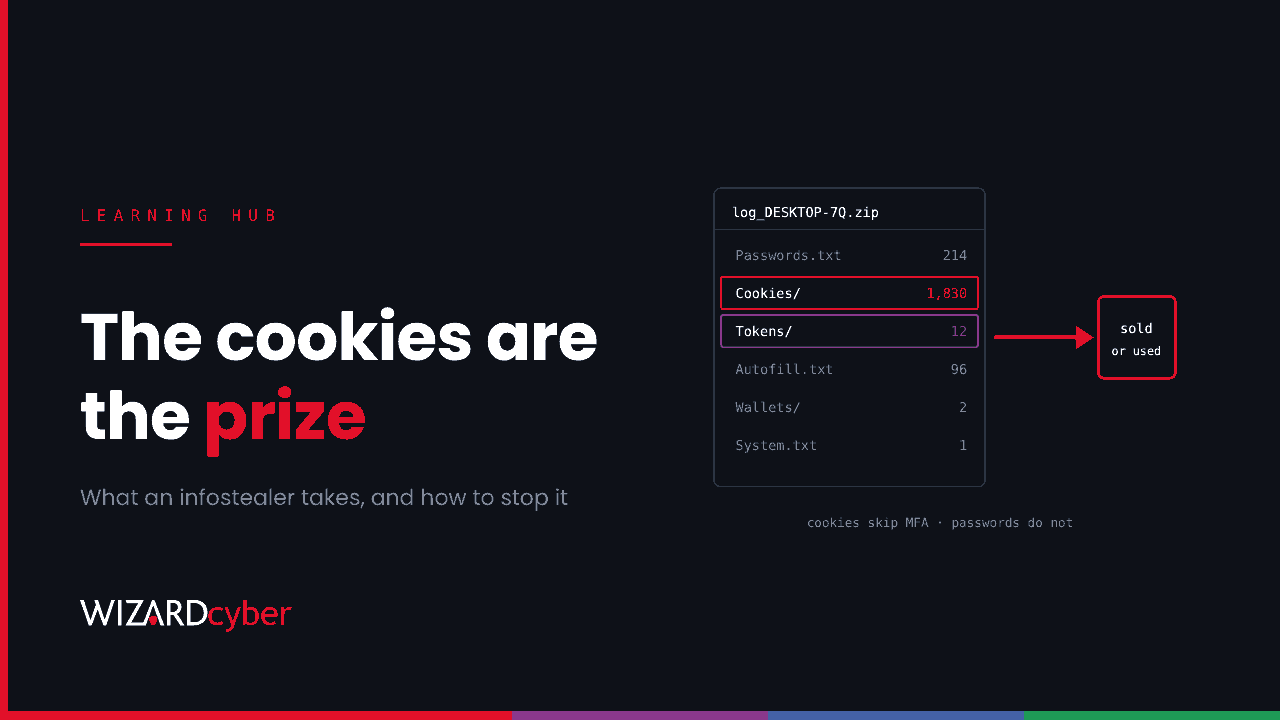
An infostealer is malware built to collect credentials from a computer and send them to the attacker: saved passwords, browser cookies and session tokens, autofill data, crypto wallets and files. It usually runs for seconds rather than days, and a single infection can hand an attacker live, signed-in sessions to every web service the victim uses. That includes Microsoft 365, and an attacker with those sessions doesn't need the password or the MFA code.
How infostealers work
Most infostealers follow the same pattern:
- Get run. The victim runs it, usually believing it is something else.
- Collect. It reads the browser's password store, cookie database and local storage, plus app tokens, wallet files, documents matching keywords, and system details such as installed software and IP address.
- Send. It packages everything into an archive, often called a "log", and uploads it to the operator's server or to a messaging channel.
- Leave or linger. Many delete themselves straight away. Others stay and act as a loader for more malware.
Logs are traded at scale. Operators sell access to the malware as a service, and buyers sort the logs for valuable sessions, such as corporate Microsoft 365, VPN portals, cloud consoles and finance systems.
How infostealers get in
- Cracked software and fake installers from search ads and lookalike download sites. This is still the most common route.
- ClickFix and fake CAPTCHA pages, which trick users into pasting a command into the Run dialog. See our ClickFix explainer.
- Malicious browser extensions and developer packages, including fake AI tools.
- Phishing attachments, often archives or disk images.
- Personal devices used to sign in to work accounts. An infection on a home PC can expose a corporate session that your endpoint tools never see.
Why browser cookies are the prize
A saved password is useful, but MFA stands between it and your account. A session cookie isn't blocked by MFA, because MFA was already completed to create it. That makes cookies the most valuable thing in a log. Our session hijacking explainer covers what attackers do with them.
Browsers have responded. Since 2024 Chrome has protected cookie encryption keys with App-Bound Encryption, which ties decryption to the browser itself so other programs can't simply read the key. Stealers have adapted by injecting into the browser or driving it remotely so the browser decrypts its own data. A sample found this month, the signed "Abe Office" agent, starts an off-screen browser with remote debugging and injects a helper DLL to do exactly that. It also has a hidden desktop, so the operator can use the stolen session from the victim's own machine, where location-based checks won't flag it. Our blog on why a valid signature tells your SOC very little looks at the certificate it carried.
A worked example: what Abe Office leaves behind
Rogue Authority's analysis lists traces you can hunt for in Defender for Endpoint. Most infostealers leave similar ones:
- A copy of itself in
%USERPROFILE%\AbeOffice\with the Mark of the Web removed. - Persistence through a Run value named "Abe Office Sync" and a scheduled task, both launching
AbeAgent.exe --autostart. - Browser profiles copied to
C:\ProgramData\AbeOffice\SystemCache\. - A browser started with
--window-position=-32000,-32000and remote debugging bound to localhost. - Outbound connections on TCP 9090 to
2.26.230[.]54.
The general version of that hunt, as a starting point to tune:
// Non-browser processes reading browser credential and cookie stores
DeviceFileEvents
| where Timestamp > ago(14d)
| where FileName in~ ("Login Data", "Cookies", "Local State", "Web Data")
| where FolderPath has_any (@"\Google\Chrome\User Data\", @"\Microsoft\Edge\User Data\")
| where InitiatingProcessFileName !in~ ("chrome.exe", "msedge.exe", "explorer.exe")
| summarize Files = make_set(FileName), Devices = dcount(DeviceId)
    by InitiatingProcessFileName, InitiatingProcessFolderPath, InitiatingProcessSHA256
| order by Devices asc
// Browsers started hidden or with remote debugging
DeviceProcessEvents
| where Timestamp > ago(14d)
| where FileName in~ ("chrome.exe", "msedge.exe")
| where ProcessCommandLine has_any ("--remote-debugging-port", "--window-position=-32000", "--headless")
| where InitiatingProcessFileName !in~ ("chrome.exe", "msedge.exe")
| project Timestamp, DeviceName, AccountName, InitiatingProcessFileName, ProcessCommandLineExpect some legitimate hits from test automation and developer tools. Allow-list them by path and signer, not by file name. File-access events for these paths may also depend on your Defender configuration, so check you see a sample before trusting an empty result.
How to protect against infostealers
- Stop the install. Remove local admin rights, use application control that trusts named publishers rather than anything signed, and block common lure routes such as cracked-software sites and newly registered domains.
- Don't store passwords in the browser on corporate devices. Use an enterprise password manager and turn off browser password saving through policy.
- Bind sessions to devices. Conditional Access that requires a compliant device, plus token protection where supported, makes stolen cookies much less useful from the attacker's own machine.
- Control personal-device access. If unmanaged devices can reach Microsoft 365, an infection you can't see can expose a session you can.
- Run EDR everywhere and watch it. Credential-store access, hidden browsers and new persistence are behaviours Defender can alert on, but only if someone is looking at the alerts.
What to do after an infection
- Isolate the device straight away.
- From a clean device, reset the user's passwords and revoke all sessions and refresh tokens, for Microsoft 365 and for every other service the browser held a session for.
- Assume every saved password on the device is exposed and rotate them, including personal ones the user may have saved.
- Check Entra ID for sign-ins, new MFA methods, inbox rules and app consents since the infection.
- Rebuild the device rather than cleaning it. Many stealers drop further malware.
FAQ
Is an infostealer the same as a keylogger?
No. A keylogger records keystrokes over time. An infostealer takes credentials and sessions that are already stored on the machine, usually in one quick pass. Some malware families do both.
Does MFA protect against infostealers?
Partly. MFA stops a stolen password being used on its own, but it doesn't stop a stolen session cookie, because the cookie was created after MFA was completed. Device-bound sessions and phishing-resistant MFA close more of the gap.
Can antivirus stop infostealers?
Often, but not reliably. New variants appear constantly and many are signed or packed to avoid detection. Behaviour-based detection and someone watching the alerts matter more than signatures.
How do attackers use infostealer logs?
They sell them or use them directly for account takeover, business email compromise, and as initial access for ransomware. A single corporate session can be worth more than thousands of consumer logs.
How Wizard Cyber helps
An infostealer infection is an endpoint event with an identity impact, so the response has to cover both. Wizard Cyber's SOCs are staffed 24/7 and have run Microsoft Sentinel since 2019, and on the managed service senior analyst sign-off is the default. Every investigation produces a full report, so you know which sessions and credentials need to be revoked, not just which device was infected.
Want to know how your endpoints and identities would handle a stealer? Talk to our team.