
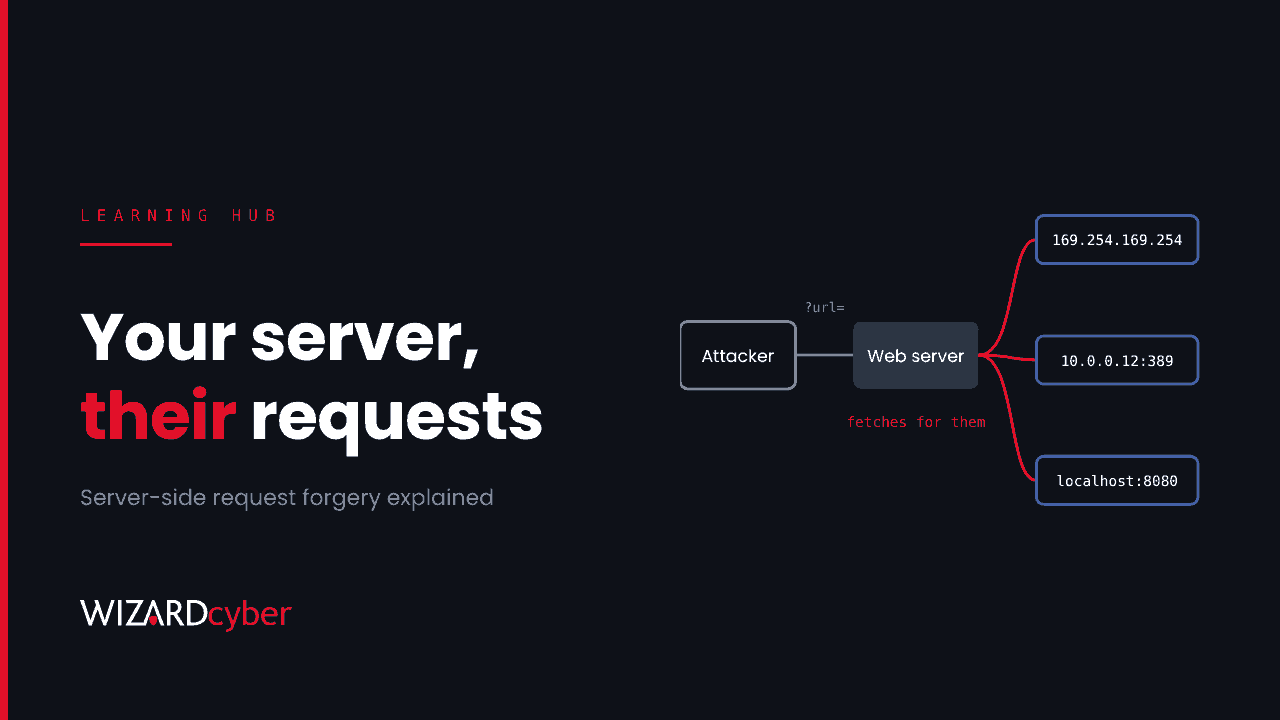
Server-side request forgery (SSRF) is a vulnerability that lets an attacker make a server send requests on their behalf. The attacker gives the application an address, and the server fetches it. Because the request comes from the server, it can reach things the attacker cannot reach directly: internal services, admin interfaces bound to localhost, other hosts on the private network, and the cloud metadata service that hands out the server's own credentials.
SSRF has its own entry in the OWASP Top 10 (A10:2021). It is behind some of the best-known cloud breaches, and it keeps appearing in products of every kind. A recent example is CVE-2026-134624, a critical SSRF in an email filtering service, disclosed after that service was breached.
How SSRF works
Plenty of applications legitimately fetch things from a URL or a host name that a user supplies:
- Link previews that pull a page's title and image.
- "Import from URL" for images, documents or feeds.
- Webhooks, where the user enters a callback address.
- PDF or screenshot generators that render a page.
- Integration settings that test a connection to an LDAP server, mail server or API.
If the application doesn't strictly control where it is allowed to connect, an attacker can replace the expected address with one of their choosing:
Expected:  https://app.example.com/preview?url=https://news.example.org/story
Attack:    https://app.example.com/preview?url=http://169.254.169.254/...
Attack:    https://app.example.com/preview?url=http://10.0.0.12:8080/admin
Attack:    https://app.example.com/preview?url=http://localhost:6379/
The server makes the request from inside your network, with its own identity and network access. Sometimes it returns the response to the attacker (basic SSRF). Sometimes it doesn't, but the attacker can still learn things from timing, error messages or side effects. That is called blind SSRF.
What an attacker can reach with SSRF
Cloud instance metadata
Every major cloud platform runs a metadata service at the link-local address 169.254.169.254. A virtual machine uses it to learn about itself and, crucially, to get tokens for its attached identity. In Azure that identity is a managed identity. If an SSRF can read a token from the metadata service, the attacker can act in the cloud as that server, with whatever permissions it was given.
Providers have added defences. Azure's Instance Metadata Service requires a Metadata: true request header and rejects requests that carry an X-Forwarded-For header. AWS's IMDSv2 requires a session token obtained with a PUT request first. These stop the simplest SSRF, where the attacker controls only the URL. They do not stop an SSRF that also lets the attacker set headers or the request method.
Internal services
Databases, caches, message queues, monitoring dashboards and admin consoles are often reachable only from inside the network, and some don't require authentication because "only internal things can reach them". SSRF breaks that assumption.
Port and network scanning
Even blind SSRF can map an internal network. The attacker points the server at host and port combinations and watches how the response time or error changes. CVE-2026-134624 is this kind: a connection check that let a privileged API user find internal hosts and ports, then send crafted data to them.
Other protocols
Some HTTP libraries also accept schemes like file://, gopher:// or dict://. Those can turn an SSRF into reading local files or talking to non-HTTP services.
Why SSRF matters more in the cloud
On a traditional network, an SSRF typically exposes internal web pages. In the cloud, the server's identity is a credential, and the metadata service hands it out to anything on the machine that asks. A single SSRF in a public web application can therefore become control of storage accounts, key vaults or the wider subscription, depending on what that identity was allowed to do. That is why least-privilege identities matter as much as fixing the bug.
How to prevent SSRF
In the application
- Allow-list destinations. If the feature only needs to call three partner APIs, allow those three host names and nothing else. Allow-lists work. Block-lists of "bad" addresses are easy to get around.
- Resolve, check, then connect to the same address. Resolve the host name, reject private, loopback, link-local and metadata ranges, and connect to the address you checked. Otherwise an attacker can use DNS that returns a different answer the second time (DNS rebinding).
- Don't follow redirects blindly. A permitted external URL can redirect to
169.254.169.254. Re-check every hop, or turn redirects off. - Restrict schemes and ports. Allow
httpsonly, on the ports you need. - Don't return raw responses. If the feature only needs a page title, return the title, not the body. That turns a full SSRF into a much weaker blind one.
In the platform
- Least-privilege identities. Give each workload's managed identity only what it needs, so a stolen token is worth little.
- Egress control. Servers that fetch user-supplied URLs should sit behind an outbound proxy or firewall that only allows what the feature needs, and blocks internal ranges.
- Use the metadata protections. Enforce IMDSv2 on AWS. Keep the metadata service unreachable from containers that don't need it.
- Authenticate internal services. Don't rely on network position. "Only reachable internally" is not authentication.
How to detect SSRF being exploited
- Outbound connections from web servers to internal ranges or
169.254.169.254that the application doesn't normally make. In Defender for Endpoint,DeviceNetworkEventsfiltered on the web server process is a good place to start. - Managed identity tokens used from somewhere unexpected. Sign-ins in
AADManagedIdentitySignInLogs, or Azure activity by that identity, against resources it doesn't normally touch. - Request parameters containing URLs, IP addresses or schemes in web server or WAF logs, especially internal addresses,
localhostor encoded variants. - Error spikes on URL-fetching features. Bursts of timeouts and connection errors can be someone scanning through your server.
Testing for SSRF
SSRF hides in features rather than in obvious input fields, so it is easy for automated scanners to miss. A good application test maps every feature that makes a server-side request: previews, imports, webhooks, integrations and document rendering. It then tests each one with internal addresses, alternative encodings, redirects, DNS rebinding and blind techniques that use an external callback server. This is a standard part of our offensive security testing.
Frequently asked questions
What is the difference between SSRF and CSRF?
CSRF (cross-site request forgery) tricks a user's browser into sending a request to a site where the user is logged in. SSRF tricks the server into sending a request. CSRF abuses the user's session. SSRF abuses the server's network position and identity.
What is blind SSRF?
Blind SSRF is when the server makes the attacker's request but doesn't return the response. Attackers still use it to scan internal networks, trigger actions on internal services, or confirm the flaw using a server they control that records incoming connections.
Does a web application firewall stop SSRF?
A WAF can block obvious payloads such as 169.254.169.254 in a parameter. Attackers have many ways to encode addresses, and can use redirects and DNS tricks to get past one. Treat a WAF as one layer, not the fix. The fix is validating destinations in the application and limiting what the server can reach.
Is SSRF only a cloud problem?
No. SSRF works against any internal network. It is more serious in the cloud because of the metadata service and the credentials it hands out.
How serious is SSRF?
It depends on what the server can reach and what its identity can do. It ranges from information disclosure to full cloud account compromise. Score each finding based on what is reachable in your environment, not on the bug class alone. Our guide to CVSS explains why environment matters.
How Wizard Cyber helps
Our testers look for SSRF in every feature that makes a server-side request, and report what an attacker could actually reach from there. Our 24/7 SOC watches the signals that show SSRF being used: web servers talking to places they shouldn't, and cloud identities acting outside their normal pattern. Book a demo to talk it through.