
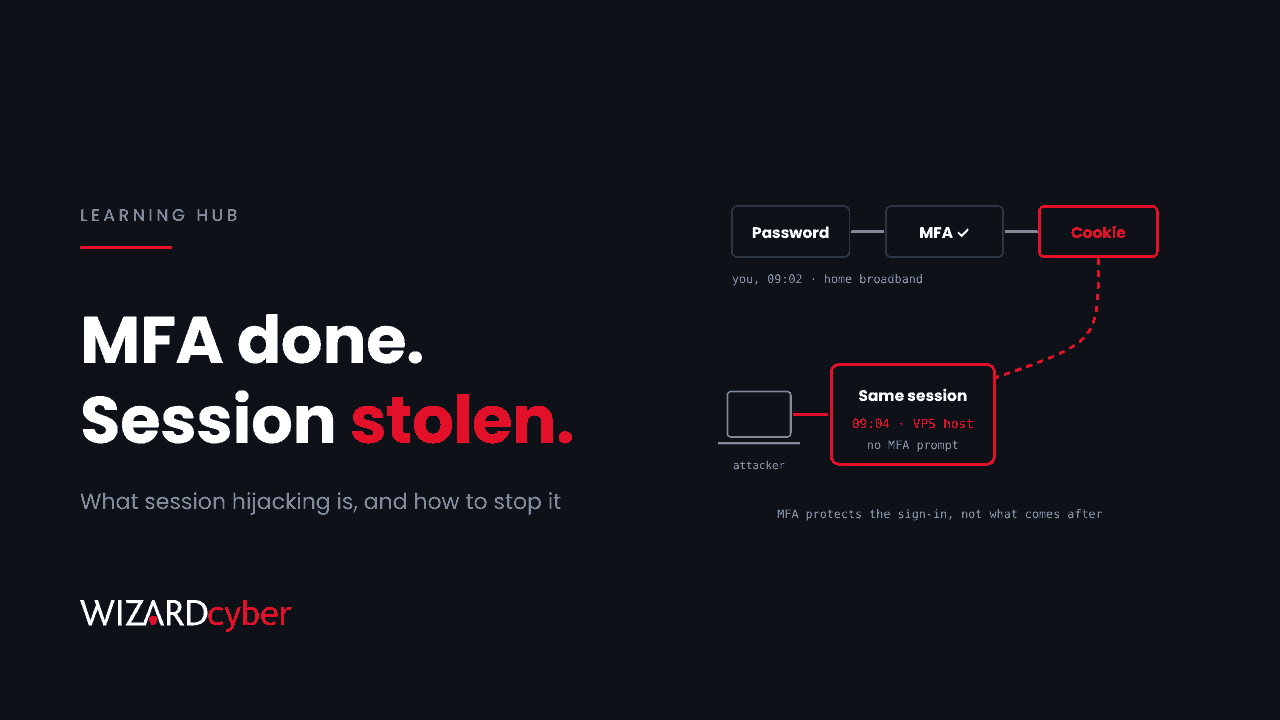
Session hijacking is when an attacker takes over a session you've already signed in to, instead of breaking your sign-in. Once you've entered your password and approved MFA, Microsoft 365 gives your browser or app a session cookie or token that proves you're signed in. Anyone who has that token can be you until it expires, and they don't need your password or MFA again. That is why session hijacking has become the standard way past MFA, and why stopping it takes more than MFA alone.
What is a session?
Asking for your password and an MFA code on every click would be unusable, so web services sign you in once and hand you a token instead. In Microsoft 365 there are a few kinds:
- Session cookies in the browser, which keep you signed in to Outlook on the web, SharePoint and the Microsoft 365 portal.
- Refresh tokens, used by apps such as Teams and Outlook to obtain new short-lived access tokens without asking you to sign in again.
- Access tokens, which are short-lived and are what an app actually presents to Exchange, SharePoint or Microsoft Graph.
All of these are bearer credentials: whoever presents one is treated as its owner. Session hijacking means getting hold of one of them, or getting the session itself, and using it.
How attackers hijack sessions
Adversary-in-the-middle (AiTM) phishing
The victim signs in through a proxy that sits between them and Microsoft's real sign-in page. The proxy passes everything through, including the MFA prompt, and keeps a copy of the session cookie Microsoft issues at the end. This is the technique behind most commercial phishing kits. Our explainer on phishing-as-a-service covers how those kits are sold.
Browser-in-the-middle
A newer variant runs the real sign-in inside a browser on the attacker's server and streams the page to the victim. The session never needs to be stolen, because it is created in the attacker's browser to begin with. We covered a recent example in PhantomDOM.
Infostealer malware
Malware on the user's device copies cookies and tokens straight out of the browser and apps, along with saved passwords. Stolen sessions are then sold or used directly. Our infostealer explainer covers this in detail.
Device code and consent phishing
Here the victim is tricked into approving a sign-in or an app on the attacker's behalf, and Microsoft issues tokens straight to the attacker. Strictly, this is token theft by deception rather than hijacking, but the result is the same. See our explainer on device code phishing.
Older techniques
Textbook session hijacking also covers session fixation, sniffing cookies over unencrypted networks and cross-site scripting. HTTPS everywhere and modern cookie settings have made these rare against Microsoft 365, though they still matter for your own web applications.
Why MFA doesn't stop it
MFA protects the moment you sign in. Session hijacking happens afterwards, or alongside the sign-in, so the attacker gets the result of your successful MFA without ever facing it. That is also why "we have MFA everywhere" and "we had an account takeover" can both be true in the same organisation. Our post on token spray-and-replay shows what this looks like in real logs.
How to prevent session hijacking in Microsoft 365
- Use phishing-resistant MFA. Passkeys, FIDO2 security keys and Windows Hello for Business are tied to Microsoft's real domain, so AiTM and browser-in-the-middle kits can't relay them. Require them for administrators first, then extend to everyone, and remove weaker fallbacks where you can.
- Require a compliant or registered device. A Conditional Access policy that requires a compliant device blocks a hijacked session used from the attacker's own machine, even when the token is valid.
- Use token protection where it's supported. Entra ID's token protection binds sign-in sessions to the device they were issued to, so a stolen token won't work elsewhere. Support depends on the app and platform, so check Microsoft's current list and roll it out in report-only mode first.
- Shorten session lifetimes for high-risk access. Sign-in frequency controls in Conditional Access limit how long a stolen session stays useful, especially for admin portals.
- Use Continuous Access Evaluation. It lets services such as Exchange and SharePoint act on events like a password reset or account disable in near real time, rather than waiting for the token to expire.
- Protect the endpoint. Infostealers take sessions from the device itself, so endpoint detection and application control matter as much as identity settings.
How to detect it
Hijacked sessions leave traces if you look across identity and endpoint data together:
- One session, two places. The same session ID or token used from different IP addresses, providers or countries in a short time.
- Hosting-provider IPs. Sign-ins from VPS and cloud hosting ranges where your users would normally be on home broadband or the office network.
- Fast follow-on activity. New inbox rules, mail forwarding, MFA method registration or OAuth consent within minutes of a sign-in.
- Entra ID Protection risk detections such as anomalous token and unfamiliar sign-in properties, where your licence includes them.
- Endpoint signals, for example processes other than the browser reading browser cookie files, or a browser started with remote debugging enabled.
What to do if you find one
- Preserve the logs before you change anything.
- Revoke the user's sessions and refresh tokens, and reset the password. Revoking without resetting leaves the door open if the password was also captured.
- Review and remove anything the attacker added: authentication methods, inbox rules, forwarding, app consents and registered devices.
- Find out how the session was taken. A phishing email means checking other recipients. Malware means treating the device as compromised.
- Check what the attacker accessed: mail, files and any downstream payment or supplier conversations.
FAQ
Is session hijacking the same as token theft?
Nearly. Token theft is the most common way to hijack a session in cloud services, and the terms are often used interchangeably. Session hijacking is the wider term and also covers taking over a live session without copying the token, as browser-in-the-middle kits do.
Does a VPN protect against session hijacking?
Not against the techniques used today. A VPN encrypts traffic on the network, but AiTM phishing, browser-in-the-middle and infostealers don't depend on intercepting your network traffic.
Will resetting the password end a hijacked session?
Not always on its own. Existing tokens can stay valid until they expire unless you also revoke sessions. Continuous Access Evaluation shortens that window for supported services. Always revoke and reset together.
Do passkeys stop session hijacking?
They stop the phishing routes to it, because a passkey can't be relayed through a fake page. They don't stop an infostealer taking a session from a device after a legitimate sign-in. That is why device compliance and endpoint protection are still needed.
How Wizard Cyber helps
Session hijacking is caught by joining signals: a sign-in that looks fine on its own, a session that moves between providers, an endpoint process touching browser files. Wizard Cyber's SOCs are staffed 24/7 and have run Microsoft Sentinel since 2019. Our identity threat detection and response service focuses on the Entra ID signals described here.
Want to know how exposed your tenant is to session hijacking? Talk to our team.