
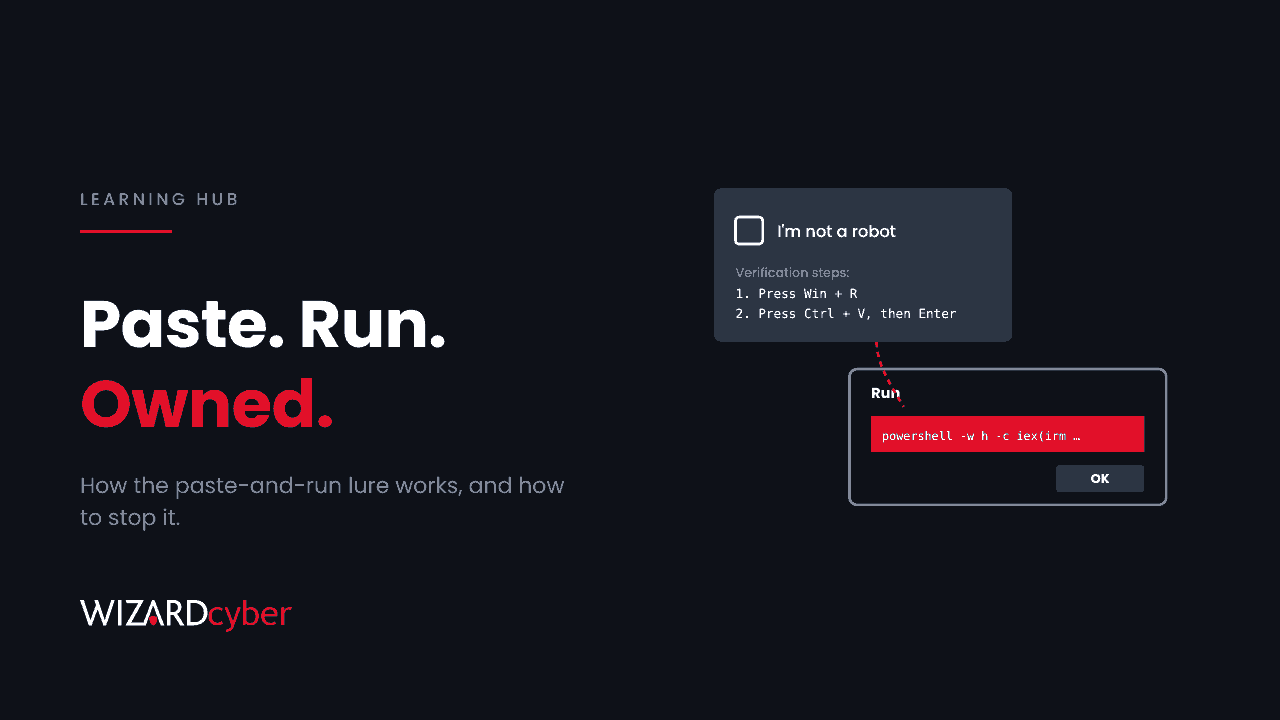
ClickFix is a social engineering technique that persuades someone to copy a command from a web page and run it on their own computer. The page shows a fake problem, such as a CAPTCHA to complete or an error to fix, and gives step-by-step instructions: press Windows+R, press Ctrl+V, press Enter. The command has already been placed on the clipboard by the page. When the person follows the steps, they install the attacker's malware themselves.
Because the victim runs the command, there's no malicious attachment for an email filter to catch and no downloaded file for the browser to warn about. That's why ClickFix has spread so quickly since it first appeared in 2024, from commodity infostealer gangs to state-backed groups. This guide explains how it works, the variants to know, and how to detect and stop it in a Microsoft environment.
How a ClickFix attack works
- The lure. The victim lands on a page through a compromised legitimate website, a malicious search ad, a phishing email or a fake document-sharing link.
- The fake problem. The page shows something familiar: "Verify you are human", a browser update error, a document that "failed to load", or a video call with no sound.
- The clipboard. When the victim clicks the button, JavaScript on the page silently copies a command to their clipboard. It's often padded so the visible part looks harmless, such as a fake verification ID.
- The instructions. The page tells the victim to open the Run dialog, paste and press Enter. On macOS, the instructions point at Terminal instead.
- The payload. The command usually starts PowerShell,
mshtaorcurlto download and run the next stage, often a loader that installs an infostealer or a remote access tool. Many chains then use DLL sideloading to hide inside a signed program.
Common variants
- Fake CAPTCHA. The most common version: a "verification" step that asks for Win+R and Ctrl+V.
- Fake error fixes. Browser, document viewer or meeting app "errors" with a "Fix it" button, which is where the name comes from.
- FileFix. The victim is told to paste a "file path" into the File Explorer address bar, which also runs commands. We covered it in From ClickFix To FileFix.
- Delivery platforms. Criminal back ends now serve ClickFix scripts and payloads as a service. In October 2026 researchers described one such panel, ROMULUS, which delivered loaders inside genuine signed software. See our analysis in A Genuine Signed Installer, A Hostile Folder.
Why ClickFix gets past security controls
- No file arrives by email. The email, if there is one, only contains a link to an ordinary-looking page.
- No download warning. The browser never downloads a file, so download reputation checks and Mark of the Web don't apply to the first step.
- The user is the one acting. The command runs with the user's own rights, started by
explorer.exe, which looks like normal user activity. - Legitimate tools do the work. PowerShell,
mshta,curlandmsiexecare built into Windows and used by administrators every day. - Training points the other way. People are taught to complete CAPTCHAs and to follow IT instructions. ClickFix borrows both habits.
How to detect ClickFix
The moment the command runs leaves good evidence. Watch for:
- PowerShell,
cmd,mshtaorcurlstarted directly byexplorer.exewith a URL in the command line, especially with hidden windows or execution policy bypass. - New entries under the user's
RunMRUregistry key, which records what was typed or pasted into the Run dialog. - PowerShell script block logging (event 4104) showing download-and-execute patterns.
- URLs that write an IP address as a single decimal number, a trick used to avoid simple matching.
- Silent
msiexecinstalls or archive tools run from Temp or AppData shortly after the above.
Starting-point queries for Microsoft Defender and Sentinel
These use Defender XDR advanced hunting tables. Administrators and some software use the Run dialog legitimately, so review results before alerting on them.
// Commands pasted into the Run dialog
DeviceRegistryEvents
| where RegistryKey has @"\Explorer\RunMRU"
| where RegistryValueName != "MRUList"
| where RegistryValueData has_any ("powershell", "mshta", "curl", "cmd", "http", "msiexec")
| project Timestamp, DeviceName, InitiatingProcessAccountName, RegistryValueData
// Script interpreters started by Explorer with a URL
DeviceProcessEvents
| where InitiatingProcessFileName =~ "explorer.exe"
| where FileName in~ ("powershell.exe", "pwsh.exe", "mshta.exe", "cmd.exe", "curl.exe")
| where ProcessCommandLine matches regex @"(?i)https?://"
| project Timestamp, DeviceName, AccountName, FileName, ProcessCommandLineHow to prevent ClickFix
- Remove the Run dialog where people don't need it. The Group Policy setting Remove Run menu from Start Menu also disables Windows+R. Most office staff never use it.
- Restrict script interpreters for standard users. App Control for Business or AppLocker can stop
mshtaand limit PowerShell, and PowerShell Constrained Language Mode removes much of what download cradles rely on. - Turn on attack surface reduction rules in Microsoft Defender for Endpoint, including the rules that block obfuscated scripts and block executables that don't meet prevalence, age or trusted-list criteria. Test them in audit mode first.
- Turn on PowerShell script block logging and send it to Sentinel, so you can see what ran.
- Stop software running from user-writable folders such as AppData and Temp, where ClickFix payloads land.
- Keep browsers current. Browser vendors have started warning users when a page tries to get them to paste dangerous commands.
- Teach one rule. A real CAPTCHA, website or IT team will never ask you to paste something into the Run box, PowerShell, Terminal or the File Explorer address bar. If a page asks, close it and report it.
What to do if someone ran the command
- Disconnect the device from the network and report it to your security team straight away.
- Assume browser-stored passwords, cookies and session tokens are stolen. Reset the user's passwords from a clean device and revoke their sessions.
- Investigate the device for persistence, such as scheduled tasks, Run keys and new programs in AppData, before returning it to use.
- Check the user's accounts for sign-ins and mailbox rules that followed the infection.
Frequently asked questions
Why is it called ClickFix?
Early versions showed fake error messages with a "Fix" button. Clicking it copied the malicious command, and the instructions told the user how to run it.
Is ClickFix only a Windows problem?
No. Windows is the main target, but there are macOS versions that ask the victim to paste a command into Terminal, and Linux variants exist too.
Would antivirus stop it?
Sometimes. Known payloads are often caught, but the commands are built to change often and the first stage uses built-in Windows tools. Behaviour-based detection of what Explorer starts, and what PowerShell does next, is more reliable.
Does multi-factor authentication help?
It helps with stolen passwords but not with stolen session cookies, which many infostealers take. That's why session revocation and phishing-resistant authentication both matter after an infection.
What MITRE ATT&CK techniques does ClickFix use?
Mainly User Execution (T1204), plus Command and Scripting Interpreter (T1059) for the PowerShell or mshta step.
How Wizard Cyber helps
ClickFix is built to look like a user doing something normal, so catching it depends on someone watching endpoint behaviour around the clock. Our SOCs are manned 24/7, and CYBERSHIELD AI's Investigation Agent works each alert to a verdict in an average of 3m 30s, or 7m 50s where Advanced Investigation is needed, with senior analyst sign-off by default on the managed service. If someone has already run a command they shouldn't have, our incident response team can help you contain it and find out what was taken.
To see how we'd catch a ClickFix attack in your environment, book a demo.