

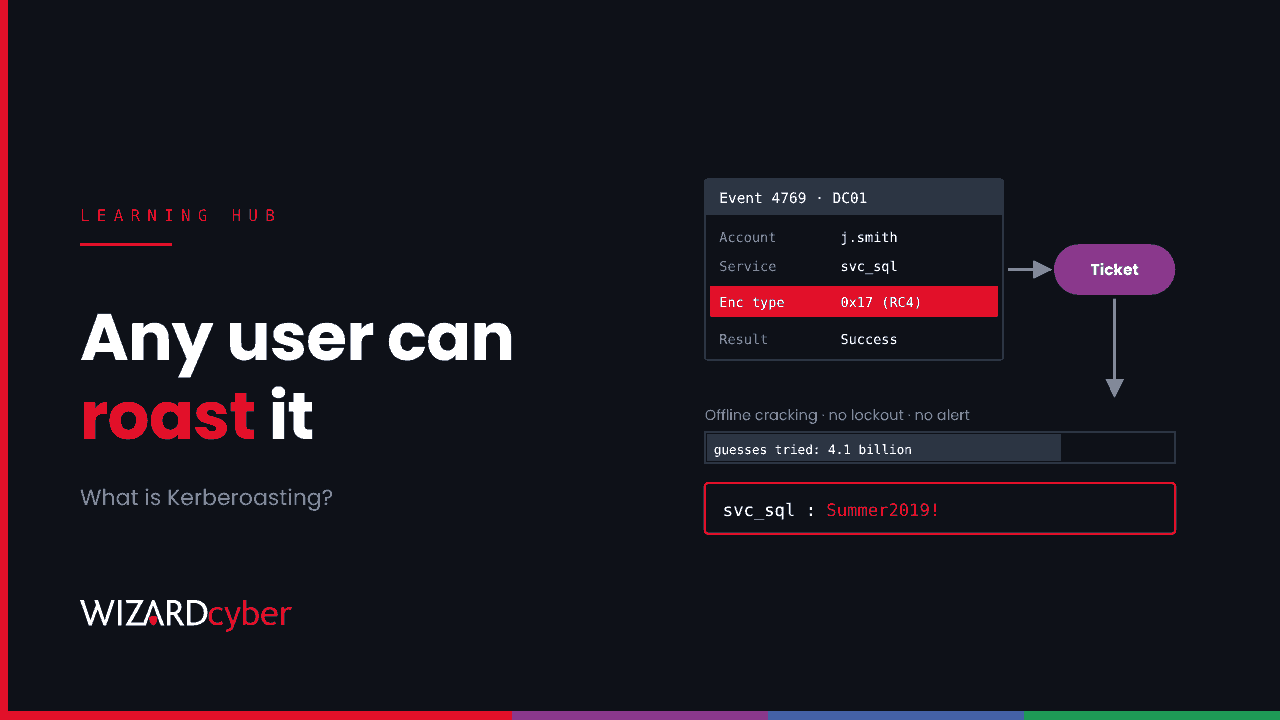
Kerberoasting is an attack on Active Directory service accounts. Any signed-in domain user can ask a domain controller for a Kerberos service ticket for any account that has a service principal name (SPN). Part of that ticket is encrypted with a key derived from the service account's password. The attacker takes the ticket away and tries to crack the password offline, where no lockout policy or alert can stop them. If the password is weak, they now hold a service account, and service accounts are often far more privileged than they need to be. This guide explains how it works, why it still works in 2026, and how to detect and prevent it.
Why it matters now
Kerberoasting has been documented for more than a decade, and it's still in current attack playbooks. On 13 November 2026 the FBI published a FLASH alert on intrusions driven by an AI-assisted penetration testing framework, listing "Kerberoasting to harvest service tickets" alongside DCSync among the privilege escalation steps. The FBI says some of those intrusions went from first targeting to privileged access in under three hours. A technique that needs only a normal user account, makes no noise on the target server and can be automated is exactly what fast-moving attackers use.
How Kerberoasting works
A quick Kerberos refresher
When you sign in to a domain-joined machine, a domain controller gives you a ticket-granting ticket (TGT). When you then want to use a service, such as a SQL Server or a web application, your machine presents the TGT and asks for a service ticket (TGS) for that service's SPN. The domain controller encrypts part of the service ticket with the service account's key, so only the real service can read it.
The domain controller doesn't check whether you're allowed to use the service. That's the service's job when you present the ticket. So any authenticated user can request a service ticket for any SPN in the domain.
The attack, step by step
- Find the targets. The attacker queries Active Directory over LDAP for user accounts with a
servicePrincipalNameset. Computer accounts also have SPNs, but their passwords are long and random, so attackers focus on user accounts used as service accounts. - Request tickets. They request a service ticket for each of those SPNs, often asking for RC4 encryption if the account allows it.
- Take them offline. They export the tickets and run them through password-cracking tools on their own hardware, trying billions of guesses without touching your network.
- Use the password. A cracked service account password gives the attacker that account's access. If it's a member of a privileged group, or has admin rights on servers, they move on from there, often towards pass-the-hash, DCSync or domain admin.
MITRE ATT&CK tracks this as T1558.003.
Why it still works
Service account passwords
Service accounts are often created by hand years ago, given a password someone could remember, set never to expire, and forgotten. Rotating them risks breaking an application, so nobody does. A password like Summer2019! falls quickly to offline cracking.
RC4
Tickets encrypted with RC4 are much faster to crack than those using AES, because the RC4 key is the account's NT hash with no salt. Microsoft has been removing RC4 as a default. Under the changes tied to CVE-2026-20833, domain controllers began auditing in January 2026, moved to enforcement in April, and from the July 2026 updates enforcement can no longer be rolled back. Domain controllers now assume AES unless an account is explicitly configured to allow RC4. That helps, but two problems remain. Accounts explicitly set to allow RC4, often for an old application, can still be roasted with RC4 tickets. And AES only slows cracking down: a weak password in an AES ticket will still fall, just more slowly.
Too much privilege
The damage depends on what the account can do. Service accounts that sit in Domain Admins, or have local admin on every server "because the installer needed it", turn a cracked password into a domain compromise.
How to detect Kerberoasting
Event 4769 on domain controllers
Every service ticket request generates event 4769 on the domain controller, if "Audit Kerberos Service Ticket Operations" is enabled. The field to watch is the ticket encryption type: 0x11 and 0x12 are AES, 0x17 is RC4. Microsoft's guidance is to monitor for anything other than AES. Now that AES is the default, RC4 tickets for user service accounts should be rare enough to investigate.
SecurityEvent
| where TimeGenerated > ago(7d)
| where EventID == 4769
| extend EncType = tostring(EventData.TicketEncryptionType),
         ServiceName = tostring(EventData.ServiceName),
         Requester = tostring(EventData.TargetUserName),
         ClientIP = tostring(EventData.IpAddress)
| where EncType in ("0x17", "0x18")
| where ServiceName !endswith "$"            // ignore computer accounts
| summarize Tickets = count(), Services = make_set(ServiceName, 50), Distinct = dcount(ServiceName)
    by Requester, ClientIP, bin(TimeGenerated, 1h)
| order by Distinct desc
Field names depend on how your domain controller logs reach Sentinel. If EventData isn't parsed in your workspace, extract the values from the EventData XML or use the Windows Security Events connector's parsed columns.
One account asking for many tickets
A real user requests tickets for the handful of services they use. An attacker roasting the domain requests tickets for every SPN at once. Look for a single account requesting tickets for an unusual number of different services in a short window, whatever the encryption type.
SecurityEvent
| where TimeGenerated > ago(1d)
| where EventID == 4769
| extend ServiceName = tostring(EventData.ServiceName), Requester = tostring(EventData.TargetUserName)
| where ServiceName !endswith "$" and ServiceName != "krbtgt"
| summarize Services = dcount(ServiceName) by Requester, bin(TimeGenerated, 10m)
| where Services > 10
Tune the threshold to your environment. Some management and monitoring tools legitimately request many tickets, so list them as exceptions rather than raising the threshold.
A honey SPN
Create a user account with an SPN that no real service uses, a long random password and no permissions. Nobody has a reason to request a ticket for it, so any 4769 event for that account is a high-confidence alert.
Defender for Identity
If you use Microsoft Defender for Identity, the "Suspected Kerberos SPN exposure" alert covers Kerberoasting, and "Security principal reconnaissance (LDAP)" often fires on the enumeration step that comes first.
How to prevent Kerberoasting
- Find your SPN accounts. In PowerShell,
Get-ADUser -Filter {ServicePrincipalName -like "*"} -Properties ServicePrincipalName, PasswordLastSet, MemberOf, msDS-SupportedEncryptionTypeslists user accounts with SPNs, when their passwords last changed and what they belong to. Remove SPNs that are no longer used. - Move to group managed service accounts. gMSAs have long random passwords that Active Directory rotates automatically, which makes cracking impractical. They're the best fix wherever the application supports them.
- Use long passwords where you can't. MITRE suggests at least 25 characters for service accounts that must stay as user accounts, kept in a vault and rotated.
- Remove RC4. Microsoft publishes scripts to find accounts and services still using RC4 in its guide to detecting and remediating RC4. Fix the applications, then remove RC4 from the accounts' supported encryption types.
- Cut privilege. Service accounts shouldn't be in Domain Admins or other privileged groups. Give them only what the service needs, and deny interactive logon where possible.
Frequently asked questions
Does an attacker need admin rights to Kerberoast?
No. Any authenticated domain account can request service tickets. That's why a single phished user is enough to start.
What's the difference between Kerberoasting and AS-REP roasting?
Kerberoasting targets service tickets for accounts with SPNs. AS-REP roasting targets accounts that have Kerberos pre-authentication turned off, which lets an attacker request crackable data for them without any credentials at all. Both end in offline password cracking.
Does MFA stop Kerberoasting?
No. Kerberos service tickets are issued inside Active Directory, and service accounts don't use MFA. Strong passwords, gMSAs and AES are what protect them.
Is Kerberoasting a risk in Microsoft Entra ID?
Kerberoasting is an attack on on-premises Active Directory. Cloud-only Entra ID accounts aren't affected, but most organisations are hybrid, and a cracked on-premises account that syncs to Entra ID or has rights over the sync server can lead into the cloud.
If RC4 is disabled, are we safe?
Safer, not safe. AES tickets take much longer to crack, but a short or common password will still fall. Fix the passwords as well as the encryption.
How Wizard Cyber helps
Wizard Cyber's SOCs are staffed 24/7 and have run Microsoft Sentinel since 2019. We bring domain controller events and Defender for Identity alerts into the same investigation as endpoint and cloud activity, so a burst of ticket requests from a user's laptop is linked to whatever that user did next. Our identity threat detection and response service focuses on attacks like this one. For more on Active Directory attacks, see our guides to Mimikatz, privilege escalation and AD CS.
Not sure how many of your service accounts could be roasted today? Talk to our team.