

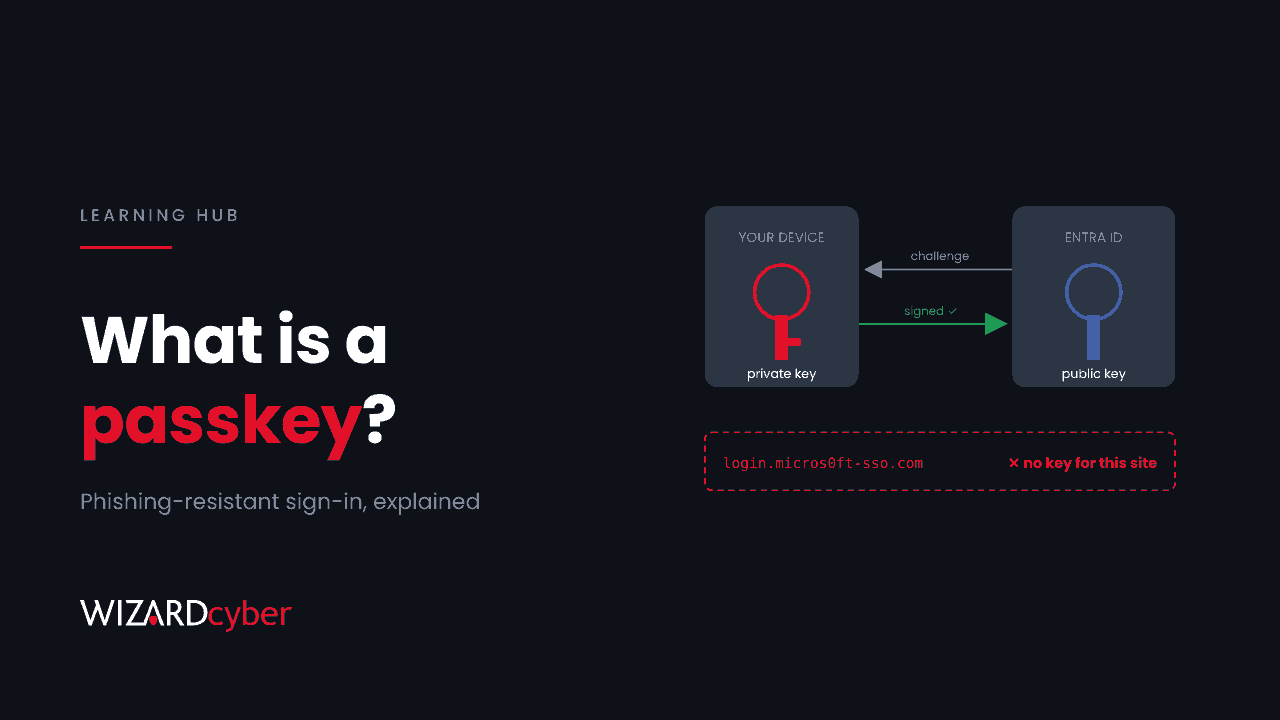
A passkey is a way to sign in without a password. Instead of something you type, it uses a pair of cryptographic keys: a private key that stays on your device and a public key held by the service you sign in to. You unlock the private key with your fingerprint, face or device PIN, and the device proves who you are by signing a challenge from the service. Because a passkey only works on the website it was created for, it can't be phished the way a password or a one-time code can.
This guide explains how passkeys work, the difference between the types, why they stop phishing, and how to roll them out and manage them in Microsoft Entra ID, including the part most guides leave out: what to do with passkeys after an account is compromised.
How a passkey works
Passkeys are built on the FIDO2 standards, specifically WebAuthn in the browser and CTAP between the browser and an authenticator. The steps are simple:
- Registration. When you create a passkey, your device generates a new key pair for that one service. The private key stays on the device or in a protected store. The public key is sent to the service and saved against your account.
- Sign-in. The service sends a random challenge. Your device asks you to unlock it with a biometric or PIN, then signs the challenge with the private key.
- Verification. The service checks the signature with the public key it already holds. If it matches, you're in.
Nothing secret ever crosses the network. The service never sees the private key, and your fingerprint or face never leaves your device. A database breach at the service exposes only public keys, which are useless to an attacker.
Why passkeys stop phishing
Most account takeovers in Microsoft 365 still start with phishing. Modern phishing kits don't just steal passwords. They sit between the user and the real sign-in page, relay the MFA prompt and capture the session cookie at the end. Our explainers on phishing-as-a-service and session hijacking cover how.
A passkey breaks that chain. When it's created, it's bound to the real domain of the service. The browser will only use it on that domain. On a lookalike site, there's simply no passkey to offer, so there's nothing to relay. That's why Microsoft and others classify passkeys as phishing-resistant MFA, alongside Windows Hello for Business and certificate-based authentication.
Passkeys also count as two factors in one: something you have (the device holding the key) and something you are or know (the biometric or PIN that unlocks it).
Device-bound and synced passkeys
There are two broad kinds, and the difference matters for an organisation.
- Device-bound passkeys live on one piece of hardware and can't be copied off it. Examples are a FIDO2 security key, Windows Hello and the passkey held in Microsoft Authenticator. Lose the device and you lose the passkey. You gain certainty about exactly where the credential lives.
- Synced passkeys are backed up to a cloud account, such as a phone platform's password manager, and appear on every device signed in to it. They're much more convenient for consumers and easier to recover. But the passkey is now only as safe as that personal cloud account, which your organisation doesn't control.
Most organisations allow device-bound passkeys for staff and treat synced passkeys with more caution, at least for administrators. Check Microsoft's current documentation for what Entra supports, because this area is changing quickly.
Passkeys in Microsoft Entra ID
Turning them on
In the Entra admin centre, the Passkey (FIDO2) method is managed under the authentication methods policy. You can enable it for all users or a pilot group, require attestation, and restrict which authenticator models are allowed by their identifiers (AAGUIDs). Restricting models is how you make sure only, say, Microsoft Authenticator and your chosen security keys can be registered.
Requiring them
Enabling a method doesn't make anyone use it. To require passkeys, use Conditional Access with the built-in phishing-resistant MFA authentication strength. Start with administrators and other high-value accounts, then widen the scope.
Getting people enrolled
The hardest part is the first enrolment. A Temporary Access Pass, issued after verifying the user's identity, lets someone register a passkey on a new device without a password. Pair that with a clear helpdesk process for lost devices. Your helpdesk is a target too, as our post on vishing explains.
The part most guides skip: passkeys after a compromise
A passkey is strong for whoever registered it. If an attacker takes over an account, even briefly, they can register a passkey of their own. A password reset doesn't remove it. Revoking sessions doesn't remove it either. In a case published by Google in November 2026, an attacker's passkeys kept working after exactly those steps. We wrote about it in You Reset The Password. Their Passkey Still Worked.
So treat registered authentication methods as part of your incident response:
- After any suspected takeover, review the user's registered methods and remove anything the user can't vouch for.
- Remove methods before you revoke sessions.
- Protect registration itself with a Conditional Access policy on the "register security information" user action, so new methods can only be added from a compliant device or trusted location.
- Monitor registrations. This Sentinel query is a starting point to tune:
AuditLogs
| where TimeGenerated > ago(30d)
| where OperationName in ("User registered security info", "Admin registered security info")
| extend User = tostring(TargetResources[0].userPrincipalName)
| join kind=leftouter (
    AADUserRiskEvents | where TimeGenerated > ago(30d)
    | summarize RiskEvents = count() by UserPrincipalName) on $left.User == $right.UserPrincipalName
| project TimeGenerated, OperationName, User, ResultDescription, RiskEvents
| order by RiskEvents desc
A new passkey on an account that also has recent risk detections deserves a phone call to the user.
Passkeys and passwords: what changes
Passkeys don't remove passwords overnight. Most organisations run both for a while, and as long as a password exists, it can still be phished or sprayed. The value comes when Conditional Access requires the passkey for the accounts and apps that matter, so a stolen password alone gets the attacker nowhere.
Frequently asked questions
Is a passkey the same as a password manager?
No. A password manager stores secrets that you still send to the website. A passkey never sends its secret anywhere. Some password managers can store synced passkeys, which is where the two overlap.
Is a passkey the same as FIDO2?
Broadly, yes. "Passkey" is the user-friendly name for a FIDO2 credential. A FIDO2 security key is one place a passkey can live.
What happens if I lose my phone?
For a device-bound passkey, you lose that credential and need to register a new one, usually with a Temporary Access Pass from your IT team. That's why organisations should let users register more than one method.
Can passkeys be stolen?
The private key is designed not to leave the device. The realistic risks are an attacker registering their own passkey on a compromised account, or a synced passkey exposed through a compromised personal cloud account. Both are reasons to monitor and review registrations.
Do passkeys stop all account takeovers?
No. They stop credential phishing and relay attacks very well. They don't stop malware stealing a session cookie from a signed-in device, consent phishing, or a helpdesk being tricked into resetting an account. Treat them as a strong layer, not the whole defence.
Where we can help
Rolling out passkeys is mostly an identity design and change project. Our Microsoft security consultancy can plan the policies and the rollout. Watching for what happens to those identities afterwards is a 24/7 job, which is where our identity threat detection and response service comes in.
To talk it through, get in touch or book a demo.