
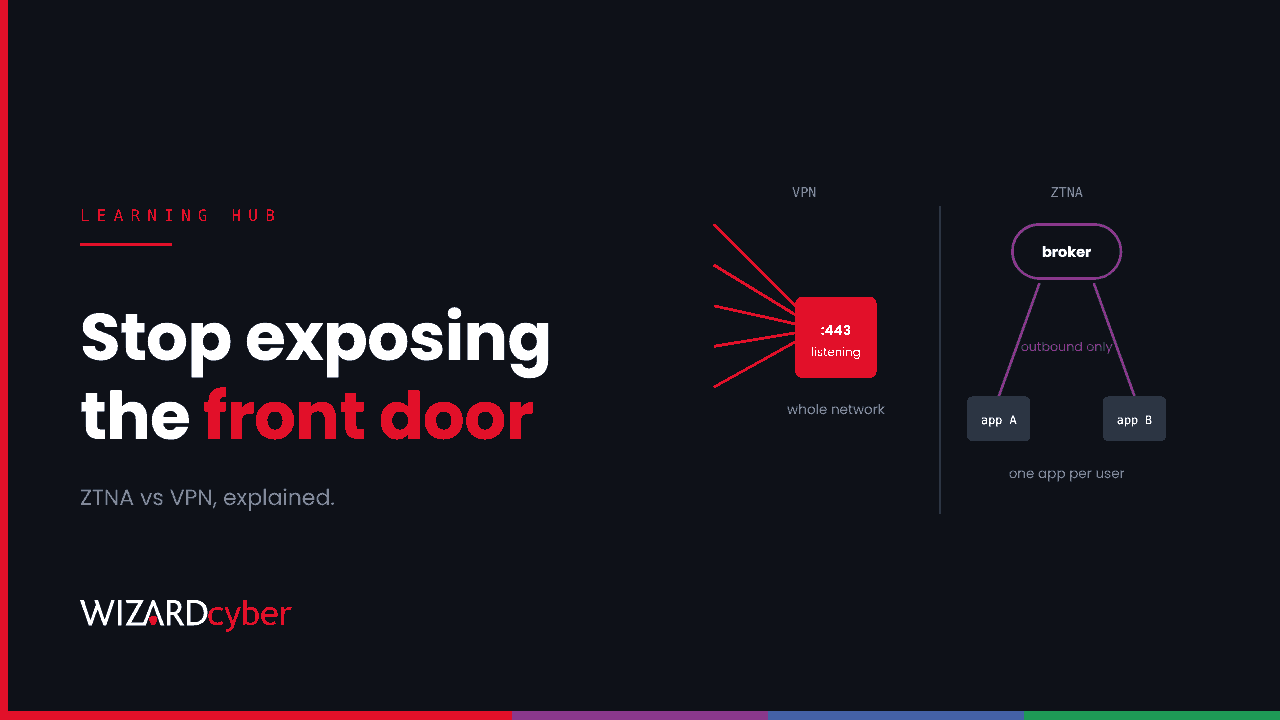
Zero Trust Network Access (ZTNA) is a way of giving users remote access to specific applications, not to a whole network. Each connection is brokered on demand after the user's identity and device have been checked, and the applications are never exposed directly to the internet. A traditional VPN does the opposite: it puts the user on the network, from an appliance that has to sit on the internet listening for connections. That appliance has become one of the most exploited types of device there is.
What is ZTNA?
ZTNA applies zero trust principles to remote access: never trust a connection because of where it comes from, verify every request explicitly, and give the least access needed. In practice, a ZTNA service:
- Checks identity and device for every session, usually against your identity provider (Microsoft Entra ID in most of our clients' estates) and your device compliance data.
- Grants access per application, not per network. A finance user gets the finance system and nothing else on the same subnet.
- Keeps applications hidden. Connectors inside your network make outbound connections to the broker, so there are no inbound ports open for a scanner to find.
- Re-evaluates during the session, so a change in risk, such as a non-compliant device or a risky sign-in, can end access without waiting for the user to log out.
The model comes from the zero trust architecture described in NIST SP 800-207. Some vendors and analysts call ZTNA a "software-defined perimeter".
How ZTNA works
- A connector, a small service or virtual appliance, runs inside the network next to the applications and opens an outbound connection to the ZTNA broker.
- The user's device runs a client, or for web apps uses a browser, and asks the broker for an application.
- The broker sends the user to the identity provider. Entra ID applies MFA and Conditional Access: who the user is, the state of the device, location and risk.
- If policy allows it, the broker joins the user's connection to the connector's connection, for that one application only.
- Every connection is logged with the user, the device, the application and the policy decision.
Microsoft's own option is Microsoft Entra Private Access, part of its Global Secure Access service. Many other providers sell ZTNA, often as part of a wider secure access service edge (SASE) offering. The architecture is broadly the same.
ZTNA vs VPN
- Exposure. A VPN concentrator listens on the internet and anyone can reach its login page. A ZTNA connector only makes outbound connections, so there is nothing for a scanner to probe.
- Access scope. A VPN usually gives network-level access, and segmentation inside the network decides what the user can reach. ZTNA gives application-level access by default.
- Trust decision. A VPN checks the user once, at connection. ZTNA checks every application request and can re-check during a session.
- Patching burden. A VPN appliance is your device, internet-facing, and must be patched by you, often quickly. With a cloud-brokered ZTNA service, the internet-facing part is the provider's responsibility. You still patch the connectors.
- Visibility. VPN logs show that a tunnel came up. ZTNA logs show which application each user reached, which is much more useful during an investigation.
The exposure point is why ZTNA matters now. In the past few weeks alone we have written about exploited flaws in Ivanti Connect Secure, PAN-OS and the SonicWall SSL VPN. The last one let some users skip SAML and MFA entirely. The NCSC has warned about the same pattern: internet-exposed edge devices are a favourite way in. Removing the listening appliance removes a whole class of these bugs.
What ZTNA doesn't fix
ZTNA is a better front door, not a complete security programme. Be clear about its limits:
- Stolen identities still work. If an attacker has a user's session token or gets past MFA by phishing, ZTNA lets them in as that user. Phishing-resistant MFA and token protection matter just as much as before. See our guides to device code phishing and phishing kits.
- Applications are still vulnerable. ZTNA controls who reaches an app. It doesn't patch the app.
- Broad policies undo the benefit. A rule that publishes a whole /16 to "All users" is a VPN with extra steps. The value comes from per-app, per-group policies.
- Connectors are infrastructure too. They run with network access inside your estate. Patch them, monitor them, and keep them off domain controllers.
- Some traffic doesn't fit. Legacy thick clients, server-initiated connections and some UDP protocols can be awkward, which is why many organisations run ZTNA and a slimmed-down VPN side by side for a while.
What changes for your SOC
Moving from VPN to ZTNA changes what your security team can see.
- New log sources. Bring ZTNA access logs into Microsoft Sentinel next to
SigninLogs. Each record ties a user, a device and an application together, which is exactly what you need when scoping an incident. - Better detections. "User reached an application they have never used before", "access from a non-compliant device was allowed" and "a connector's traffic increased tenfold" are all practical analytic rules.
- Faster containment. Revoking access to one application, or blocking one device in policy, is quicker and less disruptive than shutting down a VPN concentrator.
- A smaller patch emergency list. Fewer internet-facing appliances means fewer out-of-hours patching sprints when the next edge-device CVE lands on the KEV list.
How to start
- Inventory what the VPN is actually used for. VPN logs and firewall flow data will show which applications people reach. Usually it is a short list.
- Move web applications first. They are the easiest to publish per app, and moving them gives users an immediate benefit.
- Build policies around groups and applications, with Conditional Access requiring MFA and compliant devices.
- Shrink the VPN to the users and protocols that still need it, and plan to retire the appliance.
- Connect the logs to your SOC before you cut over, so you have a baseline.
FAQ
Is ZTNA a replacement for VPN?
For most user-to-application access, yes. Some legacy protocols and site-to-site connections still need a VPN or another kind of private link.
Is ZTNA the same as zero trust?
No. Zero trust is a security strategy that covers identity, devices, data, applications and networks. ZTNA is one component of it, the part that handles remote access to applications.
What is the difference between ZTNA and SASE?
SASE (secure access service edge) is a broader bundle of cloud-delivered network security services, usually including ZTNA, a secure web gateway, a cloud access security broker and firewall as a service. ZTNA can be bought on its own or as part of SASE.
Does ZTNA stop ransomware?
It removes one common way in, the exploited VPN appliance, and limits how far a compromised user can reach. It doesn't stop ransomware delivered through phishing or a compromised identity, so detection and response are still needed.
Does ZTNA work with Microsoft Entra ID?
Yes. Most ZTNA services use Entra ID as the identity provider, so Conditional Access and MFA policies apply to every application connection.
How Wizard Cyber helps
Our Microsoft security consultancy team can help you plan a move away from internet-facing VPN appliances using Entra ID and Conditional Access. Our managed SOC brings the new access logs into Microsoft Sentinel and watches them 24/7.
Thinking about retiring your VPN appliance? Talk to our team.