

Active Directory Certificate Services (AD CS) is the Windows Server role that runs your organisation's own certificate authority. It issues the certificates that computers and users present for Wi-Fi, VPN, smart card logon, encrypted file systems and internal websites, and Active Directory trusts them. If an attacker can get AD CS to issue them a certificate in someone else's name, they can sign in as that person, including a domain admin or a domain controller.
This guide explains what AD CS does, the misconfigurations known as ESC1 and ESC8, how to check whether you have them, and what to monitor.
What AD CS does
A certificate is a signed statement that says "this key belongs to this identity". AD CS is the signer. Its main parts are:
- The certificate authority (CA). Usually an offline root CA and one or more online issuing CAs joined to the domain.
- Certificate templates. Stored in Active Directory, they define what a certificate can be used for, who can request one, and where the name in it comes from.
- Enrolment interfaces. How clients ask for certificates: auto-enrolment over RPC, and optionally web pages such as Certificate Authority Web Enrollment (
/certsrv) and the Certificate Enrollment Web Service.
Domain controllers accept certificates for Kerberos logon through a process called PKINIT. That is what makes AD CS so powerful, and what makes a mistake in it so serious: a valid certificate for an account is as good as that account's password, and it keeps working after the password is changed.
Why attackers target AD CS
AD CS is often set up once, years ago, by someone who has since left, using templates copied from a guide. Few teams review it, and its logs are often not collected. In 2021, researchers published a catalogue of AD CS misconfigurations numbered ESC1 onwards, along with tools to find and abuse them. Those techniques now turn up in real intrusions. Microsoft described two in October 2026, both reached through fake help desk calls, which we cover in our threat research post.
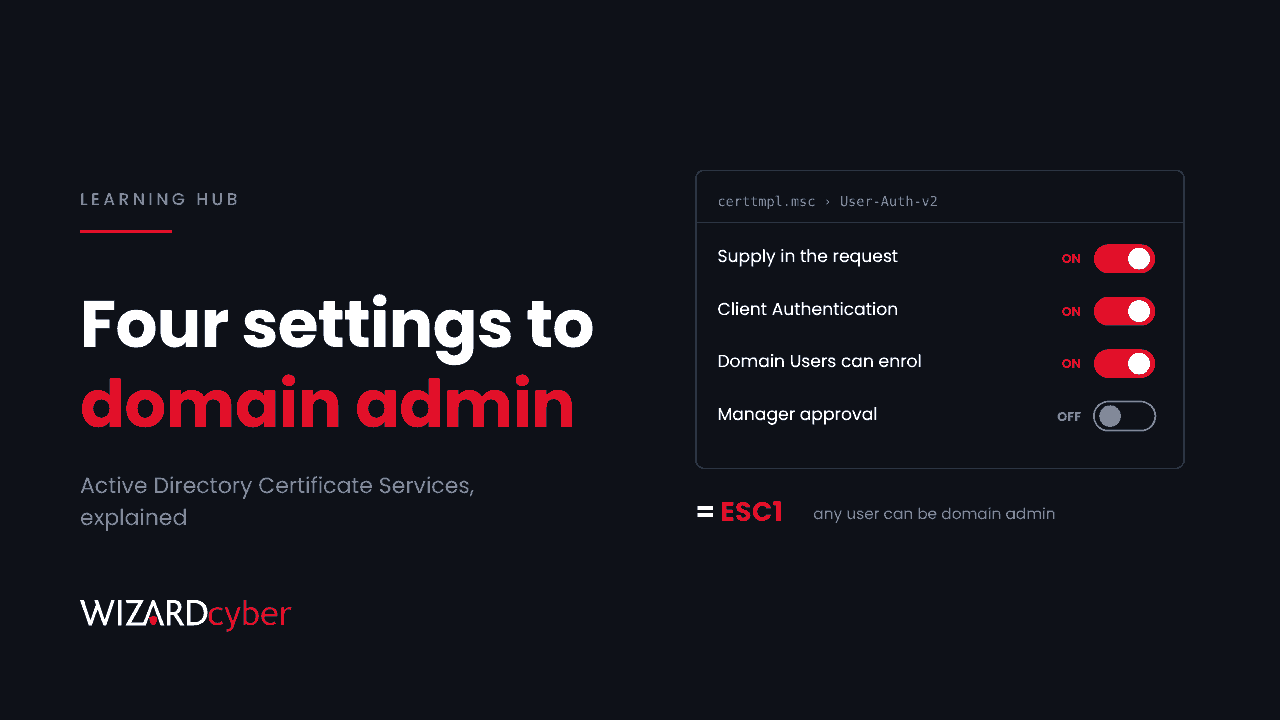
ESC1: a template that lets you choose the name
A template is vulnerable to ESC1 when all of these are true:
- the requester can supply the subject or subject alternative name ("Supply in the request");
- the certificate can be used for client authentication;
- low-privileged users, such as Domain Users or Authenticated Users, can enrol;
- no manager approval or authorised signature is required.
With that combination, any user can request a certificate that says they are a domain admin, and the CA signs it. The attacker then uses it to get a Kerberos ticket as that admin. No password is guessed and no exploit is run.
ESC8: relaying to the web enrolment page
ESC8 abuses the HTTP enrolment endpoints. If they accept NTLM authentication without protection against relay, an attacker who can make a computer authenticate to them can request a certificate as that computer.
The classic route uses PetitPotam, a technique that makes a domain controller authenticate to an attacker's machine. The attacker relays that authentication to /certsrv, requests a certificate from the Domain Controller template, and uses PKINIT to get a ticket as the domain controller. From there, DCSync gives them every password hash in the domain. Microsoft's guidance for this is KB5005413.
Other ESC misconfigurations worth knowing
- ESC2 and ESC3: templates with "any purpose" or enrolment agent rights, which let a holder request certificates for others.
- ESC4: templates that low-privileged users can edit, so they can make them vulnerable to ESC1.
- ESC6: a CA-wide setting that lets every request specify its own name.
- ESC7: users with CA management rights who can approve their own requests.
The list has grown well past ESC8. The principle stays the same: anything that lets an ordinary user control the name in a certificate, or change who can enrol, is a route to domain admin.
How to check your AD CS
- Find your CAs. Run
certutil -config - -pingor look in Active Directory Sites and Services under Services > Public Key Services. Many organisations find a CA they had forgotten about. - List published templates. In the Certification Authority console, open Certificate Templates on each issuing CA. Only published templates can be requested.
- Review each template in the Certificate Templates console (
certtmpl.msc). On the Subject Name tab, check for "Supply in the request". On Extensions, check the application policies for Client Authentication, Smart Card Logon or Any Purpose. On Security, check who has Enroll, Write and Full Control. On Issuance Requirements, check for manager approval. - Check the web endpoints. If
/certsrvor the enrolment web service is installed, confirm it is needed. If it is, confirm it requires HTTPS with Extended Protection for Authentication and that NTLM is disabled. - Use Defender for Identity. With its sensor installed on your AD CS servers, its security posture assessments flag vulnerable templates and CA settings, including ESC1, and it raises alerts on suspicious certificate requests.
How to harden AD CS
- Unpublish templates you do not use. The safest template is one the CA will not issue.
- Turn off "Supply in the request" wherever the name can come from Active Directory instead. Where you need it, such as for web server certificates, remove client authentication from the template and require manager approval.
- Narrow enrolment rights to the groups that need the certificate, not Domain Users or Authenticated Users.
- Lock down template and CA permissions so only PKI administrators can edit them.
- Remove Web Enrollment if you do not need it, or require HTTPS with Extended Protection for Authentication and disable NTLM on it.
- Reduce NTLM across the domain. Our guide What Is NTLM? explains why relay attacks depend on it.
- Treat CA servers as Tier 0. Only Tier 0 admins should log on to them, from privileged access workstations.
What to monitor
Turn on Certification Services auditing on each CA (set the CA audit filter and enable "Audit Certification Services" in advanced audit policy), then collect the CA's Security log in Microsoft Sentinel. The key events are:
- 4886 – a certificate request was received;
- 4887 – a certificate was issued;
- 4888 – a request was denied;
- 4899 and 4900 – a template or template security was changed.
The signal to look for is a mismatch: a certificate issued for an identity that is not the requester, especially a privileged one. Defender for Identity alerts on ESC1 abuse, suspicious certificate requests and certificate use over Kerberos (PKINIT), and Defender for Endpoint alerts on NTLM relay and ESC8. Several of these in the same hour from one workstation should be treated as an incident.
How Wizard Cyber helps
Our SOCs are staffed 24/7 and investigate identity alerts from Defender for Identity and Sentinel, with a full report for every investigation and senior analyst sign-off by default on the managed service. Our Microsoft security consultants can review your AD CS templates and CA configuration, and our penetration testers can show you whether an ordinary user account can reach domain admin through it.
Frequently asked questions
Do I need AD CS?
If you issue certificates for Wi-Fi, VPN, smart card or Windows Hello for Business on-premises authentication, internal web servers or device identity, you probably do. If nothing uses it, removing it is the strongest hardening step, but check carefully first.
Does changing a user's password stop a stolen certificate?
No. A certificate remains valid until it expires or is revoked, whatever the password. Revoke it, publish a new CRL, and remember that Kerberos tickets already issued with it stay valid until they expire.
What is the difference between ESC1 and ESC8?
ESC1 is a template problem: a user can ask for a certificate in someone else's name. ESC8 is an endpoint problem: an attacker relays a computer's NTLM authentication to the web enrolment page to get a certificate as that computer.
Is PetitPotam still a risk?
Microsoft has fixed parts of it, but relay attacks still work where AD CS web endpoints accept NTLM without Extended Protection for Authentication. Fixing the endpoint removes the target, whichever coercion method an attacker uses.
Does Microsoft Entra ID use AD CS?
Not by default. Entra certificate-based authentication can trust certificates from your CA, and Intune can deploy them, so a weak CA can affect cloud sign-in too if you have connected the two.
If you would like your AD CS reviewed before an attacker reviews it for you, talk to our team.