

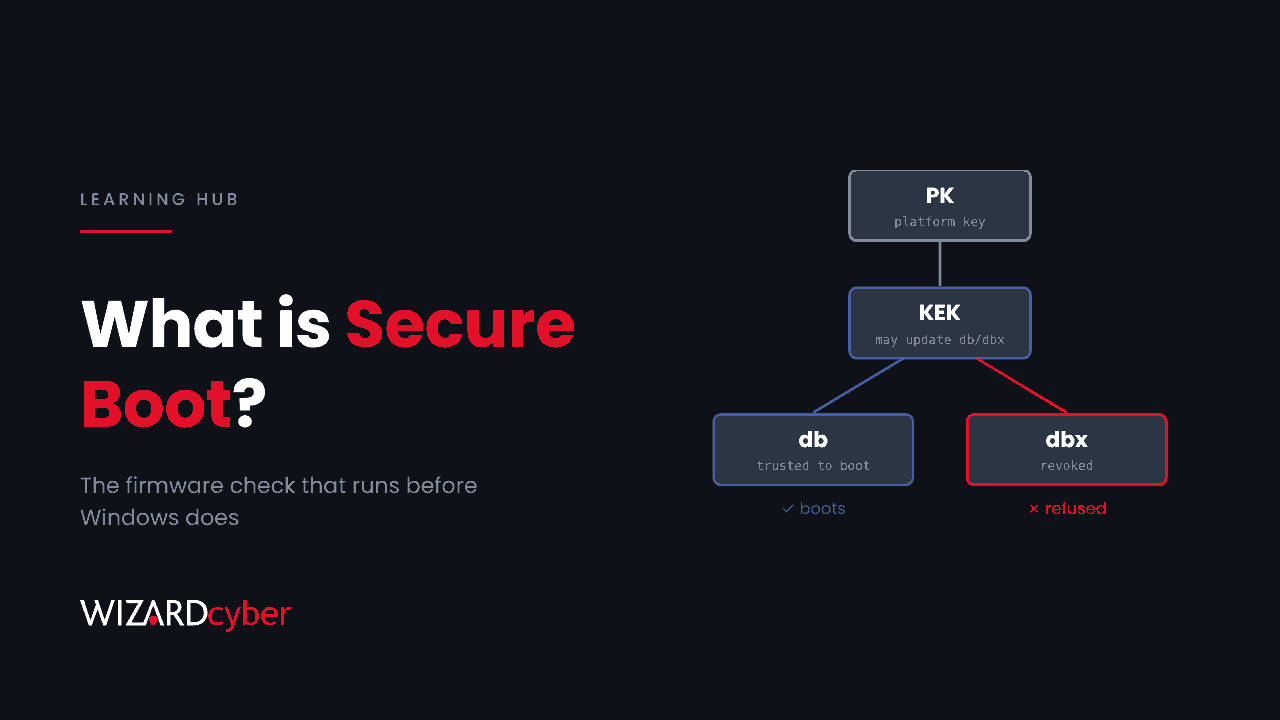
Secure Boot is a UEFI firmware feature that only lets a computer start software that has been digitally signed by someone the firmware trusts. Each component checks the next before handing over control, from the firmware to the boot loader to the operating system kernel. If something in that chain has been tampered with or isn't signed by a trusted key, the device refuses to start it. The aim is to stop malware from loading before Windows does, which is where security tools can't see it.
This guide explains how Secure Boot works, what it does and doesn't protect against, why 2026 is a big year for it, and how to check and manage it across a Windows estate.
Why the boot process needs protecting
Antivirus, EDR and most logging start once the operating system is running. Anything that loads before them can hide from them. Bootkits and rootkits exploit this: they modify the boot loader or plant code in the firmware's boot path, then start ahead of the operating system and conceal themselves from it. Malware that gets that far can survive reinstalling Windows and can turn off defences before they load.
Secure Boot moves the check earlier. The firmware itself decides what may run, using keys stored in the device.
How Secure Boot works
Secure Boot is part of the UEFI specification, which replaced the old BIOS on almost every PC made in the last decade. It relies on four stores of keys and signatures held in the firmware:
- Platform Key (PK). Usually owned by the device manufacturer. It controls changes to the KEK.
- Key Exchange Key (KEK). Keys allowed to update the two databases below. Microsoft's KEK is on almost every Windows PC, which is how Windows Update can change them.
- Signature database (db). The certificates and hashes that are trusted to boot. On Windows devices this includes Microsoft's certificate for the Windows boot manager and a separate one for third-party boot loaders and hardware option ROMs.
- Forbidden signature database (dbx). Revoked certificates and hashes. Anything in dbx is refused, even if it's also signed by something in db.
At start-up, the firmware checks the boot manager's signature against db and dbx. If it's trusted and not revoked, the boot manager runs and checks the Windows kernel in turn. On Windows, Measured Boot also records each step in the TPM. BitLocker and device health attestation use that record, so a change to the boot chain can trigger a BitLocker recovery prompt or mark a device as non-compliant.
What Secure Boot doesn't protect against
- Signed but vulnerable software. Secure Boot checks signatures, not quality. An old boot manager with a known flaw still carries a valid signature. Unless it has been added to dbx, an attacker can bring it along and exploit it. The BlackLotus and BlackX bootkits both work this way. We explain the BlackX case in our threat research post.
- Attacks after boot. Once Windows is running, Secure Boot has done its job. Phishing, stolen credentials and malware running as a normal user are outside its scope.
- Firmware flaws. If the firmware enforcing Secure Boot is itself vulnerable, the check can be bypassed. Firmware updates matter.
- An attacker with admin rights and time. Most bootkit installations need administrator access first. Secure Boot is meant to stop that access from becoming permanent and invisible, not to stop it being gained.
The 2026 certificate changeover
The Microsoft certificates that most Windows devices have trusted since 2011 expire in 2026. Microsoft lists:
- Microsoft Corporation KEK CA 2011, expires 24 June 2026. It signs updates to db and dbx. It is replaced by Microsoft Corporation KEK 2K CA 2023.
- Microsoft UEFI CA 2011, expires 27 June 2026. It signs third-party boot loaders and option ROMs. It is replaced by two certificates, Microsoft UEFI CA 2023 and Microsoft Option ROM UEFI CA 2023.
- Microsoft Windows Production PCA 2011, expires 19 October 2026. It signs the Windows boot manager. It is replaced by Windows UEFI CA 2023.
Devices without the 2023 certificates keep booting and keep receiving normal Windows updates. They can't receive new boot-level protections, such as boot manager updates, new dbx revocations or fixes for future boot flaws. Expiry also doesn't revoke anything. Old boot managers signed under PCA 2011 still load until PCA 2011 is added to dbx, which Microsoft documents as a separate step in KB5025885.
How to check Secure Boot on a Windows device
- System Information: run
msinfo32and look at Secure Boot State. It should say On. BIOS Mode should say UEFI. - PowerShell (as administrator):
Confirm-SecureBootUEFIreturnsTruewhen Secure Boot is on. - 2023 certificate present:
[System.Text.Encoding]::ASCII.GetString((Get-SecureBootUEFI db).bytes) -match 'Windows UEFI CA 2023' - PCA 2011 revoked: the same command against
dbx, matching'Microsoft Windows Production PCA 2011'.
Managing Secure Boot across an estate
- Require it. In Intune, device compliance policies for Windows can require Secure Boot to be enabled, reported through device health attestation. Pair that with Conditional Access so non-compliant devices can't reach company data.
- Report on certificates and revocations. Run the db and dbx checks above as a detection-only Intune remediation script to see where every device stands.
- Keep firmware current. Manufacturers ship firmware fixes and, in some cases, their own certificate updates.
- Prepare before revoking. Escrow BitLocker recovery keys, update recovery and installation media, pilot on a small group, then roll out in rings.
- Don't forget virtual machines. Hyper-V Generation 2 and Azure Trusted Launch VMs use Secure Boot too, and need the same updates.
Frequently asked questions
Does Windows 11 need Secure Boot?
Windows 11's minimum requirements include UEFI firmware that is Secure Boot capable, along with TPM 2.0. Microsoft strongly recommends having it switched on, and many organisations make it a compliance requirement.
Is it safe to turn Secure Boot off?
Turning it off removes protection against bootkits and can break features that depend on it, such as some BitLocker configurations and device health attestation. Some Linux distributions and older hardware tools have historically needed it off. Most mainstream Linux distributions now boot with it on. In a business, treat disabling it as an exception that needs approval.
What is the difference between Secure Boot and TPM?
Secure Boot decides what is allowed to start. The TPM is a chip that stores keys and records what did start (Measured Boot). They work together: BitLocker uses the TPM's record to release the disk key only when the boot chain is unchanged.
Will the certificate expiry stop my PCs booting?
No. Microsoft states that devices continue to start and operate normally. The risk is that they can't receive future boot security updates, and that old, vulnerable boot components stay trusted until they are revoked.
Does Secure Boot stop ransomware?
Not directly. Most ransomware runs inside a running operating system. Secure Boot helps by stopping an attacker from hiding persistent boot-level malware, so a cleaned or rebuilt device stays clean.
How Wizard Cyber can help
We help organisations report on Secure Boot and certificate status across their devices, plan the 2023 certificate rollout and the PCA 2011 revocation without stranding devices in recovery, and watch for the credential theft and lateral movement that come before a bootkit is ever installed. Our SOCs are staffed 24/7, and we have run Microsoft Sentinel since 2019.
To see how that would work in your estate, talk to us or book a demo.