

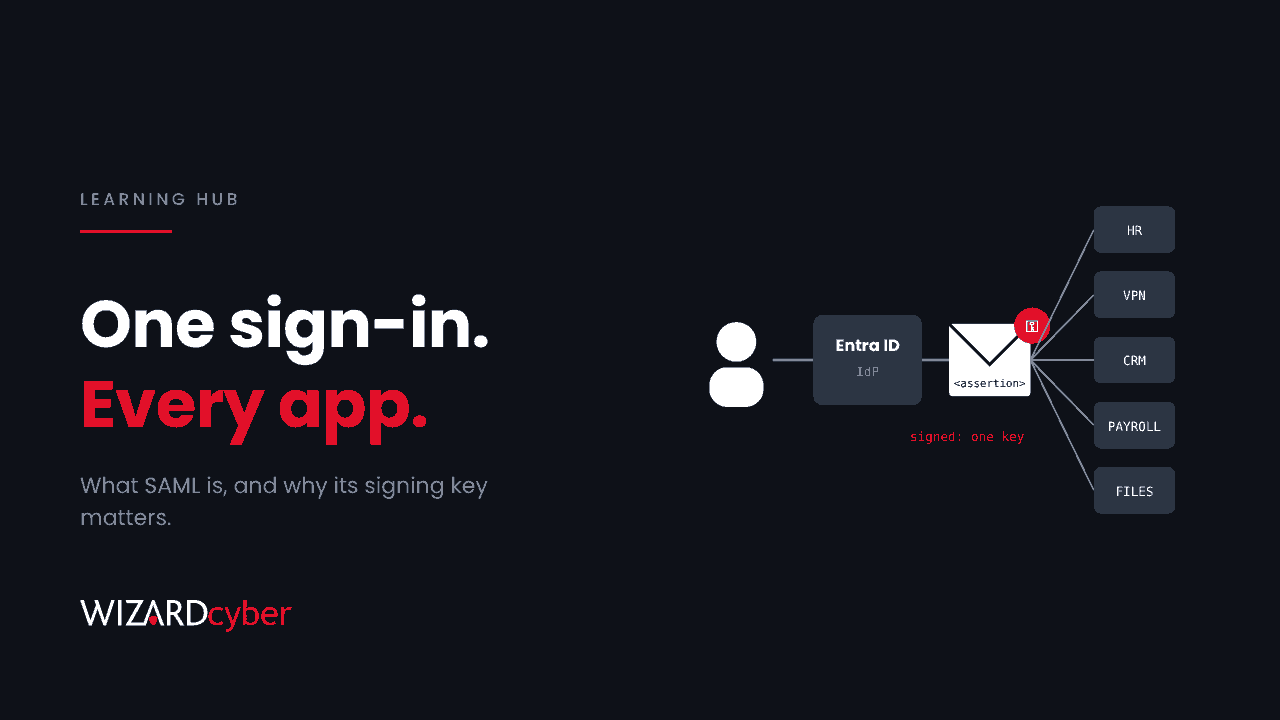
SAML (Security Assertion Markup Language) is an open standard that lets one system, the identity provider, sign a user in and then vouch for them to another system, the application. In most Microsoft environments the identity provider is Microsoft Entra ID. That makes SAML the reason one corporate login works across your HR system, your VPN and dozens of SaaS apps. It also means that if an attacker gets hold of the right signing key, or finds an app with a back door around SAML, they can be trusted everywhere SAML is trusted.
What is SAML?
SAML 2.0 is an XML-based standard published by OASIS in 2005. It defines how two parties exchange authentication information:
- The identity provider (IdP) checks who the user is: password, MFA, device compliance, Conditional Access. In Microsoft estates this is Entra ID, or sometimes AD FS on-premises.
- The service provider (SP) is the application the user wants to reach, such as a SaaS platform, a VPN or an internal web app. It doesn't check the password itself. It trusts the IdP.
- The assertion is the signed XML document the IdP issues after a successful sign-in. It says who the user is, when they authenticated, and any attributes or groups the app needs.
The trust between them rests on a certificate. The IdP signs every assertion with a private key, and the SP holds the matching public certificate. If the signature checks out, the SP lets the user in. That is single sign-on (SSO): the user signs in once, to Entra ID, and every SAML app accepts the result.
How a SAML sign-in works, step by step
The most common flow is SP-initiated:
- The user opens the application.
- The application doesn't know them, so it redirects the browser to Entra ID with a SAML authentication request.
- Entra ID signs the user in and applies MFA and any Conditional Access policies.
- Entra ID builds a SAML response containing a signed assertion and posts it back to the app through the user's browser.
- The application checks the signature, the audience (that the assertion was meant for this app), and the time window, then creates its own session.
In IdP-initiated sign-in, the user starts from the My Apps portal and Entra ID sends an assertion without a request from the app. It is convenient but harder to protect against replay, so many apps prefer SP-initiated flows.
Two points matter for security. First, the assertion travels through the user's browser, so it can be captured or tampered with if the app's checks are weak. Second, after step 5 the application runs its own session. Entra ID controls the front door, but not how long the app keeps the user signed in.
SAML vs OAuth vs OpenID Connect
These three are often confused:
- SAML answers "who is this user?" for a web application, using XML assertions. It dates from before mobile apps and APIs, and it is still the most common standard for enterprise SaaS SSO.
- OAuth 2.0 answers "what is this app allowed to do on the user's behalf?" It issues access tokens for APIs and is about authorisation, not identity. Our OAuth explainer covers it in depth.
- OpenID Connect (OIDC) is an identity layer built on OAuth. It does what SAML does using JSON tokens, and it suits modern web and mobile apps.
In Entra ID you will see both. Older and enterprise apps tend to use SAML, newer ones OIDC. From a security point of view the questions are the same: who signs the token, what the app checks, and what happens if the signing key leaks.
Setting up SAML in Microsoft Entra ID
A SAML app in Entra ID is an enterprise application. You set its identifier (Entity ID), the reply URL where assertions are sent, and the claims to include, such as the user's UPN or email address. Entra ID generates a SAML signing certificate for the app, which by default is valid for three years. You download the certificate or federation metadata and load it into the application.
Three settings are easy to get wrong:
- Assignment required. If this is off, any user in the tenant can get an assertion for the app. Turn it on and assign groups.
- Conditional Access. SAML apps can be targeted by Conditional Access just like Microsoft 365. Make sure your MFA and device policies actually include them.
- Certificate expiry notifications. Add a monitored mailbox, not the person who set the app up three years ago.
How attackers abuse SAML
1. Going around SAML entirely
The most common problem isn't a broken SAML implementation. It's an application that still accepts another way in, such as local accounts, an LDAP fallback or an admin login, so the MFA you enforce through Entra ID never applies. The SonicWall SSL VPN flaw CVE-2026-19868 is a recent example. Valid credentials for an alternate authentication method could bypass SAML and the MFA attached to it. For every SAML app, ask whether SAML is the only door.
2. Stealing or forging the signing key ("Golden SAML")
Whoever holds the IdP's private signing key can produce assertions for any user, with any claims, and skip MFA, because to the application a forged assertion looks the same as a real one. This technique, known as Golden SAML, was used against on-premises AD FS servers in the 2020 SolarWinds-related intrusions. CISA described it in advisory AA21-008A. With Entra ID the keys stay in Microsoft's cloud. An AD FS server, or a federation trust an attacker adds to your tenant, puts that power back within reach.
3. Adding a federation trust
An attacker with Global Administrator, or another sufficiently privileged role, can configure a domain in your tenant to trust an identity provider they control. After that, they can sign in as users in that domain without a password. Changes to domain federation settings should be rare and should always raise an alert.
4. Weak validation in the application
Some apps don't check the signature on every part of the assertion, accept assertions meant for another app, or ignore expiry times. XML signature wrapping attacks exploit these gaps. You can't fix a SaaS vendor's code, but you can ask about it in due diligence and include SAML apps in penetration testing.
5. Session theft after sign-in
Once the app has created its own session cookie, stealing that cookie gets an attacker in without touching SAML at all. Shorter app session lifetimes and sign-in frequency controls in Conditional Access reduce the window.
Detecting SAML abuse in Microsoft environments
These Sentinel queries are starting points to tune.
Changes to domain federation settings:
AuditLogs
| where TimeGenerated > ago(30d)
| where OperationName has_any ("Set domain authentication", "Set federation settings on domain")
| project TimeGenerated, OperationName, InitiatedBy = tostring(InitiatedBy.user.userPrincipalName),
          Target = tostring(TargetResources[0].displayName), Result
Changes to SAML signing certificates on enterprise apps:
AuditLogs
| where TimeGenerated > ago(30d)
| where OperationName has_any ("Update application – Certificates and secrets management", "Update service principal")
| extend Props = tostring(TargetResources[0].modifiedProperties)
| where Props has_any ("KeyCredentials", "PreferredTokenSigningKeyThumbprint")
| project TimeGenerated, OperationName, App = tostring(TargetResources[0].displayName),
          InitiatedBy = tostring(InitiatedBy.user.userPrincipalName)
Activity in a SAML app with no Entra sign-in to match it. Where an app sends its own logs to Sentinel, compare its logins with SigninLogs for that app. A login that Entra didn't issue an assertion for went around SAML. Our SonicWall hunting post shows this join in full.
If you still run AD FS, collect its event logs too. Microsoft Defender for Identity can watch AD FS servers for signs of signing-key theft.
Hardening checklist
- Require user assignment on every SAML enterprise app.
- Apply Conditional Access (MFA, compliant device) to SAML apps, and test that it applies.
- Disable local or fallback logins on SAML apps, or limit them to monitored emergency accounts.
- Track SAML certificate expiry and rotate certificates before they expire.
- Alert on federation changes and on new signing certificates.
- Plan the move from AD FS to Entra ID authentication if you haven't already.
- Treat Global Administrator and Application Administrator as tier 0. Our PAM guide explains how.
FAQ
Is SAML secure?
The standard is mature and sound. Problems come from how it is deployed: weak validation in an app, a stolen signing key, or a second login path that skips it.
Does SAML provide MFA?
No. SAML carries the result of authentication. MFA is enforced by the identity provider, Entra ID, before it issues the assertion. If a user reaches the app without going through Entra ID, no MFA is applied.
Is SAML being replaced by OpenID Connect?
For new apps, OIDC is increasingly the default. SAML will stay in enterprise SaaS for many years, so you need to secure both.
What is a SAML assertion?
A signed XML document issued by the identity provider. It states who the user is, when and how they authenticated, and which attributes the application should receive.
What happens when a SAML certificate expires?
The app rejects new assertions and users can't sign in. Rotate certificates in advance and update the application with the new one before you switch over.
How Wizard Cyber helps
SAML abuse rarely triggers a single obvious alert. It shows up as a federation change, a new certificate or a login with no matching sign-in, and each needs someone to connect them. Our identity threat detection and response service watches Entra ID around the clock, and our Microsoft security consultancy can review how your enterprise apps are federated.
Want to know which of your apps have a way around SAML? Talk to our team.