
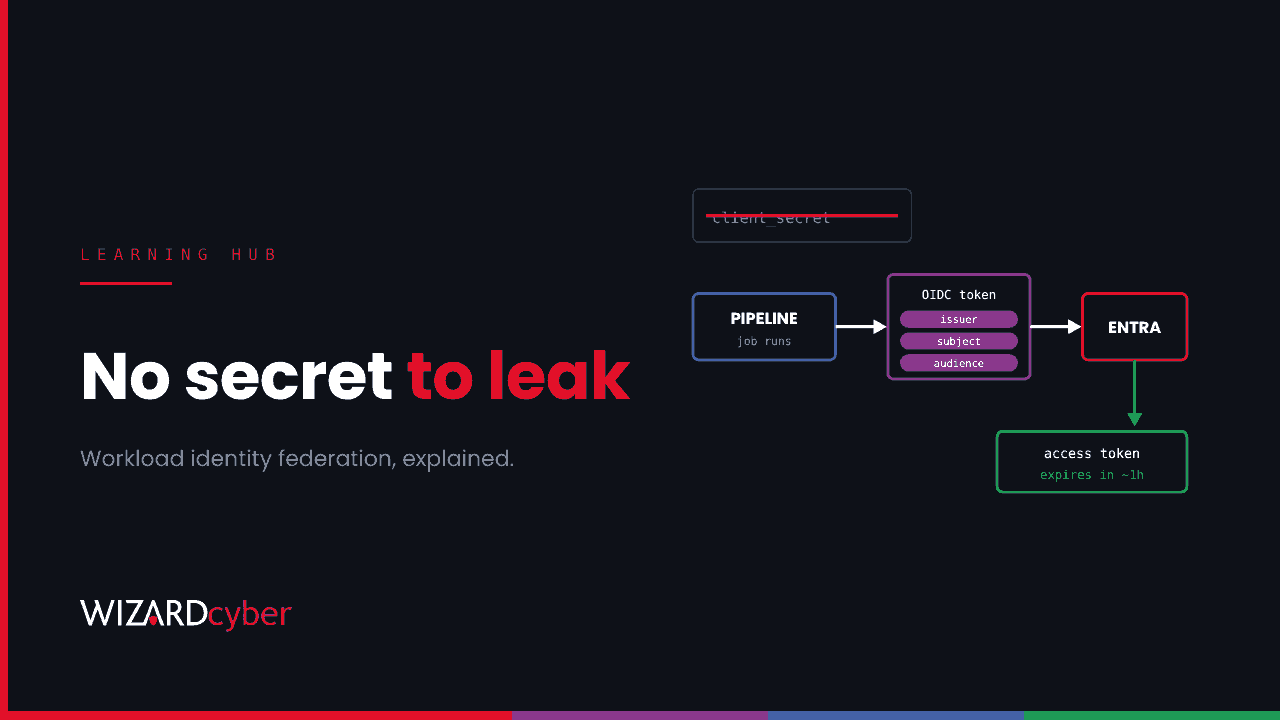
Workload identity federation lets software running outside Azure, such as a CI/CD pipeline, a Kubernetes cluster or a workload in another cloud, get access to Microsoft Entra ID protected resources without a stored secret. Instead of a client secret or certificate, the workload presents a short-lived token from a provider it already trusts, such as your pipeline platform. Entra ID checks that token against a trust you've configured and, if it matches, issues a short-lived Entra access token in return. With no secret to store, there's no secret to leak.
This guide explains how workload identity federation works, where to use it, how it differs from managed identities, and the mistakes that still leave it open to abuse.
Why it matters now
Client secrets end up in places they shouldn't: pipeline variables, configuration files, scripts and, far too often, public code repositories. In November 2026, Microsoft described an attacker using AI agents to search public repositories for exactly these secrets, then sign in as victims' own applications. In one case it went from finding a secret to taking data out of Azure Key Vault in five minutes. Microsoft's advice includes removing client secrets and moving to credentials that don't have to be stored. Our threat research on that campaign covers how to hunt for it.
How workload identity federation works
It relies on OpenID Connect (OIDC), the same standard behind "sign in with" buttons on websites. There are three parties:
- The external identity provider: the platform where your workload runs, such as your source control's pipeline service, Azure DevOps or a Kubernetes cluster. It issues signed tokens to the jobs it runs.
- Your app registration or user-assigned managed identity in Entra ID, which holds the permissions the workload needs.
- A federated identity credential on that app or identity, describing which external tokens to trust.
A federated identity credential has three key values:
- Issuer: the URL of the external provider, for example your pipeline platform's token service.
- Subject: exactly which workload is trusted, such as one repository and one deployment environment, or one Azure DevOps service connection.
- Audience: who the token is for, normally
api://AzureADTokenExchange.
When a pipeline job runs, it asks its platform for a token. The token states the issuer, the subject (for example, "this repository, production environment") and the audience. The job sends it to Entra ID. Entra ID checks the signature against the issuer's published keys and checks that the issuer, subject and audience match a federated credential exactly. If they do, it issues an access token for the app, valid for a short time. The job uses that to deploy to Azure, read from Key Vault or call Microsoft Graph, and when the job ends there's nothing left to steal.
Where to use it
CI/CD pipelines
The most common use. The major pipeline platforms support OIDC tokens for jobs, and Azure DevOps supports service connections that use workload identity federation instead of a secret. Converting existing secret-based service connections is usually a small change, and it removes the most frequently leaked kind of credential.
Kubernetes
Microsoft Entra Workload ID for Azure Kubernetes Service lets pods use federated credentials, with the cluster acting as the issuer and the Kubernetes service account as the subject. The same pattern works for clusters running elsewhere.
Workloads in other clouds
A workload running in another cloud can use that cloud's own identity tokens to get Entra access, so you don't have to copy an Azure secret into it.
Workload identity federation vs managed identities
Both remove stored secrets, but they fit different places:
- Managed identities are for workloads running inside Azure: virtual machines, App Service, Functions and so on. Azure handles the credential completely. See our guide to managed identities.
- Workload identity federation is for workloads running outside Azure, or in places like Kubernetes, where something else issues the identity token.
The two can be combined. You can add a federated credential to a user-assigned managed identity, which avoids creating an app registration at all. The rule of thumb: inside Azure, use a managed identity; outside, federate; use a client secret only when neither is possible, and then keep it in a vault and rotate it.
What can still go wrong
Federation removes the stored secret, but it moves trust to the external platform. Anyone who can make that platform issue a matching token can get your Entra access. In the campaign Todyl tracked, the attacker abused an Azure DevOps federated identity. Watch for these mistakes:
- Subjects that are too broad. Trusting every branch of a repository means anyone who can push a branch can deploy to production. Scope the subject to a protected branch or a deployment environment with required approvals.
- Weak pipeline controls. If anyone can edit the pipeline definition, they can make a trusted job do whatever they like. Protect pipeline files, require reviews and restrict who can run jobs against production.
- Too many permissions. A federated app with Owner on a subscription is still dangerous. Give it only the roles the deployment needs, on the resources it deploys to. Our guide to service principals explains where permissions hide.
- Old secrets left behind. Moving to federation achieves nothing if the original client secret is still valid. Delete it.
- Unwatched changes. An attacker with enough rights can add their own federated credential to your app. Alert on any change to an app's credentials.
How to monitor it
These queries are starting points to tune for your environment.
1. Changes to app credentials, including federated ones
AuditLogs
| where TimeGenerated > ago(30d)
| where OperationName has_any ("Update application", "Add service principal credentials",
                               "Update application – Certificates and secrets management")
| mv-expand Target = TargetResources
| mv-expand Prop = Target.modifiedProperties
| where tostring(Prop.displayName) has_any ("FederatedIdentityCredentials", "KeyDescription")
| project TimeGenerated, OperationName, App = tostring(Target.displayName),
          Changed = tostring(Prop.displayName), By = tostring(InitiatedBy.user.userPrincipalName)
The exact operation and property names vary, so run this against a test change of your own first.
2. Which apps still sign in with a secret
AADServicePrincipalSignInLogs
| where TimeGenerated > ago(14d) and ResultType == "0"
| summarize SignIns = count(), IPs = make_set(IPAddress, 5) by ServicePrincipalName, AppId, ClientCredentialType
| order by ClientCredentialType asc, SignIns desc
Apps signing in with clientSecret are your migration list. Apps using federated credentials should only ever sign in from your pipeline platform's addresses, so anything else needs a look.
Frequently asked questions
Is workload identity federation free?
Federated identity credentials are part of Microsoft Entra ID and don't need an extra licence. Some related features, such as Conditional Access for workload identities, need Workload ID Premium.
Do the tokens expire?
Yes. Both the external token and the Entra access token are short-lived, typically valid for about an hour or less, which is much of the security benefit.
Can I use it for apps in my own data centre?
Only if the workload can get a signed OIDC token from an issuer Entra ID can verify. For servers you manage, Azure Arc can give machines a managed identity instead.
Does it replace secret scanning?
No. Keep scanning code for secrets, because other credentials such as API keys and connection strings still leak. Federation removes one of the most valuable kinds.
How many federated credentials can one app have?
There's a per-app limit, so plan one credential per repository and environment rather than one per branch. Check Microsoft's documentation for the current figure.
How Wizard Cyber helps
Our Microsoft security consultancy helps find applications that still rely on client secrets and move them to workload identity federation or managed identities, with permissions cut back as we go. Our SOCs, staffed 24/7, watch service principal sign-ins and credential changes in Microsoft Sentinel, so a new federated credential or a sign-in from the wrong place gets investigated.
If you'd like to know how many of your applications still sign in with a secret, book a demo or talk to our team.