
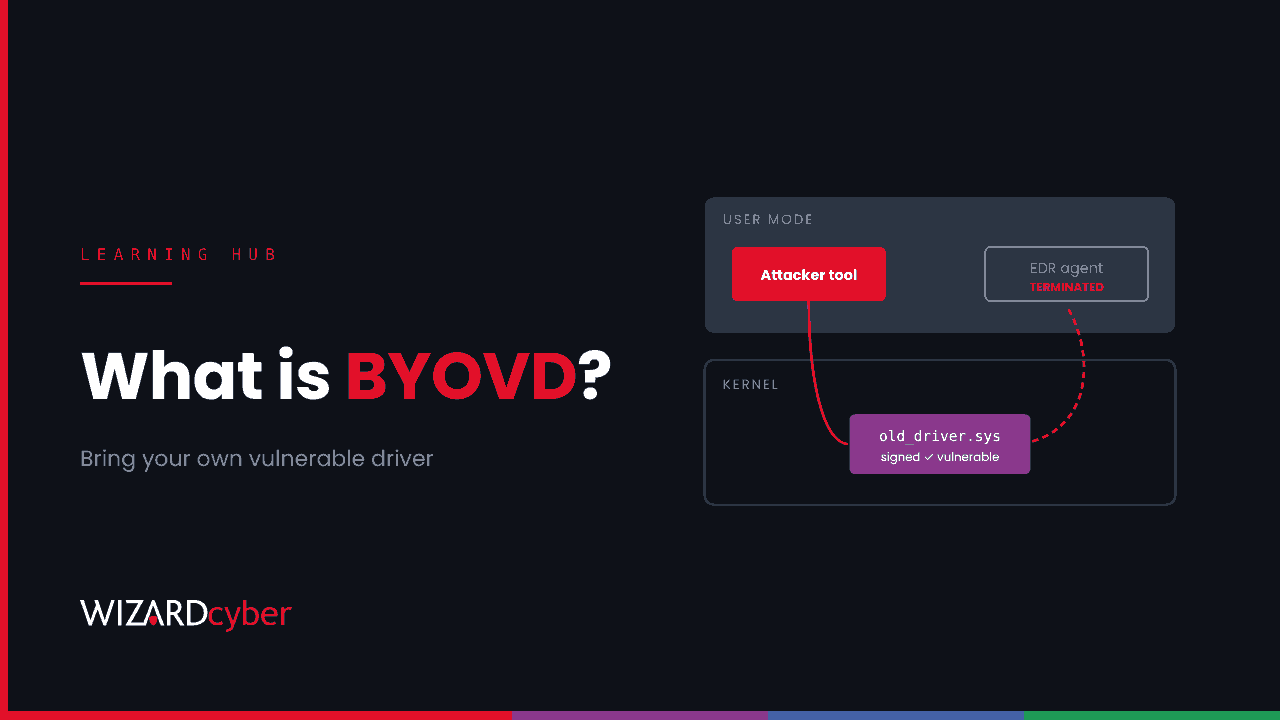
BYOVD stands for "bring your own vulnerable driver". It's a technique in which an attacker who already has administrator rights on a Windows machine installs a legitimate, digitally signed kernel driver that has a known flaw, then uses that flaw to run code or issue commands with kernel privileges. The most common goal is to switch off endpoint detection and response (EDR) and antivirus tools before deploying ransomware. Windows trusts the driver because its signature is genuine, which is what makes the technique effective.
This guide explains how BYOVD attacks work, why they're so popular with ransomware groups, and the Windows and Microsoft Defender controls that stop them.
Why the kernel matters
Windows separates code into two worlds. Ordinary applications run in user mode, where they can't touch each other's memory or the operating system's core. Drivers run in kernel mode, with full control of the machine.
Security tools protect themselves in user mode. Even a local administrator usually can't simply kill an EDR agent, because the product's own driver and Windows protections block it. Code running in the kernel isn't bound by those protections. It can terminate protected processes, remove the callbacks security tools use to watch the system, or blind them in other ways.
Getting your own code into the kernel is hard. Since Windows 10, new kernel drivers have to be signed through Microsoft's process, and an attacker can't easily get malware signed. So they don't try. They borrow a driver that's already signed.
How a BYOVD attack works
- Get administrator rights. BYOVD isn't an initial access technique. The attacker is already inside, usually after stolen credentials, a vulnerable edge device or a phishing payload, and has escalated to local admin.
- Drop a vulnerable driver. They bring a legitimate driver with a known weakness. Typical candidates are hardware utilities, overclocking and monitoring tools, anti-cheat software and, ironically, old security products. The flaw is often an interface that lets any caller read or write kernel memory, or terminate any process.
- Load it. They register the driver as a kernel service and start it. Windows checks the signature, finds it valid and loads it.
- Abuse it. Their user-mode tool sends the driver requests through its exposed interface: terminate this process, patch that memory. Security agents stop, logging goes quiet, and the attacker carries on unobserved.
Because the tooling is reusable, BYOVD "EDR killers" are traded and shared between criminal groups. Recent examples on this site include affiliates of INC and The Gentlemen, and the AuditTeam group, whose toolkit uses a signed antivirus driver to stop around 220 security, backup and database processes.
Why signed drivers are hard to stop
A signature tells Windows who published a driver. It says nothing about whether the driver is safe. Thousands of signed drivers with known flaws exist, and older ones signed under earlier rules can still load on current Windows unless something blocks them. Revoking a vendor's certificate is slow and can break legitimate hardware, so most vulnerable drivers stay valid for years. Community projects catalogue them, such as LOLDrivers, and attackers read those lists too.
It's the same lesson we discussed in Signed By A Stranger: a valid signature tells your SOC very little.
How to defend against BYOVD on Windows
1. Turn on Microsoft's vulnerable driver blocklist
Microsoft maintains a blocklist of known vulnerable and malicious drivers. It's on by default in recent Windows 11 releases and when memory integrity, Smart App Control or S mode is enabled. Check it's actually active across your fleet, servers included. The built-in list is updated with Windows releases, so it can lag behind newly abused drivers. Microsoft also publishes the list as an App Control policy you can deploy for more frequent updates.
2. Turn on memory integrity (HVCI)
Hypervisor-protected code integrity uses virtualisation-based security to enforce driver signing and the blocklist from outside the normal kernel. It makes many kernel tampering techniques much harder. Check driver compatibility in audit first.
3. Use the Defender attack surface reduction rule
The ASR rule "Block abuse of exploited vulnerable signed drivers" stops applications writing known vulnerable signed drivers to disk. Run it in audit mode briefly, then move it to block.
4. Control which drivers can load at all
For high-value servers and admin workstations, an App Control for Business policy that allows only the drivers you expect is the strongest option. It takes effort to build, but it stops drivers that aren't on any blocklist yet.
5. Protect the security tools themselves
Make sure tamper protection is on in Microsoft Defender for Endpoint. It won't stop a kernel-level kill on its own, but it stops many simpler attempts and generates useful signals.
6. Limit local administrator rights
BYOVD needs admin rights to load a driver. Remove standing local admin, use LAPS for local accounts, and tier your administrators so that a compromised workstation doesn't give an attacker admin everywhere.
How to detect BYOVD
Prevention reduces the risk. Detection catches what gets through. The pattern to watch for is a driver your estate has never seen, loaded shortly before a security tool stops reporting. This Defender advanced hunting query is a starting point to tune:
let Known = DeviceEvents
| where Timestamp between (ago(37d) .. ago(7d)) and ActionType == "DriverLoad"
| distinct SHA256;
DeviceEvents
| where Timestamp > ago(7d) and ActionType == "DriverLoad"
| where SHA256 !in (Known)
| summarize FirstSeen = min(Timestamp), Devices = dcount(DeviceId), DeviceList = make_set(DeviceName, 20)
    by FileName, FolderPath, SHA256
| where Devices <= 3
| order by FirstSeen desc
A rare new driver on one or two machines, loaded from a temporary folder, a user profile or ProgramData, is worth investigating. Add two more signals: driver services created by unexpected processes, and devices whose EDR sensor stops reporting. In Sentinel, Sysmon event ID 6 (driver loaded) gives similar visibility where Sysmon is deployed.
Frequently asked questions
Is BYOVD a vulnerability in Windows?
No. The flaw is in a third-party driver. Windows is doing what it's designed to do: loading a driver with a valid signature. The fix is to block known-bad drivers and restrict which drivers can load.
Does BYOVD need administrator rights?
Yes, to install and start the driver. That's why it's a late-stage technique, used after the attacker has already got in and escalated privileges.
Will my EDR detect it?
Often it detects the attempt, if the driver is known or the behaviour is suspicious. But the whole point of the technique is to kill the EDR, so the last alert may be the only one you get. Someone has to act on it quickly.
Is the vulnerable driver blocklist enough?
It's an important baseline, but it only covers drivers Microsoft has added, and it may lag behind new ones. Combine it with the ASR rule, HVCI and monitoring.
What is an EDR killer?
A tool built to switch off endpoint security products. Many use BYOVD to get the kernel access they need.
Where we can help
A BYOVD attack is designed to end with silence. Spotting it means someone treats a security tool going quiet as an incident, at any hour. Our SOCs are staffed 24/7, and our MXDR for Microsoft service is built around Microsoft Defender and Sentinel. Our Microsoft security consultancy can help you roll out the blocklist, HVCI and App Control without breaking your estate.
To talk it through, get in touch or book a demo.