
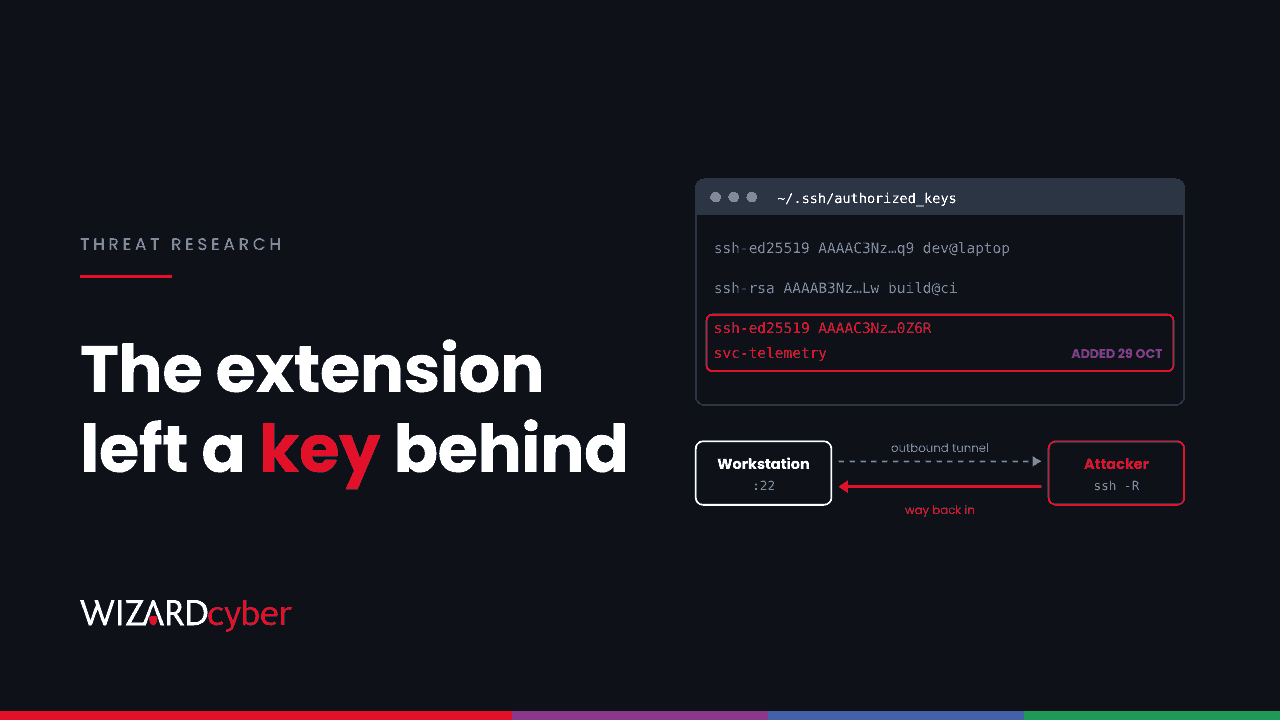
For about eleven hours on 29 October, developers who installed or auto-updated a popular AI assistant extension in one code editor's marketplace got something extra. The package was a fake carrying the real product's name. As soon as the editor loaded it, it added an attacker's key to the user's SSH authorized_keys file, tried to switch on the SSH server, opened a reverse tunnel and set itself up to restart at every logon. The extension kept working normally.
The marketplace took it down the same day, but that does not clean the machines it ran on. This post covers what the loader did, according to Microsoft's analysis published on 30 October, and gives Defender hunts for each artefact.
What happened
Two versions of the fake extension (2.1.312 and 2.1.313) were published to the editor's own extension marketplace. The marketplace operator says they were live from about 09:27 to 20:35 UTC on 29 October. Microsoft confirmed the package was never on the Visual Studio Marketplace or npm, and the AI vendor whose name it used said its own systems were not compromised and it did not build the package.
No vulnerability was exploited. Developers trusted a familiar name in a marketplace, and extensions run with the same rights as the user who installed them.
What the loader did
The injected JavaScript ran when the extension module loaded, before the genuine code started. It downloaded nothing else and hid its own errors.
- Reconnaissance. It collected the hostname, username, OS, home and working directories and the global Git email. It also listed the names (not values) of up to 40 environment variables containing words such as KEY, TOKEN, SECRET or PASS.
- An SSH key for the attacker. It appended an Ed25519 public key labelled
svc-telemetryto the user'sauthorized_keysfile and tried to enable the local SSH service. - A reverse tunnel. Using a second, embedded private key, it opened an outbound SSH connection that asked the attacker's server to forward a port back to the workstation's port 22. That route needs no inbound firewall rule.
- Persistence. It wrote scripts and startup entries to relaunch the tunnel (see below).
- Reporting. After a delay, it sent the collected details to attacker infrastructure.
The marketplace operator reported that permission errors blocked SSH access on most macOS and Windows machines. However, the key, the scripts and the startup entries could still be written. A device where the tunnel failed can still carry every artefact.
Persistence by platform
- Windows: a scheduled task named
SysMon(it tries to run as SYSTEM) pointing at%USERPROFILE%\.config\smt.cmdwith an identity filesmtk. If that fails, a Startup folder file:%APPDATA%\Microsoft\Windows\Start Menu\Programs\Startup\sysmon.cmd. - macOS: a LaunchAgent at
~/Library/LaunchAgents/com.apple.sysmond.plistplus~/.config/.smtand~/.config/.smtk. - Linux: a user crontab
@rebootentry plus the same.smtand.smtkfiles. - All platforms: a temporary private key file named
.stk_followed by ten hex characters.
The names imitate system monitoring tools. Do not dismiss a task called SysMon on a machine that does not run Sysmon, and check what any such task actually executes.
Who is affected
Anyone in your organisation who uses that editor and had the extension installed or updated during the window. Developer machines usually hold source code access, cloud CLI sessions, deployment keys and package publishing tokens, so a foothold there reaches further than a typical laptop. We make that argument in more detail in One Laptop, One Extension: Why Developer Workstations Belong In Tier 0.
Hunting in Microsoft Defender
These queries are starting points to tune for your estate. Microsoft's post lists the full indicators, including the key fingerprint SHA256:0Z6R+DF64Do2nwQic8a7kkfDLNNk4IiK+2U2Rci4htk. Use a 30-day lookback or longer.
1. Connections to the reported infrastructure
DeviceNetworkEvents
| where Timestamp > ago(30d)
| where RemoteIP == "134.209.82.225"
| project Timestamp, DeviceName, InitiatingProcessFileName, InitiatingProcessCommandLine,
          RemotePort, RemoteUrl
Port 22 shows the tunnel; port 8099 shows the reporting beacon.
2. The extension versions on disk
DeviceFileEvents
| where Timestamp > ago(30d)
| where FolderPath has "anthropic.claude-code-2.1.312"
    or FolderPath has "anthropic.claude-code-2.1.313"
| summarize FirstSeen = min(Timestamp) by DeviceName, InitiatingProcessAccountName, FolderPath
3. Persistence and key files
DeviceFileEvents
| where Timestamp > ago(30d)
| where FileName in~ ("smt.cmd", "smtk", "sysmon.cmd", ".smt", ".smtk", "com.apple.sysmond.plist")
    or FileName startswith ".stk_"
| project Timestamp, DeviceName, ActionType, FolderPath, FileName, SHA256,
          InitiatingProcessFileName, InitiatingProcessCommandLine
4. authorized_keys changed on a workstation
DeviceFileEvents
| where Timestamp > ago(30d)
| where FileName in~ ("authorized_keys", "administrators_authorized_keys")
| where ActionType in ("FileCreated", "FileModified")
| project Timestamp, DeviceName, FolderPath, InitiatingProcessFileName,
          InitiatingProcessParentFileName, InitiatingProcessAccountName
On laptops this file rarely changes. An editor or a Node.js process writing to it is the pattern to look for.
5. The SysMon scheduled task
DeviceEvents
| where Timestamp > ago(30d)
| where ActionType in ("ScheduledTaskCreated", "ScheduledTaskUpdated")
| extend TaskName = tostring(parse_json(AdditionalFields).TaskName),
         TaskContent = tostring(parse_json(AdditionalFields).TaskContent)
| where TaskName has "SysMon" and TaskContent has "smt"
| project Timestamp, DeviceName, TaskName, TaskContent, InitiatingProcessFileName
6. Reverse tunnels and SSH servers on workstations
DeviceProcessEvents
| where Timestamp > ago(30d)
| where (FileName in~ ("ssh.exe", "ssh") and ProcessCommandLine has " -R ")
    or (ProcessCommandLine has "sshd" and ProcessCommandLine has_any ("Start-Service", "Set-Service", "systemctl enable", "launchctl load"))
| project Timestamp, DeviceName, AccountName, FileName, ProcessCommandLine,
          InitiatingProcessFileName, InitiatingProcessCommandLine
Some developers use reverse tunnels on purpose. Check the destination and the parent process before closing a hit.
If you find it
- Preserve evidence first: the extension folder, the modified
authorized_keys, the scripts and the startup entries. - Isolate devices that show the loader ran or the tunnel connected.
- Remove the exact key. Confirm the fingerprint, then delete only the
svc-telemetryline. Keep the user's legitimate keys. - Remove the persistence after checking what each item runs: the scheduled task and Startup file on Windows, the LaunchAgent on macOS, the
@rebootline on Linux. Delete the.stk_,.smtand.smtkfiles and stop any SSH processes the loader started. - Remove the extension and install the genuine one from a verified publisher.
- Review what happened after the extension loaded. If the tunnel connected, treat the device as accessed: rotate the credentials, tokens and keys stored on it from a clean machine, and rebuild if you cannot restore trust.
- Restart and check again that nothing comes back.
Prevention
- Allow extensions only from approved publishers, and keep a list of which editors are in use. Many organisations govern browser extensions and forget code editors.
- Delay new versions. Where the editor supports it, an install cooldown keeps a malicious release from reaching you in its first hours.
- Remove the OpenSSH server from workstations that do not need it, and remove standing local admin rights.
- Keep developer endpoints onboarded to Defender on every platform, including macOS and Linux.
How a managed SOC helps
- Developer machines get the same scrutiny. Our SOCs are staffed 24/7 and investigate alerts from developer endpoints like any other, with a full report for every investigation and senior analyst sign-off by default on the managed service.
- Hunting after a supply chain event. Complete and Command include a threat hunting allocation, so sweeps like the six above can run as soon as a report like Microsoft's lands.
- Incident response. If the tunnel connected on any device, our responders can scope what was reached and what needs rotating.
If you want these hunts run against your estate, talk to our team.