
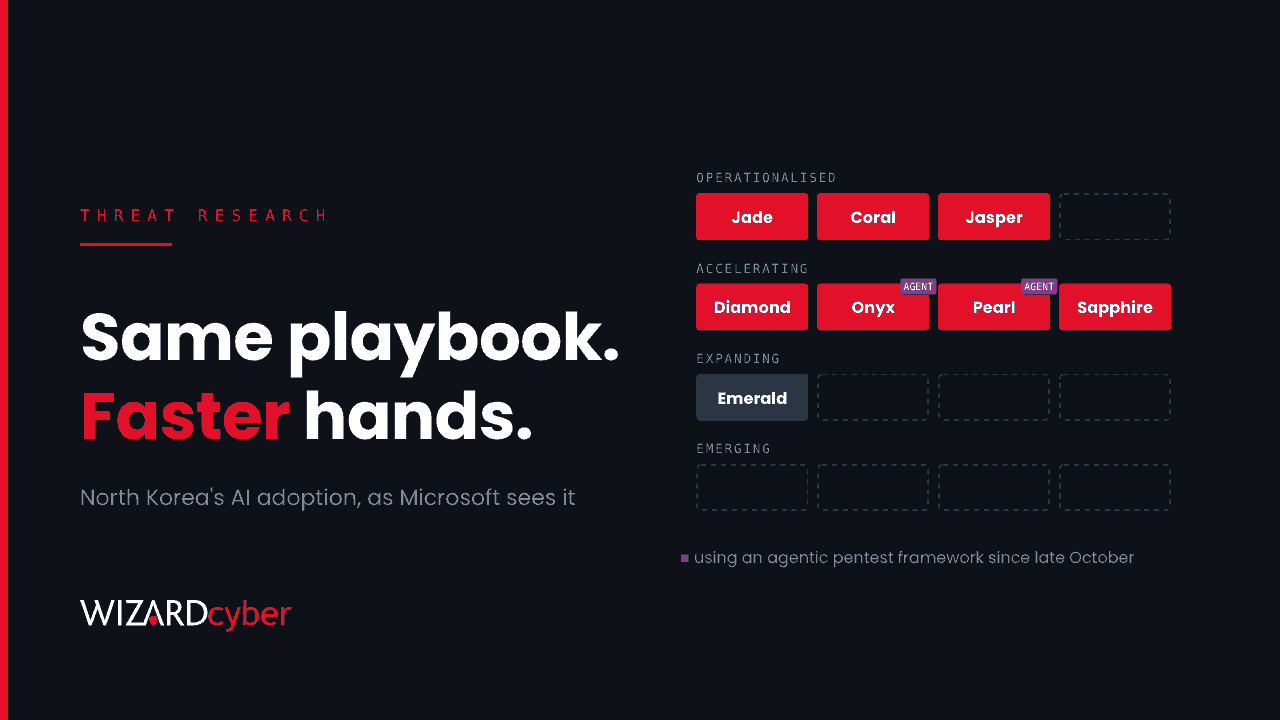
On 29 October, Microsoft Threat Intelligence published its assessment of how North Korean threat actors are using AI. It rates their adoption as high. Of the eight groups it tracks, three have AI built into their routine workflows, and two have used an open-source agentic penetration testing framework since late October. Its view is that the operations are still human-directed, and that AI makes the same playbook faster and cheaper to run. That matters for defenders: the techniques are familiar, but more of them now arrive at once.
The report lists Defender detections and mitigations. It does not include indicators or hunting queries. This post sets out what changed, who is likely to be targeted, and the hunts we would run in a Microsoft estate.
What Microsoft found
Microsoft groups the actors by how far AI has gone into their operations:
- Operationalised: Jade Sleet, Coral Sleet and Jasper Sleet. AI is part of everyday work.
- Accelerating: Diamond Sleet, Onyx Sleet, Pearl Sleet and Sapphire Sleet.
- Expanding: Emerald Sleet, which may be using synthetic voice and video.
The examples are specific:
- Jade Sleet ran job-themed approaches through three front companies in a single week in June, posing as recruiters for a spoofed AI blockchain company and inviting software engineers to interviews.
- Onyx Sleet produced more than 100 target-specific PDF lures in August and September, with dozens created within minutes of each other, which Microsoft assesses was very likely AI output.
- Coral Sleet has, since April, run a workflow to trojanise private GitHub repositories and feed them into its malware chain.
- Sapphire Sleet compromised part of the Rust software supply chain in August. Its malware compiled .NET code on the fly after compromise, most likely to evade detection.
- Jasper Sleet continues to use fabricated identities to win remote IT jobs, with AI-assisted CVs and repeatable tooling. We covered the endpoint and Entra signals for this in The New Starter Who Isn't.
- Onyx Sleet and Pearl Sleet have used ARTEX, an open-source agentic penetration testing framework, since late October.
Who should pay attention
Historically, North Korean groups have gone after cryptocurrency, defence, and anyone who can be hired or phished into giving access. Three groups of people in an ordinary UK business fall into that range:
- Developers, who get recruiter approaches, coding tests and repositories to clone.
- Hiring managers and HR, who interview remote candidates whose identity is now easier to fake.
- Anyone with access to payments or digital assets, who receives tailored lures in larger numbers than before.
When lures are cheap to produce, a crew can afford to tailor them to people who are not high-value targets. So most of the impact is on volume and quality, not on new technique.
Triage the alerts Microsoft named first
Microsoft lists actor-attributed alerts in Defender for Endpoint and Defender XDR, including "Sign-in activity by a suspected North Korean entity Jasper Sleet". It also lists Entra ID Protection alerts such as atypical travel and impossible travel, and Defender Antivirus detections for the ProcmacSteal family linked to the Rust compromise. Start by finding whether any of these have fired and been closed without investigation.
AlertInfo
| where Timestamp > ago(90d)
| where Title has_any ("Sleet", "North Korea", "ProcmacSteal")
| join kind=inner (AlertEvidence | where Timestamp > ago(90d)) on AlertId
| summarize Alerts = dcount(AlertId), Devices = make_set(DeviceName, 20),
            Accounts = make_set(AccountUpn, 20), First = min(Timestamp), Last = max(Timestamp)
          by Title, Severity
An actor-named alert deserves a full investigation even when the endpoint action shows as blocked. A blocked payload still means the lure reached a person.
Hunting queries
These are starting points to tune for your estate. Developer machines are noisy, so expect to build exclusions for your own build tooling.
1. Device code sign-ins
Microsoft's guidance is to block device code flow wherever possible. Before you do, see who uses it today. In Microsoft Sentinel:
SigninLogs
| where TimeGenerated > ago(30d)
| where AuthenticationProtocol =~ "deviceCode"
| summarize SignIns = count(), Apps = make_set(AppDisplayName, 10),
            IPs = make_set(IPAddress, 10), Countries = make_set(Location, 10)
          by UserPrincipalName, ResultType
| order by SignIns desc
Most organisations find a short list of conference room devices and command-line tools. Anything else needs an explanation. Our explainer on device code phishing covers how to block the flow with Conditional Access.
2. A "coding test" that runs more than code
Recruiter lures aimed at developers usually end with the target running a project they have just downloaded. Look for interpreters launched from download or temporary folders that then start a shell or a download tool.
DeviceProcessEvents
| where Timestamp > ago(30d)
| where InitiatingProcessFileName in~ ("node.exe", "python.exe", "pythonw.exe", "npm.cmd", "cargo.exe")
| where InitiatingProcessFolderPath has_any (@"\Downloads\", @"\AppData\Local\Temp\")
    or InitiatingProcessCommandLine has_any (@"\Downloads\", @"\AppData\Local\Temp\")
| where FileName in~ ("powershell.exe", "pwsh.exe", "cmd.exe", "curl.exe", "certutil.exe", "bitsadmin.exe", "mshta.exe")
| project Timestamp, DeviceName, AccountName, InitiatingProcessCommandLine, FileName, ProcessCommandLine
3. Build scripts reaching out
A trojanised repository or package usually does its work at install or build time. Look for package managers and build tools that start network tools or connect to hosts your developers do not normally use.
DeviceNetworkEvents
| where Timestamp > ago(30d)
| where InitiatingProcessParentFileName in~ ("cargo.exe", "npm.cmd", "node.exe", "pip.exe", "python.exe")
| where RemoteIPType == "Public"
| summarize Connections = count(), Devices = dcount(DeviceName), First = min(Timestamp)
          by RemoteUrl, RemoteIP, InitiatingProcessFileName
| where Devices <= 2
| order by First desc
Hosts that only one or two machines have ever contacted are where to start. Package registries and source hosting will dominate the results, so exclude them by domain.
4. .NET compiled at run time
Microsoft says Sapphire Sleet's malware used dynamic .NET compilation. On Windows this typically shows up as the C# compiler started by PowerShell or a script host rather than by a developer tool.
DeviceProcessEvents
| where Timestamp > ago(30d)
| where FileName in~ ("csc.exe", "cvtres.exe", "vbc.exe")
| where InitiatingProcessFileName in~ ("powershell.exe", "pwsh.exe", "wscript.exe", "cscript.exe", "mshta.exe", "rundll32.exe")
| summarize Count = count(), First = min(Timestamp), Last = max(Timestamp)
          by DeviceName, InitiatingProcessFileName, InitiatingProcessCommandLine
| order by First desc
Some management scripts use Add-Type, which produces the same pattern. Baseline them, then alert on new parents and new devices.
5. Lure documents arriving in bursts
Onyx Sleet's PDFs came in batches built minutes apart. In Defender for Office 365, look for many distinct PDF attachments from one sender domain within a short window.
EmailAttachmentInfo
| where Timestamp > ago(30d)
| where FileType =~ "pdf"
| extend SenderDomain = tostring(split(SenderFromAddress, "@")[1])
| summarize Files = dcount(SHA256), Recipients = dcount(RecipientEmailAddress)
          by SenderDomain, bin(Timestamp, 1h)
| where Files >= 10
| order by Files desc
Mitigations
- Block device code flow with Conditional Access, with named exceptions for the devices that really need it.
- Turn on the Attack Surface Reduction rules Microsoft names: block executable content from email and webmail, block executables that do not meet prevalence, age or trusted-list criteria, block potentially obfuscated scripts, and use advanced protection against ransomware.
- Run EDR in block mode with cloud-delivered protection and automated investigation turned on.
- Give developers a safe place to run code they did not write. A disposable VM or container for coding tests and unfamiliar repositories removes most of the risk of recruiter lures.
- Verify candidates on camera, check for duplicate personas and phone numbers, and treat repeated camera or microphone problems as a red flag. Take extra care with hires that come through staffing agencies.
- Watch identity risk. Atypical and impossible travel alerts on new starters and contractors deserve a closer look than usual.
How a managed SOC helps
- Every alert worked to a verdict. An actor-attributed alert marked "blocked" still means someone was targeted. Our SOCs are staffed 24/7, every investigation produces a full report, and senior analyst sign-off is the default on the managed service.
- Hunting that keeps up. Complete and Command include a threat hunting allocation, and the Intel Analyst Agent maintains a Threat Attack Profile, so reports like this one become hunts in your tenant rather than reading material.
- Identity and endpoint together. Recruiter lures and fake hires cross HR, Entra and endpoints. We read the whole chain, not one alert at a time.
If you want these hunts run across your estate, or help setting the controls above, talk to our team.