

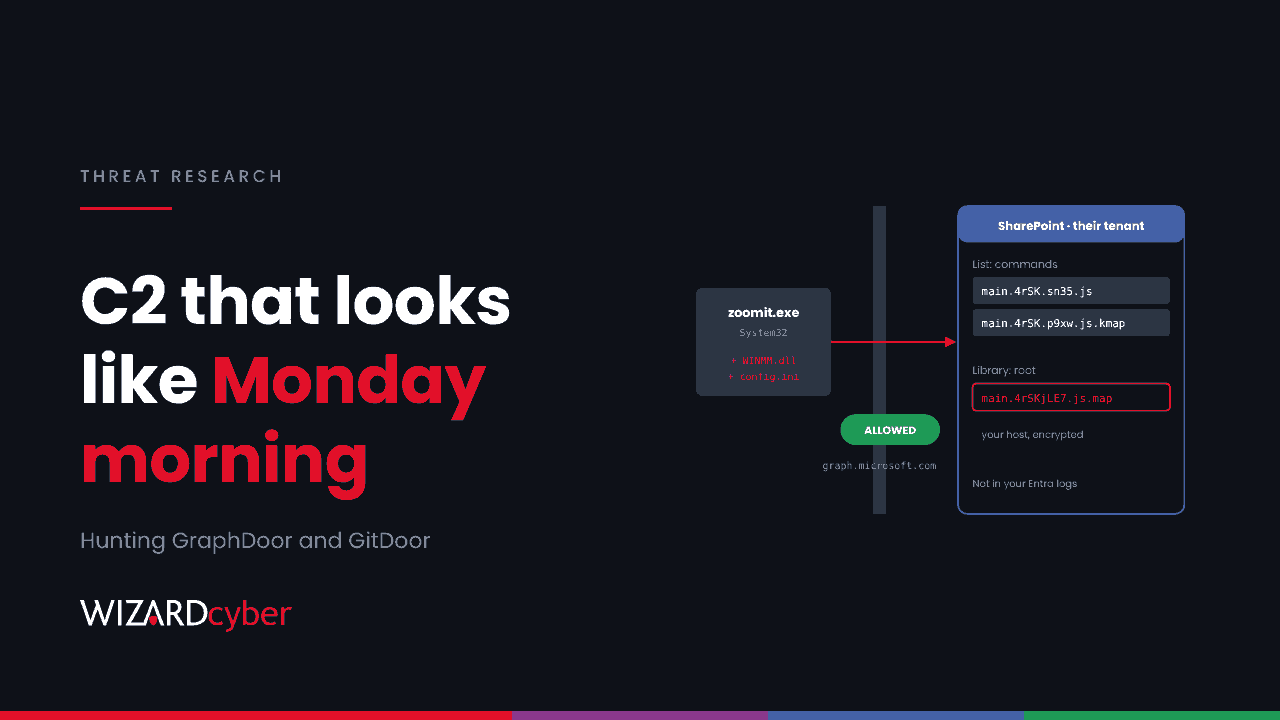
Most command-and-control traffic gets caught because it goes somewhere odd. GraphDoor doesn't. It signs in at login.microsoftonline.com, uploads to a SharePoint document library through Microsoft Graph, and reads its orders from a SharePoint list. Its sibling, GitDoor, does the same with GitHub issues and repositories. To your firewall, both look like a normal working day.
Researchers at Kaspersky published the details of this campaign, which they call Operation ShadowCloud, on 17 November (part one, part two). The victims so far are mainly government bodies in Asia and Africa, so most UK organisations aren't the target. The technique is the reason to read on. It's spreading, and it works against any organisation that trusts Microsoft and GitHub traffic by default. This post covers how it works, why your own Entra logs probably won't show it, and where to hunt in Defender and Sentinel instead.
What was found
The campaign was identified in early 2026. The researchers couldn't establish the first entry point. The evidence suggests the actor reused an earlier infection already in the network, then installed an open-source remote management agent that connected to 27.102.66[.]162. Through that agent they dropped the same three-part kit each time:
- a legitimate, signed executable (examples include a sandboxing tool's launcher, a Python runtime, a Java launcher and a screen zoom utility)
- a malicious DLL with the name that executable loads, such as
SbieDll.dll,python39.dll,jli.dll,WINMM.dllorlibcef.dll - an encrypted payload file,
config.ini, next to them
The executable sideloads the DLL, which decrypts config.ini and runs the backdoor in memory. Some of these sets sat in C:\Windows\System32 and a subfolder of it, and one was run as a Windows service. Implants linked to two China-nexus groups were found in the same staging folders within a day of the backdoors. Kaspersky says it can't attribute the activity definitively, but that "a Chinese-speaking group may be developing and/or utilizing" the tools.
How GraphDoor uses Microsoft 365
GraphDoor creates a working folder at C:\ProgramData\Intel_Log\<GUID>. It then authenticates with the OAuth client credentials flow, using an app ID and secret encrypted inside the binary. As the researchers put it, "This call authenticates the malicious application – not a user." The token request goes to a specific tenant, and the SharePoint sites it then uses (buildersemp.sharepoint[.]com and cskautogo.sharepoint[.]com) belong to that tenant. The report doesn't say whether the tenant was created by the attacker or compromised.
From there:
- Host details are encrypted and uploaded to the drive root as
main.<8 characters>.js.map, disguised as a JavaScript source map. - Commands sit in a SharePoint list as items named
main.<code>.<random>.js, with other extensions such as.kmap,.pmap,.apmap,.swpand.tmpmarking the module they're for. - Plug-ins are pulled from the list as needed: a keylogger, a process lister, a screenshot tool, a relocation module, and three proxy modules. Two of the proxies tunnel traffic through a commercial real-time messaging service's WebSocket endpoints.
The keylogger writes to %APPDATA%\Microsoft\SystemCertificates\Cache\logs.dat, and its auto-start flag is a file called %APPDATA%\log.lock. On machines with GraphDoor, the researchers also found Cobalt Strike beacons calling ms.twnic[.]top and ekmt[.]tw.
GitDoor works the same way through GitHub. It opens an issue titled problem [GUID] in a private repository to check in, reads commands from a public one, and uploads data as main.<code>.js.map with the commit message "commit from INSOMNIA". It supports 26 commands, including file management, keylogging, proxying, shellcode injection, service control, process memory dumping and uploads to a public file-sharing site.
Why your Entra logs won't show it
This is the uncomfortable part. GraphDoor's app lives in someone else's tenant. Its sign-ins and Graph calls are logged there, not in yours. Your AADServicePrincipalSignInLogs and MicrosoftGraphActivityLogs will be clean. From your side, the only evidence is an endpoint process making HTTPS calls to Microsoft's sign-in and Graph endpoints, the same hostnames Outlook, Teams and OneDrive use all day.
When the C2 server is SharePoint, the question isn't where the traffic went. It's which process sent it.
So the hunt moves to the endpoint: which processes talk to Graph and GitHub, what they loaded, and what they wrote to disk.
Hunting in Defender and Sentinel
These queries are starting points to tune for your estate. Expect to build an allow-list of legitimate processes first.
1. Unusual processes talking to Graph, GitHub or messaging relays
let Expected = dynamic(["msedge.exe","chrome.exe","firefox.exe","outlook.exe",
  "teams.exe","ms-teams.exe","onedrive.exe","winword.exe","excel.exe",
  "powerpnt.exe","git.exe","git-remote-https.exe","code.exe","svchost.exe"]);
DeviceNetworkEvents
| where TimeGenerated > ago(30d)
| where RemoteUrl has_any ("graph.microsoft.com", "api.github.com",
                           "rest.ably.io", "pusher.ably.net")
| where InitiatingProcessFileName !in~ (Expected)
| summarize Hosts = dcount(DeviceName), Urls = make_set(RemoteUrl, 10),
          Paths = make_set(InitiatingProcessFolderPath, 10)
          by InitiatingProcessFileName
| order by Hosts asc
Rare processes come first. A screen zoom utility or a Java launcher in a system folder calling Graph is the pattern to look for.
2. Sideloading from the wrong place
DeviceImageLoadEvents
| where TimeGenerated > ago(30d)
| where FileName in~ ("sbiedll.dll", "jli.dll", "python39.dll", "python311.dll",
                      "winmm.dll", "libcef.dll", "wtsapi32.dll")
| where FolderPath startswith @"C:\Windows\System32"
    or FolderPath startswith @"C:\ProgramData"
// winmm.dll and wtsapi32.dll are normal in System32 itself
| where not(FileName in~ ("winmm.dll", "wtsapi32.dll")
            and FolderPath =~ strcat(@"C:\Windows\System32\", FileName))
| project TimeGenerated, DeviceName, FolderPath, FileName, SHA256,
          InitiatingProcessFileName, InitiatingProcessFolderPath
Several of these DLL names are legitimate in their own install folders. The signal is a copy in a system folder or ProgramData, especially with an encrypted config.ini beside it.
3. File artefacts
DeviceFileEvents
| where TimeGenerated > ago(90d)
| where FolderPath contains @"\ProgramData\Intel_Log\"
    or (FileName =~ "logs.dat" and FolderPath contains @"\SystemCertificates\Cache\")
    or (FileName =~ "log.lock" and FolderPath contains @"\AppData\Roaming\")
    or (FileName =~ "config.ini" and FolderPath startswith @"C:\Windows\System32")
    or FolderPath contains @"\ProgramData\excint\"
| project TimeGenerated, DeviceName, ActionType, FolderPath, FileName,
          InitiatingProcessFileName
4. Published indicators
let IPs = dynamic(["27.102.66.162","104.194.154.28","216.73.158.72",
  "122.147.252.16","103.106.230.33","123.58.205.105","223.165.4.203",
  "172.86.66.19","103.214.68.20","216.146.25.173","103.137.63.39",
  "103.227.224.189","104.194.152.173","66.42.52.137","153.75.94.148",
  "45.59.124.164","104.194.153.161","153.75.95.27","216.73.158.117",
  "154.205.154.209","43.134.62.111","38.54.17.113","38.52.17.113"]);
let Domains = dynamic(["twnic.top","ekmt.tw","buildersemp.sharepoint.com",
  "cskautogo.sharepoint.com"]);
DeviceNetworkEvents
| where TimeGenerated > ago(90d)
| where RemoteIP in (IPs) or RemoteUrl has_any (Domains)
| project TimeGenerated, DeviceName, InitiatingProcessFileName, RemoteIP, RemoteUrl
Add the MD5 values from the reports as a DeviceFileEvents or DeviceProcessEvents check. If you have TLS-inspecting proxy logs in Sentinel, search them for the attacker's SharePoint host names and for main. files with a .js.map extension. A legitimate source map upload to a SharePoint drive root from a desktop process is rare.
5. Remote management agents nobody approved
DeviceNetworkEvents
| where TimeGenerated > ago(90d)
| where RemoteUrl has "agent.ashx"
    or InitiatingProcessFileName has "meshagent"
| summarize First = min(TimeGenerated), Hosts = make_set(DeviceName, 20)
          by InitiatingProcessFileName, RemoteUrl, RemoteIP
Kaspersky says introducing tools like this "should be treated as a suspicious event". We agree. Our explainer on RMM tools covers how to keep an approved list.
Reducing exposure
- Look at tenant restrictions. Microsoft Entra tenant restrictions are designed to stop devices on your network authenticating to tenants you haven't approved. Test whether your setup also blocks app-only token requests like GraphDoor's before you rely on it.
- Restrict who can reach Graph and GitHub. Servers rarely need either. An egress rule that only lets named processes or proxies reach them shrinks the haystack.
- Control what runs from system and ProgramData folders. Application control that only allows signed binaries in their expected install paths breaks this sideloading pattern.
- Treat new remote management agents as incidents until someone explains them.
For more on sideloading, see our explainer on DLL sideloading. For earlier C2 hunting, see our guide to hunting Sliver.
How a managed SOC helps
- Context, not hostnames. Traffic to Microsoft and GitHub is only suspicious next to the process, the DLL it loaded and the folder it ran from. CYBERSHIELD AI's Investigation Agent brings that together for each alert, averaging 3m 30s to a verdict, and our analysts take it from there.
- Hunting as well as alerting. Campaigns built to look normal are found by people looking for them. Complete and Command include a threat hunting allocation, and more can be added.
- 24/7 cover, with senior analyst sign-off by default on the managed service.
If you want to know whether something in your estate is talking to a cloud service it shouldn't, talk to our team.