

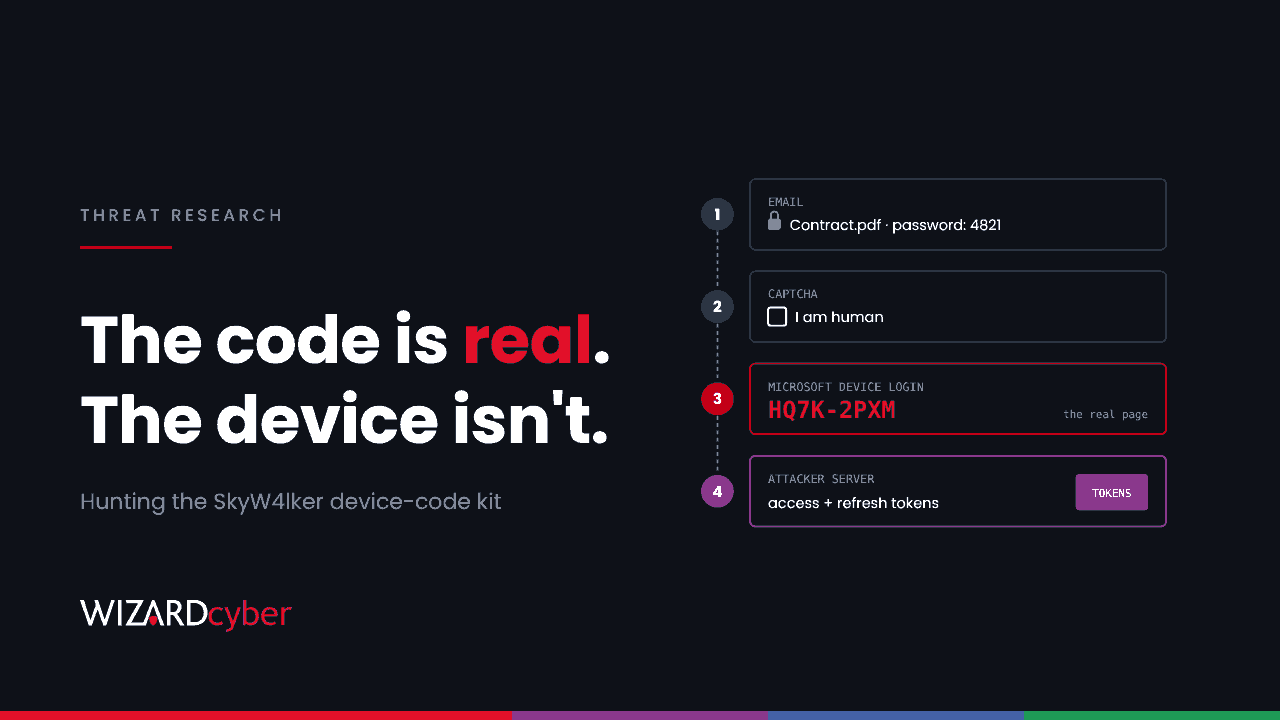
The email has an attachment and a password in the body. The attachment opens to a link, the link to a CAPTCHA, and the CAPTCHA to a page asking the user to enter a short code on Microsoft's own sign-in site. The URL really is Microsoft's. The sign-in really is the user's. When they finish, the attacker has tokens for their Microsoft 365 account, and no password was ever typed into a fake page.
That is SkyW4lker, a phishing kit analysed by ANY.RUN on 27 October and widely reported on 4 November. It abuses the OAuth device code flow, and its use is growing fast. This post explains how the chain works and how to hunt for it in Microsoft Defender and Sentinel.
What's been reported
- ANY.RUN tied 618 sandbox analyses to the kit between June and 21 October 2026. Monthly analyses grew from 20 in June to 200 in September.
- It was first seen on 23 June 2026. Researchers listed 173 domains hosting it, and 50 of 92 backend IP addresses were with a single cloud hosting provider.
- Submissions came mostly from the United States, followed by India, Canada and the United Kingdom. Sectors named were technology, manufacturing and government.
- ANY.RUN assesses "with high confidence" that SkyW4lker and an older credential-phishing kit, Gabagool, are built by the same developer. They share JavaScript modules, landing-URL formats and hosting, and look like two attack modes of one platform.
Sandbox analyses are submissions, not confirmed victims, so treat the figures as a measure of activity rather than of compromise.
How the chain works
1. A password-protected lure
Emails are themed as commercial offers, contracts, invoices, payment notices or confidential documents. The attachment is a PDF, Word or Excel file, with the password in the email body. Encryption stops many gateways from looking inside the file, so the link it contains isn't scanned at delivery.
2. Redirects through trusted services
Some variants route the victim through a page on a well-known collaboration, mapping or site-building service, or through cloud object storage, before reaching the kit. A reputable first hop gets past link filters.
3. A CAPTCHA gate
The kit uses a CAPTCHA, either a commercial one or its own self-hosted widget, to keep automated scanners and sandboxes from seeing the phishing page.
4. The device code
The phishing page registers a session with the kit's backend (sending the visitor's IP address and location), requests a device code from Microsoft, and shows it to the victim with instructions to enter it at Microsoft's device login page. The page then polls every few seconds until the victim completes sign-in.
Device code flow exists for devices without a keyboard, such as conference room displays. The user signs in on another device and the waiting device receives the tokens. Here, the "waiting device" is the attacker's server. The victim completes their normal sign-in, MFA included, so MFA doesn't stop it. Our explainer on device code phishing covers the mechanism in more depth.
5. Collection
The kit also logs what it can about the visitor, including email address, browser, MFA status and country, and offers an admin panel. Like Gabagool, it can also harvest typed credentials.
Hunting in Defender and Sentinel
These queries are starting points to tune for your environment. ANY.RUN gives no queries of its own, so they are built from the indicators and patterns in its report.
1. Device code sign-ins, and who normally uses them
SigninLogs
| where TimeGenerated > ago(30d)
| where AuthenticationProtocol =~ "deviceCode"
| summarize SignIns = count(), Apps = make_set(AppDisplayName, 10),
            IPs = make_set(IPAddress, 10), Countries = make_set(Location, 10),
            First = min(TimeGenerated), Last = max(TimeGenerated)
          by UserPrincipalName, ResultType
| order by Last desc
In most organisations, very few people legitimately use device code flow. Anyone outside that list, especially from a hosting provider IP, needs a look.
2. A device code sign-in shortly after a lure arrives
let Lures = EmailEvents
| where Timestamp > ago(14d)
| where DeliveryAction == "Delivered"
| where Subject has_any ("statement", "invoice", "contract", "submission", "Fedwire", "approved", "confidential")
| join kind=inner (EmailAttachmentInfo | where FileType in~ ("pdf","docx","xlsx","xls"))
    on NetworkMessageId
| project LureTime = Timestamp, UserPrincipalName = tolower(RecipientEmailAddress), Subject, FileName;
SigninLogs
| where TimeGenerated > ago(14d)
| where AuthenticationProtocol =~ "deviceCode" and ResultType == 0
| extend UserPrincipalName = tolower(UserPrincipalName)
| join kind=inner Lures on UserPrincipalName
| where TimeGenerated between (LureTime .. LureTime + 2d)
| project TimeGenerated, UserPrincipalName, IPAddress, Location, AppDisplayName, Subject, FileName, LureTime
Defender doesn't flag password protection as a field, so the subject list does the filtering. Adjust it to the lures you see.
3. Clicks to lookalike Microsoft hostnames
UrlClickEvents
| where Timestamp > ago(30d)
| extend Host = tostring(parse_url(Url).Host)
| where Host matches regex @"(?i)(docshare|sdocshares|pdocshared|pdfdocshared|efaxdoc|reauth|statement|copilot|login|auth).*(outlook|onedrive|copilot|office365)"
| where not(Host endswith "microsoft.com" or Host endswith "office.com"
            or Host endswith "live.com" or Host endswith "microsoftonline.com"
            or Host endswith "sharepoint.com")
| project Timestamp, AccountUpn, Host, Url, ActionType, IsClickedThrough
The regex is ANY.RUN's pattern for the kit's hostnames. The exclusions keep genuine Microsoft domains out. Add your own SharePoint and other tenant domains if they cause noise.
4. The kit's URL paths in web traffic
union isfuzzy=true
  (DeviceNetworkEvents | where Timestamp > ago(30d)
     | where RemoteUrl has_any ("session_public.php", "private_captcha", "confirm_visit.php", "mstoken_document_")
     | project Timestamp, Who = DeviceName, Url = RemoteUrl),
  (CommonSecurityLog | where TimeGenerated > ago(30d)
     | where RequestURL has_any ("session_public.php", "private_captcha", "confirm_visit.php", "mstoken_document_")
     | project Timestamp = TimeGenerated, Who = SourceIP, Url = RequestURL)
Encrypted traffic often hides full URLs from endpoint telemetry, so a proxy that inspects TLS gives better coverage here. Repeated action=poll requests are the kit waiting for the victim to finish signing in.
5. What happened after a suspect device code sign-in
let Suspect = SigninLogs
| where TimeGenerated > ago(14d)
| where AuthenticationProtocol =~ "deviceCode" and ResultType == 0
| project UserId, SuspectTime = TimeGenerated;
CloudAppEvents
| where Timestamp > ago(14d)
| join kind=inner Suspect on $left.AccountObjectId == $right.UserId
| where Timestamp between (SuspectTime .. SuspectTime + 3d)
| where ActionType in ("New-InboxRule", "Set-InboxRule", "MailItemsAccessed", "FileDownloaded",
                       "AnonymousLinkCreated", "Add registered owner to device", "Register device.")
| summarize Actions = count(), Kinds = make_set(ActionType) by AccountDisplayName, bin(Timestamp, 1h), IPAddress
Look for mailbox rules, bulk mail access, file downloads, sharing links, and device registration, which attackers use to turn a token into longer-lived access.
If you find one
- Revoke the user's sessions and refresh tokens in Entra ID. Device code flow normally issues a refresh token as well as an access token, so a password reset alone isn't enough.
- Check for new devices, authentication methods, app consents and inbox rules added since the sign-in, and remove them.
- Search for the same lure across other mailboxes and purge it.
- Block the kit's domains and the first-hop pages you found in mail flow and web filtering.
Prevention
- Block device code flow with Conditional Access. Use the authentication flows condition to block it for everyone, then exclude only the accounts or devices that need it, such as meeting room systems on known networks.
- Require a compliant or hybrid-joined device for Microsoft 365. The attacker's server isn't a managed device, so this can stop many device code sign-ins as well. Test how it behaves in your tenant before relying on it alone.
- Turn on token protection where your apps and platforms support it, so stolen tokens are harder to replay.
- Tell users the rule plainly: nobody legitimate will ask them to type a code into Microsoft's sign-in page because of an email.
- Treat password-protected attachments from outside as suspicious, and make reporting them one click.
Phishing-resistant MFA is still worth having, but it doesn't help here, because the victim is signing in to the real Microsoft page on their own device. Blocking the flow does. For the wider kit economy behind SkyW4lker, see our guide to phishing-as-a-service.
How a managed SOC helps
- Identity alerts investigated around the clock. A device code sign-in from a hosting provider at 2am needs a verdict before the morning. Our SOCs are staffed 24/7, and senior analyst sign-off is the default on the managed service.
- Email and identity joined up. We correlate the lure in Defender for Office 365 with the sign-in in Entra ID, as the queries above do.
- Hardening that sticks. Our identity threat detection and response service helps put Conditional Access controls like the device code block in place without locking out the systems that need it.
If you'd like to know who in your tenant has used device code flow this month, book a demo or talk to our team.