
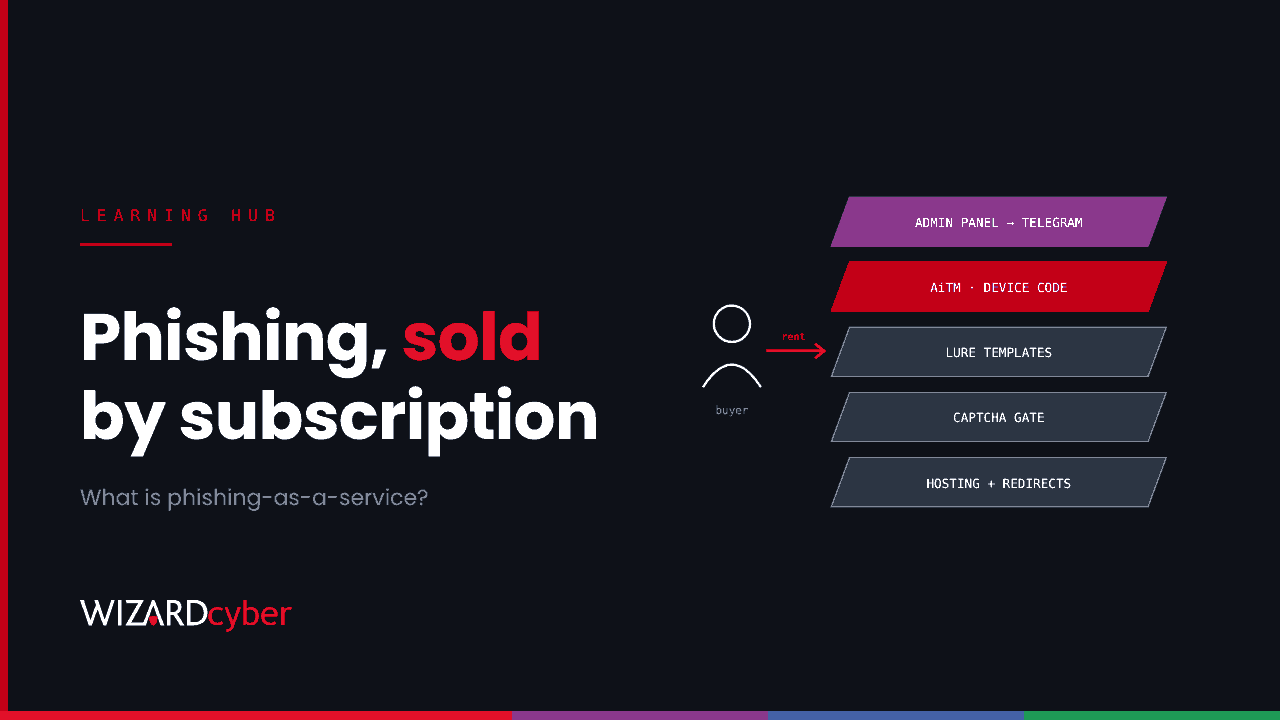
Phishing-as-a-service (PhaaS) is the business of selling ready-made phishing kits and the infrastructure to run them, usually by subscription. The buyer gets fake sign-in pages, lure templates, hosting, ways to evade security tools and a dashboard showing stolen credentials and session tokens. They don't need to build anything. PhaaS is why convincing Microsoft 365 phishing, including attacks that get past MFA, is now within reach of criminals with very little skill.
This guide explains how phishing kits work, what the main types are, why many of them defeat ordinary MFA, and which defences work in Microsoft 365.
How phishing-as-a-service works
PhaaS works like any software subscription. A developer builds and maintains the kit and sells access to it, often through Telegram channels, with support, updates and tutorials. Customers pay a recurring fee and run their own campaigns.
A typical kit includes:
- Page templates that copy Microsoft 365, Outlook, OneDrive or DocuSign sign-in screens, often personalised with the target's email address and company logo.
- Lure templates for invoices, contracts, voicemail notifications, payroll updates and shared documents.
- Evasion features such as CAPTCHAs, IP and location filtering, and obfuscated code, to hide the page from scanners and researchers.
- Hosting and redirects through compromised sites, cloud storage and trusted services, so the first link looks legitimate.
- An admin panel that collects results and often forwards them to the attacker instantly by Telegram.
The main types of kit
Credential harvesters
The oldest type. A fake sign-in page captures the username and password. MFA stops these on its own, which is why attackers moved on.
Adversary-in-the-middle (AiTM) kits
The page sits between the user and the real Microsoft sign-in, passing everything through. The user sees a real-looking sign-in, completes MFA, and the kit captures the session cookie Microsoft issues. The attacker replays the cookie and is signed in without needing the password or MFA again.
Device code kits
The kit asks Microsoft for a device code and persuades the user to enter it on Microsoft's real device login page. When the user signs in, Microsoft issues tokens to the attacker's server. No fake sign-in page is involved at all. See our guide to device code phishing.
Multi-mode platforms
Newer platforms offer several of these from one dashboard. In October 2026, ANY.RUN analysed SkyW4lker, a device code kit, and assessed with high confidence that it shares a developer with Gabagool, an older credential-phishing kit. The two share code and hosting and look like two attack modes of one platform. Analyses of SkyW4lker rose from 20 a month in June to 200 in September. Our threat research post covers how to hunt for it.
Why PhaaS gets past MFA
Most MFA methods prove that the right person is signing in. They don't prove the person is signing in to the right place, or for the right device:
- With an AiTM kit, the user completes MFA on a relayed page, and the kit keeps the resulting session.
- With a device code kit, the user completes MFA on Microsoft's real page, but the tokens go to the attacker's server.
Text codes, app notifications and one-time passcodes can all be relayed. That's why defences need to address where the session ends up, not just who signed in.
Why it matters to your organisation
- Volume and polish. Kits produce well-made, personalised lures at scale, so awareness training alone can't carry the load.
- Speed. Results reach the attacker in real time, and a stolen session can be used within minutes, often to set up inbox rules or start a business email compromise.
- Constant change. Kits rotate domains and redirect services, so blocklists age quickly.
How to defend against PhaaS in Microsoft 365
Use phishing-resistant MFA
Passkeys, FIDO2 security keys and Windows Hello for Business are tied to the real site's domain, so they won't complete a sign-in on a relayed AiTM page. Make them the standard for administrators first, then everyone. They don't stop device code phishing, because there the user signs in on the real site, so pair them with the next control.
Block device code flow
Use Conditional Access's authentication flows condition to block device code flow, and allow it only for the accounts or devices that genuinely need it.
Require managed devices
Requiring a compliant or hybrid-joined device for Microsoft 365 means a session replayed from an attacker's machine is refused. Token protection, where supported, binds tokens to the device they were issued to.
Strengthen email and web filtering
Use Defender for Office 365 Safe Links and Safe Attachments, treat password-protected attachments from outside as suspicious, and turn on network protection on endpoints to block known phishing domains.
Detect what gets through
Watch Entra ID sign-ins for device code use, impossible or unfamiliar locations, and sessions used from hosting providers, and watch Microsoft 365 for new inbox rules and MFA methods. These are the signals that a kit succeeded. Our token replay threat research shows what cookie and token replay looks like in the logs.
Make reporting easy
A user who reports a lure within minutes lets your team purge it from other mailboxes. Give everyone a one-click report button and thank them for using it.
Do takedowns help?
They do, for a while. Law enforcement and technology companies have taken down major PhaaS platforms, including LabHost, dismantled by the Metropolitan Police and international partners in 2024, and RaccoonO365, whose domains Microsoft and partners seized in 2025. But the developers and code often reappear under new names. Takedowns reduce volume. Your own controls are what keep you safe.
Frequently asked questions
What is a phishing kit?
A phishing kit is the software behind a phishing site: page templates, scripts and a back end that collects what victims enter. Phishing-as-a-service is the business of selling or renting kits, usually with hosting and support included.
Is phishing-as-a-service the same as ransomware-as-a-service?
They follow the same model, where a developer builds the tools and affiliates or customers carry out the attacks, but the goals differ. PhaaS steals credentials and sessions, which are often sold on or used as the first step in a larger attack, sometimes including ransomware.
Does MFA stop phishing kits?
Ordinary MFA stops basic credential harvesters, but not AiTM or device code kits. Phishing-resistant MFA stops AiTM kits, and blocking device code flow stops device code kits.
How can I tell if a user has been caught by a phishing kit?
Look for sign-ins from unfamiliar locations or hosting providers soon after a suspicious email, device code sign-ins by people who don't normally use them, and new inbox rules, MFA methods or devices on the account.
What should I do if someone entered their details?
Revoke the user's sessions and refresh tokens in Entra ID, reset their password, remove any MFA methods, devices or inbox rules the attacker added, and check what they accessed. Then search for the same lure in other mailboxes.
How Wizard Cyber helps
Our SOCs, staffed 24/7, investigate identity and email alerts together in Microsoft Sentinel and Defender, so a kit that gets past filtering is caught at the sign-in. Our identity threat detection and response service helps put phishing-resistant MFA and Conditional Access controls in place without disrupting the business.
If you'd like to talk through your phishing defences, book a demo or talk to our team.