
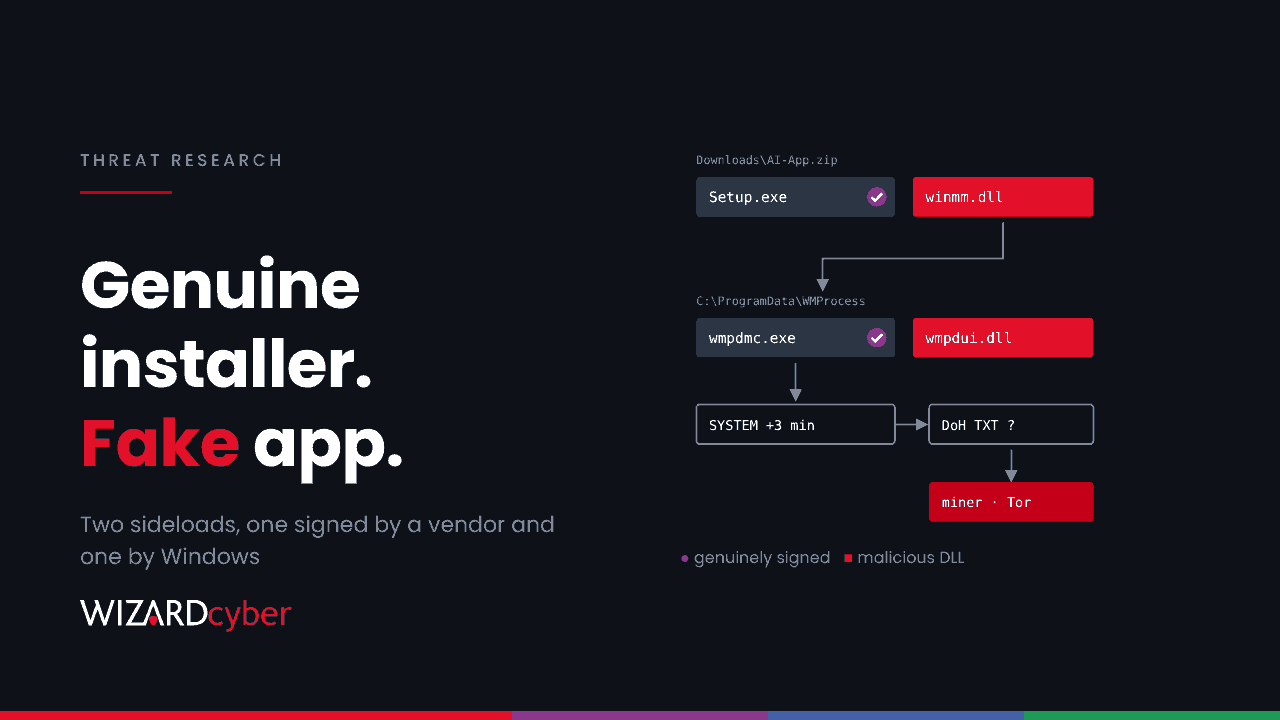
Staff who want the latest AI desktop app search for it, and some of them install whatever comes up first. A campaign researchers have named Yoba relies on this. It publishes fake AI app downloads on GitHub, and each one ships a genuine, signed installer from a real AI vendor, plus one malicious DLL beside it. The signature checks out. The installer is real. The DLL it loads is not.
The final payload seen so far is a cryptocurrency miner, which sounds minor. The chain that installs it is not: it needs administrator rights, runs as Local System, and fetches its next stage from a channel the operators can change at any time. This post covers how the chain works and gives a Defender query for each step.
What happened
On 29 October, researchers published an analysis of fake GitHub projects and GitHub Pages sites posing as desktop apps for popular AI assistants, under made-up product names (coverage). The first repository appears to date from July, and the malicious releases were uploaded at the end of August. Search engine poisoning is suspected of pushing the pages up the results.
No vulnerability is involved. The attack works because Windows loads some DLLs from an application's own folder before it looks in System32, a technique known as DLL sideloading. We saw the same idea in the ROMULUS ClickFix panel last week.
The attack chain
1. A ZIP with a genuine installer
The GitHub release is a ZIP containing a real, signed Setup.exe from an AI vendor and a malicious winmm.dll. When the user runs the installer, it loads the DLL from its own folder.
2. A dropper that checks before it acts
The DLL, named YobaDropper by the researchers, checks that its host process is called Setup.exe. If it is not, it waits for around 12 days to outlast a sandbox. It skips machines with Russian, Belarusian, Kazakh and other CIS-region keyboard layouts, and it needs administrator rights. On a machine where the user is a local admin, it carries on.
3. A Windows binary copied into ProgramData
The dropper creates C:\ProgramData\WMProcess, copies the legitimate Windows Media binary wmpdmc.exe from System32 into it, and places a second malicious DLL, wmpdui.dll, beside it. This is a second sideload, this time using a Microsoft-signed host.
4. A scheduled task as Local System
A scheduled task starts the copied wmpdmc.exe as Local System three minutes after boot. The task's author and description imitate Microsoft and Windows Media Player, so do not trust those fields when you triage.
5. Instructions over DNS-over-HTTPS
The second stage, YobaLoader, derives a domain name from an image posted to a Telegram channel. It then asks a public DNS-over-HTTPS resolver for that domain's TXT record, which holds encrypted instructions, and downloads an encrypted payload from a file-hosting site. Because the domain comes from content the operators can edit, blocking yesterday's domain does not stop tomorrow's.
6. A miner that hides from the user
The payload observed was XMRig, routed over Tor and paused while the user is active. Whatever arrives next would have the same Local System foothold.
Hunting in Microsoft Defender
These queries are starting points to tune for your estate. Add the hashes from the research as custom indicators for exact matches.
1. A signed installer loading winmm.dll from its own folder
DeviceImageLoadEvents
| where Timestamp > ago(90d)
| where FileName =~ "winmm.dll"
| where not(FolderPath startswith @"C:\Windows\")
| project Timestamp, DeviceName, InitiatingProcessFileName, InitiatingProcessFolderPath,
          FolderPath, SHA256, InitiatingProcessAccountName
Legitimate software rarely ships its own copy of winmm.dll. A hit from a Downloads or Temp folder is worth looking at straight away.
2. A Windows Media binary running outside System32
DeviceProcessEvents
| where Timestamp > ago(90d)
| where FileName =~ "wmpdmc.exe" or ProcessVersionInfoOriginalFileName =~ "wmpdmc.exe"
| where not(FolderPath startswith @"C:\Windows\")
| project Timestamp, DeviceName, AccountName, FolderPath, ProcessCommandLine,
          InitiatingProcessFileName, InitiatingProcessCommandLine
3. The DLL and the folder being created
DeviceFileEvents
| where Timestamp > ago(90d)
| where ActionType == "FileCreated"
| where FolderPath has @"\ProgramData\WMProcess\"
    or (FileName in~ ("wmpdui.dll", "winmm.dll") and FolderPath has_any (@"\ProgramData\", @"\Downloads\", @"\AppData\"))
| project Timestamp, DeviceName, FolderPath, SHA256, InitiatingProcessFileName, InitiatingProcessCommandLine
4. Scheduled tasks that run a copied system binary
DeviceEvents
| where Timestamp > ago(90d)
| where ActionType in ("ScheduledTaskCreated", "ScheduledTaskUpdated")
| extend TaskContent = tostring(parse_json(AdditionalFields).TaskContent)
| where TaskContent has @"\ProgramData\"
    and TaskContent has_any (".exe")
| project Timestamp, DeviceName, InitiatingProcessFileName,
          TaskName = tostring(parse_json(AdditionalFields).TaskName), TaskContent
A task that runs an executable from ProgramData as SYSTEM, with a Microsoft-looking description, is the pattern to look for.
5. DNS-over-HTTPS from something that is not a browser
DeviceNetworkEvents
| where Timestamp > ago(30d)
| where RemoteUrl has_any ("dns.google", "cloudflare-dns.com", "dns.quad9.net")
    or RemoteIP in ("8.8.8.8", "8.8.4.4", "1.1.1.1", "1.0.0.1")
| where RemotePort == 443
| where InitiatingProcessFileName !in~ ("msedge.exe", "chrome.exe", "firefox.exe", "brave.exe")
| summarize Connections = count(), First = min(Timestamp), Last = max(Timestamp)
          by DeviceName, InitiatingProcessFileName, InitiatingProcessFolderPath
Windows can use DoH itself, so expect some system processes. A copied wmpdmc.exe in ProgramData doing it is not one of them.
6. Mining and Tor
DeviceNetworkEvents
| where Timestamp > ago(30d)
| where RemotePort in (9001, 9030, 9050, 9150, 3333, 4444, 5555, 14444)
| summarize Connections = count(), Remotes = dcount(RemoteIP)
          by DeviceName, InitiatingProcessFileName, InitiatingProcessFolderPath, RemotePort
The ports are common defaults for Tor and mining pools and are easy to change, so treat this as a sweep, not a guarantee. Sustained high CPU on a machine whose user is idle is another clue.
If you find it
- Isolate the device and collect an investigation package before removing anything.
- Remove persistence: the scheduled task,
C:\ProgramData\WMProcessand the downloaded folder. - Treat the machine as fully compromised. The loader ran as Local System and can fetch any payload, so a miner is only what was seen. Review what else ran, and reset credentials used on the device.
- Sweep the estate with the hunts above. If one person found the fake download, colleagues searching for the same app may have too.
Prevention
- Remove standing local admin rights, especially on developer machines. Without them the dropper does not proceed.
- Extend application control to DLLs. App Control for Business can enforce rules on DLL loading as well as executables, so a signed installer does not vouch for whatever sits beside it.
- Turn on the Attack Surface Reduction rule that blocks executables unless they meet a prevalence, age or trusted-list criterion.
- Make approved AI tools easy to get. If staff can install the sanctioned app from Company Portal, fewer of them go looking on GitHub. Our explainer on shadow AI covers how to find which tools are already in use.
How a managed SOC helps
- Low-priority alerts still get a verdict. A miner alert is easy to close as nuisance. Our SOCs are staffed 24/7, and every investigation produces a full report, with senior analyst sign-off by default on the managed service.
- Hunting for what was missed. Complete and Command include a threat hunting allocation for sweeps like these.
- Compromise assessment. If you think fake installers have already run on your estate, our consultants can look for the traces described here.
If you want these hunts run for you, talk to our team.