
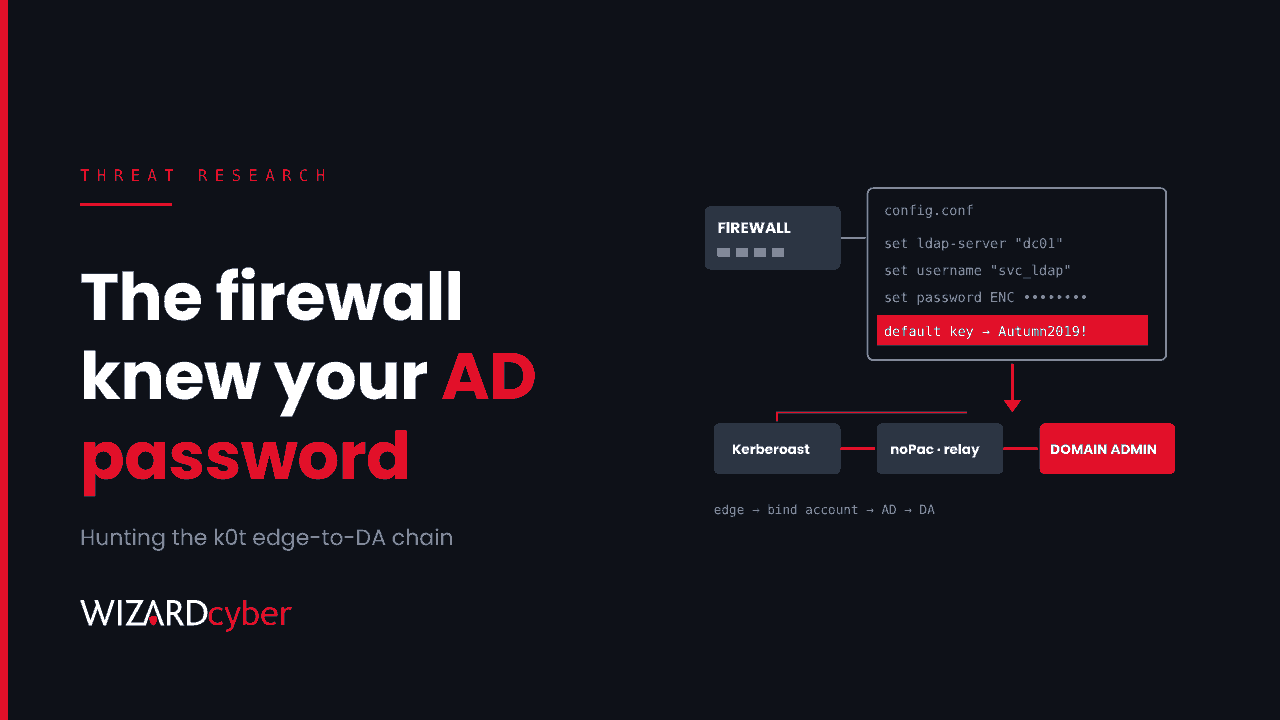
On 21 October 2026, Group-IB and NyxLab published a joint report on k0t, an operator, or a small group of collaborators, working through edge devices: firewalls, web application firewalls and VPN gateways. The edge exploits are the headline, but the reason the report matters to Microsoft estates is what happened next. Configurations taken from the firewall gave the attackers working Active Directory credentials, and from there they went for Domain Admin with well-known tools.
The researchers counted more than 70,000 exposed credentials, including network-device logins and LDAP dumps. Many victims later appeared on the Qilin and The Gentlemen leak sites. The report says that link is unconfirmed and suggests k0t may be selling access rather than deploying ransomware itself. Either way, the AD half of this chain is where a SOC gets its best chance to stop it.
How the chain works
1. Into the edge device
The report describes several ways in:
- FortiWeb CVE-2025-64446, a path traversal used to create a new admin account on the appliance.
- GlobalProtect CVE-2026-0257, an authentication bypass on portals and gateways that use authentication-override cookies. The operator's tool forges a cookie with the target's public certificate key and submits it with an empty password, then opens a VPN session. We covered the ransomware use of this flaw in our SafePay post.
- Brute force against the FortiGate REST API as a fallback, pacing attempts around a 60-second lockout.
Group-IB dates many of the FortiGate compromises between February and June 2026, so this is not only a problem for estates that patched late last week.
2. From the firewall config to Active Directory credentials
Once logged in, the operator's scanner downloads the appliance configuration and decrypts its stored secrets offline with the default FortiOS encryption key (CVE-2019-6693). Unless the private-data-encryption option has been switched on, the device falls back to that known key. The report says the configs yielded administrator and local-user credentials and "LDAP/Active Directory bound credentials".
That last item is why the chain matters to a Microsoft estate. A firewall that checks VPN users against Active Directory usually does it with a bind account. That account is often old, rarely reviewed, excluded from MFA and sometimes far more privileged than it needs to be. Once the attackers have its password, they can sign in to your domain as that account.
3. From a domain account to Domain Admin
With a foothold on the internal network, the report lists familiar tradecraft:
- Kerberoasting with Impacket's GetUserSPNs, then offline cracking of service account passwords.
- Password spraying with Kerbrute.
- noPac (CVE-2021-42278 and CVE-2021-42287) to escalate from a normal user to Domain Admin on unpatched domain controllers.
- PetitPotam coercion feeding an NTLM relay to Active Directory Certificate Services, stealing a certificate for a domain controller and with it the DC's machine hash.
- NetExec, secretsdump and Mimikatz for SAM, LSA, LSASS and DPAPI secrets, plus remote execution through scheduled tasks (atexec) and services (smbexec).
4. Persistence and exfiltration
Access was kept with VPN sessions, a self-hosted remote management server and agents, an open-source command-and-control framework and commercial remote access tools. Data left via Rclone to cloud object storage and file-sharing services. The report includes IOCs (domains, IPs, URLs and file hashes); load those from the source rather than from a summary.
Who should act
- Anyone running a FortiGate or FortiWeb, or a GlobalProtect portal or gateway, that was reachable from the internet in 2026.
- Any organisation whose firewall or VPN authenticates users against Active Directory with a stored bind account.
- Anyone with domain controllers missing the November 2021 noPac fixes, or AD CS web enrolment open to NTLM relay.
Hunting in Microsoft Defender XDR and Sentinel
These queries are starting points to tune, not finished detections. Your own admin tooling, vulnerability scanners and service accounts will appear in the results, so baseline before you alert. The identity queries need Microsoft Defender for Identity sensors on your domain controllers. Where noted, the Sentinel queries need Windows Security events collected from DCs.
1. The firewall's bind account behaving like a user
A bind account should authenticate from the firewall's management IP and nothing else. Put its name in the first line.
let BindAccounts = dynamic(["svc_fw_ldap", "fortigate-ldap"]); // replace with your own
IdentityLogonEvents
| where Timestamp > ago(30d)
| where AccountName in~ (BindAccounts)
| summarize Logons = count(), FirstSeen = min(Timestamp), LastSeen = max(Timestamp),
            Protocols = make_set(Protocol), Targets = make_set(DestinationDeviceName, 20)
    by AccountName, IPAddress, DeviceName
| order by FirstSeen desc
Any source other than the appliance, any Kerberos ticket requests, or any interactive or RDP logon is worth investigating today.
2. Kerberoasting: many RC4 service tickets from one account
// Needs Security event 4769 from domain controllers in Sentinel
SecurityEvent
| where TimeGenerated > ago(7d)
| where EventID == 4769
| where TicketEncryptionType == "0x17"            // RC4
| where ServiceName !endswith "$" and ServiceName != "krbtgt"
| summarize Services = dcount(ServiceName), Examples = make_set(ServiceName, 15)
    by TargetUserName, IpAddress, bin(TimeGenerated, 1h)
| where Services >= 5
| order by Services desc
If you run Defender for Identity, its own Kerberoasting and SPN-enumeration alerts cover the same ground. Use this query to check the pattern and to tune.
3. noPac: a computer account renamed to look like a DC
// Event 4781: account name changed. noPac renames a machine account to a DC's name without the trailing $
SecurityEvent
| where TimeGenerated > ago(30d)
| where EventID == 4781
| extend OldName = tostring(OldTargetUserName), NewName = tostring(NewTargetUserName)
| where OldName endswith "$" and not(NewName endswith "$")
| project TimeGenerated, Computer, SubjectUserName, OldName, NewName
Field names for 4781 vary by connector. If the extend returns nothing, parse EventData instead. Defender for Identity also raises a dedicated alert for suspected exploitation of these CVEs.
4. A certificate issued to a domain controller from an unexpected host
// Event 4887: certificate issued. Needs auditing enabled on the CA and events collected
SecurityEvent
| where TimeGenerated > ago(30d)
| where EventID == 4887
| extend Requester = extract(@"Requester:\s+(\S+)", 1, tostring(EventData))
| where Requester endswith "$"
| summarize Certs = count(), First = min(TimeGenerated) by Computer, Requester
Compare the requesting machine accounts against your real domain controllers and when they normally renew. A DC certificate requested through web enrolment, or out of cycle, should be investigated. The real fix is to stop the relay, covered below.
5. The post-exploitation toolset on endpoints
DeviceProcessEvents
| where Timestamp > ago(14d)
| where ProcessCommandLine has_any ("GetUserSPNs", "secretsdump", "kerbrute", "petitpotam",
                                    "nxc ", "netexec", "sekurlsa", "lsadump")
    or FileName in~ ("kerbrute.exe", "mimikatz.exe", "rclone.exe")
    or (InitiatingProcessFileName =~ "services.exe" and FileName =~ "cmd.exe" and ProcessCommandLine has "__output") // smbexec default
| project Timestamp, DeviceName, AccountName, FileName, ProcessCommandLine, InitiatingProcessFileName
| order by Timestamp desc
Most of this tooling runs from the attacker's own machine across the network, so expect little on endpoints. Treat a hit as confirmed hands-on-keyboard activity, not a maybe.
6. Remote management agents nobody installed
DeviceProcessEvents
| where Timestamp > ago(30d)
| where FileName in~ ("meshagent.exe", "MeshAgent.exe", "AteraAgent.exe", "AnyDesk.exe", "ngrok.exe")
| summarize FirstSeen = min(Timestamp), Devices = dcount(DeviceName), Examples = make_set(DeviceName, 10)
    by FileName, InitiatingProcessFileName, SHA256
| order by FirstSeen desc
If your own IT team uses any of these, filter on your known installation paths and hashes. A second, unapproved instance is exactly what to look for. Our explainer on RMM tools covers how to tell the difference.
What to do now
- Patch the edge for the CVEs above, and take management interfaces off the internet.
- Turn on
private-data-encryptionon FortiGate devices, then treat every secret in any config that may have been exported as compromised. Patching and re-encrypting do not change a password the attacker already has. - Rotate the LDAP bind account and any other AD accounts referenced in the config. Make the bind account least privilege, deny it interactive logon and restrict where it can authenticate from.
- Close the AD paths: confirm the noPac fixes are installed on every DC, set
ms-DS-MachineAccountQuotato 0, and protect AD CS web enrolment with HTTPS and Extended Protection for Authentication, or disable it if you don't need it. - Cut Kerberoasting's payoff: move service accounts to gMSAs or long random passwords, and remove RC4 where you can.
- Hunt back to February, not just the last week. Group-IB dates many compromises to the first half of 2026.
How a managed SOC helps
This chain crosses three teams: the network team owns the firewall, the identity team owns AD and the security team owns the alerts. Each step can look ordinary to the team that sees it. The SOC's job is to join them up: a bind account logging in from a new host, a burst of RC4 tickets, then a remote agent appearing on a server.
Our SOCs are staffed 24/7, with senior analysts, incident responders and L3 analysts on every shift. CYBERSHIELD AI investigates each incident as it arrives, with an average time to verdict of 3 minutes 30 seconds, so a chain like this gets pieced together while there is still time to act. If you think your edge was touched earlier this year, a compromise assessment is the place to start.
To see how that works on your estate, talk to us or book a demo.