

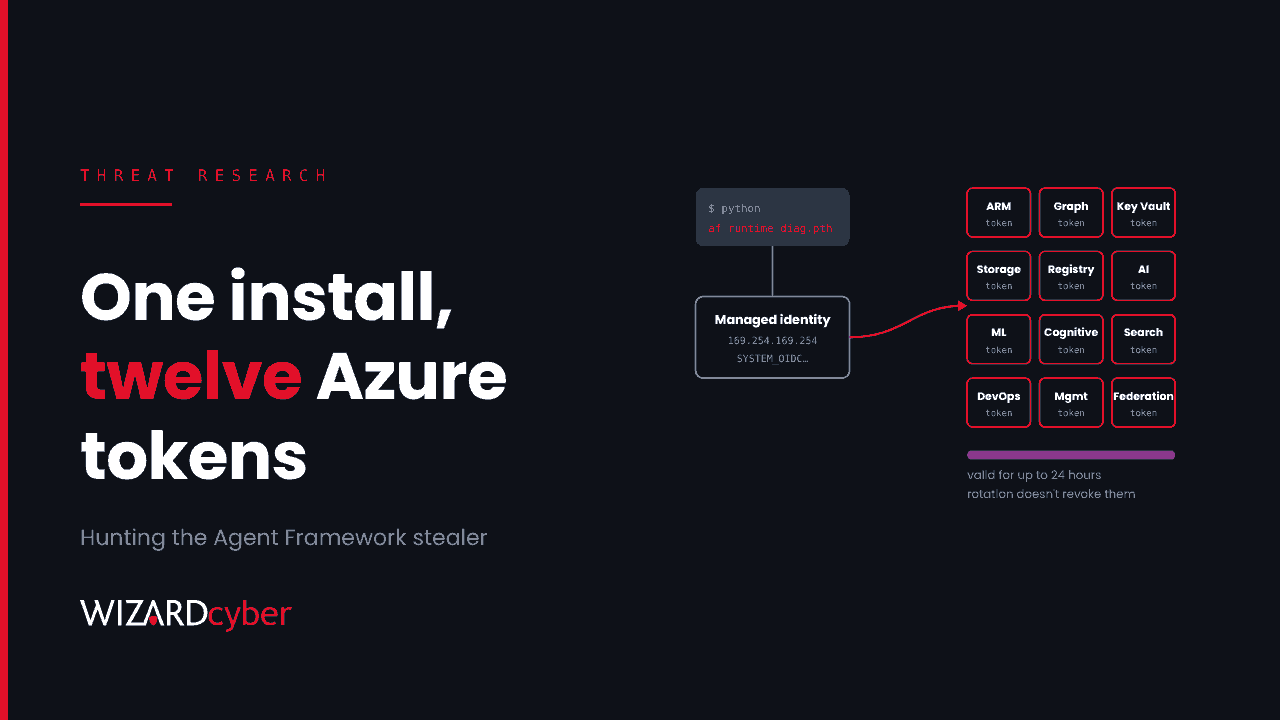
For about 40 minutes on the evening of 17 November, anyone who installed Microsoft's Agent Framework from PyPI could have got a credential stealer with it. Two releases of the agent-framework package, 1.26.1 and 1.26.2, were published 33 minutes apart and quarantined soon after. They used the same Python startup trick we covered in October. What's different is what they did next. They didn't just copy secrets off disk. They asked Azure for fresh tokens.
That changes the clean-up. Rotating the secrets the stealer read is necessary, but it doesn't touch the tokens it minted from managed identities and pipeline identities. Those were valid when they left, and the next step is to find out whether anyone used them. This post covers what the releases did, and how to hunt for them in Microsoft Defender, Sentinel and your Azure logs.
What happened
According to StepSecurity's timeline, version 1.26.1 was uploaded at 20:35 UTC on 17 November and quarantined by PyPI at 21:06. Version 1.26.2 followed at 21:08 and was quarantined at 21:16. Both were wheel-only releases with no provenance attestation. The last clean version is 1.26.0, published on 12 November. The package sees about 190,000 downloads a month, so automated builds and dependency updates that ran in that window are the main concern.
Only the agent-framework meta-package is reported as affected. Both malicious versions pinned agent-framework-core to the clean 1.26.0, and researchers who checked the sibling packages found no new uploads after 12 November. How the attacker got publishing access is not yet established. One analysis points to a compromised signing and publishing credential in Microsoft's release pipeline, but no other source confirms that, and we had seen no Microsoft statement at the time of writing.
How it runs
Each release dropped a .pth file into site-packages. Python reads these files every time the interpreter starts and executes any line that begins with import. So the stealer ran on every Python launch in the environment, including pip itself, whether or not anything imported the framework.
- 1.26.1:
agent_framework_meta.pth, which importsagent_framework_meta. The package's__init__.pywas modified to start a new_telemetry.pymodule. - 1.26.2:
af_runtime_diag.pthand a top-levelaf_runtime_diag.py. The package's own__init__.pywas put back to match the clean release, so checking that file alone won't catch it.
The collector forks into a detached process, or falls back to a background thread. It sets _AF_TEL=1 so child processes don't collect twice. Deleting the .pth file stops the next run but not one that is already going.
What it took, and what it minted
The collection side is broad. It sweeps environment variables whose names contain strings such as TOKEN, SECRET, KEY, AZURE, TENANT, CLIENT and MSI. The 1.26.2 list adds ACTIONS, OIDC, RUNNER and ARM_. On Linux it reads other processes' environments. It also picks up up to 80 credential files: Azure CLI token caches under ~/.azure, .npmrc, .netrc, .git-credentials, pip.conf, Docker config, Hugging Face tokens, Azure DevOps agent .credentials files and .env files under /app and /workspace.
The minting side is what makes this an Azure incident:
- Managed identity. On App Service, Functions or any VM with a managed identity, it requests tokens from the identity endpoint (or the instance metadata service at
169.254.169.254) for twelve audiences. Endor Labs lists them: Azure Resource Manager, Microsoft Graph, Key Vault, Storage, Container Registry, Azure AI, Machine Learning, Cognitive Services, AI Search, Azure DevOps, the classic management endpoint and the federation exchange audience. - Azure DevOps pipelines. Where
SYSTEM_ACCESSTOKENandSYSTEM_OIDCREQUESTURIare both set, it asks the pipeline for an OIDC token forapi://AzureADTokenExchange. That's the token a workload identity federation service connection swaps for Azure access. The pipeline's own access token is captured in the environment sweep anyway. - GitHub Actions (1.26.2 only). In jobs with
id-token: write, it requests OIDC tokens for the exchange audience and for Azure Resource Manager.
Everything was zlib-compressed, base64-encoded and posted to a single webhook[.]site URL ending d381fd80-ec62-42ad-8f5c-d1b15103c9bb, with the user agent af-runtime-diagnostics/1 (1.26.1) or runtime-diagnostics/1 (1.26.2). Researchers disagree on how much actually arrived. One reports three confirmed victim submissions. Others say the code only proves attempts. Either way, the managed identity and OIDC-exchanged tokens are bearer tokens, reported as valid for up to 24 hours, and they can't be revoked once issued. If you were exposed, assume they could have been used anywhere in that time.
Rotation fixes what was stolen. It doesn't tell you what was done with it in the meantime.
Hunting in Defender, Sentinel and Azure logs
The queries below are starting points to tune for your estate. Build agents, containers and App Service plans only appear in the Device* tables if Defender for Endpoint or Defender for Cloud covers them. For managed services, rely on the identity and activity logs.
1. Where the malicious versions landed
DeviceFileEvents
| where TimeGenerated > datetime(2026-11-17 20:30)
| where FileName in~ ("agent_framework_meta.pth", "af_runtime_diag.pth",
                      "af_runtime_diag.py", "_telemetry.py")
   or FolderPath matches regex @"agent_framework-1\.26\.[12]\.dist-info"
| project TimeGenerated, DeviceName, FolderPath, FileName, SHA256,
          InitiatingProcessCommandLine
Outside Defender, search lock files, requirements files, build logs, pip caches, internal mirrors and container images built since 20:35 UTC on 17 November for agent-framework==1.26.1 or 1.26.2. The researchers' write-ups list SHA-256 values for both wheels and every dropped file.
2. The exfiltration call
DeviceNetworkEvents
| where TimeGenerated > datetime(2026-11-17 20:30)
| where RemoteUrl has "webhook.site"
| where InitiatingProcessFileName startswith "python"
    or InitiatingProcessFileName in~ ("pip", "pip.exe", "uv", "uv.exe")
| project TimeGenerated, DeviceName, InitiatingProcessCommandLine,
          RemoteUrl, RemoteIP
webhook.site is a legitimate service, so check the full path in proxy logs where you have TLS inspection. A Python process talking to it from a build agent is worth a look on its own.
3. Managed identities used from somewhere new
A token minted on your App Service and replayed from an attacker's laptop shows up as the same identity calling Azure from an unfamiliar address. Start with Azure Resource Manager:
let Start = datetime(2026-11-17 20:30);
let Exposed = dynamic(["<object IDs of managed identities on affected hosts>"]);
AzureActivity
| where TimeGenerated > Start
| where Caller in (Exposed)
| summarize Ops = make_set(OperationNameValue, 25), First = min(TimeGenerated)
          by Caller, CallerIpAddress
| join kind=leftanti (
    AzureActivity
    | where TimeGenerated between (Start - 30d .. Start)
    | where Caller in (Exposed)
    | distinct Caller, CallerIpAddress
  ) on Caller, CallerIpAddress
Run the same new-address comparison over MicrosoftGraphActivityLogs (ServicePrincipalId, IPAddress, RequestUri) and your Key Vault and Storage diagnostic logs if you collect them. Graph activity logs have to be switched on in diagnostic settings before they record anything.
4. Pipeline identities exchanging tokens
AADServicePrincipalSignInLogs
| where TimeGenerated > datetime(2026-11-17 20:30)
| where ResultType == "0"
| where ClientCredentialType =~ "federatedIdentityCredential"
| summarize Count = count(), IPs = make_set(IPAddress, 20),
          Resources = make_set(ResourceDisplayName, 10)
          by ServicePrincipalName, AppId
Compare the addresses with your hosted and self-hosted agent ranges. A federated sign-in from outside them, for a service connection used by an affected pipeline, needs an answer. Check the ClientCredentialType values in your own workspace before relying on the filter.
5. What the identities could reach
For every exposed managed identity and service connection, list its role assignments and Graph permissions. That's the blast radius for the 24 hours after exposure, and a good reason to cut assignments that turn out to be broader than the workload needs.
If you were exposed
- Don't run Python in the affected environment. Even
pip uninstallstarts the interpreter and the collector. Isolate the host, then remove the files with non-Python tools or rebuild from a clean base. Kill any detached collector process. - Pin and block. Pin
agent-framework==1.26.0with a hash-pinned lock file and block 1.26.1 and 1.26.2 at your package proxy. - Rotate from a clean machine. Azure CLI sessions, DevOps personal access tokens and service connection secrets, self-hosted agent registrations, package registry and Git tokens, model provider keys and anything in
.envfiles. - Hunt the token window. Run queries 3 to 5 for at least 24 hours after the last possible exposure. Deleting a federated credential or rotating a secret doesn't invalidate a token that was already issued.
- Tighten the defaults. Grant
id-token: writeonly to jobs that deploy, restrict build agent egress to the hosts they need, and hold new upstream releases for a day or two before they reach your internal mirror. A short delay would have outlasted this whole incident.
For the background, see our explainers on managed identities, workload identity federation and supply chain attacks, and our view on why rotation isn't recovery.
How a managed SOC helps
- One investigation across endpoint, identity and cloud. A Python process calling a webhook on a build agent, and a managed identity calling Graph from a new address an hour later, are one incident. CYBERSHIELD AI's Investigation Agent works each alert to a verdict, averaging 3m 30s, and our analysts take it from there.
- Around the clock. A 24-hour token window doesn't wait for office hours. Our SOCs are staffed 24/7, with senior analyst sign-off by default on the managed service.
- The logs that matter here. Microsoft Sentinel is the only hard requirement. Connectors and rules for Azure activity, Graph activity and DevOps audit logs are built at onboarding and included in the managed service.
If you build with Python in Azure and want a second pair of eyes on your exposure, talk to our team.